Incorrect shipping charges are a major driver of cart abandonment and customer dissatisfaction for e-commerce store owners. While standard shipping costs traditionally depend on package weight, quantity, and dimensions, calculating shipping rates based on distance provides the most transparent and accurate pricing model for local and regional deliveries.
By setting up WooCommerce distance-rate shipping, you can automatically calculate fair delivery fees based on the exact mileage between your fulfillment center and the customer’s doorstep.
This complete guide will walk you through configuring distance-based shipping rules step-by-step using built-in settings and top-rated plugins to optimize your store’s logistics.
Key Takeaways:
- WooCommerce does not support distance shipping by default.
- Shipping Zones → Simple & free
- Distance Shipping Plugins → Automated & accurate
- Google Maps API is required for real-time calculations.
- Flexible Shipping is one of the best distance shipping solutions for WooCommerce.
- Distance-based shipping improves pricing accuracy and customer experience.
What is the best WooCommerce distance shipping method? Shipping Zones are best for simple local delivery, while distance shipping plugins are better for accurate, automated pricing and scalable delivery operations.
Setting Up WooCommerce Distance Rate Shipping
WooCommerce does not calculate distance-based shipping rates out of the box. You can achieve this either by using a free built-in workaround for fixed regions or by using a dedicated plugin for automated, real-time distance calculations via Google Maps.
- Use WooCommerce’s built-in shipping zones for simple regional pricing.
- Use a dedicated distance shipping plugin with Google Maps integration for automated calculations.
This choice depends on whether you want simplicity or automation.
Method 1: The Built-In WooCommerce Workaround (No Plugins)
If you only deliver to a few specific cities and handle transport yourself, you can calculate your approximate travel costs manually and use standard WooCommerce settings.
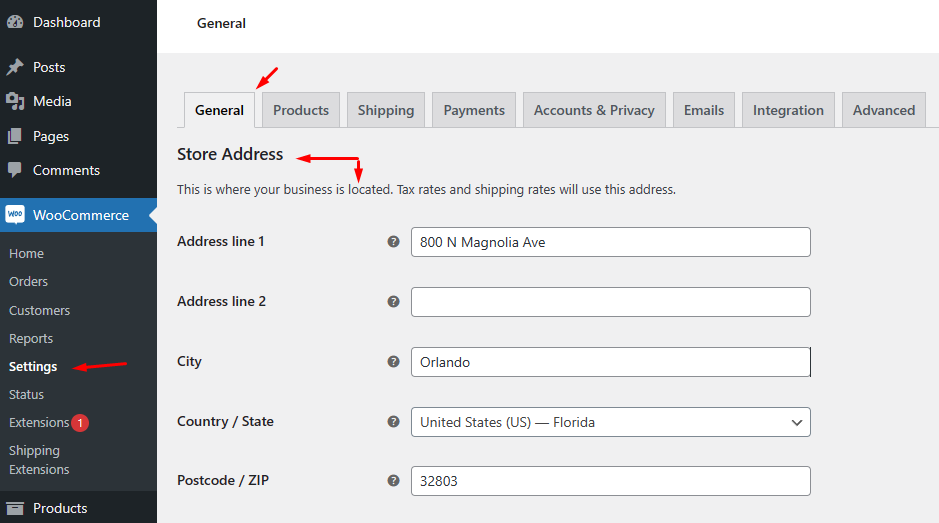
First, go to WooCommerce >> Settings >> General and set your store location.
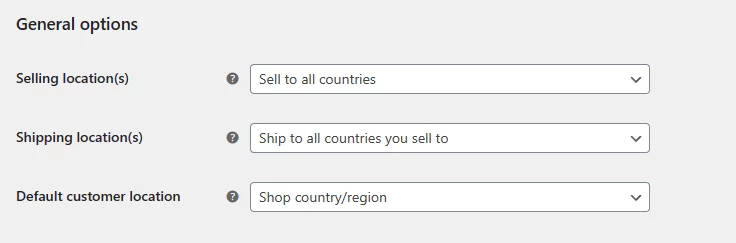
Additionally, you can set selling, shipping, and customer’s location. Save your changes.
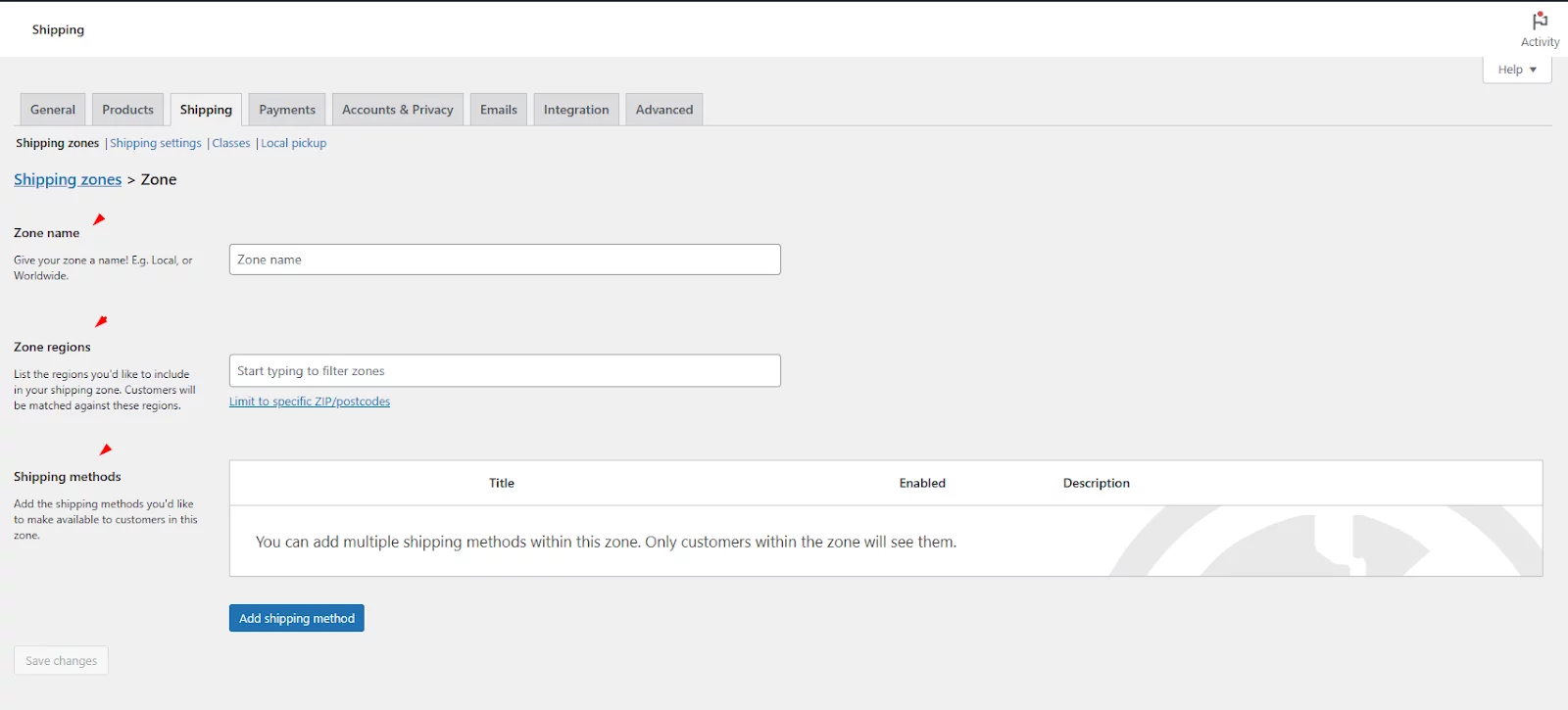
Next, jump to the Shipping tab. Click on the Add Zone or Add Shipping Zone button.
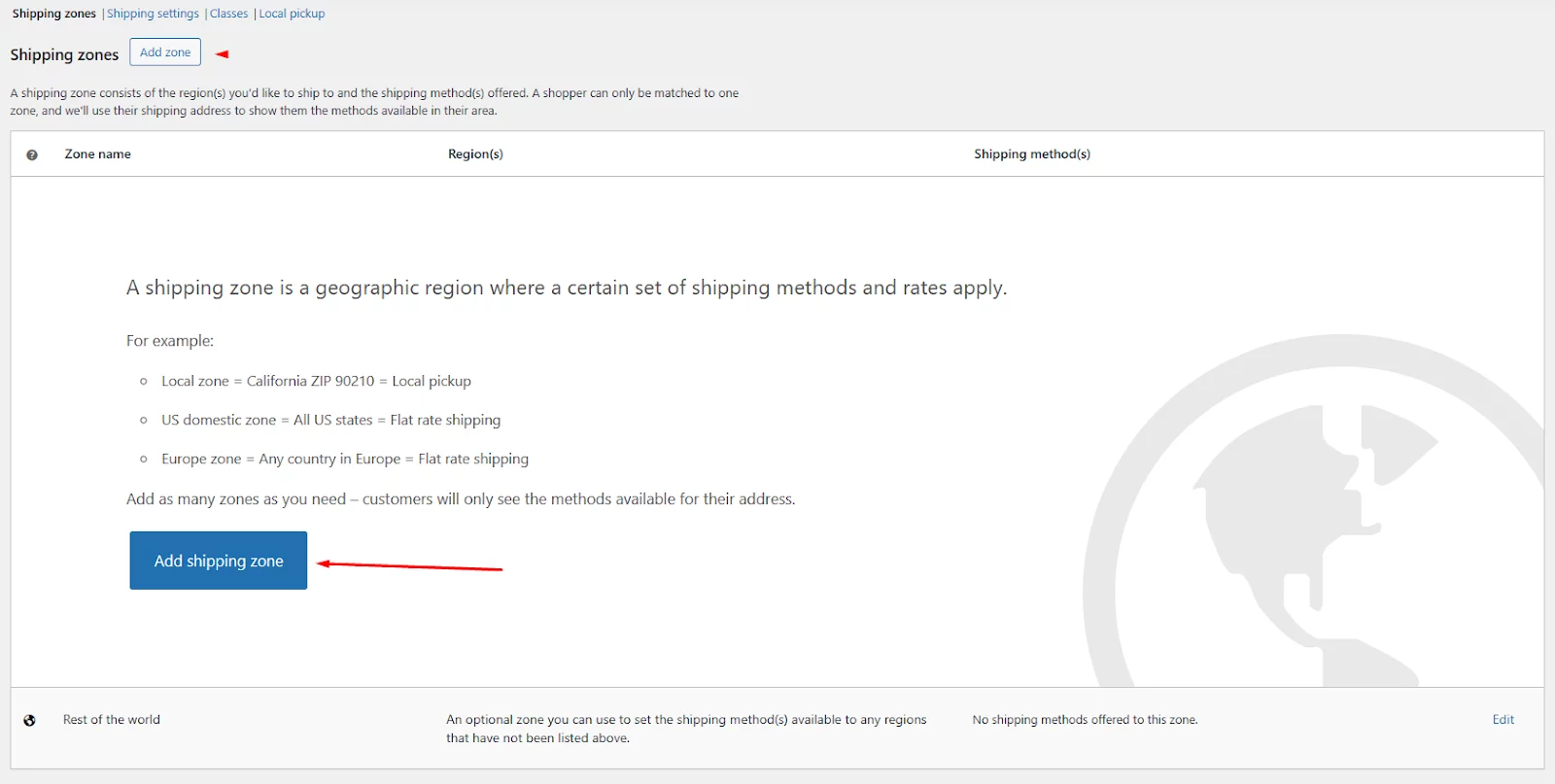
Input your zone name, and select your location. You can also pick locations by zip code.
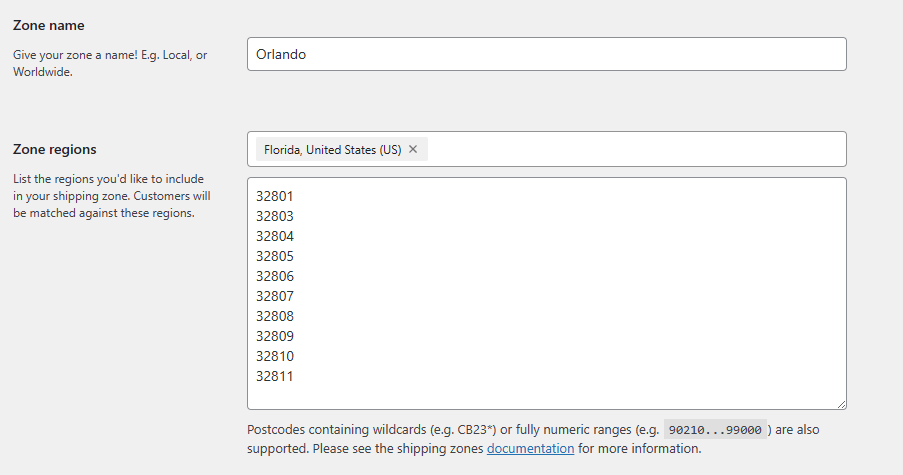
Let’s say you are creating a zone for your local customers in Orlando. You need to select the state and then enter the zip codes of the Orlando locations.
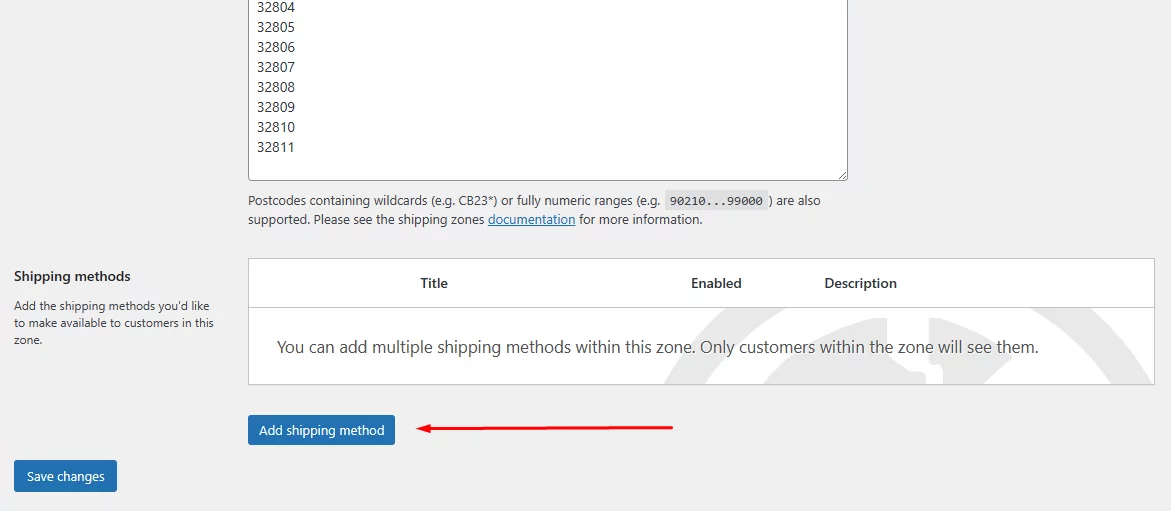
After that, click on the Add Shipping Method button.
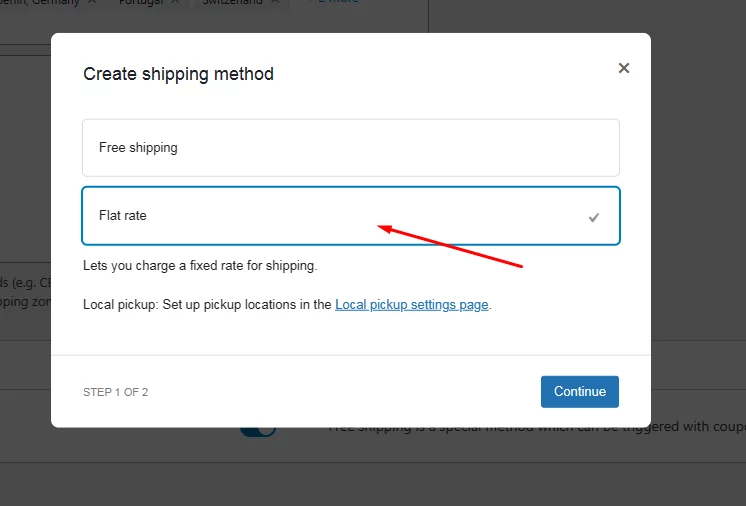
Select the Flat Rate option.
Input your shipping charge in the Cost field and save the method.
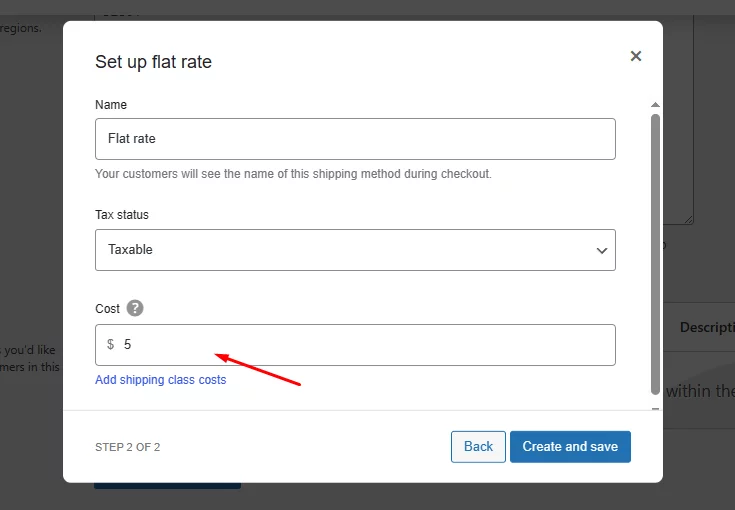
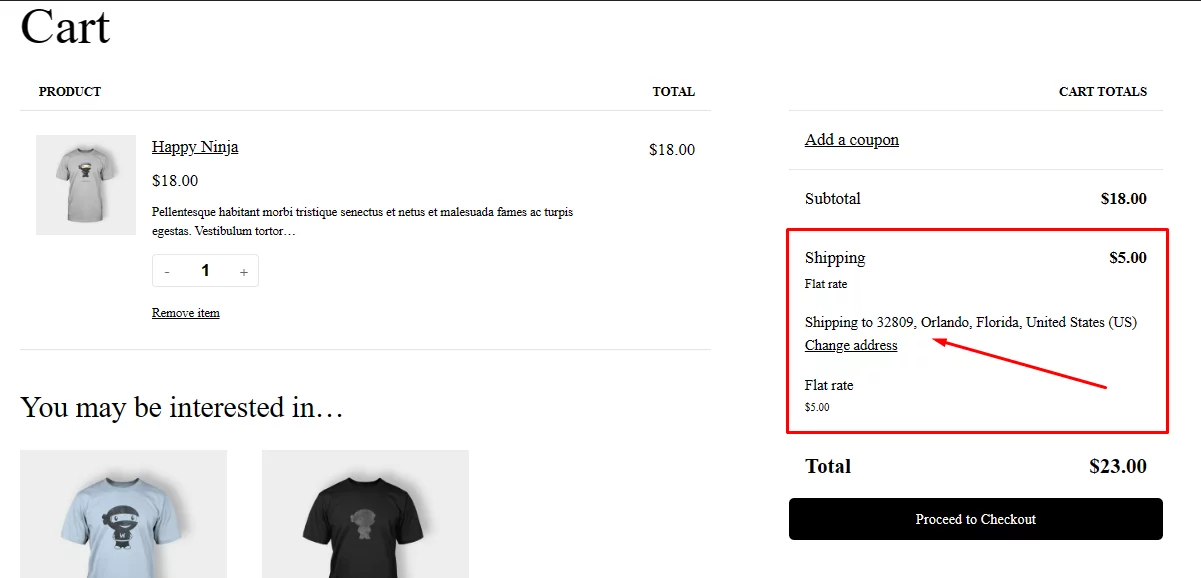
Now, if anyone from any of the zip code areas adds your products to the cart, they will see the WooCommerce distance rate shipping you have set.
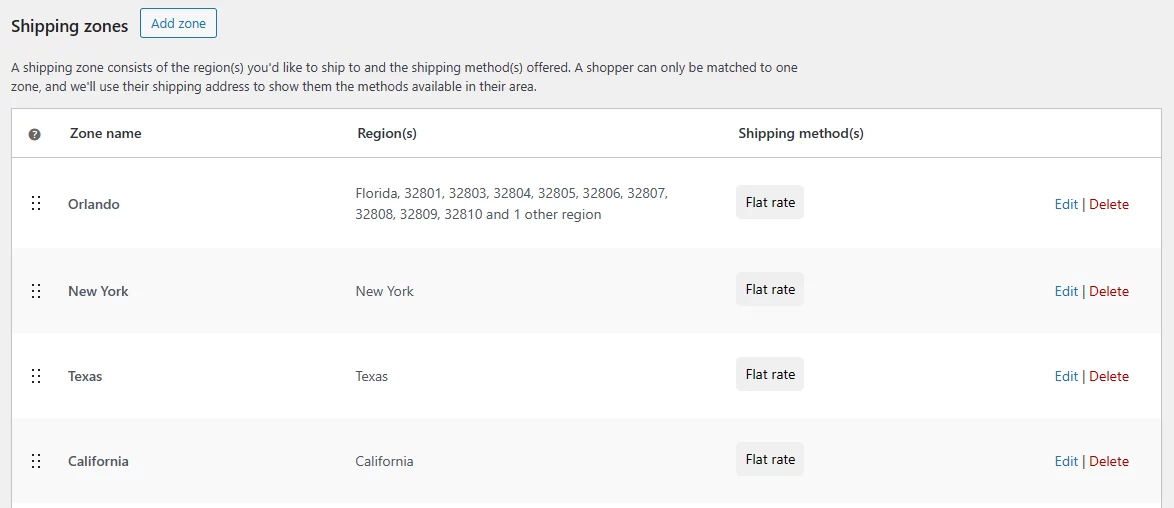
Similarly, you can create separate zones for other cities and states to display accurate shipping rates based on what you have collected from your selected carriers. All you have to do is select locations/zip codes and set flat rates for them.
Additionally, you can create classes and use Cost field variables to apply some advanced conditions for offering multiple shipping methods. For example, you can offer weight-based shipping rates.
For a complete walkthrough, you can check our guide on WooCommerce Shipping.
Coming back to WooCommerce distance rate shipping, what you have seen so far is a workaround using available tools.
For precise and advanced distance-based shipping solutions in WooCommerce, relying solely on workarounds isn’t sufficient. Instead, consider opting for a dedicated WooCommerce distance rate shipping plugin for accurate and sophisticated functionality.
Method 2: The Automated Plugin Way (Recommended)
Using a dedicated plugin like Flexible Shipping WooCommerce (with its Distance Based extension) automates the calculations by linking your store to Google Maps.
To start configuring your distance based shipping rates, head over to WooCommerce, then navigate to Settings >> Shipping, and finally Flexible Shipping Distance Based Shipping Rates.
First things first, to use distance and duration conditions in your shipping methods, you’ll need to grab a Google Maps API key. Not sure how to get one?
All destination shipping rate plugins will ask you for a Google Maps API or Distance Matrix API. Here’s how to get one.
How to Get Google Distance Matrix API
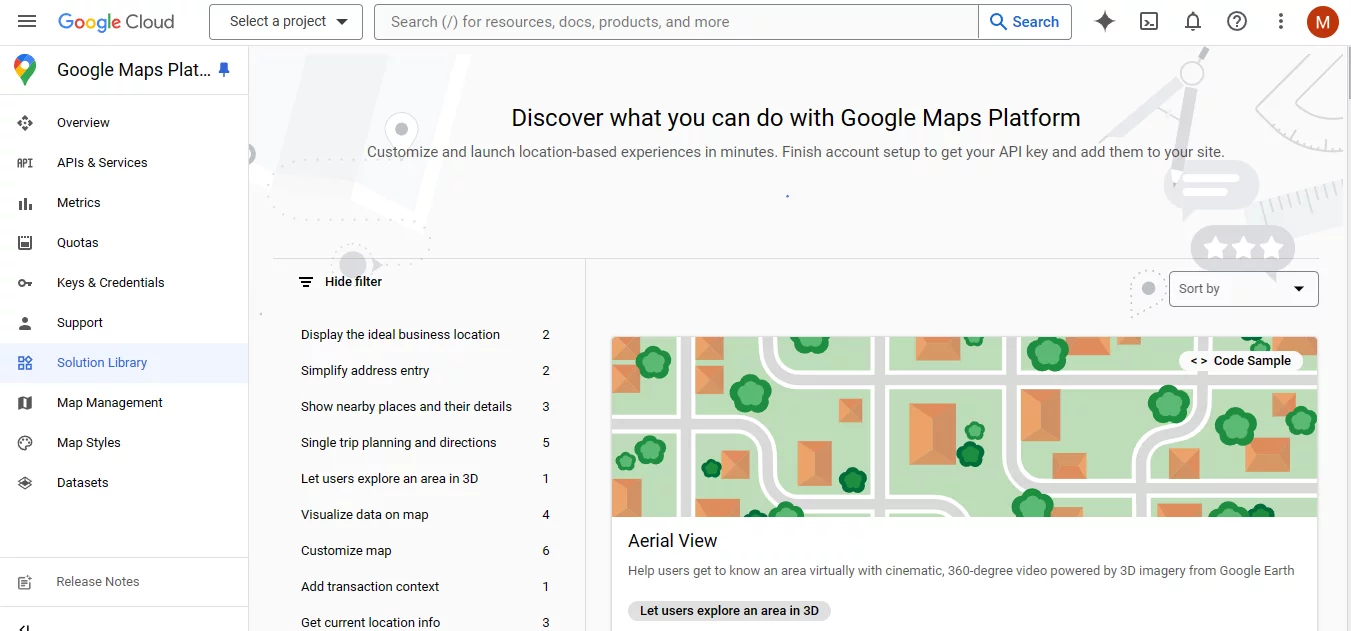
Create a Google Cloud Project (if you don’t have one):
- Go to the Google Cloud Platform Console.
- If you’re a new user, you’ll need to create a Google Account and project.
- Follow the on-screen instructions to set up your project.
Enable the Distance Matrix API:
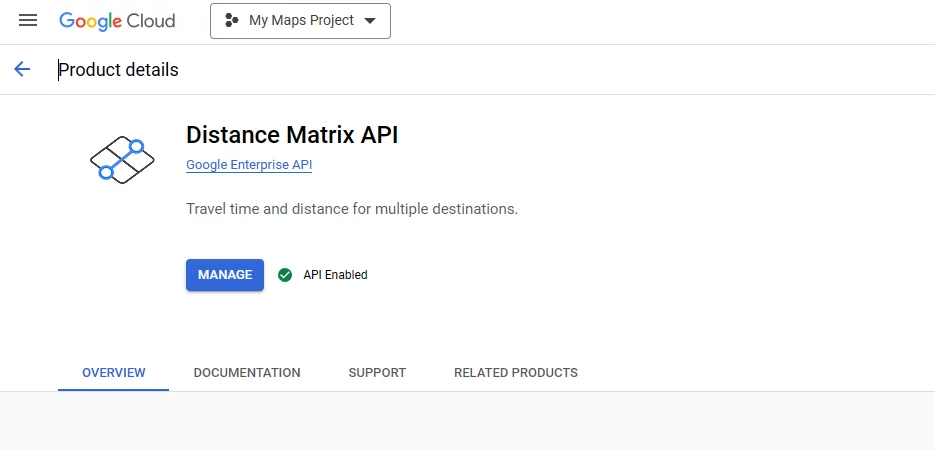
- In the Cloud Console, navigate to the APIs & Services section.
- Click on Library.
- Search for “Distance Matrix API” and click on it.
- Click on Enable.
Create an API Key:
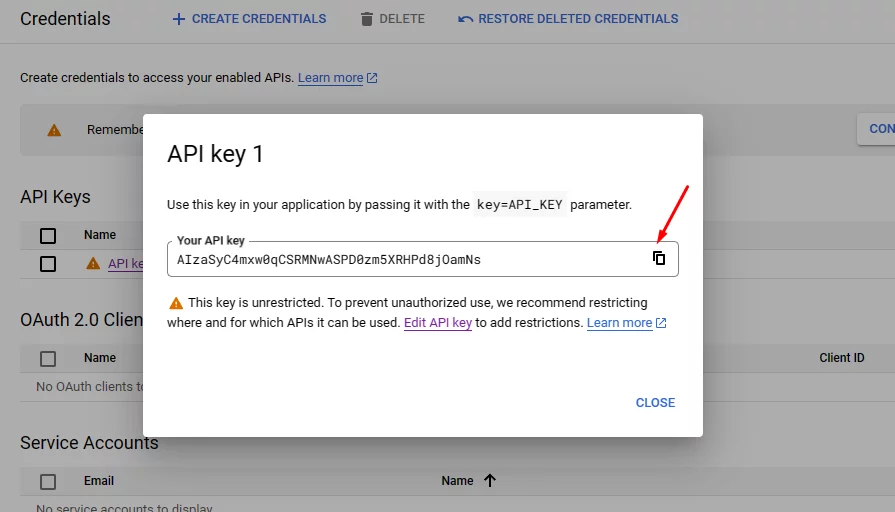
- In the left-hand menu, navigate to Credentials.
- Click on Create credentials and select the API key.
- A dialog box will display your newly created API key.
Once you acquire the key, paste it into the plugin settings. If the API Connection Status shows as “Connected,” you’re good to proceed.
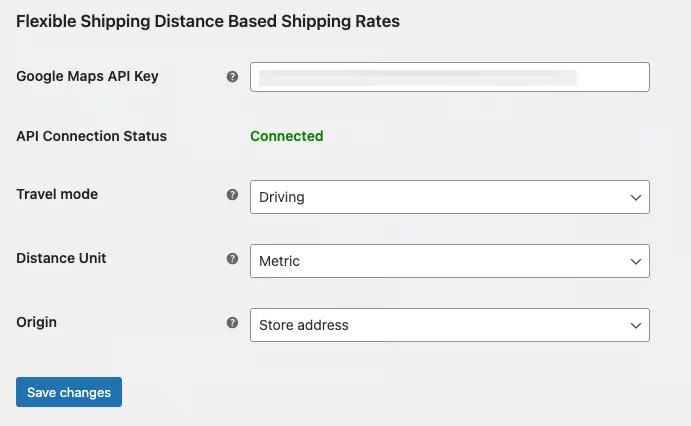
With the Google Distance Matrix API, you can tweak how Google calculates distance or travel time. You get to choose the Travel Mode, which dictates whether Google calculates based on driving, cycling, or walking. Pick the mode that suits the types of deliveries you offer.
Next up, there’s the Distance Unit setting. You can opt for either metric or imperial units. Just remember, whatever you choose here will apply to all your shipping rules later on.
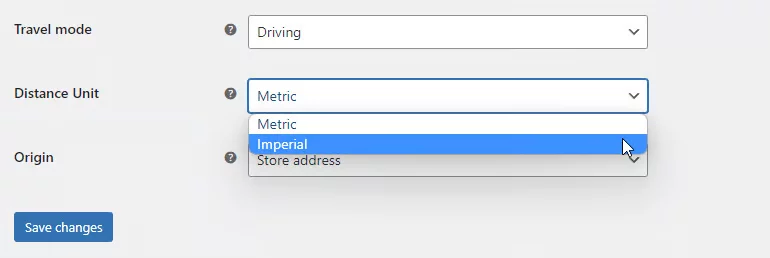
If you prefer not to base shipping costs on your store’s location (as entered in WooCommerce settings), you can set a custom shipping origin. Just select “Custom address” from the Origin field, and you can input the address for your distance calculations.
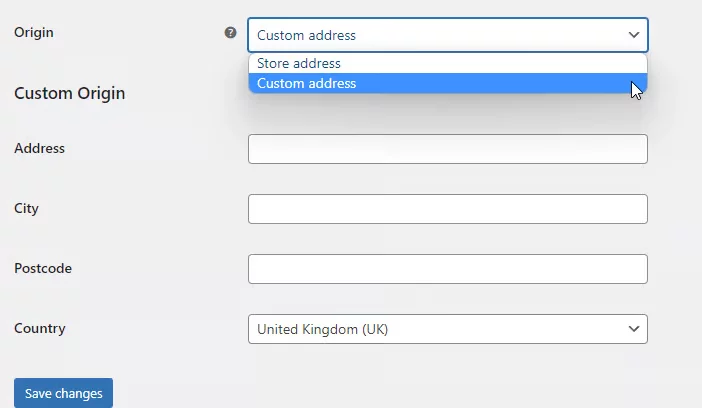
Once everything’s set to your liking, save your changes, and you’re ready to move on to adding and configuring your shipping methods.
Setting Shipping Cost Based on Distance
Go to any of your zones or create one. After that, click to add a shipping method.
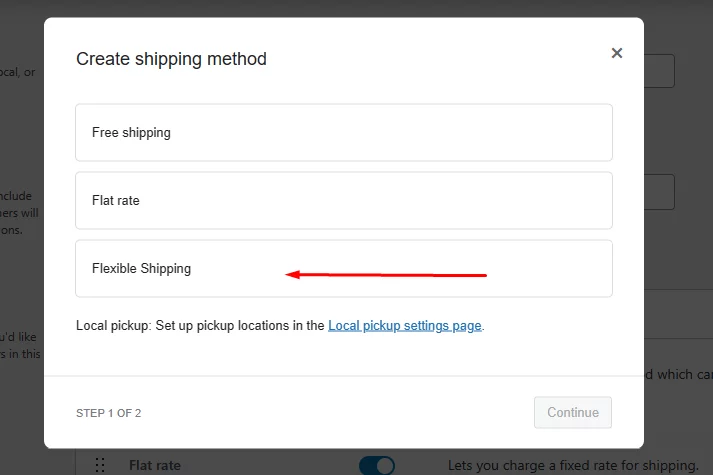
Now, you will see an additional method called Flexible Shipping. Select and continue. Next, you will need to click on edit.
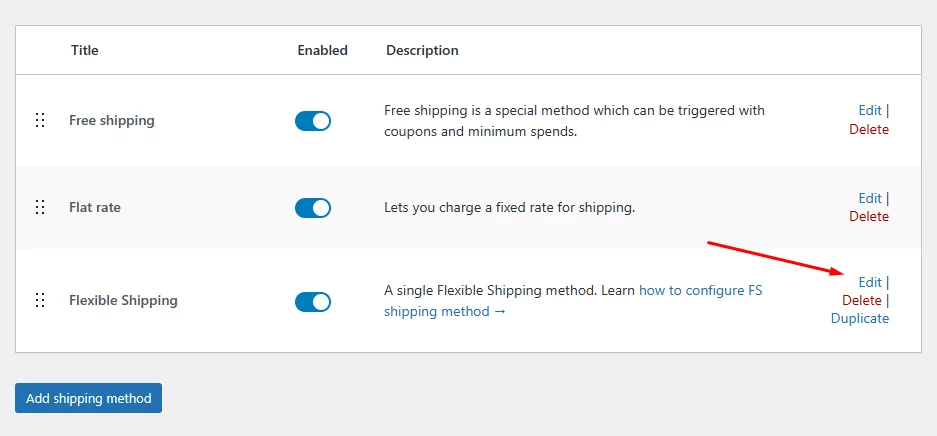
The plugin will redirect you to the shipping method configuration page.
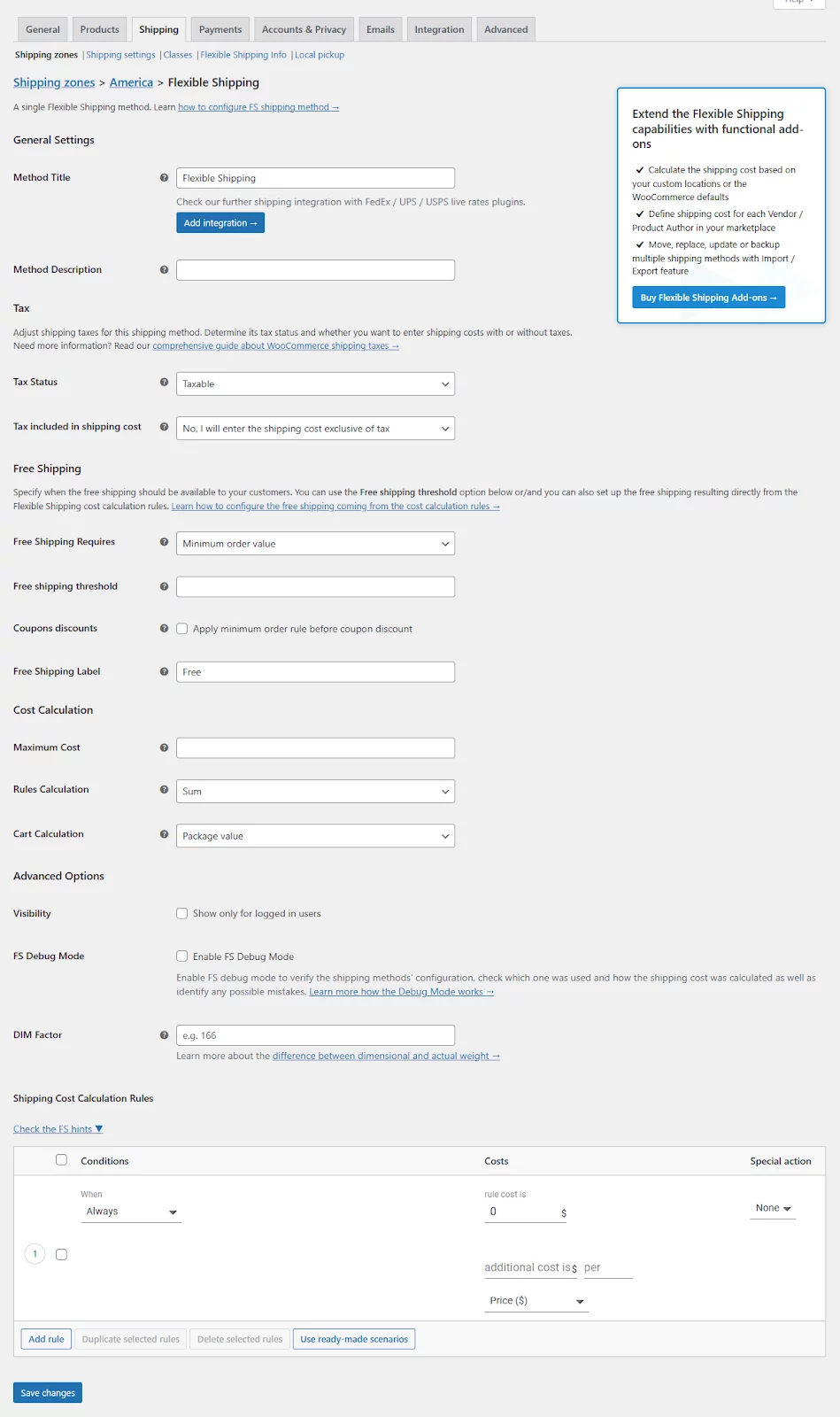
Jump to the Shipping Cost Calculation Rules section. From here, you can add a wide range of conditions to create and provide sophisticated shipping solutions.
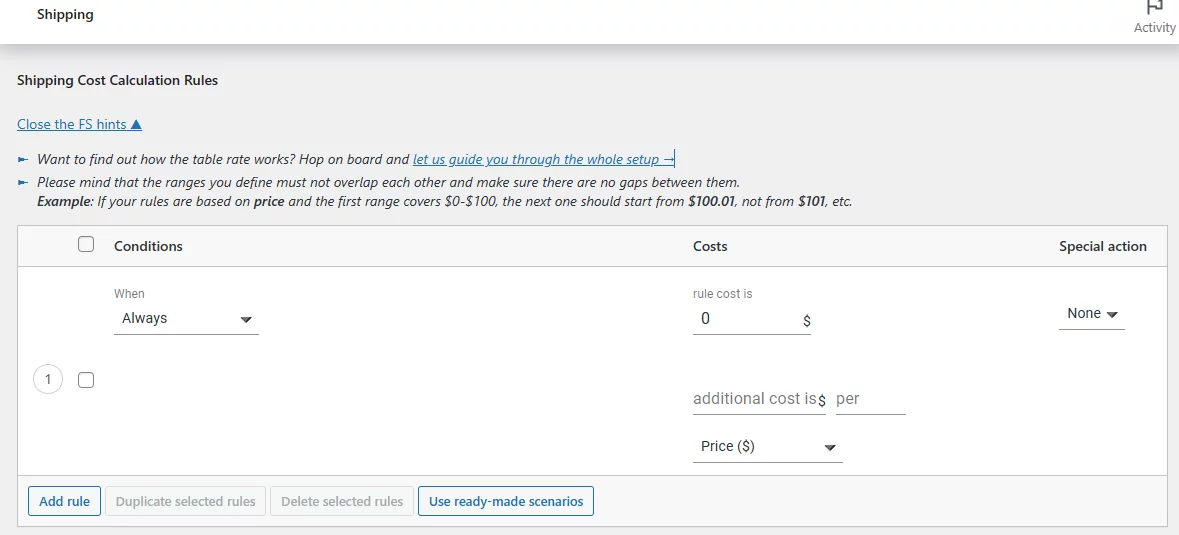
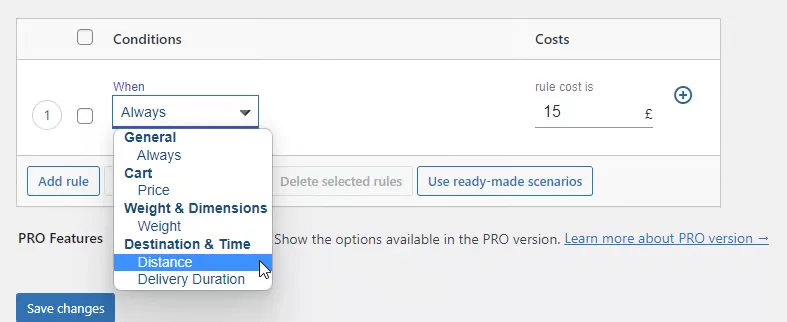
Add or edit a condition and click the When dropdown. Under Distance & Time, you will find the Distance condition.
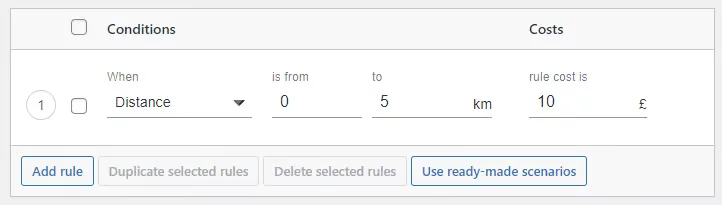
Using these condition settings, you can set a shipping rate for a specific area range. For example, let’s say you want to charge $10 to customers who live within 5 kilometers of your store.
Similarly, you can set shipping costs for customers who live farther away.
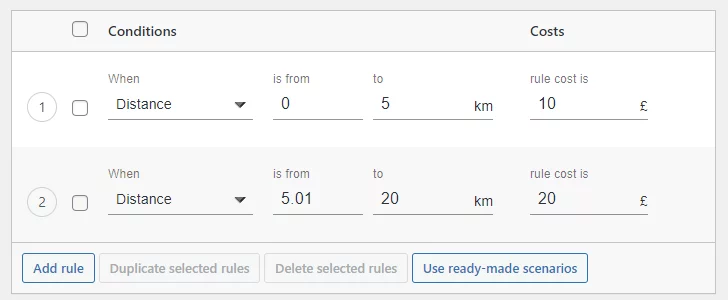
You don’t necessarily need to create individual zones for different cities and locations when you use this plugin and the distance conditions. You can set the area radius in kilometers up to where you are able to ship your products.
For example, in the last screenshot, we set the maximum distance to 20 km. This means if the shipping distance between your store and the customer’s location is more than 20 kilometers, that particular shipping option won’t show up during the checkout. It’s a straightforward way to ensure that shipping rates are only calculated for distances within your specified range.
How to Calculate Prices Based on Distance for WooCommerce
To calculate prices based on distance for WooCommerce, you need to decide how your delivery fee should increase as the customer’s distance from your store increases.
For example:
- 0–5 km: $10 shipping charge
- 5–10 km: $15 shipping charge
- 10–20 km: $25 shipping charge
- More than 20 km: Shipping option hidden
This type of distance based shipping calculator helps you avoid overcharging nearby customers and undercharging customers who live far away. It also makes checkout pricing more transparent because the delivery fee is based on the customer’s actual location.
Distance Rate Shipping Based on Delivery Duration
In addition to distance conditions, you can also configure rates based on delivery duration. The plugin will now use Google Distance Matrix API to determine your shipping cost.
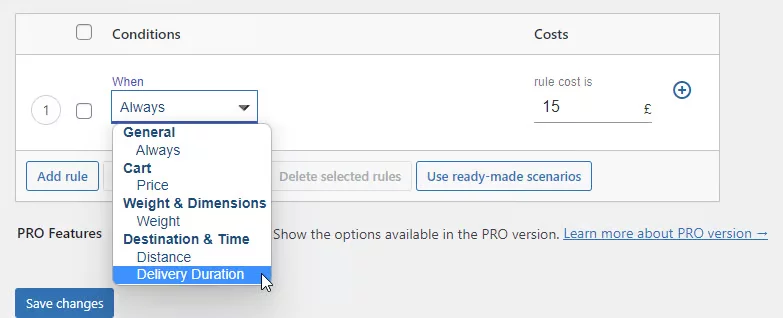
This means your delivery fees will be calculated dynamically based on the following:
- Distance between your location (customer address) and your shipping origin (store location) via the preferred route suggested by Google Maps.
- Travel mode you chose earlier, such as driving or bicycling.
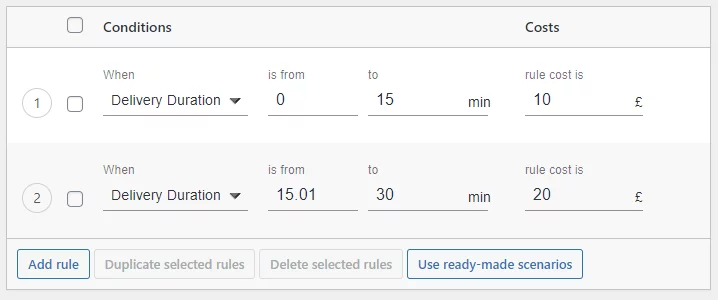
This ensures customers pay a fair shipping price based on the travel time and distance involved.
How Will Payment Be Handled for Distance-Based Shipping?
When you assign shipping rates based on distance, WooCommerce handles the payment the same way it handles any other shipping method.
The plugin calculates the delivery charge during checkout based on the customer’s address, distance, delivery radius, or travel time. WooCommerce then adds that shipping fee to the order total before the customer completes payment.
For example, if the product price is $80 and the distance-based shipping charge is $15, the customer will pay $95 before taxes or other extra fees.
You do not need a separate payment system for distance-rate shipping. The calculated shipping cost is collected through your existing WooCommerce payment gateway, such as Stripe, PayPal, bank transfer, cash on delivery, or any other enabled payment method.
Best WooCommerce Distance Rate Shipping Plugins
If you decide to go with a plugin for automated routing, these are the top three tools available:
Distance Based Shipping Rates for WooCommerce (An Extension of Flexible Shipping Plugin)
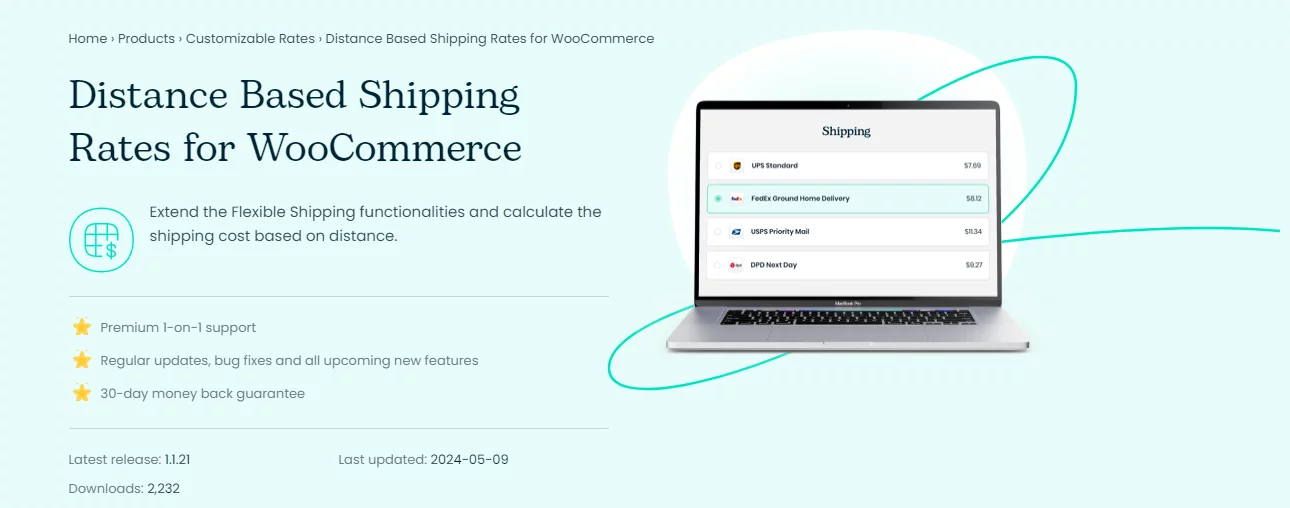
The Distance Based Shipping Rates plugin for WooCommerce is a versatile tool designed to enhance your online store’s shipping functionalities. By leveraging this plugin, store owners can calculate shipping costs based on the distance between their store and the customer’s address, offering a more precise and fair shipping rate.
This approach not only helps in managing shipping expenses better but also provides customers with an accurate cost estimation based on their location.
Key Features
- Calculate shipping costs based on the distance between the store and the customer’s address.
- Define shipping costs based on the delivery duration between the store and the customer’s address.
- Set a custom shipping origin address that is different from the WooCommerce default.
- Specify the transportation type (car, bike, etc.) to calculate distance and duration.
- Use Google Maps to set routes and calculate delivery duration with an API key.
- Seamless integration with both free and PRO versions of the Flexible Shipping plugin.
- Comprehensive guides and documentation for setup and troubleshooting.
- Dedicated technical support to assist with any issues encountered.
WooCommerce Distance Rate Shipping
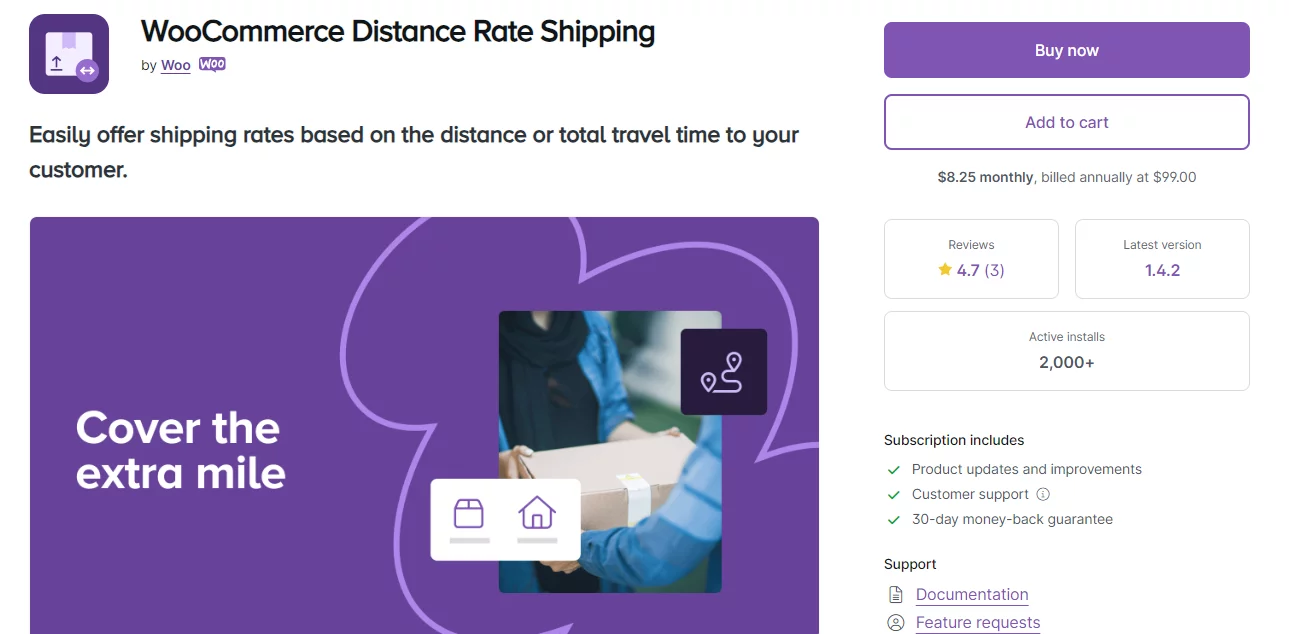
WooCommerce Distance Rate Shipping is a plugin that allows you to calculate shipping costs based on the distance between the customer’s location and the store’s origin (warehouse/store). This functionality can benefit businesses with variable shipping costs depending on location, such as local delivery services or stores with regional distribution centers.
Key features
- Leverages Google Maps to determine the distance between customer and store for accurate cost estimations.
- Allows customers to choose their preferred travel mode (driving, bicycling, etc.), which can influence the estimated delivery time.
- Enables setting fixed rates, variable costs based on distance or order value, and minimum/maximum fees for added control.
- Requires a Google account and potentially incurs usage costs depending on the chosen plan.
Shipping Rate by Distance for WooCommerce
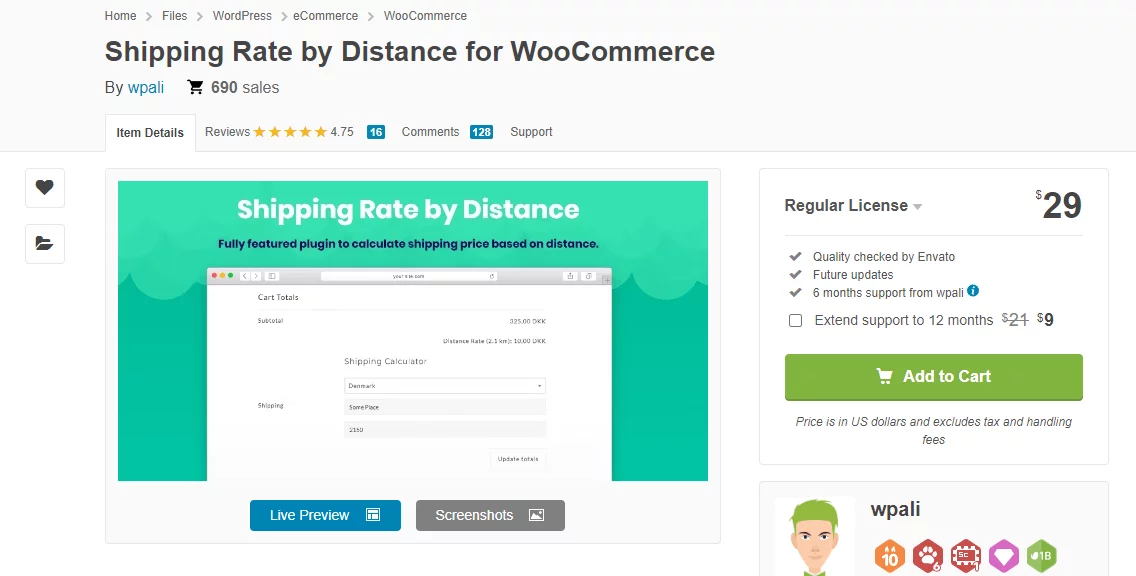
This WooCommerce distance rate shipping plugin simplifies shipping charges by calculating them based on the distance between the shipping destination and your store or warehouse. You can create multiple shipping rates by defining different distance ranges.
There’s no limit to the number of conditions or ranges you can set. Additionally, it supports both kilometers and miles for distance calculations.
Key Features
- Create shipping rates for your WooCommerce store based on different distance ranges.
- No limits on the number of rules and conditions you can configure.
- Supports international shipping.
- Easy setup and configuration.
WooCommerce Distance Rate Shipping Plugin: What to Check Before Choosing One
Before choosing a WooCommerce distance rate shipping plugin, check whether it supports your actual delivery workflow. Some plugins are better for simple local delivery, while others are better for advanced real-time shipping rates.
Look for these features:
- Google Maps API or Distance Matrix API integration
- Distance-based rules by mile or kilometer
- Delivery duration-based rules
- Custom shipping origin or warehouse address
- Minimum and maximum shipping fee options
- Shipping rates by city, zip code, or location
- Compatibility with WooCommerce shipping zones
- Support for fixed, variable, and conditional shipping rates
- Clear documentation and support
If you only need a simple local delivery rate, WooCommerce shipping zones may be enough. If you need automated distance calculation at checkout, a dedicated plugin is the better choice.
When should you use WooCommerce distance-rate shipping?
While distance-based shipping is highly effective, it is not a one-size-fits-all solution. WooCommerce distance-rate shipping is most beneficial for e-commerce stores looking to automate regional logistics, protect profit margins on heavy goods, or improve local checkout conversions.
Evaluating your specific business model helps determine if calculating shipping costs by distance is the right choice for your online store.
Which business types benefit most from distance-based shipping?
- Local Businesses with Delivery Zones: If your primary customer base is within a specific city, county, or state, setting your WooCommerce shipping cost by distance creates highly accurate local delivery tiers. This lowers costs for nearby customers and optimizes neighborhood fulfillment.
- Stores Selling Bulky or Heavy Items: Freight and shipping costs for heavy cargo fluctuate drastically by mile or kilometer. Implementing WooCommerce shipping rates by distance protects your profit margins by passing the true cost of long-distance, heavy-item transit to the buyer transparently.
- Businesses Offering Perishable Goods: Meal prep services, bakeries, and florists require fast, local routing. Distance-rate automation allows you to align delivery fees with specific travel times, ensuring fresh items arrive safely within a precise radius.
- Lean Operations with Limited Resources: Managing dozens of regional flat rates manually becomes unmanageable as an e-commerce store grows. A distance-rate shipping setup automates calculation rules completely, saving hours of manual admin tasks.
- Stores Focusing on Customer Cart Conversions: Surprise shipping fees are a leading cause of cart abandonment. Displaying immediate, distance-verified shipping charges upfront increases trust and builds consumer satisfaction during checkout.
Overall, this model works best for businesses where delivery cost, distance, or speed directly impacts profit margins or customer experience.
Key factors to consider before changing your shipping strategy
Before configuring distance-based shipping rules in your store dashboard, analyze these two critical operational metrics:
- Average Order Value (AOV): If your store has a high average order value, absorbing shipping costs into a “Free Shipping” threshold may drive more sales than calculating specific distance rates.
- Competitor Strategy Benchmarking: Analyze your industry competitors. If they use expensive flat rates, offering tiered, lower-cost distance shipping to your local customers can give your store a distinct competitive advantage.
Together, these factors determine whether distance-based shipping will improve conversions or mainly optimize cost accuracy in your store.
Who benefits most from WooCommerce distance-rate shipping?
Distance-rate shipping solves specific logistical challenges for e-commerce stores that manage local delivery fleets, high-volume weights, or time-sensitive inventories.
The table below outlines which business models see the highest return on investment when switching to a distance-based shipping framework:
| Business Classification | Why Distance-Based Shipping Works |
|---|---|
| Local Services & Bakeries | Provides strict control over fresh delivery boundaries by applying customized, per-mile radial shipping zones. |
| Heavy & Bulky Goods Stores | Safeguards retail margins by charging real-time freight costs, preventing the profit losses common with flat-rate shipping for heavy items. |
| Perishable Goods Merchants | Matches dynamic delivery fees with expedited transit times to guarantee fresh, temperature-controlled arrivals. |
| Resource-Limited Brands | Replaces manual shipping calculator workflows with automated distance calculations, eliminating operational bottlenecks. |
In short, distance-based shipping works best when delivery is not fixed, but varies based on distance, speed, or product sensitivity.
Common WooCommerce Distance Rate Shipping Problems
Even after setting up distance based shipping, you may face a few common issues during checkout.
Shipping option does not appear at checkout
This usually happens when the customer address is outside your selected distance range, shipping zone, or delivery radius. Check your maximum distance rule and make sure the customer’s zip code or location is included in the shipping zone.
Google Maps API is not working
If the API connection fails, check whether the Distance Matrix API is enabled in your Google Cloud account. Also confirm that your API key is added correctly inside the plugin settings.
Wrong shipping cost appears
This can happen when the store origin, custom warehouse address, distance unit, or travel mode is not configured properly. Check whether your plugin is calculating by miles or kilometers and whether the correct shipping origin is selected.
Shipping cost changes by location
This is expected in distance-rate shipping. The delivery fee may vary depending on location because the customer’s address changes the travel distance, route, and delivery duration.
Frequently Asked Questions
Does WooCommerce support distance rate shipping by default?
No, WooCommerce does not support automatic distance rate shipping by default. You can use shipping zones as a free workaround or use a WooCommerce distance rate shipping plugin for automated calculations.
Can I calculate shipping cost by distance in WooCommerce?
Yes. You can calculate shipping cost by distance in WooCommerce using a distance based shipping plugin that connects with Google Maps API or Distance Matrix API.
Is there a free WooCommerce distance based shipping plugin?
Some plugins offer free versions or free basic features, but advanced distance calculation usually requires a premium extension. If you want a completely free method, you can use WooCommerce shipping zones and flat rate shipping as a workaround.
Can I set WooCommerce shipping rates by city?
Yes. You can set WooCommerce shipping rates by city using shipping zones, zip codes, or location-based rules. This is useful when you want fixed delivery charges for selected cities instead of real-time distance calculation.
Can I add shipping charges in WooCommerce based on zip code?
Yes. WooCommerce shipping zones allow you to create shipping rules based on zip code. This is one of the easiest ways to set up local delivery charges without a plugin.
Does distance-based shipping work with international shipping?
It depends on the plugin. Some distance rate shipping plugins support international shipping, while others are designed mainly for local or regional delivery. Always check the plugin features before installing it.
What is the difference between flat rate shipping and distance rate shipping?
Flat rate shipping charges the same fee for a selected zone or order condition. Distance rate shipping calculates the delivery charge based on how far the customer is from your store, warehouse, or shipping origin.
Wrap up
WooCommerce distance rate shipping helps businesses provide more accurate and transparent delivery pricing. Whether you use WooCommerce’s built-in shipping zones or an advanced plugin with Google Maps integration, distance-based pricing improves customer experience and operational efficiency.
For growing stores, automated distance shipping plugins offer the most scalable and flexible solution.

Free version on WordPress.org. Every Pro licence includes a 30-day money-back guarantee.