%22%2F%3E%0A%3Cpath%20d%3D%22M59.8894%2016.6974C60.1689%2016.9331%2060.5416%2017.1216%2060.9142%2017.0745C61.5664%2017.0273%2061.8925%2016.6031%2061.6596%2015.7547C61.5198%2014.4349%2061.4267%2013.1623%2061.2869%2011.8425C61.1006%209.72149%2060.8211%207.55331%2060.5881%205.38512L60.1689%201.70863C60.0757%200.81307%2059.6099%200.294591%2058.7713%200.106053C58.4918%20-0.0353509%2058.2123%20-0.0353509%2057.9328%200.106053C57.7931%200.106053%2057.6999%200.106053%2057.6067%200.153187C56.5353%200.483129%2055.4172%200.81307%2054.3458%201.19015C53.5073%201.47295%2052.6222%201.75576%2051.7371%202.03857C50.2929%202.50991%2048.8488%203.02839%2047.4047%203.49974C46.4264%203.82967%2045.4016%204.1596%2044.3768%204.48952L44.3767%204.48956C43.6313%204.72523%2043.3518%205.24371%2043.6313%205.85646C43.7711%206.13927%2044.004%206.32781%2044.2369%206.46921C44.7028%206.79915%2045.2152%207.08196%2045.6811%207.4119C45.8674%207.55331%2046.0537%207.69471%2045.8208%208.02465C45.7276%208.21319%2045.5879%208.35459%2045.4481%208.54313L45.355%208.73167L44.5164%2010.0986L43.9108%2010.9941L43.3052%2011.8897L43.2121%2011.9839L42.1406%2013.5865L44.5867%2019.8706C45.5713%2022.1447%2048.6357%2026.5713%2052.552%2023.6277L53.9265%2022.2593L54.3458%2021.5523C54.3924%2021.458%2054.4856%2021.3637%2054.5321%2021.2694L54.5787%2021.2223C55.2309%2020.1854%2055.883%2019.1956%2056.5352%2018.2059L56.5353%2018.2057C57.0477%2017.4044%2057.5601%2016.6503%2058.0726%2015.849C58.2123%2015.6604%2058.3055%2015.6133%2058.4918%2015.7076C58.9577%2016.0375%2059.4235%2016.4146%2059.8894%2016.6974Z%22%20fill%3D%22%233D89D0%22%2F%3E%0A%3Cpath%20d%3D%22M28.0259%2022.0232C27.9793%2022.0703%2027.9793%2022.1175%2027.9327%2022.1646C27.9793%2022.1175%2028.0259%2022.0703%2028.0259%2022.0232Z%22%20fill%3D%22url(%23paint1_linear)%22%2F%3E%0A%3Cpath%20d%3D%22M53.9265%2022.3064C53.7402%2022.5892%2053.5538%2022.872%2053.3675%2023.202C53.0414%2023.7204%2052.7153%2024.1918%2052.3892%2024.7103C51.3178%2026.4071%2050.1531%2027.9625%2048.4295%2029.0938C46.9388%2030.0365%2045.4015%2030.6021%2043.6779%2030.8849C42.1872%2031.1206%2040.7896%2030.9791%2039.3921%2030.5549C37.6219%2030.0365%2036.038%2029.1409%2034.687%2027.8211C33.7088%2026.8784%2032.9634%2025.7944%2032.3578%2024.616C32.0317%2023.9561%2031.7988%2023.2491%2031.4727%2022.5421C31.0534%2021.5522%2030.1683%2019.2427%2030.1218%2019.1012C30.0752%2019.0541%2030.0752%2018.9598%2030.0286%2018.9127C29.9354%2018.7242%2029.8422%2018.5828%2029.7957%2018.3942C29.6559%2018.0172%2029.4696%2017.6401%2029.3298%2017.2159C29.2366%2017.0273%2029.1901%2016.8388%2029.0969%2016.6503C28.9571%2016.3674%2028.864%2016.0846%2028.7242%2015.7547C28.5845%2015.3776%2028.4447%2015.0005%2028.2584%2014.6235C28.1652%2014.3407%2028.0254%2014.0579%2027.9323%2013.775C27.9323%2013.7279%2027.9323%2013.7279%2027.8857%2013.6808C27.7925%2013.4922%2027.7459%2013.3037%2027.6528%2013.1152C27.4664%2012.5967%2027.2335%2012.1253%2027.0006%2011.6069C27.0006%2011.5597%2026.954%2011.5126%2026.9074%2011.4655C26.8142%2011.2769%2026.7211%2011.1355%2026.5813%2010.947C26.5347%2010.8998%2026.4882%2010.8527%2026.4882%2010.8056C26.4416%2010.7584%2026.395%2010.7113%2026.395%2010.6642C26.3484%2010.617%2026.3018%2010.5699%2026.2552%2010.5228C26.2086%2010.4756%2026.2086%2010.4285%2026.1621%2010.4285L26.1155%2010.3814C26.0689%2010.3342%2026.0223%2010.2871%2026.0223%2010.2871C25.9291%2010.1928%2025.8826%2010.1457%2025.7894%2010.0514C25.7428%2010.0043%2025.6962%209.95715%2025.6496%209.95715C25.603%209.91002%2025.5565%209.91002%2025.5099%209.86288C25.4167%209.81575%2025.3701%209.76861%2025.277%209.67435C25.2304%209.62721%2025.1838%209.62721%2025.1372%209.58008C25.0906%209.53294%2025.044%209.53294%2024.9974%209.48581C24.9509%209.48581%2024.9043%209.43867%2024.9043%209.43867C24.8577%209.39154%2024.8111%209.39154%2024.7645%209.3444C24.7179%209.3444%2024.7179%209.29727%2024.6714%209.29727C24.5782%209.25014%2024.485%209.203%2024.3918%209.15587C22.9943%208.59025%2021.1775%208.77879%2020.1992%209.10873C19.2675%209.43867%2018.2893%2010.3342%2018.2427%2010.4285C18.6619%209.72148%2019.0812%208.96733%2019.547%208.26031C20.1526%207.36475%2020.7117%206.4692%2021.3638%205.62078C22.3887%204.63095%2023.4602%203.78253%2024.6714%203.07551C27.0006%201.75575%2029.4696%201.52007%2032.0317%201.89715C33.3361%202.08569%2034.5939%202.60417%2035.7585%203.35832C36.9231%204.06534%2037.9014%204.96089%2038.7399%206.04499C39.2989%206.79914%2039.8114%207.60043%2040.1374%208.49598C40.6033%209.67435%2041.1623%2010.8056%2041.5816%2011.9839C41.7679%2012.5496%2042.0008%2013.068%2042.2338%2013.6336C42.2338%2013.6336%2042.2338%2013.6336%2042.2338%2013.6808V13.7279L45.0288%2019.8554C45.4015%2020.8452%2045.9139%2021.6465%2046.7059%2022.3535C47.2183%2022.872%2047.8705%2023.1548%2048.5227%2023.3905C48.5693%2023.3905%2048.6158%2023.4376%2048.6624%2023.4376C49.7805%2023.7676%2051.2246%2023.3905%2052.3426%2023.0134C53.088%2022.6835%2053.6936%2022.4007%2053.9265%2022.3064Z%22%20fill%3D%22url(%23paint2_linear)%22%2F%3E%0A%3Cpath%20d%3D%22M28.0255%2022.0238C27.9789%2022.0709%2027.9789%2022.118%2027.9324%2022.1652C27.9324%2022.1652%2027.9324%2022.1652%2027.9324%2022.2123C27.7926%2022.448%2027.6063%2022.6836%2027.4665%2022.9664C25.8826%2025.8416%2024.4385%2028.1512%2021.6434%2029.6595C19.3142%2030.9793%2016.8452%2031.215%2014.2831%2030.8379C14.1433%2030.8379%2014.0501%2030.7908%2013.9104%2030.7908C12.7458%2030.6022%2011.5812%2030.0838%2010.4165%2029.2825C8.78607%2028.1512%207.52829%2026.5958%206.64318%2024.8047L6.17733%2023.9091L5.01272%2021.5524L0.726927%2012.6911C0.447419%2012.0784%200.214496%2011.4656%200.121327%2010.8529C-0.437689%207.8834%200.95985%204.77252%203.80151%203.35849C5.43198%202.51007%207.24878%202.4158%208.87924%202.93428C10.6029%203.45276%2012.1402%204.67825%2013.0253%206.46937L13.1184%206.6579L14.7489%209.95732C14.7955%2010.0516%2014.7955%2010.1459%2014.8421%2010.2401C15.075%2010.8529%2015.8204%2012.4083%2016.426%2013.5867C16.4725%2013.6809%2016.5191%2013.7752%2016.5657%2013.8223C16.6123%2013.9638%2016.7055%2014.1052%2016.752%2014.1994C16.7986%2014.2937%2016.8452%2014.3408%2016.8452%2014.4351C16.8452%2014.4822%2016.8918%2014.4822%2016.8918%2014.5294C16.9384%2014.5765%2016.9384%2014.6708%2016.985%2014.7179C16.985%2014.765%2017.0316%2014.765%2017.0316%2014.8122C17.0316%2014.8593%2017.0781%2014.8593%2017.0781%2014.9064C17.0781%2014.9536%2017.1247%2015.0007%2017.1247%2015.0478C17.1247%2015.095%2017.1713%2015.095%2017.1713%2015.1421C17.3111%2015.4249%2017.4042%2015.7549%2017.544%2016.0377C17.6372%2016.2262%2017.6837%2016.4147%2017.7769%2016.6504C17.9632%2017.1689%2018.1962%2017.6402%2018.3825%2018.1587C18.5223%2018.4415%2018.6154%2018.7715%2018.7552%2019.0543C18.8018%2019.1485%2018.8484%2019.29%2018.8949%2019.3842C18.9881%2019.5728%2019.0347%2019.7613%2019.1279%2019.9498C19.3608%2020.5154%2019.5937%2021.0811%2019.9664%2021.5995C20.1993%2021.8823%2020.3857%2022.1652%2020.6652%2022.4008C22.3888%2023.9563%2024.9975%2023.862%2028.0255%2022.0238Z%22%20fill%3D%22url(%23paint3_linear)%22%2F%3E%0A%3Cpath%20d%3D%22M68.0888%2024.8694L68%207.88696H71.9963L71.8187%2018.4448L76.8806%207.88696H80.6548L81.3209%2018.3999L85.5392%207.88696H89.713L82.4754%2024.8694H78.1683L77.5466%2013.9072L72.3959%2024.8694H68.0888Z%22%20fill%3D%22%230D5293%22%2F%3E%0A%3Cpath%20d%3D%22M92.7771%2025.1385C89.2693%2025.1385%2086.7383%2022.6675%2086.7383%2019.2081C86.7383%2015.3893%2089.8021%2012.1545%2093.4431%2012.1545C96.6402%2012.1545%2098.8603%2014.4458%2098.8603%2017.7704C98.8603%2018.5342%2098.8159%2019.1182%2098.7271%2019.6124H90.4237C90.6457%2021.0501%2091.7114%2022.0385%2093.2211%2022.0385C94.1536%2022.0385%2094.9528%2021.724%2095.5301%2021.095L97.617%2023.4762C96.0185%2024.6443%2094.5976%2025.1385%2092.7771%2025.1385ZM90.6457%2017.411H95.4857C95.3081%2016.0632%2094.4644%2015.2545%2093.2211%2015.2545C92.0666%2015.2096%2091.0898%2016.0632%2090.6457%2017.411Z%22%20fill%3D%22%230D5293%22%2F%3E%0A%3Cpath%20d%3D%22M105.965%2024.9589C104.411%2024.9589%20103.167%2024.24%20102.368%2022.8473L101.924%2024.869H98.1499L101.791%207.52717L105.698%206.89819L104.322%2013.5923C105.166%2012.7836%20106.32%2012.2894%20107.519%2012.2894C110.139%2012.2894%20112.181%2014.8054%20112.181%2018.0401C112.226%2021.814%20109.428%2024.9589%20105.965%2024.9589ZM103.789%2016.3778L102.945%2020.4212C103.478%2021.185%20104.366%2021.6792%20105.388%2021.6792C107.208%2021.6792%20108.54%2020.2415%20108.54%2018.3097C108.54%2016.6474%20107.43%2015.4793%20105.92%2015.4793C105.077%2015.4793%20104.411%2015.7937%20103.789%2016.3778Z%22%20fill%3D%22%230D5293%22%2F%3E%0A%3Cpath%20d%3D%22M120.44%207.88696H125.058L127.899%2024.8694H123.725L123.193%2020.8259H117.154L114.978%2024.8694H110.582L120.44%207.88696ZM122.704%2017.5912L121.949%2011.9304L118.886%2017.5463H122.704V17.5912Z%22%20fill%3D%22%230D5293%22%2F%3E%0A%3Cpath%20d%3D%22M131.23%2012.3347H135.004L134.782%2013.5927C135.626%2012.7391%20136.736%2012.2449%20137.935%2012.2449C140.555%2012.2449%20142.597%2014.7608%20142.597%2017.9955C142.597%2021.8143%20139.8%2024.9592%20136.336%2024.9592C134.782%2024.9592%20133.539%2024.2853%20132.828%2022.9824L131.274%2030.0809H127.456L131.23%2012.3347ZM134.205%2016.3332L133.317%2020.5114C133.85%2021.2303%20134.738%2021.6796%20135.715%2021.6796C137.535%2021.6796%20138.867%2020.2419%20138.867%2018.31C138.867%2016.6477%20137.757%2015.4796%20136.247%2015.4796C135.493%2015.4796%20134.827%2015.7492%20134.205%2016.3332Z%22%20fill%3D%22%230D5293%22%2F%3E%0A%3Cpath%20d%3D%22M144.595%2012.3347H148.369L148.147%2013.5927C148.99%2012.7391%20150.101%2012.2449%20151.299%2012.2449C153.919%2012.2449%20155.962%2014.7608%20155.962%2017.9955C155.962%2021.8143%20153.164%2024.9592%20149.701%2024.9592C148.147%2024.9592%20146.904%2024.2853%20146.193%2022.9824L144.683%2030.0809H140.865L144.595%2012.3347ZM147.57%2016.3332L146.682%2020.5114C147.214%2021.2303%20148.102%2021.6796%20149.079%2021.6796C150.9%2021.6796%20152.232%2020.2419%20152.232%2018.31C152.232%2016.6477%20151.122%2015.4796%20149.612%2015.4796C148.857%2015.4796%20148.191%2015.7492%20147.57%2016.3332Z%22%20fill%3D%22%230D5293%22%2F%3E%0A%3Cpath%20d%3D%22M159.115%2024.8694H155.296L158.005%2012.3347H161.824L159.115%2024.8694ZM158.449%208.47099C158.449%207.1681%20159.559%206%20160.847%206C161.912%206%20162.8%206.85361%20162.8%207.93186C162.8%209.27967%20161.69%2010.4029%20160.358%2010.4029C159.248%2010.4029%20158.449%209.54924%20158.449%208.47099Z%22%20fill%3D%22%230D5293%22%2F%3E%0A%3Cpath%20d%3D%22M169.727%2020.6909L171.592%2023.1619C170.304%2024.4648%20168.572%2025.1387%20166.752%2025.1387C163.466%2025.1387%20161.068%2022.7126%20161.068%2019.388C161.068%2015.3446%20164.088%2012.1099%20167.862%2012.1099C170.082%2012.1099%20171.947%2013.0983%20173.013%2014.7606L170.304%2017.0069C169.727%2015.9736%20168.927%2015.4794%20167.773%2015.4794C166.13%2015.4794%20164.842%2017.0518%20164.842%2019.0286C164.842%2020.6909%20165.819%2021.6793%20167.329%2021.6793C168.261%2021.7243%20169.016%2021.4098%20169.727%2020.6909Z%22%20fill%3D%22%230D5293%22%2F%3E%0A%3Cpath%20d%3D%22M175.722%207.52717L179.629%206.89819L177.365%2017.6807L182.426%2012.3344H187L180.517%2018.6691L184.691%2024.869H180.162L177.009%2019.5676L175.899%2024.869H172.081L175.722%207.52717Z%22%20fill%3D%22%230D5293%22%2F%3E%0A%3Cdefs%3E%0A%3ClinearGradient%20id%3D%22paint0_linear%22%20x1%3D%2223.1831%22%20y1%3D%2224.7007%22%20x2%3D%2223.3049%22%20y2%3D%228.44851%22%20gradientUnits%3D%22userSpaceOnUse%22%3E%0A%3Cstop%20stop-color%3D%22%23327ACD%22%2F%3E%0A%3Cstop%20offset%3D%221%22%20stop-color%3D%22%234696D2%22%2F%3E%0A%3C%2FlinearGradient%3E%0A%3ClinearGradient%20id%3D%22paint1_linear%22%20x1%3D%2227.9436%22%20y1%3D%2222.0876%22%20x2%3D%2228.0428%22%20y2%3D%2222.0876%22%20gradientUnits%3D%22userSpaceOnUse%22%3E%0A%3Cstop%20offset%3D%220.2029%22%20stop-color%3D%22%234C51BF%22%20stop-opacity%3D%220.9%22%2F%3E%0A%3Cstop%20offset%3D%221%22%20stop-color%3D%22%235A67D8%22%20stop-opacity%3D%220.9%22%2F%3E%0A%3C%2FlinearGradient%3E%0A%3ClinearGradient%20id%3D%22paint2_linear%22%20x1%3D%2232.4583%22%20y1%3D%222.22148%22%20x2%3D%2239.8371%22%20y2%3D%2230.0298%22%20gradientUnits%3D%22userSpaceOnUse%22%3E%0A%3Cstop%20offset%3D%220.3367%22%20stop-color%3D%22%2342B9FF%22%2F%3E%0A%3Cstop%20offset%3D%220.7818%22%20stop-color%3D%22%233B97E1%22%2F%3E%0A%3Cstop%20offset%3D%221%22%20stop-color%3D%22%233784D1%22%2F%3E%0A%3C%2FlinearGradient%3E%0A%3ClinearGradient%20id%3D%22paint3_linear%22%20x1%3D%2211.252%22%20y1%3D%220.972585%22%20x2%3D%2215.8771%22%20y2%3D%2225.7529%22%20gradientUnits%3D%22userSpaceOnUse%22%3E%0A%3Cstop%20offset%3D%220.3367%22%20stop-color%3D%22%2342B9FF%22%2F%3E%0A%3Cstop%20offset%3D%220.7818%22%20stop-color%3D%22%233B97E1%22%2F%3E%0A%3Cstop%20offset%3D%221%22%20stop-color%3D%22%233784D1%22%2F%3E%0A%3C%2FlinearGradient%3E%0A%3C%2Fdefs%3E%0A%3C%2Fsvg%3E%0A)


How to Create ChatGPT Ads for Your WooCommerce Store
 Mohammad Miraj
 A practical guide to running feed-based ads inside ChatGPT, plus how to build the feed automatically with CTX Feed Plugin.
ChatGPT has quietly become a place where people shop. They describe what they need in plain language, ask follow-up questions, and weigh their options without ever opening a search engine.
In February 2026, OpenAI turned that behavior into ad inventory, and by June it opened the door for retailers to upload an entire product catalog and let ChatGPT build the ads for them.
If you run a WooCommerce store, that shift matters. The ads that perform best inside ChatGPT are built from a clean, structured product feed, and that is exactly the kind of file CTX Feed already generates.
This guide walks through how ChatGPT ads actually work, how to write creative that fits a conversational setting, and how to produce a ChatGPT-ready feed from your store in a few clicks.
The short version:
ChatGPT ads match products to conversations, not keywords. You give OpenAI a structured product feed through its Ads Manager, and the system generates and serves ads automatically. The fastest way to produce that feed from WooCommerce is the dedicated ChatGPT (OpenAI) template in CTX Feed, which maps your store data to the fields OpenAI expects and keeps the feed updated on a schedule.
What Are ChatGPT Ads?
ChatGPT ads are sponsored placements that appear below ChatGPT’s responses. OpenAI switched ads on for the first time on February 9, 2026, initially for people on the free and Go plans.
For shoppers, an ad shows up when the conversation signals real buying intent, say, someone comparing running shoes or asking for a gift under $50.
The big difference from Google or Meta is the input. You do not bid on keywords or pick match types. The platform reads the catalog you upload, builds the ad units, and decides when a product is a good fit for what someone is talking about.
It behaves much more like Google Shopping or Performance Max than like classic search ads.
Keyword targeting vs. conversational intent
Traditional search ads react to a query: a few typed words, matched to a bid.
ChatGPT works from a richer signal, the full back-and-forth of a conversation, including the context a user has already shared. That means an ad can surface at the exact moment someone is deciding what to buy, rather than the moment they happen to type a phrase.
For advertisers, the practical takeaway is simple: clarity wins.
An ad that plainly states what the product is, who it is for, and when it helps is far more likely to line up with a real conversation than a clever-but-vague tagline.
| Keyword Ads (Google/Bing) | ChatGPT Ads |
|---|---|
| You bid on keywords and match types | No keyword bidding; the system reads intent |
| Ad matched to a short typed query | Ad matched to the full conversation context |
| You build campaigns per product or group | Catalog feed auto-generates ad units |
| Triggered at the moment of search | Triggered during high-intent discussion |
Why feed based ads matter for retailers?
OpenAI has said that feed-based ads have been among the strongest-performing formats in its beta so far.
The likely reason is timing: product ads built from structured data tend to appear during purchase-focused conversations, reaching people who are already in a buying mindset.
- Scale without manual work: one feed upload can power ads across your whole catalog instead of one campaign per product.
- Relevance by default: structured attributes let the system match the right product to the right conversation.
- Always current: pricing, availability, and product details stay in sync when your feed refreshes on a schedule.
- Familiar format: ChatGPT Ads Manager uses the same structured catalog format you already send to Google Shopping, so you are not starting from scratch.
Before You Start: What You Need?
A few things are worth knowing before you build anything, since the program is still a beta with real constraints.
- Beta access. Feed-based campaigns run inside the OpenAI Ads Manager, which is currently open to a growing set of retail advertisers rather than every business. There is no public self-serve signup for small stores yet.
- A compliant product feed. Your feed must follow OpenAI’s feed specifications and is uploaded over SFTP.
- Catalog size. Feeds need a minimum number of products to be eligible, and the platform scales up to very large catalogs (reports cite up to a million SKUs per advertiser through ad-tech partners). Check the current limits in Ads Manager before you build.
- Policy compliance. Your creative, image, and landing page all have to comply with OpenAI’s Ads Policies. Misleading, inconsistent, or disallowed content gets rejected.
Heads up: the beta is still rough in places. Some advertisers have reported products not appearing after a feed uploads cleanly, and a few Ads Manager quirks. Build your feed correctly first so that when access and stability align, you are ready to go live without rework.
How to Write ChatGPT Ad Creative That Works?
Because ChatGPT matches ads to conversations, your job is to describe your offering clearly enough that the system can recognize where it fits.
Think less about a single hero headline and more about giving the platform a varied, honest set of signals to work with.
Overall approach
- Build for coverage, not one message. Create multiple title and copy variations per product. A diverse set lets the system match your ads across a wider range of conversations.
- Keep each variation distinct. Every title and description should introduce a different angle rather than repeat the same point in new words.
- Focus on usefulness. Ads should feel genuinely helpful for what the user is trying to do, not like an interruption.
- Represent the product accurately. Clear, honest messaging improves both the user experience and your performance, and keeps you on the right side of policy.
ChatGPT Ad Title Guidelines
- Spell out the value. Make it immediately clear what the product is or why it is useful.
- Stay concise. Use focused language and respect the recommended character limits.
- Be informative, not just catchy. Prioritize useful specifics over broad marketing language.
ChatGPT Ad Copy Guidelines
- Complement the title. Add new information rather than echoing it.
- Expand the value. Give more detail on benefits, features, or use cases.
- Keep it easy to scan. Use straightforward language so a user can evaluate the offer at a glance.
ChatGPT Ad Landing Pages Guidelines
- Link to the most relevant page. Send people to a product or collection page, not a generic homepage.
- Make the path seamless. A tight connection between ad and landing page helps users move from interest to action.
- Add tracking parameters. Include your own UTM parameters on each destination URL so you can measure performance.
- Stay reachable. Landing pages must use valid links and must not block OpenAI’s user agents (OAI-AdsBot and OAI-SearchBot).
ChatGPT Ad Images Guidelines
- Keep them simple and relevant. Clear visuals that support the ad’s message work best.
- Avoid clutter. Skip overly abstract or busy images that are hard to read at a glance.
- Match the message. Align the image with the title and copy so the whole creative feels cohesive.
Quick example Weak: “Upgrade Your Style Today”Stronger: “Waterproof Leather Hiking Boots, Ankle Support for Wet Trails”, which tells both the user and the system exactly what it is and when it helps.
How to Create Your ChatGPT Ads Feed with CTX Feed Plugin?
Everything above depends on one thing: a clean, correctly mapped product feed.
Writing that file by hand for a WooCommerce store is tedious and error-prone. CTX Feed solves this with a dedicated ChatGPT (OpenAI) template that pre-maps your store data to the fields OpenAI expects, so you are configuring a feed rather than authoring one from scratch.

CTX Feed is a WooCommerce product feed plugin used on 70,000+ active installations, and the ChatGPT (OpenAI) template ships in the plugin.
Here is the full workflow.
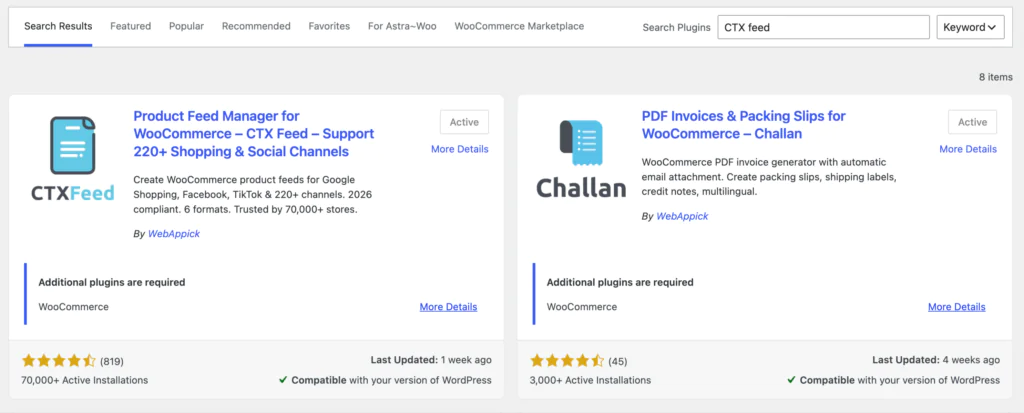
Step 1: Install and activate CTX Feed
- In your WordPress dashboard, go to Plugins → Add New.
- Search for CTX Feed (Product Feed Manager for WooCommerce).
- Click Install Now, then Activate. Make sure you are on a recent version so the ChatGPT template is available.
Step 2: Create a new feed and choose the ChatGPT template
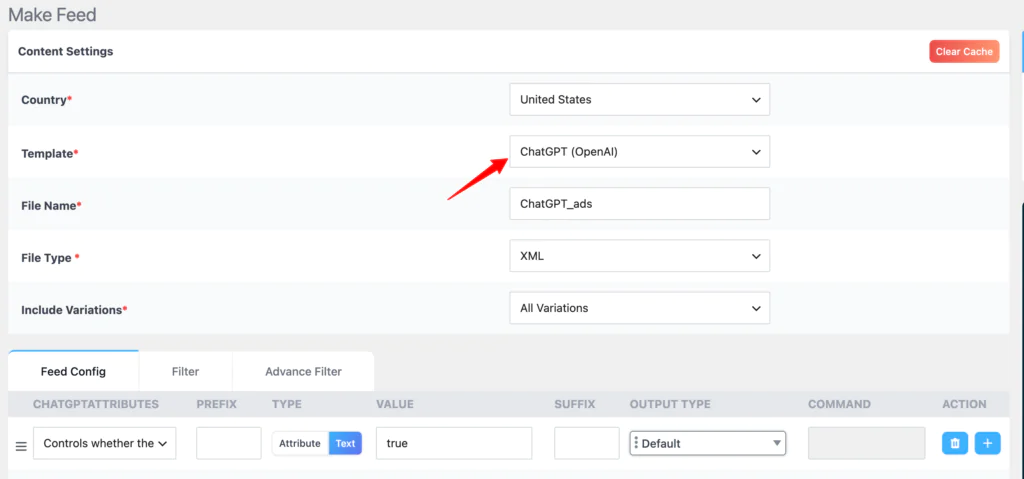
- Go to CTX Feed → Make Feed in the WordPress admin menu.
- Under Merchant / Template, select ChatGPT (OpenAI) from the template list.
- Choose your feed file type to match OpenAI’s spec (for example CSV or XML, depending on what the current OpenAI feed specification requires).
- Give the feed a clear Title so you can find it later, such as “ChatGPT Ads Feed.”
Step 3: Review and refine the field mapping
The ChatGPT template automatically maps your WooCommerce data to the attributes OpenAI uses. Most fields are filled from your existing product data, but it pays to review them, since gaps here are the usual cause of poor matching or rejected items.
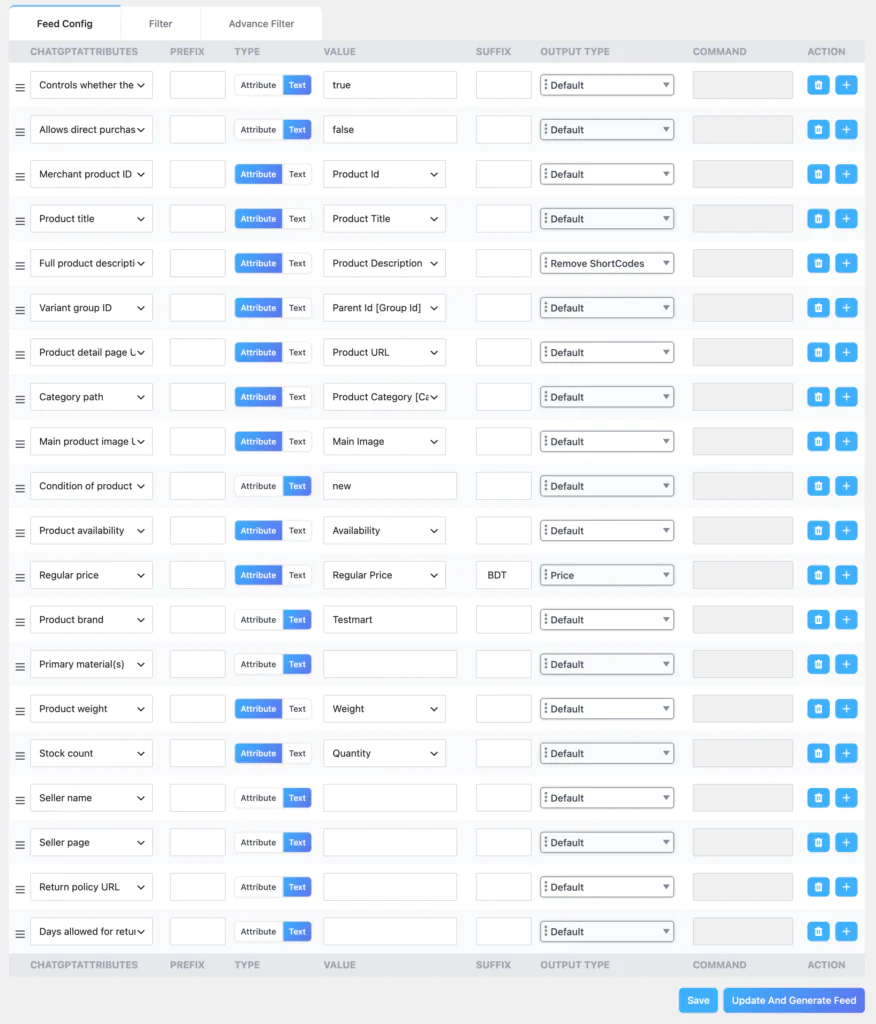
Pay particular attention to:
| Field | What it does | Why it matters |
|---|---|---|
| title | Product name shown in the ad | Should be specific and descriptive, not just a SKU |
| description | Product detail used by the AI | Rich, natural-language text helps the AI understand the item |
| link | Landing page URL | Point to the product page, not the homepage |
| image_link | Main product image | Clear, relevant visual that matches the message |
| price / availability | Pricing and stock status | Kept current so ads never show stale info |
| gtin / mpn | Product identifiers | Improve matching and eligibility where applicable |
If a field your products do not track is included (material is a common one for apparel), either map it from a WooCommerce attribute or fill it where it applies.
CTX Feed lets you set custom mappings and pull from ACF custom fields if your data lives there.
Step 4: Filter which products go into the feed
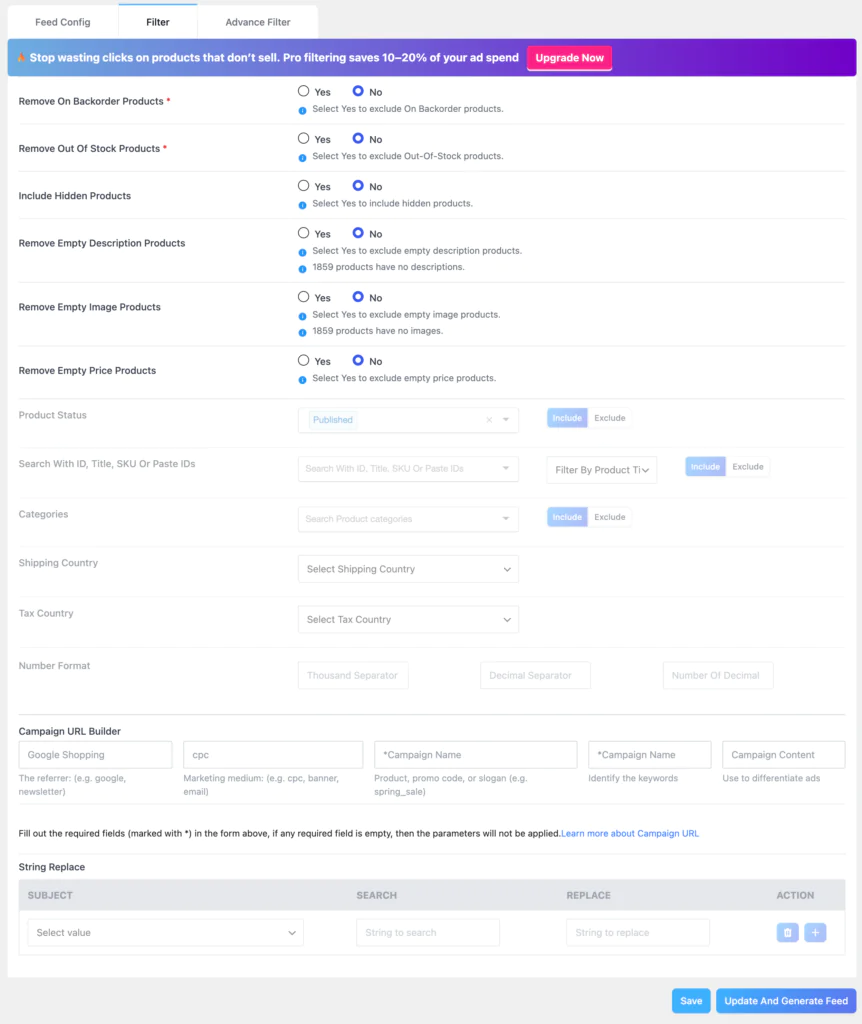
You rarely want every product in an ad feed. Use CTX Feed’s filters to keep the feed focused and compliant:
- Exclude out-of-stock items so you are not advertising things you cannot sell.
- Limit the feed to specific categories if you only want to promote part of the catalog.
- Use advanced filters (price range, product type, custom fields) to shape the exact set you want.
Step 5: Generate the feed and grab the URL
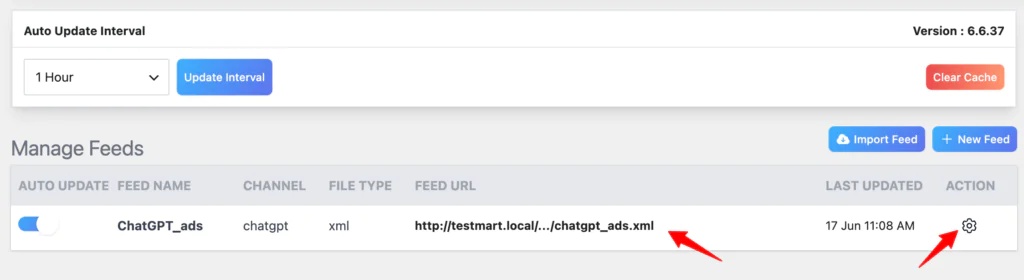
- Click Update and Generate Feed.
- CTX Feed builds the file and gives you a feed URL along with download options.
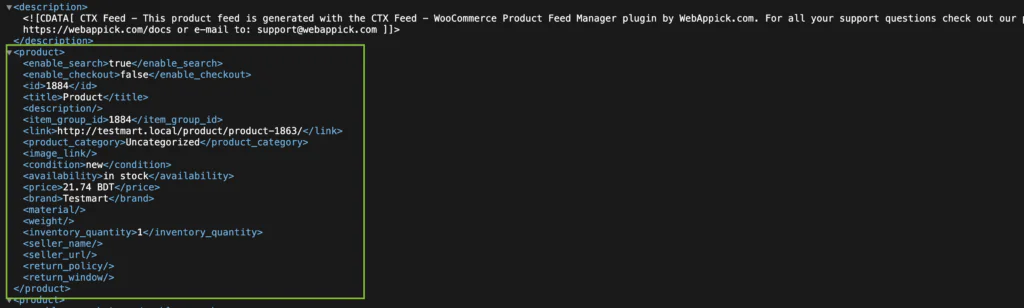
- Open the feed once to confirm titles, descriptions, prices, and image links look right before you submit anything.
Step 6: Set automatic feed updates
Prices and stock change constantly, and stale data is one of the fastest ways to get items disapproved.
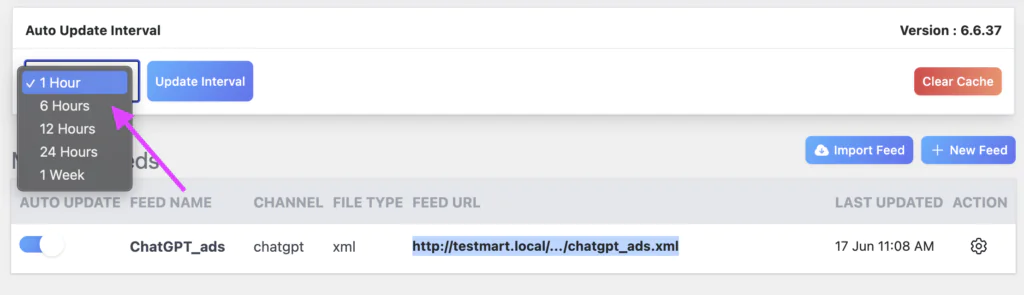
In CTX Feed → Auto Update interval, enable scheduled feed refreshes (for example 24 Hours) so your ChatGPT feed always reflects current inventory without manual regeneration.
How to Submit Your Feed to OpenAI Ads Manager?
Once your CTX Feed file is generated and validated, the rest happens inside OpenAI’s Ads Manager. The exact screens are evolving, but the flow follows the steps below.
Always confirm against OpenAI’s current documentation, since the beta changes quickly.
1. Create a feed in Ads Manager
- In Ads Manager, open the Tools tab and select Feeds.
- Click Create Feed and follow the prompts. Chatgpt Ads Manager then generates the SFTP connection details you need.
2. Configure the SFTP connection
- From the feed row, open the three-dot menu and choose Edit SFTP Connection.
- Pick your authentication method (password or SSH key) and follow the in-app connection guide.
3. Upload and validate
- Upload the file CTX Feed generated through the SFTP connection.
- Wait for ChatGPT Ads Manager to process it, this can take anywhere from a few minutes to a few hours depending on feed size.
- Items process gradually; check the ad group creation modal for the number of items ready to serve.
4. Create the campaign
- Go to the Campaigns tab and create a new campaign.
- In the campaign type dropdown, select Product feed, then complete the campaign settings.
5. Build an ad group and choose products
- Create an ad group and select your uploaded feed.
- Apply product filters to define which products are eligible, then confirm the product count shown.
- If the built-in filters are not enough, use the ads_metadata field in your feed (values like bidding_tier or product_line) to organize products into groups.
6. Create the ad template and launch
- Create one ad template for the group; it is the base for all eligible products. Titles and descriptions are pulled from your feed.
- Review the sample product preview so titles, descriptions, images, and landing pages look right.
- Confirm the feed, product count, budget, bid, and targeting, then submit for review and launch.
Tip: Because Ads Manager pulls titles and descriptions straight from the feed, the quality of your CTX Feed mapping directly shapes your ad quality. Strong, specific product titles and rich descriptions in WooCommerce translate into stronger ChatGPT ads.
Frequently Asked Questions
Can any business run ads on ChatGPT?
Not yet. As of mid-2026, feed-based campaigns run through OpenAI’s Ads Manager beta, which is open to a growing set of retail advertisers rather than every business. There is no public self-serve platform for small stores, though OpenAI has signaled a wider rollout later in 2026.
Do I need a separate feed just for ChatGPT?
ChatGPT Ads Manager uses the same structured catalog format you already send to Google Shopping, so the underlying data is familiar. That said, using the dedicated ChatGPT (OpenAI) template in CTX Feed ensures your file maps cleanly to the fields OpenAI expects rather than relying on a Google feed as-is.
How do ChatGPT ads decide which product to show?
Instead of matching a typed keyword, the system reads the conversation’s intent and context, then selects a relevant product from your feed. That is why clear, descriptive titles and rich descriptions matter so much.
Why are feed-based ads recommended over manual ads?
OpenAI has reported that feed-based ads are among its strongest-performing formats, likely because they appear during purchase-focused conversations. They also scale: one feed can power ads across your entire catalog instead of one campaign per product.
How do I keep my feed accurate?
Enable scheduled feed updates in CTX Feed so pricing and stock stay current automatically. Stale data is a common cause of disapprovals and wasted spend.
What can get my ad rejected?
Misleading or inconsistent messaging, disallowed content, or a landing page that blocks OpenAI’s user agents (OAI-AdsBot and OAI-SearchBot). Keep creative honest and make sure your pages are reachable.
Final Thoughts
ChatGPT ads reward stores that treat their product data as a first-class asset. The platform does the heavy lifting of matching products to conversations, but it can only work with what you give it. A clean, well-mapped, regularly updated feed is the difference between ads that land and items that never surface.
That is exactly where CTX Feed fits. Its ChatGPT (OpenAI) template turns the hardest part, producing a compliant, accurate feed from WooCommerce, into a few clicks, so you can spend your energy on the creative and the strategy instead of wrestling with file formats.