%22%2F%3E%0A%3Cpath%20d%3D%22M59.8894%2016.6974C60.1689%2016.9331%2060.5416%2017.1216%2060.9142%2017.0745C61.5664%2017.0273%2061.8925%2016.6031%2061.6596%2015.7547C61.5198%2014.4349%2061.4267%2013.1623%2061.2869%2011.8425C61.1006%209.72149%2060.8211%207.55331%2060.5881%205.38512L60.1689%201.70863C60.0757%200.81307%2059.6099%200.294591%2058.7713%200.106053C58.4918%20-0.0353509%2058.2123%20-0.0353509%2057.9328%200.106053C57.7931%200.106053%2057.6999%200.106053%2057.6067%200.153187C56.5353%200.483129%2055.4172%200.81307%2054.3458%201.19015C53.5073%201.47295%2052.6222%201.75576%2051.7371%202.03857C50.2929%202.50991%2048.8488%203.02839%2047.4047%203.49974C46.4264%203.82967%2045.4016%204.1596%2044.3768%204.48952L44.3767%204.48956C43.6313%204.72523%2043.3518%205.24371%2043.6313%205.85646C43.7711%206.13927%2044.004%206.32781%2044.2369%206.46921C44.7028%206.79915%2045.2152%207.08196%2045.6811%207.4119C45.8674%207.55331%2046.0537%207.69471%2045.8208%208.02465C45.7276%208.21319%2045.5879%208.35459%2045.4481%208.54313L45.355%208.73167L44.5164%2010.0986L43.9108%2010.9941L43.3052%2011.8897L43.2121%2011.9839L42.1406%2013.5865L44.5867%2019.8706C45.5713%2022.1447%2048.6357%2026.5713%2052.552%2023.6277L53.9265%2022.2593L54.3458%2021.5523C54.3924%2021.458%2054.4856%2021.3637%2054.5321%2021.2694L54.5787%2021.2223C55.2309%2020.1854%2055.883%2019.1956%2056.5352%2018.2059L56.5353%2018.2057C57.0477%2017.4044%2057.5601%2016.6503%2058.0726%2015.849C58.2123%2015.6604%2058.3055%2015.6133%2058.4918%2015.7076C58.9577%2016.0375%2059.4235%2016.4146%2059.8894%2016.6974Z%22%20fill%3D%22%233D89D0%22%2F%3E%0A%3Cpath%20d%3D%22M28.0259%2022.0232C27.9793%2022.0703%2027.9793%2022.1175%2027.9327%2022.1646C27.9793%2022.1175%2028.0259%2022.0703%2028.0259%2022.0232Z%22%20fill%3D%22url(%23paint1_linear)%22%2F%3E%0A%3Cpath%20d%3D%22M53.9265%2022.3064C53.7402%2022.5892%2053.5538%2022.872%2053.3675%2023.202C53.0414%2023.7204%2052.7153%2024.1918%2052.3892%2024.7103C51.3178%2026.4071%2050.1531%2027.9625%2048.4295%2029.0938C46.9388%2030.0365%2045.4015%2030.6021%2043.6779%2030.8849C42.1872%2031.1206%2040.7896%2030.9791%2039.3921%2030.5549C37.6219%2030.0365%2036.038%2029.1409%2034.687%2027.8211C33.7088%2026.8784%2032.9634%2025.7944%2032.3578%2024.616C32.0317%2023.9561%2031.7988%2023.2491%2031.4727%2022.5421C31.0534%2021.5522%2030.1683%2019.2427%2030.1218%2019.1012C30.0752%2019.0541%2030.0752%2018.9598%2030.0286%2018.9127C29.9354%2018.7242%2029.8422%2018.5828%2029.7957%2018.3942C29.6559%2018.0172%2029.4696%2017.6401%2029.3298%2017.2159C29.2366%2017.0273%2029.1901%2016.8388%2029.0969%2016.6503C28.9571%2016.3674%2028.864%2016.0846%2028.7242%2015.7547C28.5845%2015.3776%2028.4447%2015.0005%2028.2584%2014.6235C28.1652%2014.3407%2028.0254%2014.0579%2027.9323%2013.775C27.9323%2013.7279%2027.9323%2013.7279%2027.8857%2013.6808C27.7925%2013.4922%2027.7459%2013.3037%2027.6528%2013.1152C27.4664%2012.5967%2027.2335%2012.1253%2027.0006%2011.6069C27.0006%2011.5597%2026.954%2011.5126%2026.9074%2011.4655C26.8142%2011.2769%2026.7211%2011.1355%2026.5813%2010.947C26.5347%2010.8998%2026.4882%2010.8527%2026.4882%2010.8056C26.4416%2010.7584%2026.395%2010.7113%2026.395%2010.6642C26.3484%2010.617%2026.3018%2010.5699%2026.2552%2010.5228C26.2086%2010.4756%2026.2086%2010.4285%2026.1621%2010.4285L26.1155%2010.3814C26.0689%2010.3342%2026.0223%2010.2871%2026.0223%2010.2871C25.9291%2010.1928%2025.8826%2010.1457%2025.7894%2010.0514C25.7428%2010.0043%2025.6962%209.95715%2025.6496%209.95715C25.603%209.91002%2025.5565%209.91002%2025.5099%209.86288C25.4167%209.81575%2025.3701%209.76861%2025.277%209.67435C25.2304%209.62721%2025.1838%209.62721%2025.1372%209.58008C25.0906%209.53294%2025.044%209.53294%2024.9974%209.48581C24.9509%209.48581%2024.9043%209.43867%2024.9043%209.43867C24.8577%209.39154%2024.8111%209.39154%2024.7645%209.3444C24.7179%209.3444%2024.7179%209.29727%2024.6714%209.29727C24.5782%209.25014%2024.485%209.203%2024.3918%209.15587C22.9943%208.59025%2021.1775%208.77879%2020.1992%209.10873C19.2675%209.43867%2018.2893%2010.3342%2018.2427%2010.4285C18.6619%209.72148%2019.0812%208.96733%2019.547%208.26031C20.1526%207.36475%2020.7117%206.4692%2021.3638%205.62078C22.3887%204.63095%2023.4602%203.78253%2024.6714%203.07551C27.0006%201.75575%2029.4696%201.52007%2032.0317%201.89715C33.3361%202.08569%2034.5939%202.60417%2035.7585%203.35832C36.9231%204.06534%2037.9014%204.96089%2038.7399%206.04499C39.2989%206.79914%2039.8114%207.60043%2040.1374%208.49598C40.6033%209.67435%2041.1623%2010.8056%2041.5816%2011.9839C41.7679%2012.5496%2042.0008%2013.068%2042.2338%2013.6336C42.2338%2013.6336%2042.2338%2013.6336%2042.2338%2013.6808V13.7279L45.0288%2019.8554C45.4015%2020.8452%2045.9139%2021.6465%2046.7059%2022.3535C47.2183%2022.872%2047.8705%2023.1548%2048.5227%2023.3905C48.5693%2023.3905%2048.6158%2023.4376%2048.6624%2023.4376C49.7805%2023.7676%2051.2246%2023.3905%2052.3426%2023.0134C53.088%2022.6835%2053.6936%2022.4007%2053.9265%2022.3064Z%22%20fill%3D%22url(%23paint2_linear)%22%2F%3E%0A%3Cpath%20d%3D%22M28.0255%2022.0238C27.9789%2022.0709%2027.9789%2022.118%2027.9324%2022.1652C27.9324%2022.1652%2027.9324%2022.1652%2027.9324%2022.2123C27.7926%2022.448%2027.6063%2022.6836%2027.4665%2022.9664C25.8826%2025.8416%2024.4385%2028.1512%2021.6434%2029.6595C19.3142%2030.9793%2016.8452%2031.215%2014.2831%2030.8379C14.1433%2030.8379%2014.0501%2030.7908%2013.9104%2030.7908C12.7458%2030.6022%2011.5812%2030.0838%2010.4165%2029.2825C8.78607%2028.1512%207.52829%2026.5958%206.64318%2024.8047L6.17733%2023.9091L5.01272%2021.5524L0.726927%2012.6911C0.447419%2012.0784%200.214496%2011.4656%200.121327%2010.8529C-0.437689%207.8834%200.95985%204.77252%203.80151%203.35849C5.43198%202.51007%207.24878%202.4158%208.87924%202.93428C10.6029%203.45276%2012.1402%204.67825%2013.0253%206.46937L13.1184%206.6579L14.7489%209.95732C14.7955%2010.0516%2014.7955%2010.1459%2014.8421%2010.2401C15.075%2010.8529%2015.8204%2012.4083%2016.426%2013.5867C16.4725%2013.6809%2016.5191%2013.7752%2016.5657%2013.8223C16.6123%2013.9638%2016.7055%2014.1052%2016.752%2014.1994C16.7986%2014.2937%2016.8452%2014.3408%2016.8452%2014.4351C16.8452%2014.4822%2016.8918%2014.4822%2016.8918%2014.5294C16.9384%2014.5765%2016.9384%2014.6708%2016.985%2014.7179C16.985%2014.765%2017.0316%2014.765%2017.0316%2014.8122C17.0316%2014.8593%2017.0781%2014.8593%2017.0781%2014.9064C17.0781%2014.9536%2017.1247%2015.0007%2017.1247%2015.0478C17.1247%2015.095%2017.1713%2015.095%2017.1713%2015.1421C17.3111%2015.4249%2017.4042%2015.7549%2017.544%2016.0377C17.6372%2016.2262%2017.6837%2016.4147%2017.7769%2016.6504C17.9632%2017.1689%2018.1962%2017.6402%2018.3825%2018.1587C18.5223%2018.4415%2018.6154%2018.7715%2018.7552%2019.0543C18.8018%2019.1485%2018.8484%2019.29%2018.8949%2019.3842C18.9881%2019.5728%2019.0347%2019.7613%2019.1279%2019.9498C19.3608%2020.5154%2019.5937%2021.0811%2019.9664%2021.5995C20.1993%2021.8823%2020.3857%2022.1652%2020.6652%2022.4008C22.3888%2023.9563%2024.9975%2023.862%2028.0255%2022.0238Z%22%20fill%3D%22url(%23paint3_linear)%22%2F%3E%0A%3Cpath%20d%3D%22M68.0888%2024.8694L68%207.88696H71.9963L71.8187%2018.4448L76.8806%207.88696H80.6548L81.3209%2018.3999L85.5392%207.88696H89.713L82.4754%2024.8694H78.1683L77.5466%2013.9072L72.3959%2024.8694H68.0888Z%22%20fill%3D%22%230D5293%22%2F%3E%0A%3Cpath%20d%3D%22M92.7771%2025.1385C89.2693%2025.1385%2086.7383%2022.6675%2086.7383%2019.2081C86.7383%2015.3893%2089.8021%2012.1545%2093.4431%2012.1545C96.6402%2012.1545%2098.8603%2014.4458%2098.8603%2017.7704C98.8603%2018.5342%2098.8159%2019.1182%2098.7271%2019.6124H90.4237C90.6457%2021.0501%2091.7114%2022.0385%2093.2211%2022.0385C94.1536%2022.0385%2094.9528%2021.724%2095.5301%2021.095L97.617%2023.4762C96.0185%2024.6443%2094.5976%2025.1385%2092.7771%2025.1385ZM90.6457%2017.411H95.4857C95.3081%2016.0632%2094.4644%2015.2545%2093.2211%2015.2545C92.0666%2015.2096%2091.0898%2016.0632%2090.6457%2017.411Z%22%20fill%3D%22%230D5293%22%2F%3E%0A%3Cpath%20d%3D%22M105.965%2024.9589C104.411%2024.9589%20103.167%2024.24%20102.368%2022.8473L101.924%2024.869H98.1499L101.791%207.52717L105.698%206.89819L104.322%2013.5923C105.166%2012.7836%20106.32%2012.2894%20107.519%2012.2894C110.139%2012.2894%20112.181%2014.8054%20112.181%2018.0401C112.226%2021.814%20109.428%2024.9589%20105.965%2024.9589ZM103.789%2016.3778L102.945%2020.4212C103.478%2021.185%20104.366%2021.6792%20105.388%2021.6792C107.208%2021.6792%20108.54%2020.2415%20108.54%2018.3097C108.54%2016.6474%20107.43%2015.4793%20105.92%2015.4793C105.077%2015.4793%20104.411%2015.7937%20103.789%2016.3778Z%22%20fill%3D%22%230D5293%22%2F%3E%0A%3Cpath%20d%3D%22M120.44%207.88696H125.058L127.899%2024.8694H123.725L123.193%2020.8259H117.154L114.978%2024.8694H110.582L120.44%207.88696ZM122.704%2017.5912L121.949%2011.9304L118.886%2017.5463H122.704V17.5912Z%22%20fill%3D%22%230D5293%22%2F%3E%0A%3Cpath%20d%3D%22M131.23%2012.3347H135.004L134.782%2013.5927C135.626%2012.7391%20136.736%2012.2449%20137.935%2012.2449C140.555%2012.2449%20142.597%2014.7608%20142.597%2017.9955C142.597%2021.8143%20139.8%2024.9592%20136.336%2024.9592C134.782%2024.9592%20133.539%2024.2853%20132.828%2022.9824L131.274%2030.0809H127.456L131.23%2012.3347ZM134.205%2016.3332L133.317%2020.5114C133.85%2021.2303%20134.738%2021.6796%20135.715%2021.6796C137.535%2021.6796%20138.867%2020.2419%20138.867%2018.31C138.867%2016.6477%20137.757%2015.4796%20136.247%2015.4796C135.493%2015.4796%20134.827%2015.7492%20134.205%2016.3332Z%22%20fill%3D%22%230D5293%22%2F%3E%0A%3Cpath%20d%3D%22M144.595%2012.3347H148.369L148.147%2013.5927C148.99%2012.7391%20150.101%2012.2449%20151.299%2012.2449C153.919%2012.2449%20155.962%2014.7608%20155.962%2017.9955C155.962%2021.8143%20153.164%2024.9592%20149.701%2024.9592C148.147%2024.9592%20146.904%2024.2853%20146.193%2022.9824L144.683%2030.0809H140.865L144.595%2012.3347ZM147.57%2016.3332L146.682%2020.5114C147.214%2021.2303%20148.102%2021.6796%20149.079%2021.6796C150.9%2021.6796%20152.232%2020.2419%20152.232%2018.31C152.232%2016.6477%20151.122%2015.4796%20149.612%2015.4796C148.857%2015.4796%20148.191%2015.7492%20147.57%2016.3332Z%22%20fill%3D%22%230D5293%22%2F%3E%0A%3Cpath%20d%3D%22M159.115%2024.8694H155.296L158.005%2012.3347H161.824L159.115%2024.8694ZM158.449%208.47099C158.449%207.1681%20159.559%206%20160.847%206C161.912%206%20162.8%206.85361%20162.8%207.93186C162.8%209.27967%20161.69%2010.4029%20160.358%2010.4029C159.248%2010.4029%20158.449%209.54924%20158.449%208.47099Z%22%20fill%3D%22%230D5293%22%2F%3E%0A%3Cpath%20d%3D%22M169.727%2020.6909L171.592%2023.1619C170.304%2024.4648%20168.572%2025.1387%20166.752%2025.1387C163.466%2025.1387%20161.068%2022.7126%20161.068%2019.388C161.068%2015.3446%20164.088%2012.1099%20167.862%2012.1099C170.082%2012.1099%20171.947%2013.0983%20173.013%2014.7606L170.304%2017.0069C169.727%2015.9736%20168.927%2015.4794%20167.773%2015.4794C166.13%2015.4794%20164.842%2017.0518%20164.842%2019.0286C164.842%2020.6909%20165.819%2021.6793%20167.329%2021.6793C168.261%2021.7243%20169.016%2021.4098%20169.727%2020.6909Z%22%20fill%3D%22%230D5293%22%2F%3E%0A%3Cpath%20d%3D%22M175.722%207.52717L179.629%206.89819L177.365%2017.6807L182.426%2012.3344H187L180.517%2018.6691L184.691%2024.869H180.162L177.009%2019.5676L175.899%2024.869H172.081L175.722%207.52717Z%22%20fill%3D%22%230D5293%22%2F%3E%0A%3Cdefs%3E%0A%3ClinearGradient%20id%3D%22paint0_linear%22%20x1%3D%2223.1831%22%20y1%3D%2224.7007%22%20x2%3D%2223.3049%22%20y2%3D%228.44851%22%20gradientUnits%3D%22userSpaceOnUse%22%3E%0A%3Cstop%20stop-color%3D%22%23327ACD%22%2F%3E%0A%3Cstop%20offset%3D%221%22%20stop-color%3D%22%234696D2%22%2F%3E%0A%3C%2FlinearGradient%3E%0A%3ClinearGradient%20id%3D%22paint1_linear%22%20x1%3D%2227.9436%22%20y1%3D%2222.0876%22%20x2%3D%2228.0428%22%20y2%3D%2222.0876%22%20gradientUnits%3D%22userSpaceOnUse%22%3E%0A%3Cstop%20offset%3D%220.2029%22%20stop-color%3D%22%234C51BF%22%20stop-opacity%3D%220.9%22%2F%3E%0A%3Cstop%20offset%3D%221%22%20stop-color%3D%22%235A67D8%22%20stop-opacity%3D%220.9%22%2F%3E%0A%3C%2FlinearGradient%3E%0A%3ClinearGradient%20id%3D%22paint2_linear%22%20x1%3D%2232.4583%22%20y1%3D%222.22148%22%20x2%3D%2239.8371%22%20y2%3D%2230.0298%22%20gradientUnits%3D%22userSpaceOnUse%22%3E%0A%3Cstop%20offset%3D%220.3367%22%20stop-color%3D%22%2342B9FF%22%2F%3E%0A%3Cstop%20offset%3D%220.7818%22%20stop-color%3D%22%233B97E1%22%2F%3E%0A%3Cstop%20offset%3D%221%22%20stop-color%3D%22%233784D1%22%2F%3E%0A%3C%2FlinearGradient%3E%0A%3ClinearGradient%20id%3D%22paint3_linear%22%20x1%3D%2211.252%22%20y1%3D%220.972585%22%20x2%3D%2215.8771%22%20y2%3D%2225.7529%22%20gradientUnits%3D%22userSpaceOnUse%22%3E%0A%3Cstop%20offset%3D%220.3367%22%20stop-color%3D%22%2342B9FF%22%2F%3E%0A%3Cstop%20offset%3D%220.7818%22%20stop-color%3D%22%233B97E1%22%2F%3E%0A%3Cstop%20offset%3D%221%22%20stop-color%3D%22%233784D1%22%2F%3E%0A%3C%2FlinearGradient%3E%0A%3C%2Fdefs%3E%0A%3C%2Fsvg%3E%0A)


How to Gain More Impressions on Google Shopping (2026 Guide)
 Mohammad Miraj
 Low impressions on Google Shopping means fewer eyes on your products and fewer chances to sell.
The good news? You do not need a huge budget to fix this.
In this guide, you will learn exactly how to gain more impressions on google shopping using simple, proven steps that work in 2026.
What Are Google Shopping Impressions?
A Google Shopping impression is counted every time your product appears in the search results. It does not matter if someone clicks on it or not.
If your product shows up, that counts as one impression.
More impressions mean more people are seeing your products. This is the first step toward more clicks and more sales.
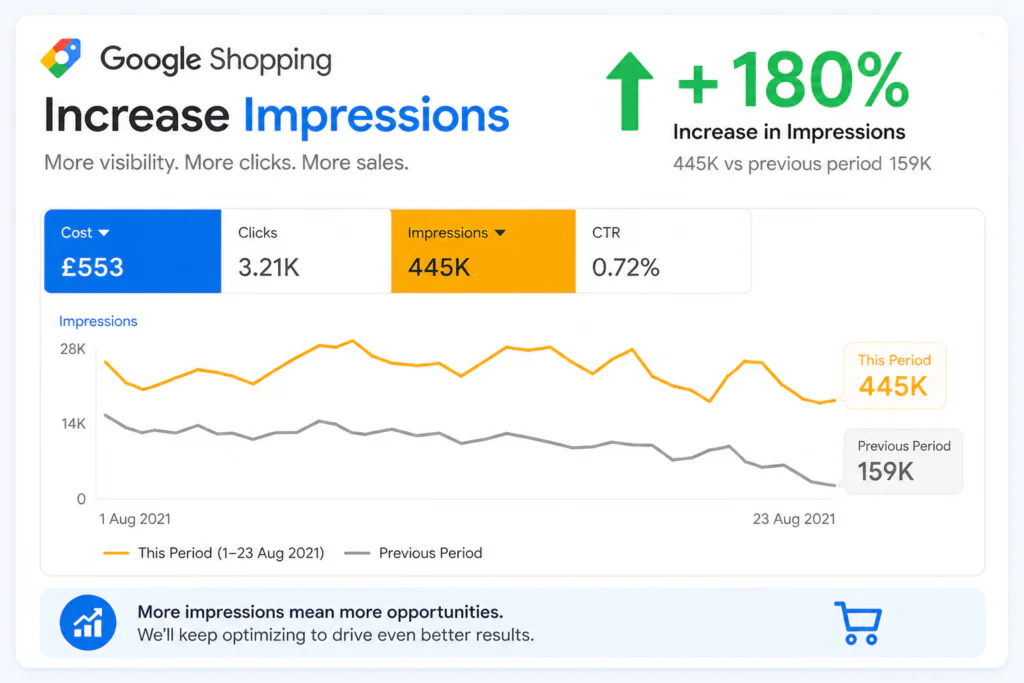
Without strong impression volume, even the best product page will struggle to convert.
QUICK DEFINITION: Impressions = how many times your product listing appeared in Google search results, including the Shopping tab, Google search feed placements, and the Google Images Shopping results.
Why Impressions Matter for Your Online Store
Impressions are the foundation of the entire Google Shopping funnel. Here is the simple path every shopper follows:
- Your product gets a high Google Shopping impression count
- More shoppers see your listing in Google search results
- Some of those shoppers click on your product
- Some of those visitors buy from your store
If your shopping impression share is low, your products are simply not showing up. That means you are missing shoppers who are actively searching for what you sell.
Google uses impression share as a signal of your ad visibility compared to your total eligible impressions.
PRO TIP: Check your Impression Share (IS) score in Google Ads. If it is below 50%, there is a real opportunity to grow. Use the Search Impression Share column in your campaign reports to identify this gap and measure how much of the available impressions on Google ads you are capturing.
Optimize Your Google Shopping Product Feed
Your optimize product feed is the most important factor in gaining more Google Shopping impressions. Google reads your feed to understand what you are selling.
A clean, accurate, and detailed feed helps Google match your products to more relevant search queries.
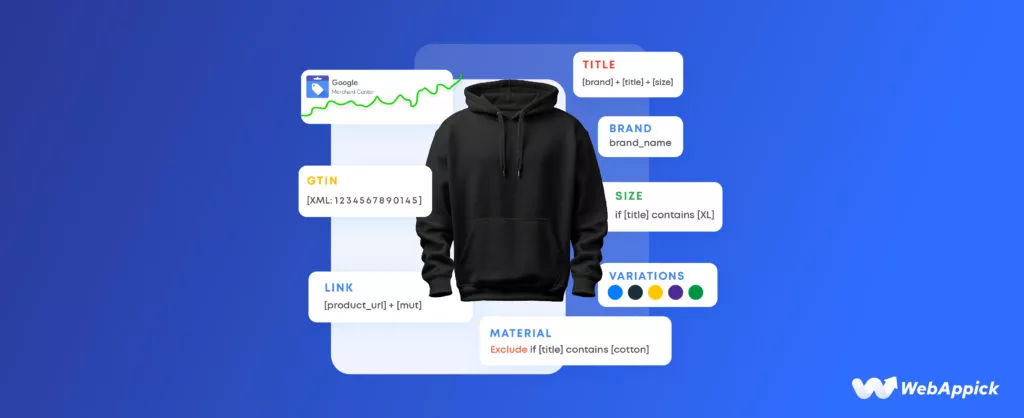
Google Shopping ads with low impressions are almost always caused by a poor-quality product feed.
Before adjusting bids or budgets, fix the feed first.
Key Product Feed Attributes to Focus On
| Feed Attribute | Why It Matters | Impression Impact |
|---|---|---|
| Product Title | Primary signal Google uses for query matching. Most direct influence on impressions. | Very High |
| Product Description | Adds semantic context, LSI keywords, and NLP depth to help match more queries. | High |
| Google Product Category | Helps Google understand product type for Shopping tab placement. | High |
| GTIN (Barcode) | Unlocks more auction eligibility. Products with GTINs get more impressions. | High |
| Product Images | Affects CTR which signals quality to Google and influences future impression share. | Medium |
| Price and Availability | Google penalizes mismatches between your feed and landing page. | Medium |
| Brand and MPN | Enables brand-specific queries to match your listings. | Lower |
COMMON MISTAKE: Many advertisers upload a basic feed and never update it. Stale product data leads to lower quality scores and reduced impression share. Keep your feed fresh by scheduling daily or weekly updates through Google Merchant Center.
Improve Product Titles to Increase Impression Volume
Google Shopping Product titles are the single biggest lever you can pull to gain more Google Shopping impressions. Google uses your title to match your product to search queries.
A weak title means fewer matches. A strong title means more search visibility.
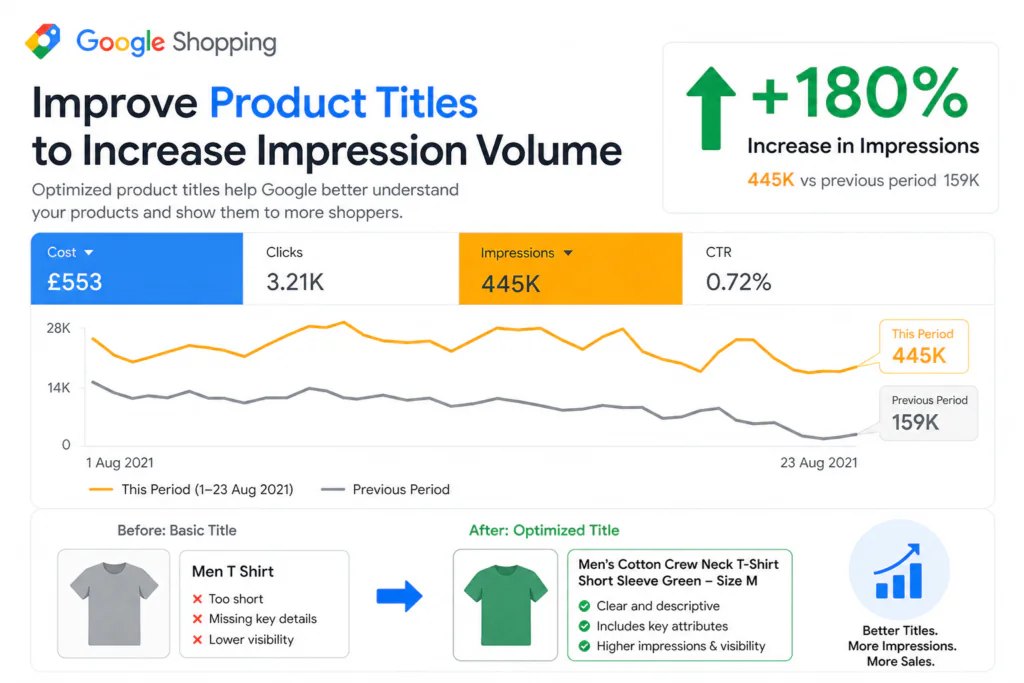
The Ideal Product Title Structure:
| 1 | Brand Name: Start with the brand if it is well-known. Shoppers often search by brand directly. Brand names boost recognition and click-through rate in Google Shopping results. |
| 2 | Product Type or Category: Use the exact category term shoppers search for. ‘Running Shoes’ beats ‘Athletic Footwear’. Match the language your buyers use in search. |
| 3 | Key Attributes: Add size, color, material, gender, or model number. These specifics match more long-tail queries and capture high-intent buyers. |
| 4 | Variant or Model Number: For electronics or tools, include the model number. Many buyers search with exact model names and these are lower-competition queries. |
Product Title Optimization Examples:
| Before (Weak Title) | After (Optimized Title) |
|---|---|
| Blue Shirt | Nike Men’s Blue Oxford Shirt – Slim Fit – Size M |
| Phone Case | iPhone 15 Pro Max Case – Clear TPU – Shockproof Slim Cover |
| Dog Food | Royal Canin Adult Dog Food – Dry Kibble – 12kg Bag |
| Running Shoes | Adidas Women’s Ultraboost 22 Running Shoes – White – Size 7 |
TITLE CHARACTER LIMIT
Google displays roughly 70 characters of your product title in Shopping ads. Put the most important keywords in the first 70 characters. You can use up to 150 characters in the feed for broader query matching across more Google impressions.
Use the Right Bidding Strategy for More Impressions
Your Google Shopping bid directly impacts how often your ads are served. Low bids mean Google shows your products less. But simply raising bids without strategy wastes budget.
Here is how to approach bidding to improve impression share on Google Ads.
Bidding Options to Increase Google Shopping Visibility
- Target Impression Share bidding: This smart bidding strategy automatically adjusts bids to help your ads appear more often. Set a target impression share percentage and let Google optimize your Shopping impression count.
- Maximize Clicks: Google will try to get you the most clicks within your daily budget. This often increases overall impression volume by targeting more auctions. Good starting point if you have Google Shopping ads with low impressions.
- Manual CPC with bid adjustments: You stay in control. Increase bids on high-performing product categories to shift impression share to where it matters most.
- Target ROAS (Return on Ad Spend): Best for stores with strong conversion data. Google uses past performance to optimize bids for impression share among buyers, not just browsers.
STRATEGY TIP:
If you are just starting out and seeing no impressions on Google Ads, use Maximize Clicks to build impression data quickly. Once you have 30 to 50 conversions in 30 days, switch to Target ROAS for smarter impression optimization.
Fix Product Disapprovals in Google Merchant Center
This step is often overlooked. Disapproved products cannot show at all. They get zero impressions on Google Shopping.
Fixing disapprovals is one of the fastest ways to increase your Google Shopping impression count immediately.
Most Common Reasons for Product Disapproval
- Mismatched price or availability between the feed and your website
- Missing required attributes such as GTIN, brand, or condition
- Policy violations including prohibited products or misleading descriptions
- Low-quality images with text overlays, watermarks, or white borders missing
- Landing page issues such as slow page speed, broken links, or mismatched product details
Log into Google Merchant Center regularly. Go to Products and then Diagnostics. Review all disapproved and limited items. Fix them and resubmit.
Even fixing a small batch can noticeably lift your impression share and shopping impression volume.
Use Negative Keywords to Protect Impression Quality
Negative keywords help protect your impression share from being wasted on irrelevant searches. When your Shopping ads appear for the wrong queries, click-through rate drops.
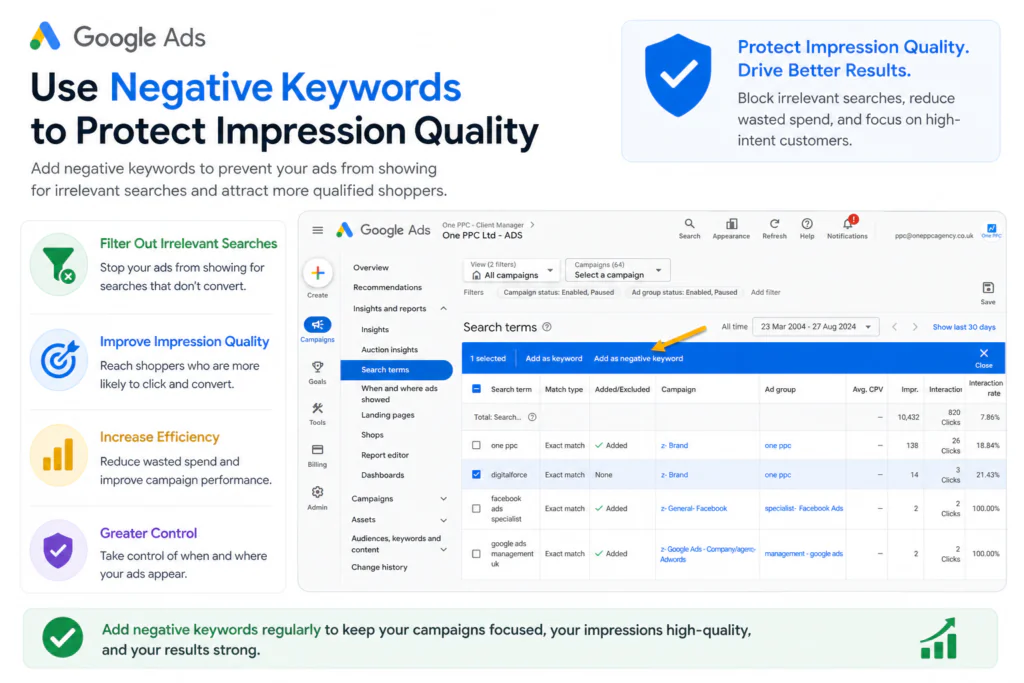
Google interprets low CTR as a signal that your ads are less relevant. This can reduce future impressions on Google Ads.
How to Build a Negative Keyword List for Google Shopping?
| 1 | Review Search Term Reports: In Google Ads, go to Keywords and then Search Terms. Look for irrelevant queries that triggered your Shopping ads and contributed to Google Ads impressions but no clicks. |
| 2 | Identify Wasted Spend Patterns: Look for terms with high impressions, zero clicks, or zero conversions. These queries are harming your quality signals and should be added as negatives. |
| 3 | Add Negatives at Campaign or Ad Group Level: Add them at the right level so you do not accidentally block good traffic in other campaigns. |
| 4 | Review Monthly: New irrelevant queries appear constantly. Make this a monthly habit to keep impression quality high and maintain a healthy impressions vs clicks ratio. |
Leverage Performance Max Campaigns to Expand Reach
Performance Max (PMax) campaigns are Google’s newest campaign type. They run across all Google channels including Shopping, Search, Display, YouTube, Gmail, and Maps.

For e-commerce stores, PMax is a powerful way to dramatically increase Google Shopping impression share and overall impression volume.
Why Performance Max Helps with Impressions
- Google’s AI targets shoppers across multiple channels, not just Shopping
- PMax uses your product feed to match listings to high-intent queries automatically
- It captures demand across the full shopping funnel, from awareness to purchase
- Asset groups allow you to tailor messaging for different product categories
- PMax campaigns can increase impressions on Google Ads across all placements simultaneously
PMAX VS STANDARD SHOPPING CAMPAIGNS:
Standard Shopping campaigns give you more control over individual products. PMax gives you broader impression reach. Many advertisers run both side by side. Use Standard Shopping for your top-performing products and PMax to maximize impressions on Google and capture new audiences.
Tips for Getting More Impressions from PMax
- Upload high-quality images and videos as assets to unlock more placement types
- Write clear, benefit-focused ad headlines and descriptions in your asset groups
- Set a sufficient daily budget as PMax needs data to optimize effectively
- Use audience signals to help Google’s machine learning target the right shoppers faster
- Keep your product feed clean and complete as it directly feeds PMax impression performance
Track Impressions and Improve Over Time
You cannot improve what you do not measure. Tracking your Google Shopping impression data consistently helps you understand what is working and where you are losing visibility.
Use Google Ads, Google Merchant Center, and Google Analytics impressions data together for a full picture.
Key Metrics to Track Alongside Impressions
| Metric | What It Tells You | Action Trigger |
|---|---|---|
| Impression Share (IS) | Percentage of total eligible Google impressions you are winning | Below 60%: investigate |
| Lost IS (Budget) | Impressions lost because your daily budget ran out | Above 10%: raise budget |
| Lost IS (Rank) | Impressions lost because of low Ad Rank (bid or quality) | Above 20%: improve feed |
| Click-Through Rate (CTR) | How many of your Google Shopping impressions result in a click | Below 1%: fix title/image |
| Impressions vs Clicks ratio | Balance between visibility and engagement quality | High ratio: review relevance |
| Impression GA4 | Google Analytics 4 impressions data for Shopping campaigns | Use with Merchant Center |
KEY INSIGHT:
The goal is not just more impressions. It is the right impressions from the right shoppers at the right moment. A focused Google Shopping impression share of 70% on your best products outperforms a scattered 30% across all products.
Quick Wins Checklist for More Google Shopping Impressions
Use this checklist to run a fast audit of your Shopping campaigns today and start fixing low impressions on Google Shopping ads right away.
- Review all disapproved products in Google Merchant Center and fix them immediately
- Add brand, product type, size, color, and key attributes to product titles
- Write keyword-rich product descriptions (minimum 500 characters)
- Upload high-resolution product images (minimum 800×800 pixels, white or neutral background)
- Check your Impression Share score and identify lost IS reasons (budget vs rank)
- Add GTINs (barcodes) to all eligible products for better auction eligibility
- Review search term reports and add irrelevant queries as negative keywords
- Set up a Performance Max campaign to expand reach across all Google channels
- Schedule daily or weekly feed refreshes to keep product data up to date in Merchant Center
- Ensure your product landing pages load in under 3 seconds to avoid quality penalization
Frequently Asked Questions
How long does it take to see more Google Shopping impressions after optimizing?
Most advertisers see noticeable changes within 7 to 14 days after optimizing their product feed and fixing disapprovals. Bidding changes can show results within 3 to 5 days. Performance Max campaigns typically need 4 to 6 weeks to fully optimize through Google’s machine learning.
Why do I have impressions but no clicks on Google Shopping?
Low CTR with decent impressions usually points to issues with your product title, image quality, or price competitiveness. Shoppers see your listing but something is stopping them from clicking. Check if your prices are competitive, ensure your images are clean and high-quality, and rewrite your titles to include more specific attributes that match buyer intent.
What is a good Google Shopping impression share?
A healthy impression share is typically 60% or above for competitive categories. Top e-commerce advertisers often aim for 70 to 85%. If your Google Shopping impression share is below 40%, there is significant room for improvement through better feed quality, higher bids, or increased budget.
Why are my Google Shopping ads showing no impressions?
Zero impressions on Google Shopping are usually caused by: all products being disapproved in Merchant Center, your daily budget being exhausted before the day starts, bids being too low to compete in auctions, your products violating Google Shopping policies, or your target location and language settings being too narrow. Check Merchant Center diagnostics first.
Does a higher budget always increase impressions on Google Ads?
Not always. If your Lost IS is caused by Rank rather than Budget, increasing spend will not help much. You need to improve your Ad Rank by improving your product feed quality, titles, and bids together. Check whether your Lost IS (Budget) or Lost IS (Rank) is the bigger number in your campaign reports.
How do Google Analytics impressions differ from Google Ads impressions?
Google Ads impressions count how many times your Shopping ad was shown in search results. Google Analytics 4 impressions (impression GA4) track product impressions in your website’s e-commerce data layer, such as product list views. They measure different things. For Shopping campaign performance, use Google Ads impression data as your primary metric.
How do product descriptions affect Google Shopping impressions?
Product descriptions are not shown directly in Shopping ads but Google’s algorithm reads them to better understand your product. Rich, detailed descriptions with relevant terms help Google match your product to a wider range of search queries and increase your total shopping impressions. Aim for at least 500 characters with natural use of product attributes, use cases, and specifications.