If you run a WooCommerce store and want to sell on Google Shopping, you have two main paths.
You can use the official Google for WooCommerce plugin, built and maintained by WooCommerce itself.
Or you can use CTX Feed, a dedicated product feed plugin trusted by over 70,000 active stores worldwide.
Both tools can help you get your products in front of Google shoppers. But they are built for very different purposes, and the gap between them becomes obvious the moment you need anything beyond a basic setup.
This guide breaks down every major difference between CTX Feed vs Google for WooCommerce. We cover feed customization, channel support, filtering options, automation, error prevention, and real-world performance.
By the end, you will know exactly which plugin suits your store and why thousands of WooCommerce store owners are switching to CTX Feed Plugin.
What We Cover in This Guide?
- What is CTX Feed and what is Google for WooCommerce
- Side-by-side feature comparison
- Why CTX Feed is the best product feed plugin for Google Shopping
- How to generate an optimized product feed with CTX Feed
- How to use CTX Feed for error-free Google Shopping feeds
- Why Google Shopping users are moving from Google for WooCommerce to CTX Feed
- Key drawbacks of the Google for WooCommerce plugin
- Final verdict and recommendation
Understanding the Two Plugins
What is CTX Feed?
CTX Feed (formerly WooFeed by WebAppick) is a purpose-built product feed management plugin for WooCommerce. With over 70,000 active installations, it has grown into the most feature-rich product feed tool available for WooCommerce stores.
CTX Feed lets you create, manage, and auto-update product feeds for over 220+ shopping channels and marketplaces. Google Shopping is just one of them.
The plugin gives you granular control over every field, filter, attribute mapping, pricing rule, and feed format your channel requires.
Core focus: Product feed generation, optimization, and distribution for 220+ shopping channel or comparison site.
What is Google for WooCommerce?
Google for WooCommerce (previously called Google Listings and Ads, version 3.7.0) is an official plugin developed by WooCommerce and maintained by Automattic.
It provides a native connection between your WooCommerce store and Google’s ecosystem, including Google Merchant Center, Google Shopping, and Google Ads.
The plugin automates product syncing to Google Merchant Center, lets you run Performance Max campaigns from inside your WordPress dashboard, and shows basic analytics.
It was designed for simplicity: connect your store and let Google handle the rest.
Core focus: Automated product sync with Google Merchant Center and running Google Ads campaigns.
Side-by-Side Feature Comparison
The table below compares the two plugins across every major capability that matters for Google Shopping success.
| Feature | CTX Feed | Google for WooCommerce |
|---|---|---|
| Feed Templates | 220+ pre-built templates for Google, Facebook, Pinterest, Bing, Amazon, TikTok, and more | Google Shopping only (Google Merchant Center & Google Ads) |
| Feed File Formats | XML, CSV, TSV, TXT, JSON, XLSX | Automatic sync via API (no downloadable feed file) |
| Custom Feed Builder | Full custom XML and CSV builder with CodeMirror editor | Not available |
| Multi-Channel Support | 220+ channels in one plugin | Google ecosystem only |
| Attribute Mapping | Advanced attribute mapping with glue, prefix, suffix, output type, character limits | Limited, automated field mapping |
| Dynamic Attributes | Create custom dynamic attributes with conditional logic | Not available |
| Category Mapping | Map your WooCommerce categories to Google (and other merchant) taxonomies | Partial – basic Google category mapping |
| Product Filters | 12+ filter options: stock, price, category, tag, product ID, visibility, custom fields, post status | Basic visibility control |
| Variation Handling | All, default, first, last, cheapest variation options | Basic variation support |
| Variable Product Price | Min, max, range options for variable product prices in feed | No granular control |
| Out-of-Stock Control | Exclude out-of-stock, backorder, empty image, empty description, empty price products | Basic stock sync |
| Advanced Product Filtering | Filter by attribute, tag, ID, price range, stock, custom meta fields | Limited to catalog visibility |
| FTP/SFTP Upload | Automatic FTP and SFTP upload of feed file to any server | Not available |
| Auto-Refresh Schedule | Hourly, every 6h, 12h, daily, weekly, custom schedule | Automatic sync (no cron control) |
| Batch Processing | Configurable batch size for large catalogs | Background sync (no batch control) |
| ACF Support | Advanced Custom Fields (ACF) as feed attributes | Not supported |
| WPML / Multilingual | WPML and multilingual currency support | Not available |
| Multi-Currency | Multiple active currency support via plugins | Single currency |
| Bundle/Composite Products | Support for WooCommerce Bundles and Composite Products | Limited |
| Google Taxonomy | Built-in searchable Google product taxonomy | Built-in but limited mapping |
| Output Type Control | Strip HTML, strip shortcodes, truncate, capitalize, lowercase, and more | None |
| Prefix/Suffix | Add custom prefix and suffix to any feed field | Not available |
| Static/Pattern Values | Set a fixed static value for any attribute | Not available |
| Price Rules | Include sale price, regular price, custom price calculation in feed | Sale price sync (limited) |
| Shipping Data | Custom shipping label and cost in feed | Uses WooCommerce shipping settings |
| Tax Data | Include/exclude tax from prices in feed | Limited |
| Google Ads Integration | Feed URL for Google Merchant Center (Ads managed separately) | Built-in Google Ads and PMax campaign management |
| Performance Analytics | Not built-in (uses Google Merchant Center/Analytics) | Built-in reports: clicks, impressions, revenue |
| Price Benchmarking | Not built-in | Available (v3.0+): compare prices against competitors |
| Enhanced Conversions | Not built-in | Available via gtag integration |
| Active Installations | 70,000+ | 100,000+ (broader ecosystem audience) |
| Setup Complexity | Moderate (full control requires configuration) | Very easy (wizard-based onboarding) |
| Best For | Merchants who need optimized, multi-channel feeds with full control | Merchants who want a quick Google-only setup with minimal configuration |
Why CTX Feed is the Best Product Feed Plugin for Google Shopping?
Google Shopping success depends almost entirely on feed quality. The better your product data, the better your ad performance.
CTX Feed was built from the ground up to solve every feed quality problem WooCommerce store owners face.
1. Full Attribute Control for Every Google Shopping Field
Google Merchant Center has strict requirements for product data. Fields like google_product_category, brand, GTIN, MPN, condition, color, size, material, and age_group must be correctly formatted.
With CTX Feed, you map every single one of these fields manually or with smart attribute mapping.
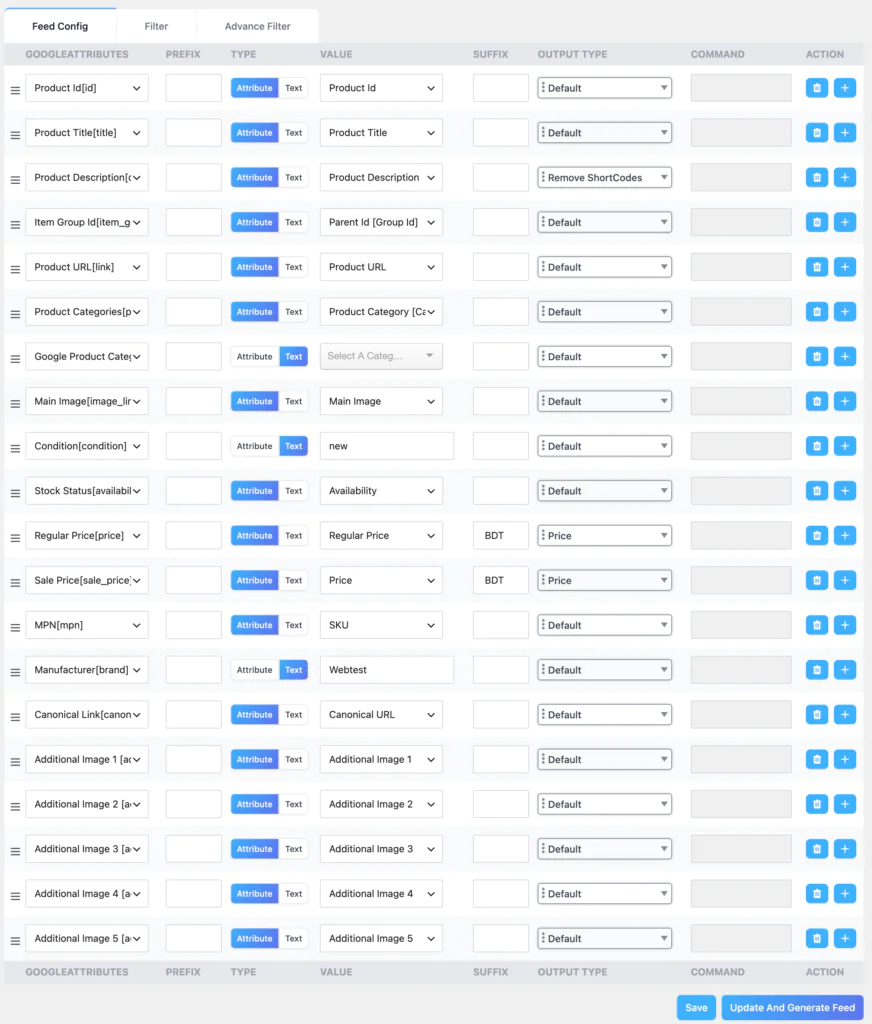
You can add a prefix or suffix to any field value. For example, if your shipping attribute needs to be in the format "AU:::Standard Shipping:15 AUD", CTX Feed lets you build that exact string without any workarounds.
The plugin gives you a prefix field, a value field, a suffix field, an output type field, and even a character limit field for every attribute row.
Google for WooCommerce maps fields automatically based on your WooCommerce product data.
This sounds convenient until Google starts disapproving products because a field is blank, incorrectly formatted, or pulling from the wrong source.
2. The Most Powerful Product Filter System Available
One of the most common causes of Google Shopping feed rejections is including products that should not be in the feed at all.
Products with no images, no descriptions, no prices, out-of-stock items, or items in categories you do not want to advertise all create problems.
CTX Feed lets you filter products based on a long list of conditions. You can exclude out-of-stock and backorder products with a single toggle.
You can remove products that have no description, no image, or no price. You can filter by category, tag, product ID list, price range, post status, and custom meta fields.
Beyond these standard filters, the plugin lets you set conditional rules using attribute-based filters.
For example, you can say: include only products where the price is greater than 10 and the category is “Electronics” and the product has a featured image.
This level of filtering is simply not available in Google for WooCommerce.
3. Variation Handling That Matches Google’s Requirements
Variable products are a major source of confusion in Google Shopping feeds. Google wants individual variation data in most cases, including specific color, size, and price for each variant.
But sometimes you want to show only the cheapest option, or only the default variation.
CTX Feed handles this with dedicated variation options. You can include all variations, just the default variation, just the first variation, just the last variation, or only the cheapest variation.
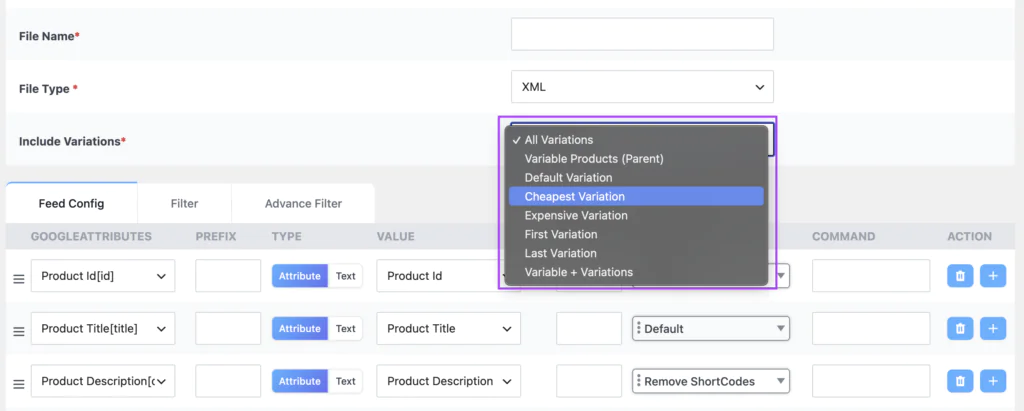
You also control how variable product prices appear in the feed: show the price range, show the minimum price, or show the maximum price.
This granularity is impossible in Google for WooCommerce, which syncs variations automatically based on WooCommerce’s built-in structure.
4. 220+ Channel Templates in One Plugin
Google Shopping is important, but it is not the only place where product feed traffic matters. Meta (Facebook) Shopping, Pinterest Ads, Microsoft Bing Shopping, TikTok Shop, Amazon, Idealo, PriceRunner, Kelkoo, Shareasale, Awin, and dozens more all accept product feeds.
CTX Feed ships with 220+ pre-built channel templates. Each template is pre-configured with the correct attribute names, required fields, and file format that channel expects.
You do not need to research each channel’s documentation. You pick the template, map your attributes, and generate the feed.
Google for WooCommerce works only with Google. If you want to expand to Facebook or Pinterest, you need a separate plugin entirely.
5. ACF and Custom Meta Field Support
Many WooCommerce stores store important product data in Advanced Custom Fields (ACF) or custom meta fields.
Brand names, EAN/GTIN codes, product materials, certifications, and other details are often stored in custom fields rather than standard WooCommerce product attributes.
CTX Feed has native support for ACF fields and any WordPress option/meta field. You can pull any custom field value directly into your feed, which means your product data is always complete and accurate.
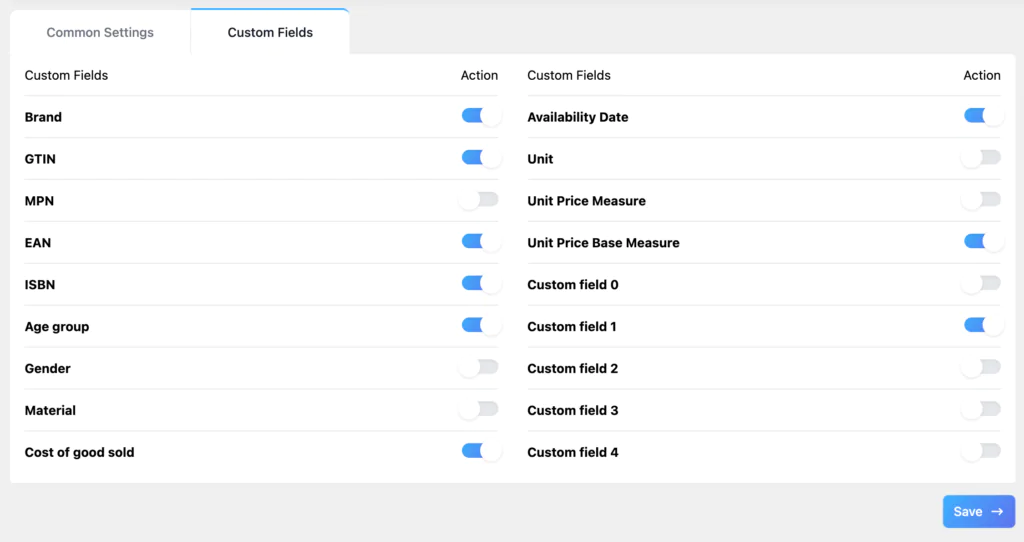
Google for WooCommerce does not support ACF fields.
6. Auto-Upload via FTP and SFTP
Some shopping channels and price comparison sites do not accept a feed URL. They require a file to be uploaded to an FTP or SFTP server on a schedule.
CTX Feed has this built in. You configure your FTP or SFTP credentials once per feed, and the plugin uploads the updated feed file automatically every time it refreshes.
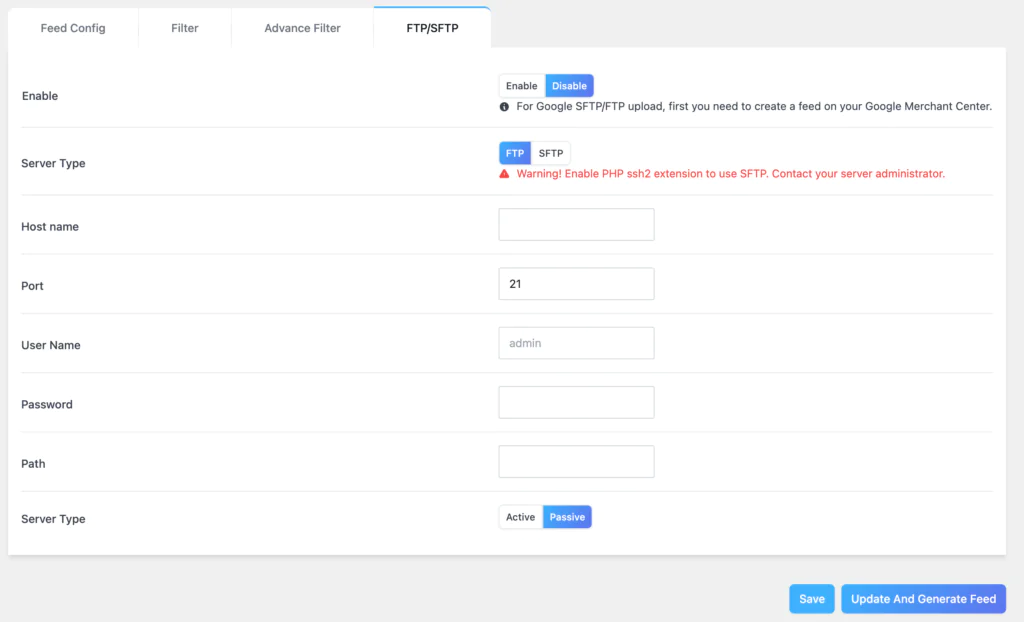
Google for WooCommerce does not have FTP upload capability at all, since it syncs through the Google API directly.
7. Advanced Custom XML Builder
Some channels require highly customized XML structures that do not match standard feed formats. CTX Feed includes a full CodeMirror-powered XML editor where you can write your own XML template from scratch.
You insert product attribute placeholders inside your custom XML structure, and CTX Feed fills in the values for each product.
This is a professional-grade feature that no other free WooCommerce feed plugin offers.
8. Multi-Language and Multi-Currency Support
If your store uses WPML or a similar multilingual plugin, CTX Feed can generate separate feeds for each language.
Similarly, if your store uses a multi-currency plugin, CTX Feed can generate feeds in specific currencies for specific markets.
This is critical for international sellers running Google Shopping in multiple countries.
How to Generate the Most Optimized Product Feed with CTX Feed?
An optimized Google Shopping feed means more of your products get approved, more of your ads get shown, and your cost per click goes down because your product data is highly relevant.
Here is a step-by-step process for generating the best possible feed with CTX Feed.
Step 1: Install and Activate CTX Feed
Install CTX Feed from the WordPress plugin repository or upload the pro version. After activation, you will see the CTX Feed menu in your WordPress admin sidebar.
Navigate to CTX Feed and click Create Feed to start.
Step 2: Choose Your Template and File Settings
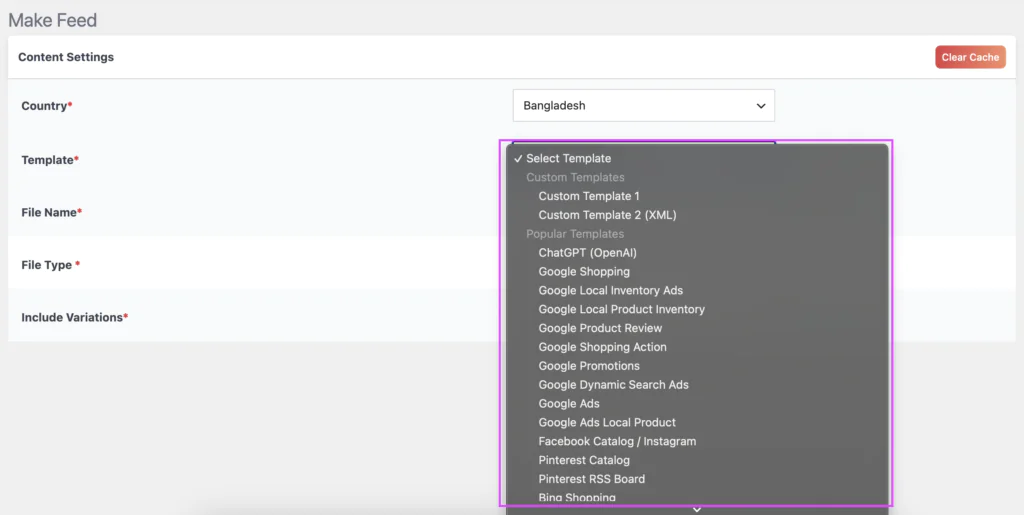
In the Content Settings section, select Google Shopping as your template. Choose your country, file type (XML is standard for Google Shopping), and give your feed a unique filename.
Under the variation settings, decide whether you want all variations, individual variations, or just the default.
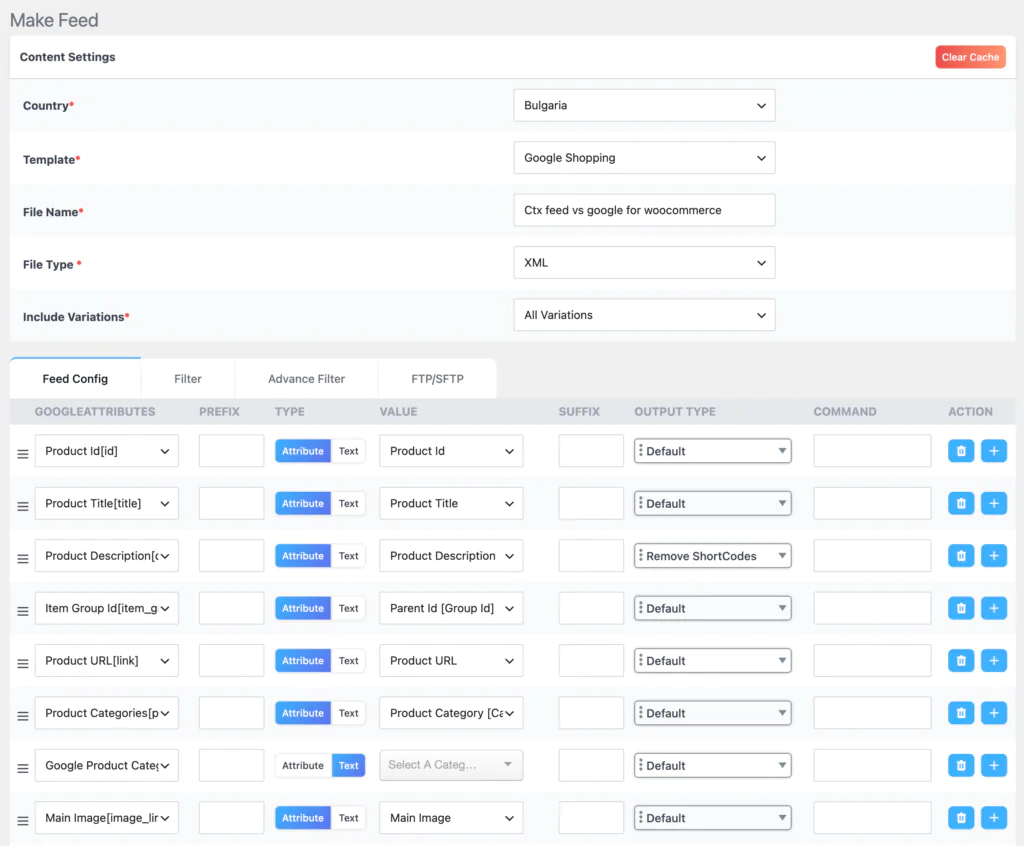
Step 3: Map Your Product Attributes
This is where CTX Feed does the heavy lifting. Each row in the feed configuration represents a Google Shopping attribute. For each attribute, you choose the WooCommerce product field that maps to it.
For best results, map these attributes carefully:
- Map to Product ID or SKU. Use SKU if your SKUs are unique.id
- Map to Product Title. Consider adding a prefix for brand name if needed.title
- Map to Product Description (not short description, unless short description is better populated).description
- Use CTX Feed’s built-in Google taxonomy dropdown and pick the most specific category.google_product_category
- Map to a brand attribute or enter a static pattern value if all products share one brand.brand
- Map to your GTIN or MPN custom field. This is critical for Shopping ads eligibility.gtin / mpn
- Set as a static pattern value: new.condition
- Map to stock status.availability
- Map to regular price. Set output type to strip HTML.price
- Map to sale price if applicable.sale_price
- Map to product image. Use the first image for main image.image_link
- Map to gallery images for multi-image feeds.additional_image_link
- Map to product URL.link
- Add a static pattern or map to shipping attributes as required by Google.shipping
Step 4: Configure Advanced Filters
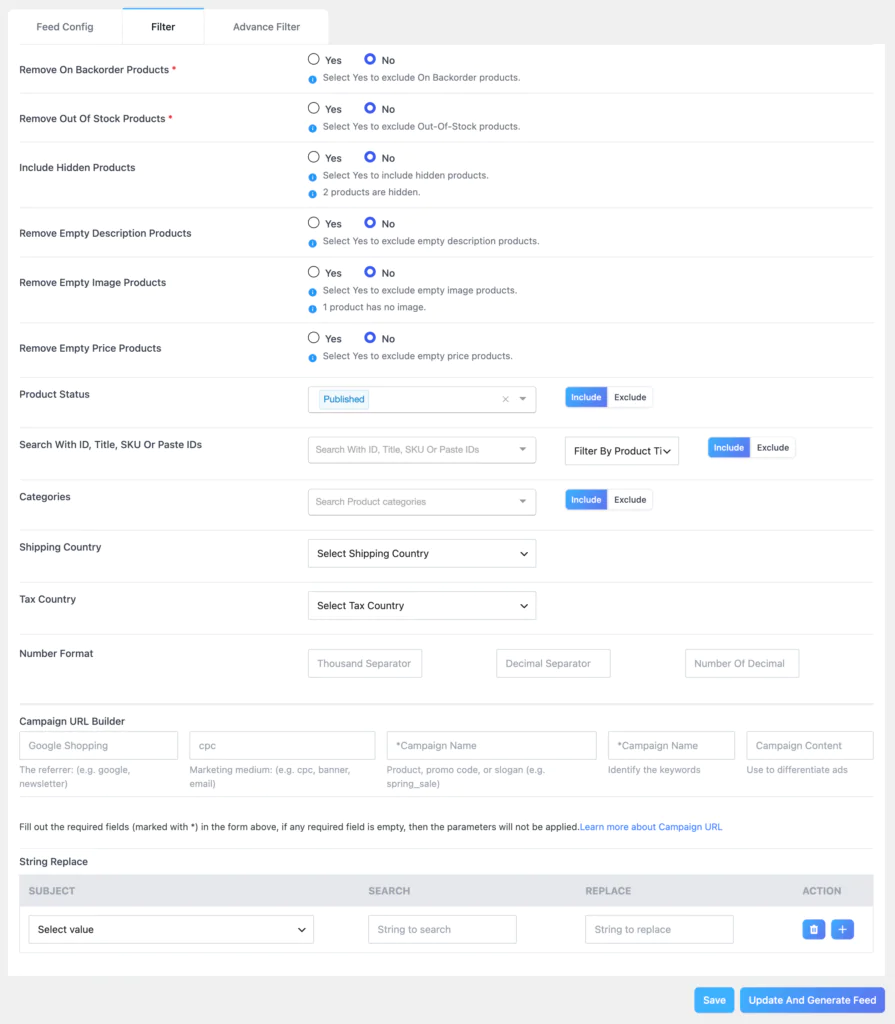
Navigate to the Filters tab in the feed configuration. Enable these filters for a clean, optimized feed:
- Remove Out of Stock Products: Yes
- Remove On Backorder Products: Yes (recommended)
- Remove Empty Image Products: Yes (Google will reject products without images)
- Remove Empty Description Products: Yes
- Remove Empty Price Products: Yes (products without prices cannot show ads)
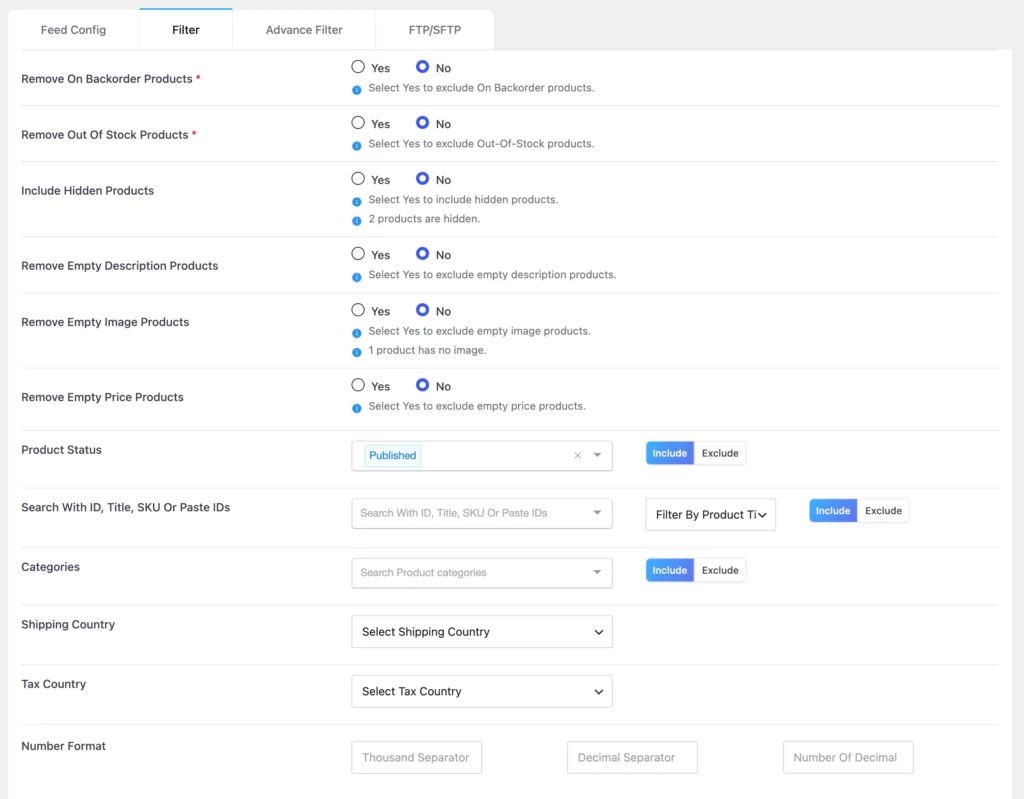
These five filters alone will prevent the majority of Google Merchant Center disapprovals before they happen.
Step 5: Set the Auto-Update Schedule
Google recommends updating your product feed at least once per day for accurate price and stock data. In CTX Feed’s feed settings, set the update interval to every 24 hours or every 12 hours for stores with frequently changing inventory.
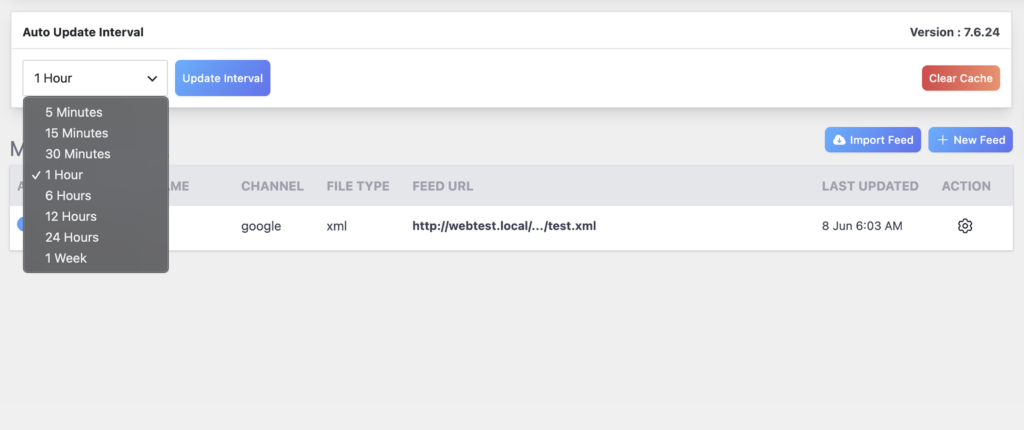
If you have a very large catalog, configure the batch size setting to a number your server can process comfortably without timeouts.
Step 6: Generate and Submit to Google Merchant Center
Once your feed is configured, click Generate Feed. CTX Feed will process all your products and create the feed file. You will see a direct URL for your feed file.
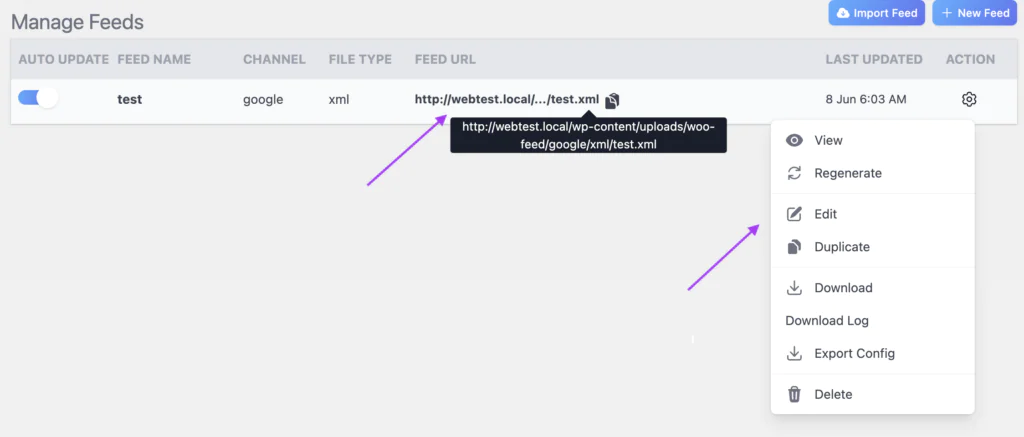
Copy this URL and go to Google Merchant Center, then navigate to Products and add it as a scheduled fetch under your data sources. Set the fetch frequency to daily and save.
Step 7: Map Your Store Categories to Google Taxonomy
This is an advanced optimization step that many store owners skip. Go to CTX Feed’s Category Mapping section. Here you can map each of your WooCommerce product categories to the most specific Google product category taxonomy.
This helps Google better understand your products and improves ad targeting accuracy.
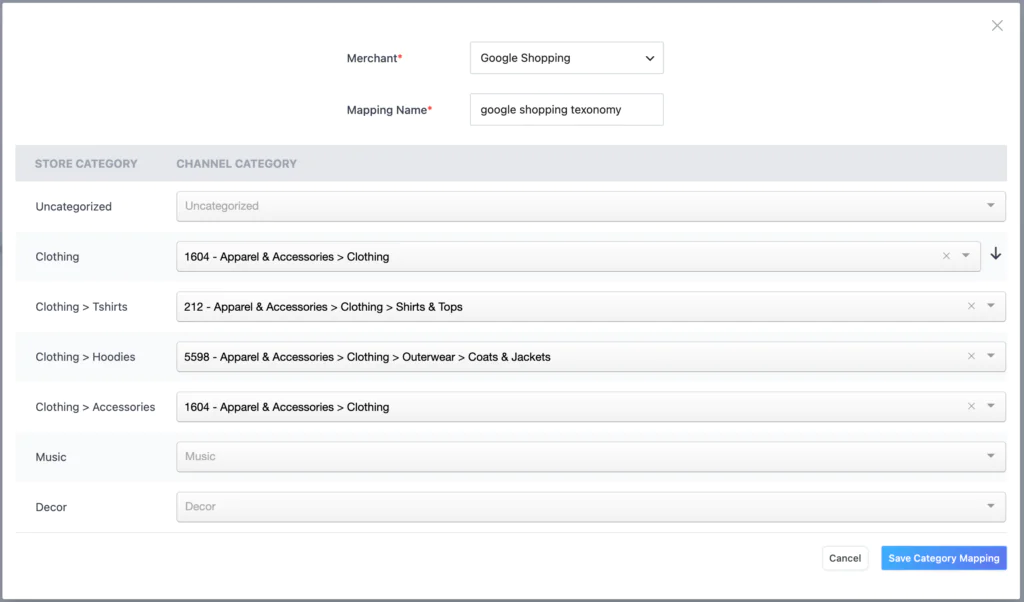
For example, if your WooCommerce category is “Running Shoes“, map it to “Apparel and Accessories > Shoes > Athletic Shoes > Running Shoes” in Google’s taxonomy.
CTX Feed provides the full Google taxonomy list in a searchable dropdown.
How to Use CTX Feed for Error-Free Product Feeds for Google Shopping Ads?
Google Merchant Center has a long list of reasons it disapproves products. Many of these disapprovals are preventable with the right plugin settings.
CTX Feed addresses each common error category directly.
Error Category 1: Missing or Invalid GTIN
Google requires GTIN (barcode) data for branded products. If your products have GTINs, store them in a custom field or ACF field in WooCommerce.
Then in CTX Feed, map the gtin attribute to that field. CTX Feed’s ACF and custom meta field support means you can pull this data from wherever you store it.
If your products do not have GTINs (handmade, custom, or private label items), add identifier_exists as an attribute with the static value ‘no’ in your feed.
This tells Google explicitly that no GTIN exists and prevents the disapproval.
Error Category 2: Missing or Incorrect google_product_category
This is one of the most common reasons Google rejects products. CTX Feed includes the full Google product taxonomy list in a searchable dropdown.
When you configure the google_product_category field, select the most specific category possible for each product type.
Use CTX Feed’s Category Mapping feature to apply category-level taxonomy assignments. This way, every product in a given WooCommerce category automatically gets the right Google taxonomy value without setting it individually.
Error Category 3: Products Without Images
Google will not show ads for products that have no product image, or for products with a placeholder image. In CTX Feed, enable the Remove Empty Image Products filter. This excludes any product with no featured image from your feed entirely, which prevents the disapproval and keeps your feed clean.
Additionally, map the additional_image_link attribute to pull gallery images. Products with multiple high-quality images often perform better in Google Shopping results.
Error Category 4: Price Discrepancies
One of the most serious Google Shopping policy violations is when the price shown in the ad does not match the price on the product page. This happens when your feed has stale pricing data. CTX Feed’s automatic scheduled refresh prevents this.
Set your feed to update at least once every 24 hours so that price changes, sales, and promotions are always reflected accurately.
Also ensure your price field is mapped to the correct WooCommerce price field. If you run sales, map the sale_price field as well so Google shows the correct strikethrough pricing in ads.
Error Category 5: Incorrect Availability Data
Showing ads for out-of-stock products is another policy violation that can get your Merchant Center account suspended.
CTX Feed solves this at the source by giving you the option to exclude out-of-stock and backorder products from the feed completely.
Enable both filters and Google will never see a product that cannot be purchased.
Error Category 6: Title and Description Quality
Google’s algorithm ranks products partly based on the quality of titles and descriptions. CTX Feed lets you set output types for title and description fields including strip HTML, strip shortcodes, and character truncation.
Strip HTML removes any stray formatting tags from descriptions. Truncation ensures your title does not exceed 150 characters, which is Google’s recommended limit.
For titles, you can use CTX Feed’s prefix/suffix feature to add brand names or key attributes at the start of the title.
For example, a prefix of your brand name followed by the product title gives Google Shopping’s algorithm a clear signal about what the product is.
Using CTX Feed’s Dynamic Attributes for Edge Cases
Some products need custom attribute values that cannot come directly from any single WooCommerce field.
CTX Feed’s Dynamic Attribute feature lets you create a new attribute by combining multiple fields or by writing conditional logic.
For example, you might create a dynamic attribute called “full_title” that combines the brand field, a space, and the product title field, giving you richer titles without changing your actual product data in WooCommerce.
Why Google Shopping Users Are Switching from Google for WooCommerce to CTX Feed?
Many store owners start with Google for WooCommerce because it is the official plugin and it promises a simple setup. Over time, they hit limitations that send them looking for an alternative. Here is what drives that switch.
Reason 1: No Control Over Feed Content
With Google for WooCommerce, your product data syncs automatically based on what is stored in WooCommerce. If your product titles are not optimized for Google Shopping, you cannot fix them in the feed without changing them in WooCommerce.
If a field is missing, you cannot add a fallback value. There is no attribute mapping interface that lets you customize each field independently.
CTX Feed solves this immediately. You can map any attribute to any WooCommerce field, add static values, combine multiple fields, and use prefix/suffix to format values exactly as Google requires.
Reason 2: No Multi-Channel Capability
Successful ecommerce stores do not rely on one channel. When a store owner realizes they also want to run ads on Facebook, Pinterest, or Microsoft Shopping, they find that Google for WooCommerce does nothing for those channels.
They end up installing multiple separate plugins, each with its own configuration and update schedule.
CTX Feed handles all 220+ channels from a single dashboard. One plugin, one place to manage all your product feeds.
Reason 3: Limited Filtering Causes Product Disapprovals
Google for WooCommerce syncs products based on WooCommerce catalog visibility. This is a coarse filter. It does not automatically remove products with missing images, empty descriptions, zero prices, or products that are on backorder.
When these products end up in your Merchant Center feed, they get disapproved, and a feed with many disapprovals can affect the performance of your entire account.
Merchants who switch to CTX Feed often see their disapproval rate drop dramatically within the first refresh cycle because CTX Feed’s filters catch exactly the categories of products that Google rejects.
Reason 4: No FTP Support for Price Comparison Sites
Store owners who want to list on price comparison engines like PriceRunner, Idealo, or regional shopping sites often find these platforms require a feed file delivered to an FTP server. Google for WooCommerce has no such capability.
CTX Feed’s built-in FTP and SFTP upload feature makes this straightforward.
Reason 5: No Variation Control
Managing variable products in Google Shopping is a significant challenge. Some store owners want only the default variation in their feed to avoid duplicate products.
Others want all variations for maximum visibility. Google for WooCommerce offers no configuration for this. CTX Feed lets you choose exactly how variations are included, per feed.
Reason 6: No ACF or Custom Field Support
Many WooCommerce stores are built with Advanced Custom Fields to store product metadata like materials, certifications, supplier codes, or size guides.
This data is often exactly what Google needs for attributes like material, care_instructions, and product_detail.
CTX Feed can pull these ACF fields directly into the feed. Google for WooCommerce cannot.
Key Drawbacks of the Google for WooCommerce Plugin?
Google for WooCommerce is a well-built official plugin and there are situations where it is the right choice. But for store owners who take Google Shopping seriously, it has real limitations.
1. Feed-as-a-Black-Box
You cannot download, inspect, or modify the feed data that Google for WooCommerce sends to Merchant Center. The sync happens through Google’s API in the background.
When products get disapproved, diagnosing the problem means navigating Merchant Center’s diagnostic tools rather than looking at your actual feed file.
With CTX Feed, you can open the feed XML, find the product, and see exactly what data was sent.
2. No Custom Attribute Values
There is no way to add a static custom value to a field in Google for WooCommerce. If your products do not have a brand field populated in WooCommerce, you cannot tell the plugin to use a fixed brand name for all products.
With CTX Feed, you simply set that field to Pattern (Static Value) and type in the value.
3. Google Only
The plugin works exclusively with Google’s ecosystem. Every other shopping channel is outside its scope. This forces multi-channel sellers to maintain multiple feed plugins simultaneously.
4. Requires Jetpack/WooCommerce.com Connection
Google for WooCommerce uses a WordPress.com proxy connection to communicate with Google’s API. This means your site needs to be connected to Jetpack or WooCommerce.com for the plugin to function.
Some store owners have privacy concerns about this, and others find the connection requirement adds complexity to their setup.
5. No Batch or Schedule Control
The plugin syncs products on its own schedule in the background. You cannot control the batch size for large catalogs, which can cause performance issues on shared hosting. You also cannot force a full resync at will (beyond the manual resync option added in recent versions).
CTX Feed gives you full control over update schedule, batch size, and manual regeneration.
6. Performance Issues on Large Catalogs
Several reports from high-volume stores (10,000+ products) indicate that Google for WooCommerce’s background sync can struggle with large catalogs, causing slow admin panels and database load.
CTX Feed’s configurable batch processing was specifically designed to handle large catalogs without impacting site performance.
7. No FTP Upload, No Downloadable Feed File
While this works fine for Google Merchant Center (which can fetch a URL), it is a hard blocker for any platform that requires a file delivered to an FTP server or hosted at a specific path.
CTX Feed’s FTP/SFTP support and downloadable feed files handle both cases with no workarounds needed.
Why Accurate Product Feeds Matter for Google Shopping Success?
Before comparing plugins, it is worth understanding why the quality of your product feed is the single biggest lever you have over your Google Shopping results. Most store owners focus on bidding strategies, budgets, and ad copy.
But none of that matters if your feed is incomplete, inaccurate, or poorly structured.
Google Shopping works differently from search ads. There is no headline you write. There is no keyword list you bid on directly.
Google reads your product feed and decides when, where, and how to show your products based entirely on what that feed contains.
Your product title, description, category, price, image, and attributes are all signals Google uses to match your products to shopper searches.
Feed Quality Directly Impacts Impressions
If your product titles are vague, Google has a hard time knowing when to show them. A title like “Blue Widget” tells the algorithm almost nothing. A title like “Men’s Lightweight Running Shoe Blue Size 10 Nike” is rich with signals that match specific search queries.
CTX Feed gives you the prefix/suffix and output type controls to build those richer titles without editing every product individually in WooCommerce.
Disapproved Products Do Not Show Ads
Every disapproved product in your Merchant Center feed is a product that is not making you money.
Disapprovals happen when required fields are missing, data is incorrectly formatted, prices do not match the live website, or products violate Google’s policies.
A feed plugin that gives you full control over what goes into the feed and how it is formatted is the most direct way to reduce disapproval rates.
According to Google’s own recommendations, feeds should be updated at least once per day to keep prices and stock data accurate.
Stale feed data is one of the most common reasons Google suspends Merchant Center accounts.
CTX Feed’s scheduled auto-refresh runs on your chosen schedule so your feed never falls behind your actual store data.
Feed Completeness Unlocks More Ad Features
Many Google Shopping ad features, including seller ratings, product annotations, price drop badges, and promotion labels, are only available when your feed contains the right data in the right format. A feed that includes sale_price alongside regular_price enables automatic price drop annotations.
A feed with correctly mapped google_product_category unlocks more precise targeting and better placement in Google’s Shopping tab. These features drive higher click-through rates and lower cost per conversion, and they are only accessible through a feed that is built with care.
[IMAGE: Infographic: Product feed quality pyramid showing the relationship between feed completeness, disapproval rate, impressions, and ROAS (return on ad spend)]
The Cost of Poor Feed Data
A feed with 20% of products disapproved means 20% of your catalog is not contributing to revenue. A feed where titles are pulled directly from generic WooCommerce product names means your impressions are fragmented across irrelevant queries.
A feed where prices are stale by 48 hours can trigger Google policy violations. The cumulative cost of a poorly managed feed is not just a few missed clicks.
It is lower Quality Scores, higher CPCs, reduced visibility, and in serious cases, Merchant Center account suspension.
This is precisely why CTX Feed was built the way it was.
Every feature in CTX Feed, from attribute mapping to dynamic attributes to the advanced filter system, exists to help you send Google exactly the product data it needs to give your products maximum visibility at the lowest cost per click.
Which Plugin Is Best for Different Types of WooCommerce Stores?
Not every WooCommerce store has the same needs. The right plugin depends on the size of your catalog, the channels you sell on, and how much control you need over your product data.
Here is a practical breakdown.
Best for Small Stores (Under 500 Products, Google Only)
If you are just getting started with Google Shopping and your store has a small, well-maintained catalog with complete product data, Google for WooCommerce can get you up and running quickly.
Its wizard-based setup takes minutes and the automatic sync means you do not need to think much about feed management.
However, even small stores benefit from CTX Feed’s filters. If even a handful of your products have missing images or empty prices, those will end up in your Merchant Center feed and get disapproved. CTX Feed’s free version handles small catalogs well and gives you those critical filters from day one.
Recommended: CTX Feed free version for better feed quality, or Google for WooCommerce if absolute simplicity is the priority.
Best for Growing Stores (500 to 5,000 Products)
Growing stores typically have product catalog complexity that Google for WooCommerce cannot handle cleanly. Variable products, products stored in multiple categories, ACF fields for brand or GTIN data, and the need to exclude certain product lines from ads are all situations that require CTX Feed’s level of control.
At this size, feed quality also starts to matter significantly for ad profitability. A 1,000-product catalog with 15% disapproval means 150 products are not earning you any revenue from Shopping ads.
CTX Feed’s filter system and attribute mapping eliminate most of the root causes of those disapprovals.
Growing stores also tend to start exploring channels beyond Google. Adding a Facebook catalog feed, a Pinterest feed, or a Bing Shopping feed takes minutes in CTX Feed because the templates are already built.
With Google for WooCommerce, each new channel means a new plugin and a new setup process.
Recommended: CTX Feed Pro. The investment pays for itself quickly through improved feed quality and multi-channel reach.
[IMAGE: Screenshot: CTX Feed feed list showing multiple feeds for different channels: Google Shopping, Facebook, Pinterest, Bing, all managed from one dashboard]
Best for Multi-Channel Sellers
For stores that sell across Google Shopping, Facebook and Instagram, Microsoft Bing Shopping, Pinterest, TikTok Shop, Amazon, and price comparison sites simultaneously, CTX Feed is not just the better choice, it is the only practical choice as a single plugin.
Managing separate plugins for each channel creates a maintenance nightmare. Each plugin has its own settings, its own update schedule, and its own potential for conflicts.
CTX Feed centralizes everything. You create one feed per channel, all from the same interface, all updating on whatever schedule you set.
Multi-channel sellers also benefit from CTX Feed’s FTP upload feature. Price comparison sites like Idealo, Kelkoo, and PriceRunner often require scheduled file delivery rather than a URL fetch. CTX Feed handles this natively.
Recommended: CTX Feed Pro is essential for multi-channel operations. There is no comparable alternative.
Best for Agencies Managing Multiple Clients
Digital marketing agencies and freelancers who manage WooCommerce stores for multiple clients face a distinct challenge: each client has different products, different channels, different feed requirements, and different levels of data completeness.
A plugin that requires minimal configuration but offers no control is a problem when a client’s feed is full of disapprovals and you need to fix them.
CTX Feed’s per-feed configuration model means every client’s store can have multiple feeds configured independently.
The attribute mapping, filter settings, and schedule are all saved per feed, so you can tune each one precisely. The ability to export and review feed files directly also makes quality control and troubleshooting straightforward.
Agencies also appreciate that CTX Feed’s template library covers virtually every channel any client might ask about. There is no situation where a client wants to list on a specific platform and CTX Feed does not have a template for it.
Recommended: CTX Feed Pro for all agency work. The time savings from centralized feed management and the reduction in client-side disapprovals make it the professional standard.
Real-World Use Cases: When to Choose CTX Feed?
Sometimes the feature comparison is clear in theory but the practical decision is still uncertain. These real-world scenarios illustrate exactly when CTX Feed is the right tool.
Use Case 1: Fashion Store with Hundreds of Variable Products
A clothing store sells t-shirts in 8 colors and 6 sizes, generating up to 48 variations per product. The store owner wants each variation to appear in Google Shopping with the correct color, size, and price. They also want to exclude any variation that is out of stock.
With Google for WooCommerce, all variations sync but there is no way to control how out-of-stock variations are handled or how variation-level attributes like color and size are formatted in the feed.
With CTX Feed, the store owner configures the feed to include all variations, maps the color and size attributes explicitly to the Google Shopping color and size fields, and enables the out-of-stock filter to automatically exclude unavailable variants.
The result is a clean, fully attributed feed where every in-stock product has its exact color, size, and price in Google’s index.
Use Case 2: Electronics Store Needing GTIN Data
An electronics retailer stores manufacturer barcodes (GTINs) in an ACF field called “ean_barcode” that was added to the product editor. Google requires GTIN for branded electronics products. Without GTIN, these products cannot show in many Google Shopping placements.
Google for WooCommerce has no way to pull data from ACF fields. The GTIN data simply never makes it into the Merchant Center feed.
With CTX Feed, the store owner maps the gtin attribute to the “ean_barcode” ACF field directly. All products that have a barcode stored now send that data to Google, unlocking better ad placements and reduced disapproval rates.
Use Case 3: Home Goods Store Expanding to Facebook and Pinterest
A home decor store has been running Google Shopping successfully and now wants to add Facebook Dynamic Ads and Pinterest Shopping Ads to reach more customers.
They currently use Google for WooCommerce for their Google feed.
To add Facebook, they would need to install the official Facebook for WooCommerce plugin and configure it separately.
To add Pinterest, they need another plugin. Each plugin has its own settings, its own product sync, and its own potential for conflict.
With CTX Feed, the store owner creates a new feed using the Facebook template and another using the Pinterest template. Both are generating and auto-updating within an hour of getting started.
Use Case 4: B2B Store with Custom Pricing
A wholesale store uses a role-based pricing plugin that shows different prices to different user groups. The store also has some products that should not be advertised on Google (minimum order products, products that require a quote).
The standard WooCommerce product data does not cleanly separate these.
With CTX Feed, the store owner uses the advanced product filter to exclude specific product categories and product IDs from the feed.
They also configure the price field to pull from the appropriate pricing meta field that reflects the correct retail price. Products that should not be advertised simply do not appear in the feed.
Use Case 5: Large Catalog Store with Server Performance Concerns
A general merchandise store has 15,000 products. When they tried Google for WooCommerce, the background sync process caused noticeable slowdowns in their WordPress admin panel and occasional timeouts on shared hosting.
The automatic sync had no configuration options to reduce the load.
After switching to CTX Feed, the store owner configured the batch size to 200 products per batch with a schedule of one update per day during off-peak hours (2 AM).
The feed generates in batches without ever putting a load spike on the server that affects admin or customer-facing performance.
[IMAGE: Screenshot: CTX Feed batch processing settings showing batch size configuration, update interval selector, and last generated timestamp]
CTX Feed Advantages for Growing WooCommerce Stores
Growth creates feed complexity. As your store adds more products, more categories, more channels, and more customers in different markets, the demands on your product feed management system grow with it. CTX Feed was built to scale with that growth.
Here is how it helps at each stage.
Advantage 1: Your Feed Quality Scales With Your Catalog
With Google for WooCommerce, adding 500 new products to your store means 500 more products syncing automatically, with whatever data quality those products happen to have.
If some of those products are missing images or prices because they were imported from a supplier CSV, they go straight into your Merchant Center feed and get disapproved.
With CTX Feed, your filter rules apply to every product in the catalog, including new ones. The moment a new product is added, it gets evaluated against the same quality gates you configured once.
Products with missing required data simply do not appear in the feed until they are properly set up. This means your feed quality stays consistent regardless of how fast you add products.
Advantage 2: Centralized Feed Management Saves Time as You Scale
A growing store that runs ads on three or four channels without CTX Feed is dealing with multiple plugins, multiple dashboards, and multiple update schedules to monitor.
When a product is discontinued, it needs to be removed from feeds on every channel.
When a price changes, you need to make sure every feed reflects the new price on schedule.
CTX Feed’s centralized feed manager shows all your feeds in one place. Each one shows the last generation time, the number of products included, and the current status.
A single manual regenerate button updates any feed on demand.
This kind of operational efficiency becomes more valuable every time you add a new channel or grow your catalog.
Advantage 3: Multi-Language and Multi-Currency Support for International Growth
When a WooCommerce store starts expanding internationally, product feed management becomes significantly more complex.
Google Shopping in Germany needs a German-language feed with Euro pricing. Google Shopping in Australia needs prices in Australian dollars.
Without proper language and currency handling in the feed, international campaigns either show incorrect data or fail to be approved at all.
CTX Feed supports WPML and polylang for multilingual feeds, allowing you to generate a separate correctly-translated feed for each language version of your store.
The currency settings let you generate feeds in any active currency your store supports. This is a feature that growing international sellers simply cannot work without.
Advantage 4: Revenue Growth Through Channel Diversification
One of the most consistent ways ecommerce businesses grow revenue is by reaching customers on new platforms.
A customer who does not use Google Shopping might discover your product on Pinterest. A customer who ignores banner ads might respond to a Facebook Dynamic Ad.
CTX Feed’s 220+ channel templates make channel diversification faster and cheaper than any other approach.
Instead of spending weeks integrating a new shopping channel, a store owner with CTX Feed can create a new feed for a new channel, configure the attribute mapping using the pre-built template, and have products listed within a day.
The marginal cost of adding each additional channel is very low once CTX Feed is already installed and your product data is already mapped.
Advantage 5: Better Ad Performance Through Richer Product Data
Growing stores invest more in Google Ads as they scale. At higher budgets, feed quality has a direct and measurable impact on return on ad spend (ROAS).
A feed where every product has a complete title with brand name and key attribute keywords, a correctly classified google_product_category, accurate GTIN data, and high-resolution images will consistently outperform a feed where this data is incomplete or missing.
CTX Feed gives you the tools to build that richer data layer systematically. Attribute mapping ensures the right data goes to the right field for every product.
Dynamic attributes let you create calculated values like combined titles or formatted shipping strings. Output types let you clean up messy descriptions.
The result is a feed that gives Google’s algorithm everything it needs to show your products to the right people at the right time.
[IMAGE: Chart or graphic: Revenue growth trajectory comparison showing a store using a basic auto-sync tool versus a store using CTX Feed with optimized feeds across multiple channels]
Advantage 6: Reduced Dependency on Platform-Specific Ecosystems
Google for WooCommerce requires a connection to WordPress.com through Jetpack. This creates a dependency on a third-party service for your core advertising infrastructure.
If that connection has issues, or if your business has reasons to avoid the data sharing that Jetpack involves, your feed sync stops working.
CTX Feed stores your feed files directly on your server and serves them from your own domain. There are no third-party service dependencies.
Google Merchant Center fetches the feed from your URL directly. Your feed pipeline is entirely under your control, which is exactly what a serious ecommerce business needs as it grows.
Advantage 7: Proactive Error Prevention Protects Revenue
A Google Merchant Center account with a high disapproval rate can be placed under review or suspended.
Recovering from a suspension takes days or weeks and directly costs revenue every day your ads are not running.
CTX Feed’s filter system acts as a proactive quality gate that prevents the most common disapproval causes before they ever reach Merchant Center.
For a growing ecommerce business where Google Shopping ads are a significant revenue source, this protection is not a nice-to-have.
It is a business continuity requirement. Every day your ads run without issues is revenue that a competitor with a suspended account is not earning.
Final Verdict: Which Plugin Should You Choose?
Choose Google for WooCommerce if…
- You only sell on Google and have no plans to expand to other channels
- You want a quick, hands-off setup with minimal configuration
- You are comfortable letting Google manage the product sync automatically
- You want Performance Max campaign management inside your WordPress dashboard
- Your WooCommerce product data is already complete and well-structured
Choose CTX Feed if…
- You want full control over every field in your Google Shopping feed
- You need to sell on multiple channels beyond Google
- Your store has variable products with complex variation requirements
- You store product data in ACF or custom meta fields
- You want to reduce or eliminate feed-related product disapprovals
- You need FTP upload for price comparison sites
- You run a large catalog and need configurable batch processing
- You want to see exactly what data is being sent to Merchant Center
- You want multilingual and multi-currency feed support
For any WooCommerce store owner who is serious about Google Shopping performance, CTX Feed is the clear choice. With 70,000+ active installations and the most complete set of feed customization tools available for WooCommerce, it gives you the control you need to build feeds that Google loves and that drive real advertising results.
Frequently Asked Questions:
Is CTX Feed free?
Yes, CTX Feed has a free version available on the WordPress plugin repository that supports a wide range of channels. The Pro version unlocks additional features like dynamic attributes, advanced attribute mapping, ACF support, FTP upload, and priority support.
Can I use both plugins at the same time?
Yes, technically you can have both installed. However, there is no benefit to running both, and Google for WooCommerce’s automatic sync may conflict with the feed data CTX Feed sends. It is best to use one or the other.
Will CTX Feed work with my existing Google Merchant Center account?
Yes. CTX Feed generates a feed URL that you register as a data source in Google Merchant Center under Products. Merchant Center then fetches your feed on a scheduled basis. Your existing Merchant Center account, Google Ads account, and campaign setup remain unchanged.
How long does it take to set up CTX Feed for Google Shopping?
A basic Google Shopping feed can be configured and generating in under 5 minutes. A fully optimized feed with category mapping, attribute mapping, filters, and custom attributes typically takes a couple of hours to configure properly, but that investment pays off in significantly better feed quality.
Does CTX Feed support Google’s Performance Max campaigns?
CTX Feed provides the product feed that Google uses for Performance Max and Standard Shopping campaigns. Campaign setup and management happens directly in Google Ads. If you want in-dashboard campaign management, you would use Google for WooCommerce for that specific function while still using CTX Feed for superior feed quality.
CTX Feed vs Google for WooCommerce: The choice comes down to control. CTX Feed gives it to you.

Free version on WordPress.org. Every Pro licence includes a 30-day money-back guarantee.