%22%2F%3E%0A%3Cpath%20d%3D%22M59.8894%2016.6974C60.1689%2016.9331%2060.5416%2017.1216%2060.9142%2017.0745C61.5664%2017.0273%2061.8925%2016.6031%2061.6596%2015.7547C61.5198%2014.4349%2061.4267%2013.1623%2061.2869%2011.8425C61.1006%209.72149%2060.8211%207.55331%2060.5881%205.38512L60.1689%201.70863C60.0757%200.81307%2059.6099%200.294591%2058.7713%200.106053C58.4918%20-0.0353509%2058.2123%20-0.0353509%2057.9328%200.106053C57.7931%200.106053%2057.6999%200.106053%2057.6067%200.153187C56.5353%200.483129%2055.4172%200.81307%2054.3458%201.19015C53.5073%201.47295%2052.6222%201.75576%2051.7371%202.03857C50.2929%202.50991%2048.8488%203.02839%2047.4047%203.49974C46.4264%203.82967%2045.4016%204.1596%2044.3768%204.48952L44.3767%204.48956C43.6313%204.72523%2043.3518%205.24371%2043.6313%205.85646C43.7711%206.13927%2044.004%206.32781%2044.2369%206.46921C44.7028%206.79915%2045.2152%207.08196%2045.6811%207.4119C45.8674%207.55331%2046.0537%207.69471%2045.8208%208.02465C45.7276%208.21319%2045.5879%208.35459%2045.4481%208.54313L45.355%208.73167L44.5164%2010.0986L43.9108%2010.9941L43.3052%2011.8897L43.2121%2011.9839L42.1406%2013.5865L44.5867%2019.8706C45.5713%2022.1447%2048.6357%2026.5713%2052.552%2023.6277L53.9265%2022.2593L54.3458%2021.5523C54.3924%2021.458%2054.4856%2021.3637%2054.5321%2021.2694L54.5787%2021.2223C55.2309%2020.1854%2055.883%2019.1956%2056.5352%2018.2059L56.5353%2018.2057C57.0477%2017.4044%2057.5601%2016.6503%2058.0726%2015.849C58.2123%2015.6604%2058.3055%2015.6133%2058.4918%2015.7076C58.9577%2016.0375%2059.4235%2016.4146%2059.8894%2016.6974Z%22%20fill%3D%22%233D89D0%22%2F%3E%0A%3Cpath%20d%3D%22M28.0259%2022.0232C27.9793%2022.0703%2027.9793%2022.1175%2027.9327%2022.1646C27.9793%2022.1175%2028.0259%2022.0703%2028.0259%2022.0232Z%22%20fill%3D%22url(%23paint1_linear)%22%2F%3E%0A%3Cpath%20d%3D%22M53.9265%2022.3064C53.7402%2022.5892%2053.5538%2022.872%2053.3675%2023.202C53.0414%2023.7204%2052.7153%2024.1918%2052.3892%2024.7103C51.3178%2026.4071%2050.1531%2027.9625%2048.4295%2029.0938C46.9388%2030.0365%2045.4015%2030.6021%2043.6779%2030.8849C42.1872%2031.1206%2040.7896%2030.9791%2039.3921%2030.5549C37.6219%2030.0365%2036.038%2029.1409%2034.687%2027.8211C33.7088%2026.8784%2032.9634%2025.7944%2032.3578%2024.616C32.0317%2023.9561%2031.7988%2023.2491%2031.4727%2022.5421C31.0534%2021.5522%2030.1683%2019.2427%2030.1218%2019.1012C30.0752%2019.0541%2030.0752%2018.9598%2030.0286%2018.9127C29.9354%2018.7242%2029.8422%2018.5828%2029.7957%2018.3942C29.6559%2018.0172%2029.4696%2017.6401%2029.3298%2017.2159C29.2366%2017.0273%2029.1901%2016.8388%2029.0969%2016.6503C28.9571%2016.3674%2028.864%2016.0846%2028.7242%2015.7547C28.5845%2015.3776%2028.4447%2015.0005%2028.2584%2014.6235C28.1652%2014.3407%2028.0254%2014.0579%2027.9323%2013.775C27.9323%2013.7279%2027.9323%2013.7279%2027.8857%2013.6808C27.7925%2013.4922%2027.7459%2013.3037%2027.6528%2013.1152C27.4664%2012.5967%2027.2335%2012.1253%2027.0006%2011.6069C27.0006%2011.5597%2026.954%2011.5126%2026.9074%2011.4655C26.8142%2011.2769%2026.7211%2011.1355%2026.5813%2010.947C26.5347%2010.8998%2026.4882%2010.8527%2026.4882%2010.8056C26.4416%2010.7584%2026.395%2010.7113%2026.395%2010.6642C26.3484%2010.617%2026.3018%2010.5699%2026.2552%2010.5228C26.2086%2010.4756%2026.2086%2010.4285%2026.1621%2010.4285L26.1155%2010.3814C26.0689%2010.3342%2026.0223%2010.2871%2026.0223%2010.2871C25.9291%2010.1928%2025.8826%2010.1457%2025.7894%2010.0514C25.7428%2010.0043%2025.6962%209.95715%2025.6496%209.95715C25.603%209.91002%2025.5565%209.91002%2025.5099%209.86288C25.4167%209.81575%2025.3701%209.76861%2025.277%209.67435C25.2304%209.62721%2025.1838%209.62721%2025.1372%209.58008C25.0906%209.53294%2025.044%209.53294%2024.9974%209.48581C24.9509%209.48581%2024.9043%209.43867%2024.9043%209.43867C24.8577%209.39154%2024.8111%209.39154%2024.7645%209.3444C24.7179%209.3444%2024.7179%209.29727%2024.6714%209.29727C24.5782%209.25014%2024.485%209.203%2024.3918%209.15587C22.9943%208.59025%2021.1775%208.77879%2020.1992%209.10873C19.2675%209.43867%2018.2893%2010.3342%2018.2427%2010.4285C18.6619%209.72148%2019.0812%208.96733%2019.547%208.26031C20.1526%207.36475%2020.7117%206.4692%2021.3638%205.62078C22.3887%204.63095%2023.4602%203.78253%2024.6714%203.07551C27.0006%201.75575%2029.4696%201.52007%2032.0317%201.89715C33.3361%202.08569%2034.5939%202.60417%2035.7585%203.35832C36.9231%204.06534%2037.9014%204.96089%2038.7399%206.04499C39.2989%206.79914%2039.8114%207.60043%2040.1374%208.49598C40.6033%209.67435%2041.1623%2010.8056%2041.5816%2011.9839C41.7679%2012.5496%2042.0008%2013.068%2042.2338%2013.6336C42.2338%2013.6336%2042.2338%2013.6336%2042.2338%2013.6808V13.7279L45.0288%2019.8554C45.4015%2020.8452%2045.9139%2021.6465%2046.7059%2022.3535C47.2183%2022.872%2047.8705%2023.1548%2048.5227%2023.3905C48.5693%2023.3905%2048.6158%2023.4376%2048.6624%2023.4376C49.7805%2023.7676%2051.2246%2023.3905%2052.3426%2023.0134C53.088%2022.6835%2053.6936%2022.4007%2053.9265%2022.3064Z%22%20fill%3D%22url(%23paint2_linear)%22%2F%3E%0A%3Cpath%20d%3D%22M28.0255%2022.0238C27.9789%2022.0709%2027.9789%2022.118%2027.9324%2022.1652C27.9324%2022.1652%2027.9324%2022.1652%2027.9324%2022.2123C27.7926%2022.448%2027.6063%2022.6836%2027.4665%2022.9664C25.8826%2025.8416%2024.4385%2028.1512%2021.6434%2029.6595C19.3142%2030.9793%2016.8452%2031.215%2014.2831%2030.8379C14.1433%2030.8379%2014.0501%2030.7908%2013.9104%2030.7908C12.7458%2030.6022%2011.5812%2030.0838%2010.4165%2029.2825C8.78607%2028.1512%207.52829%2026.5958%206.64318%2024.8047L6.17733%2023.9091L5.01272%2021.5524L0.726927%2012.6911C0.447419%2012.0784%200.214496%2011.4656%200.121327%2010.8529C-0.437689%207.8834%200.95985%204.77252%203.80151%203.35849C5.43198%202.51007%207.24878%202.4158%208.87924%202.93428C10.6029%203.45276%2012.1402%204.67825%2013.0253%206.46937L13.1184%206.6579L14.7489%209.95732C14.7955%2010.0516%2014.7955%2010.1459%2014.8421%2010.2401C15.075%2010.8529%2015.8204%2012.4083%2016.426%2013.5867C16.4725%2013.6809%2016.5191%2013.7752%2016.5657%2013.8223C16.6123%2013.9638%2016.7055%2014.1052%2016.752%2014.1994C16.7986%2014.2937%2016.8452%2014.3408%2016.8452%2014.4351C16.8452%2014.4822%2016.8918%2014.4822%2016.8918%2014.5294C16.9384%2014.5765%2016.9384%2014.6708%2016.985%2014.7179C16.985%2014.765%2017.0316%2014.765%2017.0316%2014.8122C17.0316%2014.8593%2017.0781%2014.8593%2017.0781%2014.9064C17.0781%2014.9536%2017.1247%2015.0007%2017.1247%2015.0478C17.1247%2015.095%2017.1713%2015.095%2017.1713%2015.1421C17.3111%2015.4249%2017.4042%2015.7549%2017.544%2016.0377C17.6372%2016.2262%2017.6837%2016.4147%2017.7769%2016.6504C17.9632%2017.1689%2018.1962%2017.6402%2018.3825%2018.1587C18.5223%2018.4415%2018.6154%2018.7715%2018.7552%2019.0543C18.8018%2019.1485%2018.8484%2019.29%2018.8949%2019.3842C18.9881%2019.5728%2019.0347%2019.7613%2019.1279%2019.9498C19.3608%2020.5154%2019.5937%2021.0811%2019.9664%2021.5995C20.1993%2021.8823%2020.3857%2022.1652%2020.6652%2022.4008C22.3888%2023.9563%2024.9975%2023.862%2028.0255%2022.0238Z%22%20fill%3D%22url(%23paint3_linear)%22%2F%3E%0A%3Cpath%20d%3D%22M68.0888%2024.8694L68%207.88696H71.9963L71.8187%2018.4448L76.8806%207.88696H80.6548L81.3209%2018.3999L85.5392%207.88696H89.713L82.4754%2024.8694H78.1683L77.5466%2013.9072L72.3959%2024.8694H68.0888Z%22%20fill%3D%22%230D5293%22%2F%3E%0A%3Cpath%20d%3D%22M92.7771%2025.1385C89.2693%2025.1385%2086.7383%2022.6675%2086.7383%2019.2081C86.7383%2015.3893%2089.8021%2012.1545%2093.4431%2012.1545C96.6402%2012.1545%2098.8603%2014.4458%2098.8603%2017.7704C98.8603%2018.5342%2098.8159%2019.1182%2098.7271%2019.6124H90.4237C90.6457%2021.0501%2091.7114%2022.0385%2093.2211%2022.0385C94.1536%2022.0385%2094.9528%2021.724%2095.5301%2021.095L97.617%2023.4762C96.0185%2024.6443%2094.5976%2025.1385%2092.7771%2025.1385ZM90.6457%2017.411H95.4857C95.3081%2016.0632%2094.4644%2015.2545%2093.2211%2015.2545C92.0666%2015.2096%2091.0898%2016.0632%2090.6457%2017.411Z%22%20fill%3D%22%230D5293%22%2F%3E%0A%3Cpath%20d%3D%22M105.965%2024.9589C104.411%2024.9589%20103.167%2024.24%20102.368%2022.8473L101.924%2024.869H98.1499L101.791%207.52717L105.698%206.89819L104.322%2013.5923C105.166%2012.7836%20106.32%2012.2894%20107.519%2012.2894C110.139%2012.2894%20112.181%2014.8054%20112.181%2018.0401C112.226%2021.814%20109.428%2024.9589%20105.965%2024.9589ZM103.789%2016.3778L102.945%2020.4212C103.478%2021.185%20104.366%2021.6792%20105.388%2021.6792C107.208%2021.6792%20108.54%2020.2415%20108.54%2018.3097C108.54%2016.6474%20107.43%2015.4793%20105.92%2015.4793C105.077%2015.4793%20104.411%2015.7937%20103.789%2016.3778Z%22%20fill%3D%22%230D5293%22%2F%3E%0A%3Cpath%20d%3D%22M120.44%207.88696H125.058L127.899%2024.8694H123.725L123.193%2020.8259H117.154L114.978%2024.8694H110.582L120.44%207.88696ZM122.704%2017.5912L121.949%2011.9304L118.886%2017.5463H122.704V17.5912Z%22%20fill%3D%22%230D5293%22%2F%3E%0A%3Cpath%20d%3D%22M131.23%2012.3347H135.004L134.782%2013.5927C135.626%2012.7391%20136.736%2012.2449%20137.935%2012.2449C140.555%2012.2449%20142.597%2014.7608%20142.597%2017.9955C142.597%2021.8143%20139.8%2024.9592%20136.336%2024.9592C134.782%2024.9592%20133.539%2024.2853%20132.828%2022.9824L131.274%2030.0809H127.456L131.23%2012.3347ZM134.205%2016.3332L133.317%2020.5114C133.85%2021.2303%20134.738%2021.6796%20135.715%2021.6796C137.535%2021.6796%20138.867%2020.2419%20138.867%2018.31C138.867%2016.6477%20137.757%2015.4796%20136.247%2015.4796C135.493%2015.4796%20134.827%2015.7492%20134.205%2016.3332Z%22%20fill%3D%22%230D5293%22%2F%3E%0A%3Cpath%20d%3D%22M144.595%2012.3347H148.369L148.147%2013.5927C148.99%2012.7391%20150.101%2012.2449%20151.299%2012.2449C153.919%2012.2449%20155.962%2014.7608%20155.962%2017.9955C155.962%2021.8143%20153.164%2024.9592%20149.701%2024.9592C148.147%2024.9592%20146.904%2024.2853%20146.193%2022.9824L144.683%2030.0809H140.865L144.595%2012.3347ZM147.57%2016.3332L146.682%2020.5114C147.214%2021.2303%20148.102%2021.6796%20149.079%2021.6796C150.9%2021.6796%20152.232%2020.2419%20152.232%2018.31C152.232%2016.6477%20151.122%2015.4796%20149.612%2015.4796C148.857%2015.4796%20148.191%2015.7492%20147.57%2016.3332Z%22%20fill%3D%22%230D5293%22%2F%3E%0A%3Cpath%20d%3D%22M159.115%2024.8694H155.296L158.005%2012.3347H161.824L159.115%2024.8694ZM158.449%208.47099C158.449%207.1681%20159.559%206%20160.847%206C161.912%206%20162.8%206.85361%20162.8%207.93186C162.8%209.27967%20161.69%2010.4029%20160.358%2010.4029C159.248%2010.4029%20158.449%209.54924%20158.449%208.47099Z%22%20fill%3D%22%230D5293%22%2F%3E%0A%3Cpath%20d%3D%22M169.727%2020.6909L171.592%2023.1619C170.304%2024.4648%20168.572%2025.1387%20166.752%2025.1387C163.466%2025.1387%20161.068%2022.7126%20161.068%2019.388C161.068%2015.3446%20164.088%2012.1099%20167.862%2012.1099C170.082%2012.1099%20171.947%2013.0983%20173.013%2014.7606L170.304%2017.0069C169.727%2015.9736%20168.927%2015.4794%20167.773%2015.4794C166.13%2015.4794%20164.842%2017.0518%20164.842%2019.0286C164.842%2020.6909%20165.819%2021.6793%20167.329%2021.6793C168.261%2021.7243%20169.016%2021.4098%20169.727%2020.6909Z%22%20fill%3D%22%230D5293%22%2F%3E%0A%3Cpath%20d%3D%22M175.722%207.52717L179.629%206.89819L177.365%2017.6807L182.426%2012.3344H187L180.517%2018.6691L184.691%2024.869H180.162L177.009%2019.5676L175.899%2024.869H172.081L175.722%207.52717Z%22%20fill%3D%22%230D5293%22%2F%3E%0A%3Cdefs%3E%0A%3ClinearGradient%20id%3D%22paint0_linear%22%20x1%3D%2223.1831%22%20y1%3D%2224.7007%22%20x2%3D%2223.3049%22%20y2%3D%228.44851%22%20gradientUnits%3D%22userSpaceOnUse%22%3E%0A%3Cstop%20stop-color%3D%22%23327ACD%22%2F%3E%0A%3Cstop%20offset%3D%221%22%20stop-color%3D%22%234696D2%22%2F%3E%0A%3C%2FlinearGradient%3E%0A%3ClinearGradient%20id%3D%22paint1_linear%22%20x1%3D%2227.9436%22%20y1%3D%2222.0876%22%20x2%3D%2228.0428%22%20y2%3D%2222.0876%22%20gradientUnits%3D%22userSpaceOnUse%22%3E%0A%3Cstop%20offset%3D%220.2029%22%20stop-color%3D%22%234C51BF%22%20stop-opacity%3D%220.9%22%2F%3E%0A%3Cstop%20offset%3D%221%22%20stop-color%3D%22%235A67D8%22%20stop-opacity%3D%220.9%22%2F%3E%0A%3C%2FlinearGradient%3E%0A%3ClinearGradient%20id%3D%22paint2_linear%22%20x1%3D%2232.4583%22%20y1%3D%222.22148%22%20x2%3D%2239.8371%22%20y2%3D%2230.0298%22%20gradientUnits%3D%22userSpaceOnUse%22%3E%0A%3Cstop%20offset%3D%220.3367%22%20stop-color%3D%22%2342B9FF%22%2F%3E%0A%3Cstop%20offset%3D%220.7818%22%20stop-color%3D%22%233B97E1%22%2F%3E%0A%3Cstop%20offset%3D%221%22%20stop-color%3D%22%233784D1%22%2F%3E%0A%3C%2FlinearGradient%3E%0A%3ClinearGradient%20id%3D%22paint3_linear%22%20x1%3D%2211.252%22%20y1%3D%220.972585%22%20x2%3D%2215.8771%22%20y2%3D%2225.7529%22%20gradientUnits%3D%22userSpaceOnUse%22%3E%0A%3Cstop%20offset%3D%220.3367%22%20stop-color%3D%22%2342B9FF%22%2F%3E%0A%3Cstop%20offset%3D%220.7818%22%20stop-color%3D%22%233B97E1%22%2F%3E%0A%3Cstop%20offset%3D%221%22%20stop-color%3D%22%233784D1%22%2F%3E%0A%3C%2FlinearGradient%3E%0A%3C%2Fdefs%3E%0A%3C%2Fsvg%3E%0A)


How to Add Inventory in Google Merchant Center
 Shuaib Zibran Ahmed
 To add inventory in Google Merchant Center for your WooCommerce store, you manage it directly through your product data sources. For online products, your inventory, availability, and pricing are handled by syncing your WooCommerce catalog as a primary product feed under Product sources.
For in-store or local inventory, you will map your physical stock using a local product inventory feed under Settings → Data sources → Supplemental sources.
You can automate this inventory sync by installing a dedicated plugin like the official Google Listings & Ads extension, generating a product feed file (via XML or CSV) to upload via scheduled fetch, or using the Content API for real-time updates.
Note: A primary product feed must already be active before you can configure local in-store inventory. For standard online-only WooCommerce stores, your primary feed automatically handles all inventory updates.
How to Add Inventory in Google Merchant Center
You have several methods to Add Inventory in Google Merchant Center, depending on your setup and business needs.
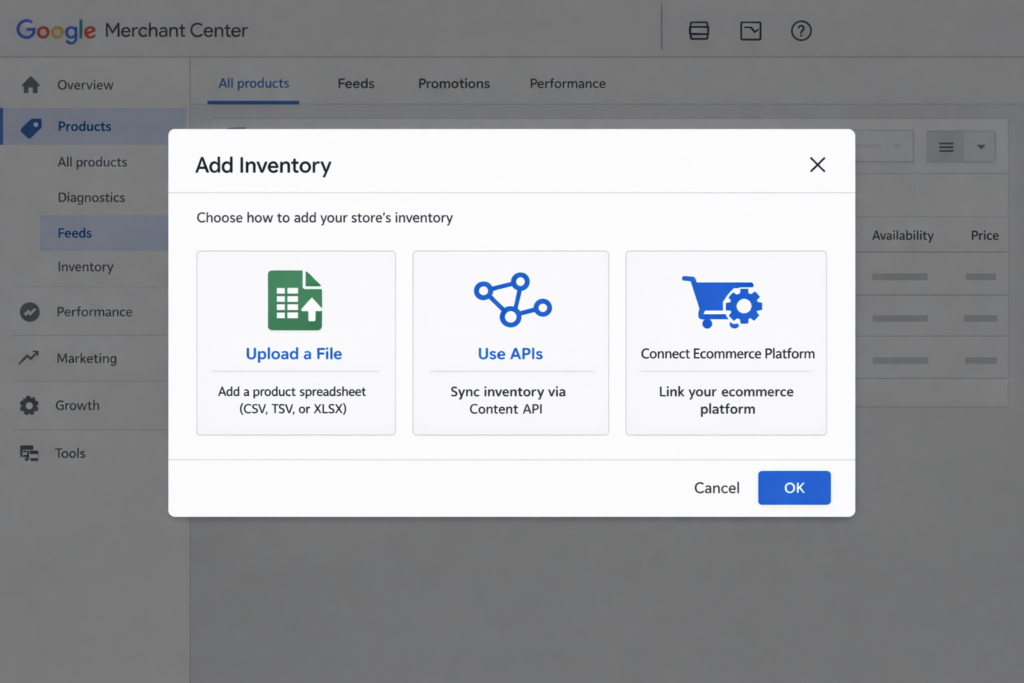
Method 1: Primary Product Feed
This is the standard method for online inventory. Your product feed includes availability, price, and all required product attributes. It is submitted through Product sources and forms your main product catalog.
Supported availability values in the primary feed: in_stock, out_of_stock, preorder, backorder.
Method 2: Manual Entry (Product Editor)
For small catalogs or one-off updates:
- Go to Products → All products.
- Click Add products.
- Select “Add new products one by one.”
- Fill in the availability field and other required attributes.
- Save the product.
This method is not practical for large catalogs or frequent updates.
Method 3: Automated Platform Sync
If you use Shopify, BigCommerce, or a similar platform:
- Connect your store in Merchant Center under Settings → Data sources.
- The system automatically fetches product and inventory data.
- Changes made on your store reflect in Merchant Center within approximately 24–48 hours.
Method 4: Local Inventory Feed (Supplemental)
Required if you have physical store locations and want to show in-store availability or run Local Inventory Ads. This is covered step by step in the next section.
How to Add a Local Inventory Feed in Google Merchant Center
A local inventory feed provides per-store stock and availability details, for example: Store A has 10 units, Store B has 3 units. It supplements your primary product feed and is required for any local inventory program.
Prerequisites before you start:
- An active Merchant Center account
- A primary product feed already set up and approved
- Store locations configured in Merchant Center
- Google Business Profile linked (recommended for local programs)
Step 1: Navigate to Data Sources
- Sign in to Google Merchant Center.
- Go to Settings → Data sources.
- Select Product sources → Supplemental sources.
Step 2: Add Local Inventory
- Click Add local inventory.
- Choose how you want to submit the feed:
- Enter a URL (HTTP/HTTPS or SFTP)
- Upload a file directly
- Schedule a fetch from SFTP or Google Cloud Storage
Step 3: Set Language and Feed Label
After selecting your input method:
- Choose the language for the feed.
- Assign a feed label.
The feed label must match the language and label used in your primary product feed. This is how Google links your local inventory data to the correct products.
Step 4: Schedule the Fetch and Save
If you are using a URL, set a fetch schedule. The default is every 24 hours. Save the feed. Google will begin parsing the inventory data; initial processing can take up to 24 hours.
For high-frequency inventory changes, consider updating your feed every 4–12 hours or using the Content API for near-real-time updates. Google’s general recommendation is to refresh local inventory feeds at least once every 24 hours to keep availability data accurate.
Local Inventory Feed: Required Attributes
Every local inventory feed requires three attributes at minimum:
id: The product identifier, which must match the id in your primary product feed exactly.store_code: The unique identifier for each store location, as configured in Merchant Center.availability: The current stock status for that store. Supported values are in_stock, limited_availability, on_display_to_order, and out_of_stock.
The following attributes are commonly used in production feeds:
price: A store-specific price override (overrides the primary feed price for that location).sale_price: The discounted sale price for the product at that store.sale_price_effective_date: The date range during which the sale price applies. Format: 2026-01-01T00:00Z/2026-01-07T23:59Z. This tells Google exactly when to display the sale price, and it must be set alongsidesale_pricefor the discount to show correctly.quantity: The number of units available. If provided, Google may use the lower signal between quantity and availability to classify stock status.pickup_sla: The estimated fulfillment timeframe for store pickup. This attribute is required when store pickup is enabled. Common values are same day and next day. As of September 2024,pickup_methodis optional, andpickup_sladrives pickup eligibility.local_shipping_label: Used for local delivery programs.
Local Inventory Feed: CSV and XML Examples
CSV Schema
The minimum viable local inventory CSV feed requires these columns: id, store_code, availability.
CSV template:
id,store_code,availability,quantity,price,sale_price,sale_price_effective_date,pickup_method,pickup_sla,local_shipping_labelCSV example (one product, two stores):
id,store_code,availability,quantity,price,sale_price,sale_price_effective_date,pickup_method,pickup_sla,local_shipping_label
SKU-10001,STORE-001,in_stock,12,149.00 USD,129.00 USD,2026-01-01T00:00Z/2026-01-07T23:59Z,buy,same day,Sameday
SKU-10001,STORE-002,limited_availability,2,149.00 USD,,,reserve,next day,
XML Schema (RSS 2.0)
Merchant Center also accepts XML feeds using RSS 2.0 structure with the g: namespace.
XML example:
<?xml version="1.0" encoding="UTF-8"?>
<rss version="2.0" xmlns:g="http://base.google.com/ns/1.0">
  <channel>
    <title>Local Inventory Feed</title>
    <link>https://example.com</link>
    <description>Store-level inventory updates</description>

    <item>
      <g:id>SKU-10001</g:id>
      <g:store_code>STORE-001</g:store_code>
      <g:availability>in_stock</g:availability>
      <g:quantity>12</g:quantity>
      <g:price>149.00 USD</g:price>
      <g:sale_price>129.00 USD</g:sale_price>
      <g:sale_price_effective_date>2026-01-01T00:00Z/2026-01-07T23:59Z</g:sale_price_effective_date>
      <g:pickup_method>buy</g:pickup_method>
      <g:pickup_sla>same day</g:pickup_sla>
      <g:local_shipping_label>Sameday</g:local_shipping_label>
    </item>

    <item>
      <g:id>SKU-10001</g:id>
      <g:store_code>STORE-002</g:store_code>
      <g:availability>limited_availability</g:availability>
      <g:quantity>2</g:quantity>
      <g:price>149.00 USD</g:price>
      <g:pickup_method>reserve</g:pickup_method>
      <g:pickup_sla>next day</g:pickup_sla>
    </item>

  </channel>
</rss>
The required attributes for local inventory remain id, store_code, and availability.
Automating Inventory Updates via the Content API
For large catalogs or high-frequency changes, the Content API for Shopping (v2.1) lets you push local inventory updates programmatically using the localinventory.custombatch endpoint.
What You Can Update via API
Each batch entry requires a storeCode and productId. Optional fields include: quantity, price, salePrice, salePriceEffectiveDate, availability, pickupMethod, pickupSla, and instoreProductLocation.
Note: local_shipping_label is not available as an API field in v2.1. It must be submitted through feed uploads.
Endpoint:
POST https://shoppingcontent.googleapis.com/content/v2.1/localinventory/batchOAuth scope required:
https://www.googleapis.com/auth/contentPython Script: CSV to custombatch
This script reads a CSV file shaped like the template above, builds batch entries, and sends them to the localinventory.custombatch endpoint. Your account must already be enrolled in a local program and have local products configured before using this.
import csv
import json
import os
import requests
from google.oauth2 import service_account
from google.auth.transport.requests import Request

# ----------------------------
# Config
# ----------------------------
SERVICE_ACCOUNT_JSON = os.environ.get("GOOGLE_APPLICATION_CREDENTIALS", "service-account.json")
MERCHANT_ID = os.environ.get("GMC_MERCHANT_ID")  # e.g., "123456789"
CSV_PATH = os.environ.get("LOCAL_INVENTORY_CSV", "local_inventory.csv")

SCOPE = "https://www.googleapis.com/auth/content"
BATCH_ENDPOINT = "https://shoppingcontent.googleapis.com/content/v2.1/localinventory/batch"


def get_access_token() -> str:
    creds = service_account.Credentials.from_service_account_file(
        SERVICE_ACCOUNT_JSON,
        scopes=[SCOPE],
    )
    creds.refresh(Request())
    return creds.token


def parse_money(value: str):
    if not value:
        return None
    parts = value.strip().split()
    if len(parts) != 2:
        raise ValueError(f"Invalid money format: {value!r} (expected 'NUMBER CURRENCY')")
    amount, currency = parts
    return {"value": amount, "currency": currency}


def build_batch_entries(csv_path: str, merchant_id: str):
    entries = []
    batch_id = 1

    with open(csv_path, newline="", encoding="utf-8") as f:
        reader = csv.DictReader(f)
        for row in reader:
            product_id = row["id"].strip()
            store_code = row["store_code"].strip()
            availability = (row.get("availability") or "").strip()
            quantity_raw = (row.get("quantity") or "").strip()
            price_raw = (row.get("price") or "").strip()
            sale_price_raw = (row.get("sale_price") or "").strip()
            sale_price_effective_date = (row.get("sale_price_effective_date") or "").strip()
            pickup_method = (row.get("pickup_method") or "").strip()
            pickup_sla = (row.get("pickup_sla") or "").strip()

            local_inventory = {"storeCode": store_code}

            if availability:
                local_inventory["availability"] = availability
            if quantity_raw:
                local_inventory["quantity"] = int(quantity_raw)
            if price_raw:
                local_inventory["price"] = parse_money(price_raw)
            if sale_price_raw:
                local_inventory["salePrice"] = parse_money(sale_price_raw)
            if sale_price_effective_date:
                local_inventory["salePriceEffectiveDate"] = sale_price_effective_date
            if pickup_method:
                local_inventory["pickupMethod"] = pickup_method
            if pickup_sla:
                local_inventory["pickupSla"] = pickup_sla

            entries.append(
                {
                    "batchId": batch_id,
                    "merchantId": str(merchant_id),
                    "method": "insert",
                    "productId": product_id,
                    "localInventory": local_inventory,
                }
            )
            batch_id += 1

    return entries


def push_custombatch(access_token: str, entries):
    headers = {
        "Authorization": f"Bearer {access_token}",
        "Content-Type": "application/json",
    }
    payload = {"entries": entries}
    resp = requests.post(BATCH_ENDPOINT, headers=headers, data=json.dumps(payload), timeout=60)
    resp.raise_for_status()
    return resp.json()


def main():
    if not MERCHANT_ID:
        raise RuntimeError("Set GMC_MERCHANT_ID env var to your Merchant Center merchantId.")

    token = get_access_token()
    entries = build_batch_entries(CSV_PATH, MERCHANT_ID)
    result = push_custombatch(token, entries)

    for entry in result.get("entries", []):
        if "errors" in entry:
            print("ERROR:", json.dumps(entry["errors"], indent=2))
        else:
            print("OK batchId:", entry.get("batchId"))

    print("Done.")


if __name__ == "__main__":
    main()
Why "method": "insert" for updates? The localinventory.custombatch endpoint uses "insert" for both new entries and updates. Submitting an entry for an existing product/store combination overwrites the current local inventory data for that location.
For large CSV files, chunk your batch entries before sending. Google’s APIs have practical batch-size limits; sending very large payloads in a single request can cause timeouts or errors.
Frequently Asked Questions
What is the minimum update frequency for a local inventory feed in Google Merchant Center?
Google recommends refreshing your local inventory feed at least once every 24 hours. For retailers with fast-moving stock, updating every 4–12 hours gives better accuracy. If your inventory changes frequently throughout the day, the Content API is the better option since it supports near-real-time updates without waiting for a scheduled feed fetch.
What does pickup_sla mean in a Google Merchant Center local inventory feed?
pickup_sla defines the estimated fulfillment timeframe for store pickup. It tells shoppers how quickly they can collect their order. Common values are same day and next day. This attribute became required for store pickup programs after September 1, 2024, when pickup_method became optional. Without a valid pickup_sla, store pickup options may not display correctly in Google surfaces.
How does sale_price_effective_date work in Google Merchant Center?
sale_price_effective_date sets the date range during which a sale price is active. It must be formatted as YYYY-MM-DDTHH:MMZ/YYYY-MM-DDTHH:MMZ (start/end in ISO 8601). If this attribute is missing, Google may not display the sale price even if sale_price is present. Always include both attributes together when running time-limited promotions.
What is the difference between a primary product feed and a local inventory feed?
The primary product feed contains your full product catalog, including titles, descriptions, images, prices, and base availability. It is required for all Merchant Center programs. The local inventory feed is a supplemental feed that overrides or extends the primary feed with store-specific data, such as per-store stock levels, local pricing, and pickup options. You need both active feeds for Local Inventory Ads to work.
Can I use the Content API to update online inventory?
Yes. Online inventory attributes such as availability and price can be updated through the products.update method in the Content API. The localinventory service specifically handles store-level updates for local inventory programs. For online-only merchants, updating the primary product feed, either via file upload or through the products API, is the standard approach.
Key Takeaways
- Inventory in Google Merchant Center is managed through the primary product feed for online products, a local inventory feed for in-store availability, and the Content API for programmatic updates at scale.
- A local inventory feed requires three attributes at minimum:
id,store_code, andavailabilitywith valid values (in_stock,limited_availability,on_display_to_order,out_of_stock). pickup_slais required for store pickup programs and must match the fulfillment timeframe (such assame dayornext day). As of September 2024,pickup_methodis optional.- Always include
sale_price_effective_datealongsidesale_price. Without the date range, Google may not display the promotional price. - The local inventory feed label must match the language and label in your primary product feed, or Google will not link the two feeds correctly.
- For high-frequency inventory changes, the Content API’s
localinventory.custombatchendpoint gives you near-real-time control without waiting for a scheduled feed refresh. - Google treats inventory accuracy as a policy requirement. Incorrect availability data affects product eligibility, ad delivery, and overall Merchant Center account health.