
A packing slip and an invoice are not the same document. A packing slip is a shipping document that lists the items inside a package. An invoice is a billing document that records the financial details of a sale. Both travel with an order, but they serve entirely different purposes in the order fulfillment process.
This guide covers the difference between a packing slip and an invoice, explains related documents such as commercial invoices, delivery notes, and bills of lading, and shows how to generate both automatically in WooCommerce with the Challan plugin.
What Is a Packing Slip?
A packing slip is a printed document placed inside a shipment that lists every item in the package. It travels with the order so the recipient can verify the contents upon delivery.
In simple terms, a packing slip confirms what is in the box. It includes the customer’s shipping address, the seller’s address, the order number, a list of products, SKUs, quantities, and product weights or dimensions. It does not include pricing, taxes, or payment terms.
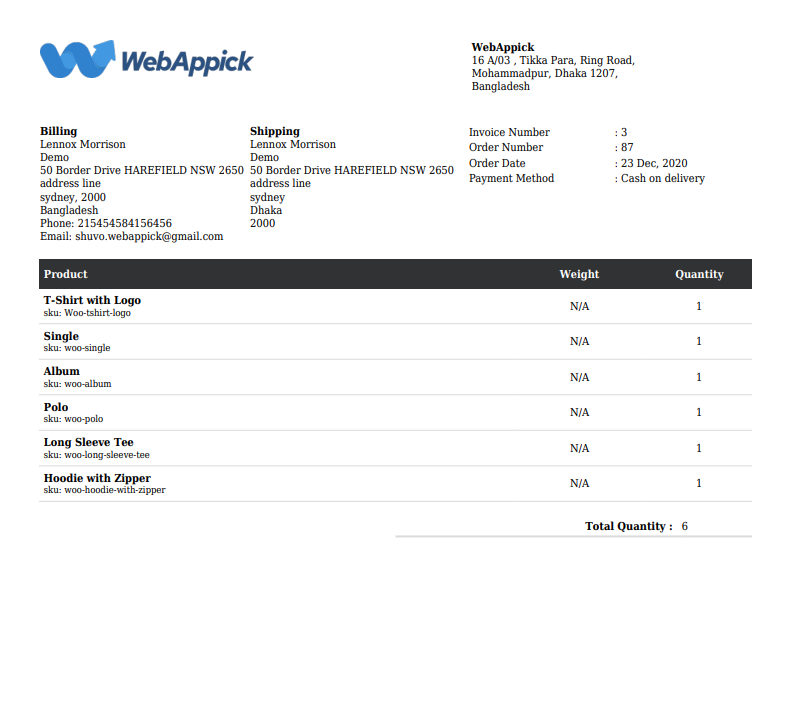
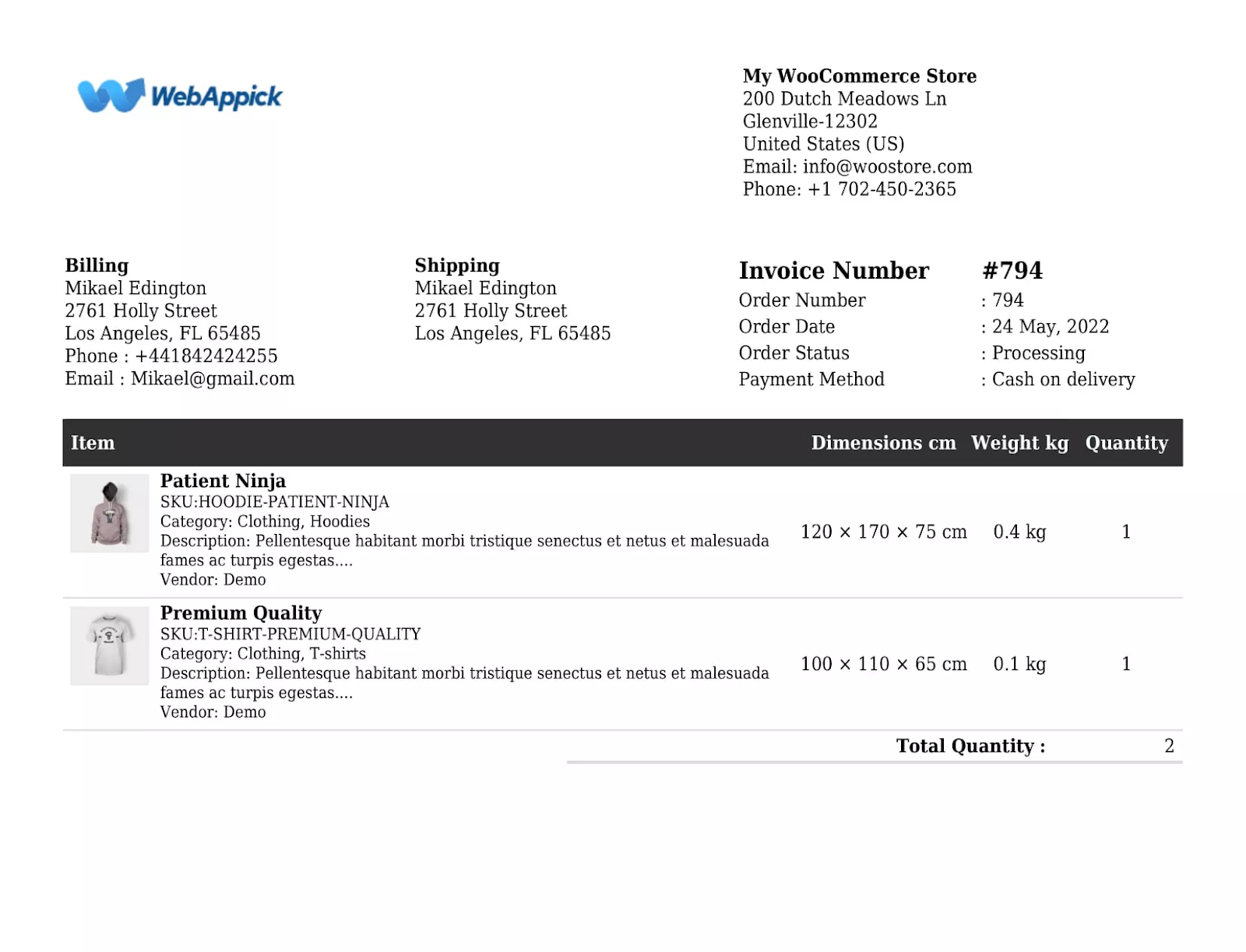
Here’s an example of a WooCommerce printed packing slip made with the Challan plugin:
Is a packing slip proof of purchase?
No. A packing slip is not proof of purchase. It confirms what was shipped, not what was paid. The invoice is the proof of purchase. Customers can use a packing slip to verify they received everything they ordered, but it has no financial or legal authority over the transaction.
What Is the Purpose of a Packing Slip?
A packing slip supports the physical fulfillment side of an order. Here is how it helps:
Shipment integrity: Warehouse and shipping staff use the packing slip to pick and verify the correct items before sealing the box. Comparing the packed contents against the packing slip prevents costly errors before dispatch.
Multi-box order tracking: For large orders shipped in multiple boxes, each packing slip corresponds to a specific shipment. This makes it easy to track which items are in which box and confirm everything arrives.
Customer satisfaction: Customers can check the packing slip against what they received. If anything is missing or incorrect, the packing slip gives them a clear reference when contacting support.
Backup for lost shipping labels: Packing slips go inside the box. If the external shipping label is damaged or falls off, the carrier can still identify the delivery destination using the inside slip.
Brand building: A custom packing slip with your logo, tagline, and brand colors adds professionalism to the unboxing experience, similar to a personalized invoice.
Tip: For high-volume WooCommerce stores, use a plugin like Challan to generate and attach packing slips automatically based on order status, with no manual creation needed.
What Information Is on a Packing Slip?
Most professional WooCommerce packing slips include the following elements:
- Customer’s shipping and billing address
- Seller’s company or warehouse address
- Packing slip number
- Order number
- Order date
- List of products
- Product SKUs
- Quantity of each item
- Product weight and dimensions
- Total item count
Packing slips do not include prices, tax amounts, payment methods, or subtotals. Those belong on the invoice.
Does the Packing Slip Go Inside the Box?
Yes. The packing slip goes inside the shipping box, placed on top of the items before sealing. This is standard practice across eCommerce and business shipments. The recipient opens the box and immediately sees what was shipped.
Some sellers also place a copy in a clear adhesive pouch on the outside of the box, next to the shipping label. However, inside is the most common approach.
Do not confuse the packing slip with the shipping label. The shipping label is always attached to the outside of the package for the carrier. The packing slip is tucked inside for the recipient.
What Is a Packing Slip vs Packing List?
The terms “packing slip” and “packing list” are used interchangeably for domestic eCommerce shipments. Both refer to the document inside a package that lists what was shipped.
The distinction matters in international trade. In that context, a packing list tends to be a more detailed document that includes gross and net weights, package dimensions, carton numbers, and Harmonized System (HS) codes required for customs clearance.
For standard WooCommerce orders shipped domestically, a packing slip and a packing list mean the same thing.
Packing Slip vs Shipping Label: What Is the Difference?
A shipping label is attached to the outside of the package. It contains the carrier information, tracking barcode, sender address, and delivery address. The shipping label is meant for the courier to route and deliver the parcel.
A packing slip is placed inside the package. It lists what products are in the box, along with quantities, SKUs, and order details. The packing slip is meant for the customer or receiving warehouse to verify the shipment contents.
In short: the shipping label tells the carrier where the package is going. The packing slip tells the customer what is inside.
Do All Packages Need a Packing Slip?
Not all packages require a packing slip. For single-item orders or digital products, a packing slip is unnecessary.
However, for orders with multiple items, a packing slip is strongly recommended. It prevents shipping errors, helps customers verify their order, and speeds up return processing.
For international shipments, the situation is different. While a packing slip may not be legally required, a commercial invoice and detailed packing list are often mandatory for customs clearance.
Are Packing Slips Required by Law?
No. Packing slips are not required by law for domestic shipments. No federal regulation in most countries mandates including one with every package.
That said, packing slips are a best practice for eCommerce businesses. They reduce errors, simplify returns, and improve customer satisfaction.
For international shipments, a detailed packing list is often required alongside a commercial invoice for customs clearance. Some B2B contracts also require a packing slip as part of the order fulfillment terms.
What Is an Invoice?
An invoice is a billing document that records the financial details of a sale. It serves as a legal request for payment or as proof that a transaction occurred.
For WooCommerce stores where customers pay upfront, an invoice acts as a financial record and legal proof of purchase. The parcel invoice meaning is the same: a document that details what was sold, the price, taxes, and payment terms.
Online invoices are typically sent as PDF attachments to the order confirmation email.
What Is a Package Invoice?
A package invoice, sometimes called a packaging invoice or parcel invoice, is the billing document included with or sent alongside a shipped package. It contains the buyer’s and seller’s information, product details, pricing, tax amounts, payment method, and payment terms.
Do not confuse a package invoice with a packing slip. The invoice is a billing and financial document. The packing slip is a shipping list. They often travel together, but they serve entirely different purposes.
Why Do You Need an Invoice?
Even in WooCommerce stores where payment is collected at checkout, invoices still serve important purposes:
Recordkeeping: B2B buyers always require an invoice for their own accounting and compliance. Individual customers also use invoices as legal records of their purchases.
Professionalism: Sending a well-formatted invoice builds trust and sets your store apart from competitors.
Brand marketing: Custom WooCommerce invoice templates that include your logo, upsell links, and personalized notes double as marketing touchpoints.
Tax filing: Invoices form the paper trail required for GST, VAT, and income tax reporting. Without them, tax filing becomes difficult and risky.
Legal protection: An invoice is a legally binding record of the agreement between buyer and seller. If a dispute arises over payment or order details, the invoice is your primary proof.
Payment tracking: Invoices help both parties track whether payment has been made, how much is outstanding, and when it is due.
On-time payments: For contract-based businesses or B2B stores offering payment terms, an invoice with a clear due date reduces late payments and the need to chase clients.
What Information Is on a Sales Invoice?
A complete WooCommerce sales invoice should include:
- Company logo
- Company information
- Customer’s information
- Invoice number
- Sequential order number
- Date
- Payment method
- Products purchased
- Price and quantity
- Tax information
- Subtotal and total amount charged
- Terms and conditions
- Personal notes
Can You Ship Without an Invoice?
No. An invoice is a legal document. For international shipments in particular, customs clearance requires it. Shipping without an invoice can result in delays, storage fees, returned shipments, or legal complications. Even low-value samples require a commercial invoice.
What Is the Difference Between an Invoice and a Commercial Invoice?
A standard invoice is a formal billing document issued between a seller and a buyer after a product or service is delivered.
A commercial invoice is a specialized version used for international shipments. It contains additional details required by customs authorities, including country of origin, product weights, Harmonized System (HS) codes, and declared value for duties.
For international trade, you will typically need both a commercial invoice and a detailed packing list, alongside a Bill of Lading.
The key difference between a commercial invoice and a packing list is scope: the commercial invoice handles the financial and customs aspects of the shipment, while the packing list focuses on the physical contents of the package.
Bill of Lading vs Packing Slip
A Bill of Lading (BoL) and a packing slip have completely different functions, and this is one of the most searched comparisons in shipping.
A BoL is a legal document between the shipper and the carrier. It acts as a receipt for the goods, a contract of carriage, and a document of title. It covers transportation terms, carrier liability, and shipment details. The BoL is critical for freight, international trade, and logistics.
A packing slip lists the items inside the package and is intended for the recipient to verify order contents. It carries no legal authority over transportation terms.
Here is a quick comparison:
- BoL: Legal document between shipper and carrier. Covers transportation terms, carrier liability, and title. Used in freight and international trade.
- Packing slip: Shipping document between seller and buyer. Covers order contents and product details. Used in eCommerce and standard parcel shipping.
For large-scale freight or international orders, you need both. For standard WooCommerce orders shipped via parcel carriers, a packing slip with a shipping label is typically sufficient.
Picking Slip vs Packing Slip
A picking slip (also called a pick ticket or pick list) is an internal warehouse document. It tells warehouse staff which items to pull from shelves for a particular order, including product names, SKUs, warehouse locations, and quantities.
A packing slip is an external document that goes inside the package for the buyer.
The picking slip is used before packing. The packing slip is included with the shipment. The picking slip is an instruction for the warehouse team. The packing slip is confirmation for the customer.
Order Confirmation vs Invoice
An order confirmation is sent to the customer immediately after they place an order. It confirms the order was received and accepted. It typically includes the order number, product list, estimated delivery date, and total amount.
An invoice is a formal billing document. It serves as a legal request for payment and includes detailed pricing, tax breakdowns, payment terms, and due dates. The invoice is used for accounting, tax filing, and financial record-keeping.
In WooCommerce, the order confirmation email is triggered automatically at checkout. The invoice is generated separately and attached to the email or made available for download.
An order confirmation tells your customer their order was placed. An invoice tells them exactly what they owe and serves as legal proof of purchase.
Difference Between Payslip and Invoice
A payslip (also called a pay slip or pay stub) is a document provided by an employer to an employee. It details earnings, tax deductions, benefits, and net pay for a specific pay period. Payslips are part of payroll management.
An invoice is a document sent by a seller or contractor to a buyer requesting payment for goods or services delivered. Invoices are part of the billing cycle.
In short:
- Payslip: employer to employee a salary record
- Invoice: seller to buyer a payment request
A freelancer issuing invoices to clients is not the same as an employee receiving a payslip. If you are a business owner paying contractors, you receive invoices from them, not payslips.
Packing Slip vs Invoice: 9 Key Differences
Packing slips and invoices are both essential documents in order fulfillment, but they serve completely different operational purposes.
Document Category and Type
A packing slip is a shipping document created after an order is confirmed. It is a shipping list that helps verify items are correctly packed and shipped.
An invoice is a billing document. It can be created before or after a transaction takes place. It serves as a sales receipt for record-keeping, payment requests, and legal compliance.
Template and File Format
A packing slip must be a printed document placed inside the shipped package. PDF format is now standard for sharing digital packing slips in order management systems.
An invoice is typically sent digitally to the customer as a PDF attachment to the order confirmation email. It can also be printed when a customer or receiving company requires a physical copy.
Usage in Order Fulfillment
You need to create an invoice for every order you receive, regardless of whether you sell physical or virtual products.
You only need a packing slip when physical products are involved. Packing slips confirm what items a customer should expect in their shipment. If you sell only virtual products, packing slips are unnecessary.
Sender and Receiver
You, as the seller, send both documents. The recipient differs based on who you are selling to.
For B2B orders, the invoice goes to the accounts department and the packing slip goes to the warehouse or receiving department. For consumer orders, the invoice goes to the customer who paid, and the packing slip goes to whoever receives the package.
Contents
Both documents share some common fields: seller address, customer address, order number, product list, and date.
The key difference is in the financial details. An invoice must include prices, taxes, subtotals, totals, and payment method. A packing slip does not. A packing slip must include product weights and dimensions. An invoice does not.
How It Works in Practice
Here is a practical walkthrough of when each document is needed:
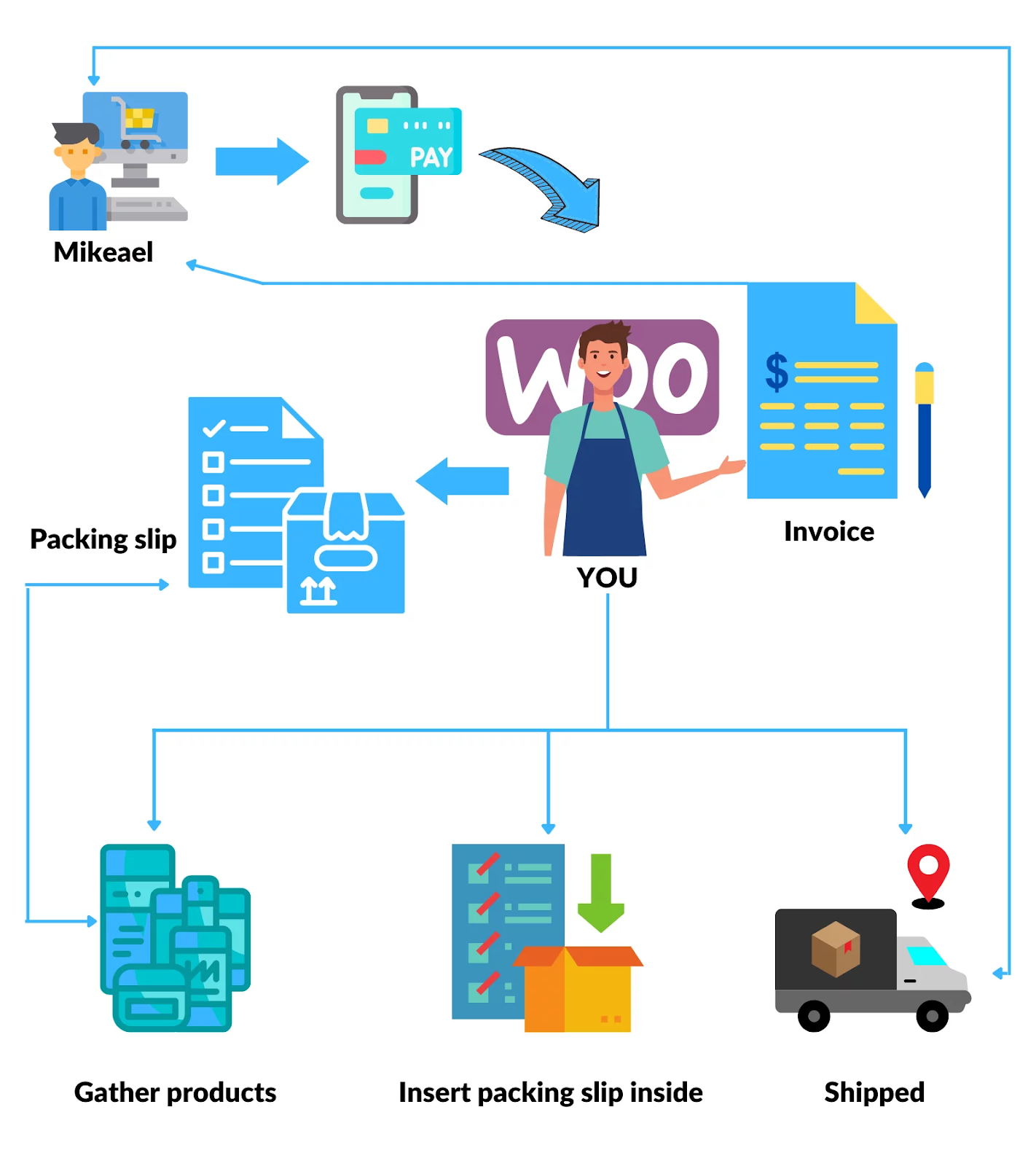
- A customer places an order and completes payment.
- The payment gateway confirms the transaction.
- You create an invoice and attach it to the order confirmation email.
- You begin the fulfillment process and create a packing slip for the warehouse or shipping team.
- The packing slip goes inside the box with the products.
- The customer receives the package and the packing slip. You retain the invoice for records.
If the customer purchases on behalf of a third party or company, the buyer receives the invoice and the delivery recipient receives the package with the packing slip inside.
Legal Implications
The invoice carries the legal weight. It is the official record of the sale — what was sold, for how much, and under what terms. If there is a dispute over price, payment, or the transaction itself, the invoice is your primary proof for tax authorities, returns processing, and legal proceedings.
A packing slip is a shipping list with no legal authority over the financial terms of the sale.
Visual Comparison (Packing slip vs Invoice)
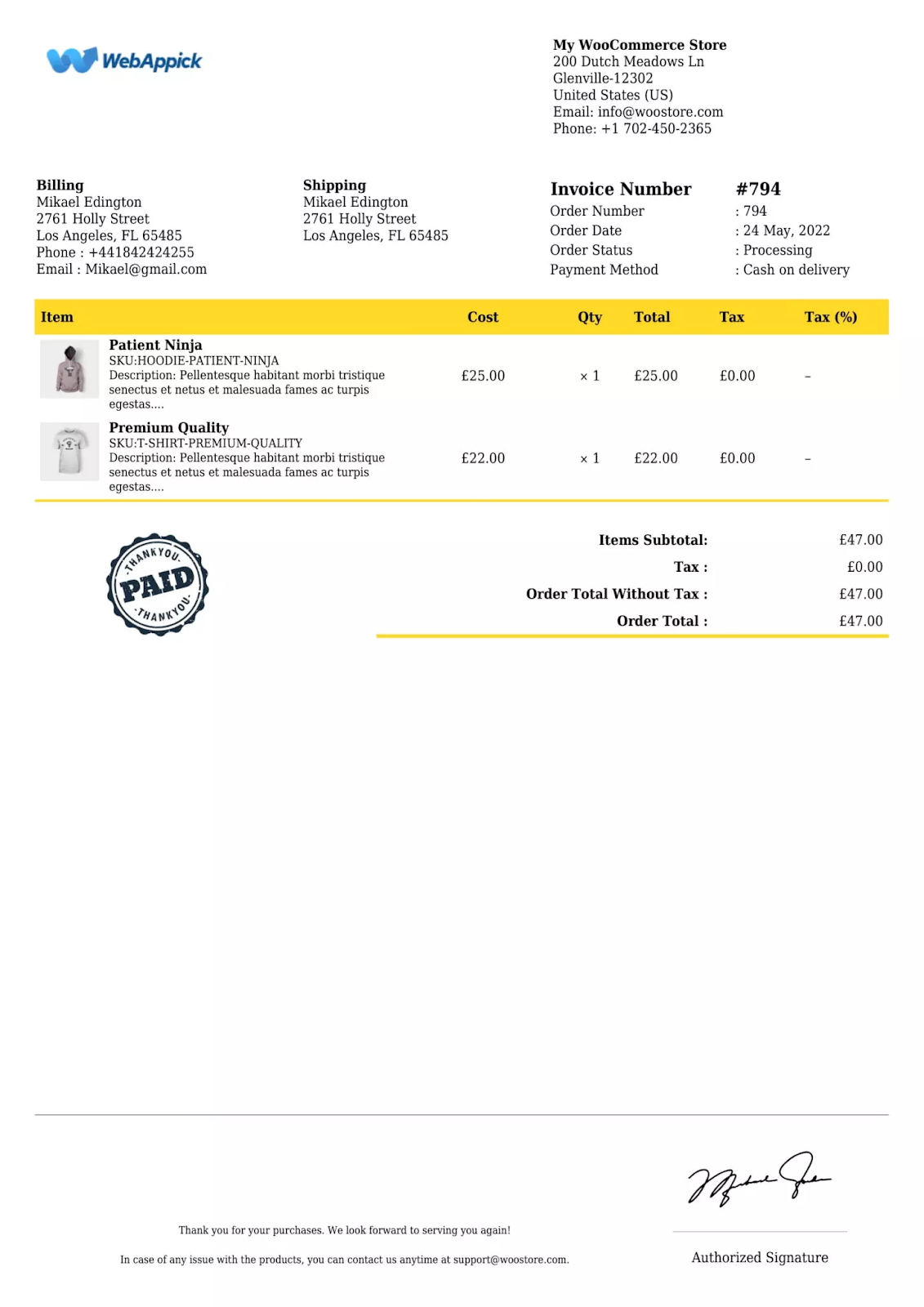
We will now take a look at the invoice and packing slip we created for Mikael Edington. We used the Challan plugin to create both the order slip and invoice.
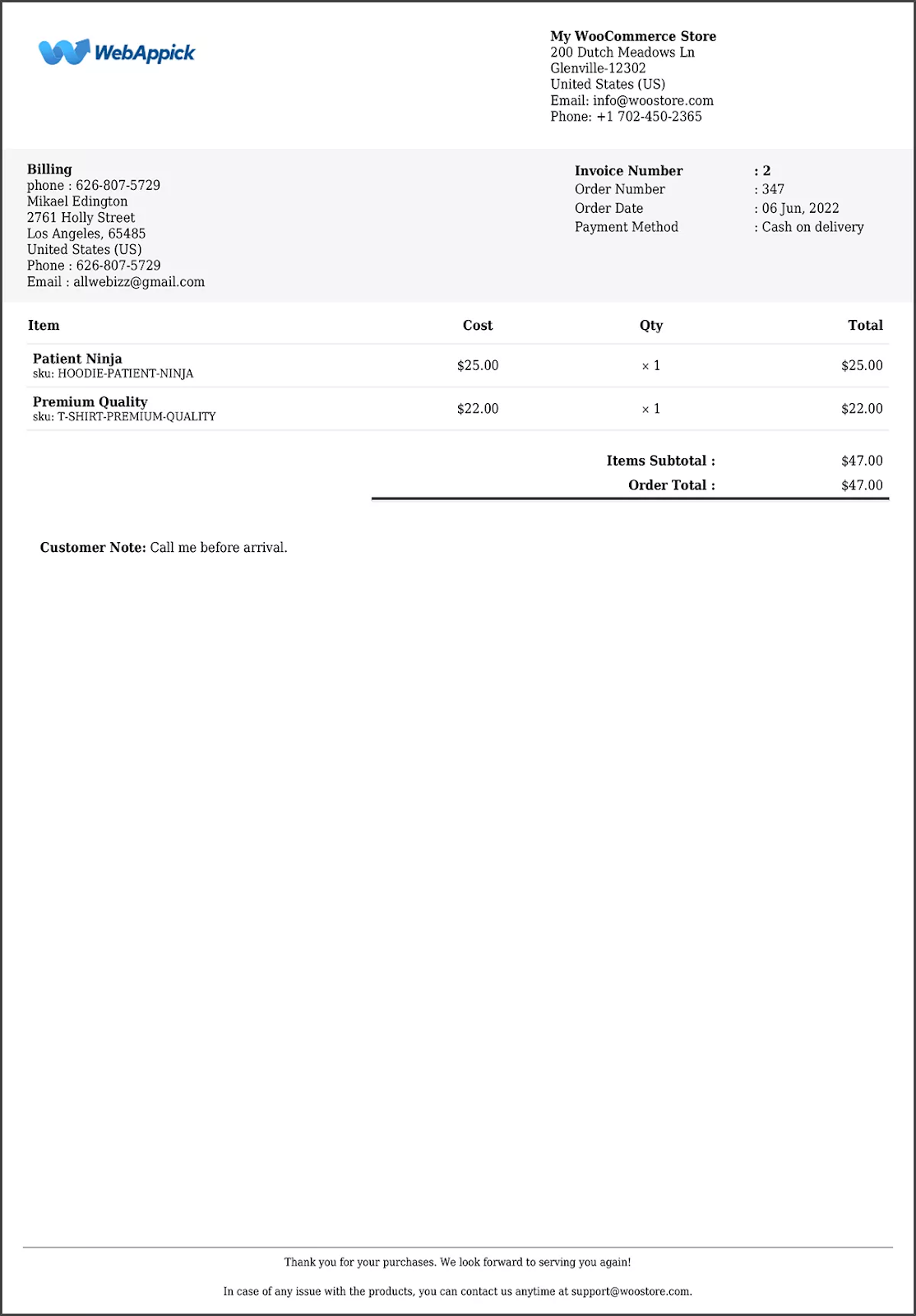
Here’s the personalized invoice for Mikael Edington.
And this is the packing slip for that exact order.
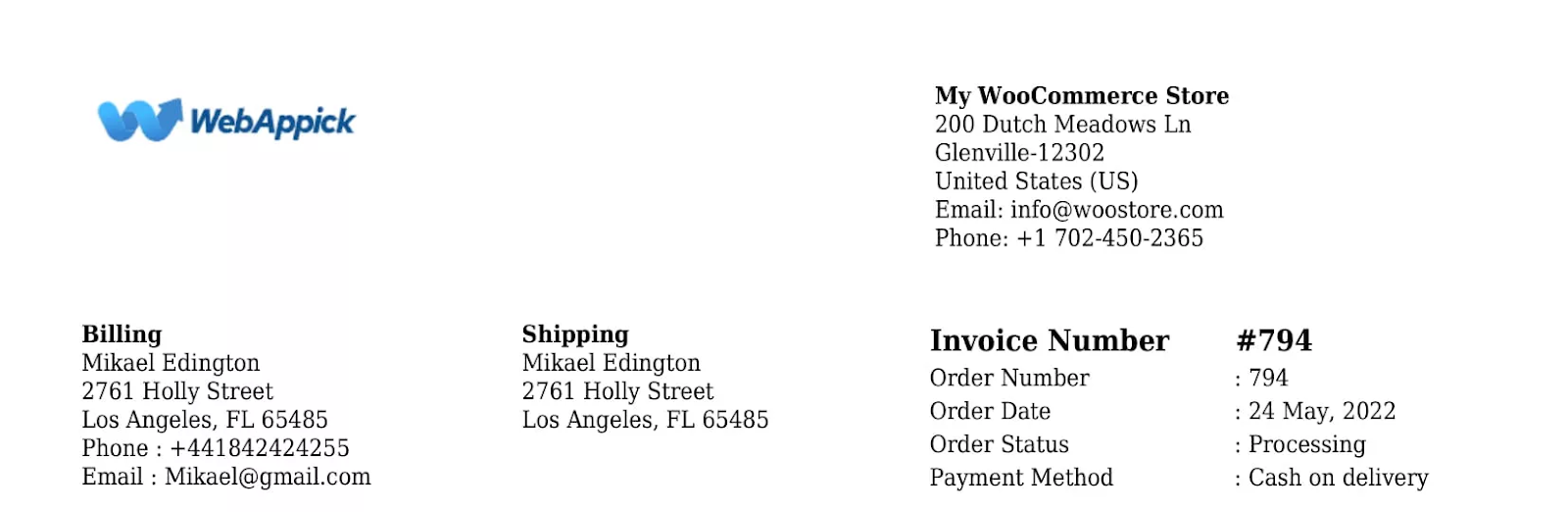
The header section, which includes your address, Mikael’s addresses, invoice and order number, date, etc., of both the packaging slip and invoice, looks similar.
However, the main differences are in the body, including the product item table and the footer section.
The WooCommerce invoice product item table includes individual prices, subtotal and tax costs, and tax percentages for the products. It also has a price summary section and footer with custom notes, a paid stamp.
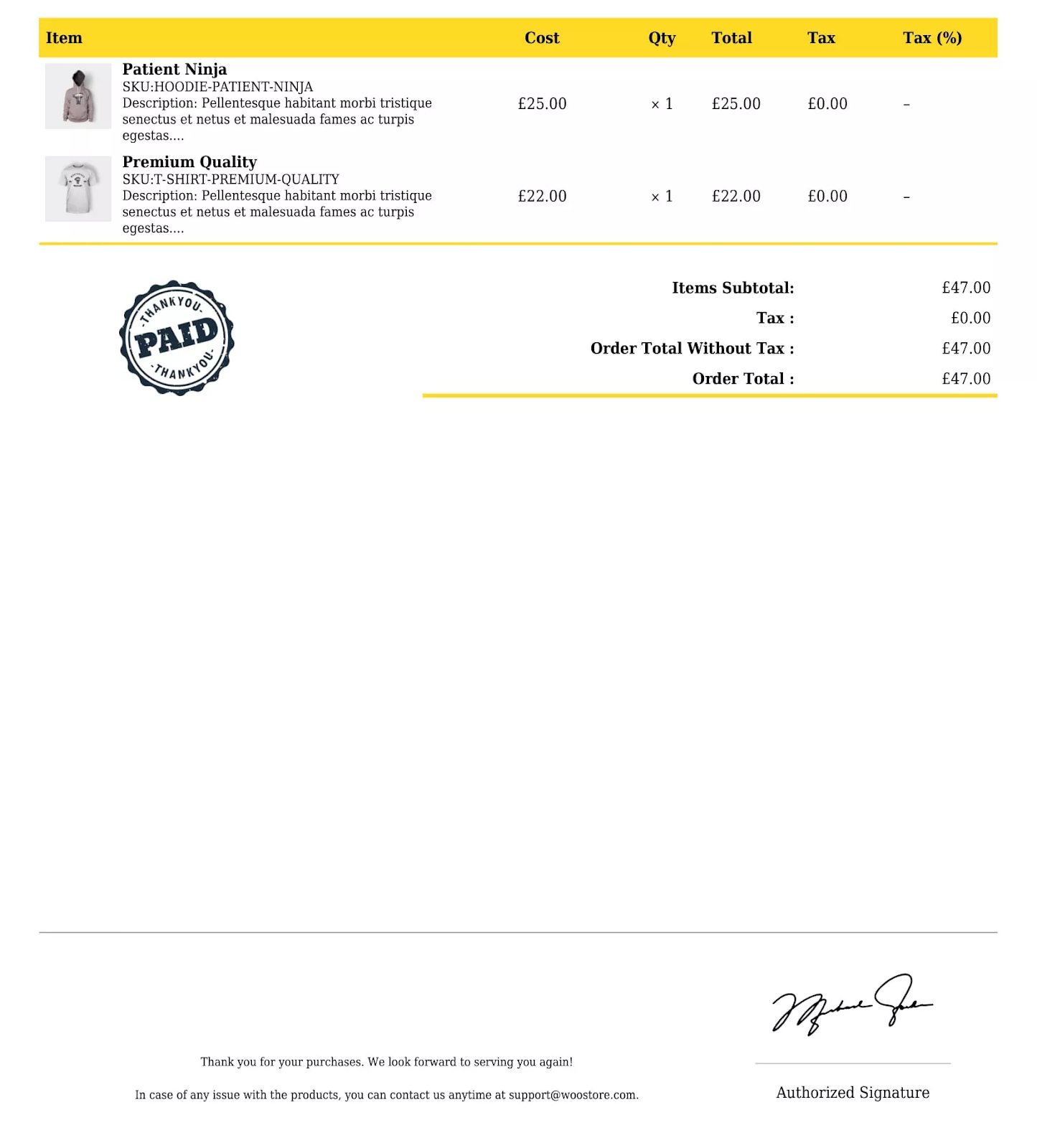
The invoice doesn’t have product weight and dimensions.
The packing slip, on the other hand, doesn’t need price and tax information. Therefore, it only has weight and dimensions for the products.
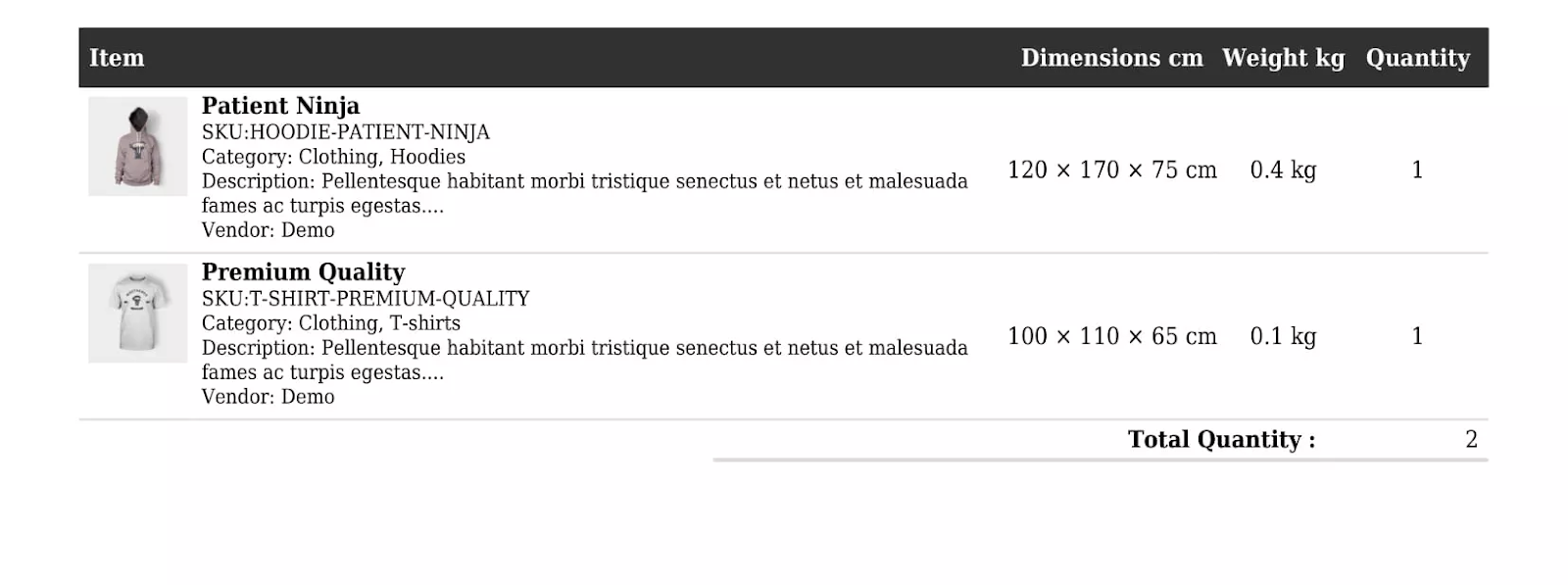
The packing slip doesn’t necessarily need any paid stamps or custom notes, which is why this document has no footer.
Comparison Table (Invoice vs Packing slip)
Let’s have a look at what we have learned about the packing slip vs Invoice in a nutshell.
| Content | Packing Slip | Invoice |
|---|---|---|
| Document category | Shipping document | Billing document |
| Document type | Must be printed | Downloadable PDF or printed |
| Product type | Physical only | Virtual and physical |
| Time of creation | After order/payment confirmation | Before or after payment |
| Document use | Shipping list | Financial record |
| Price summary | Not required | Required |
| Tax information | Not required | Required |
| Product weight and dimensions | Required | Not required |
| Total items quantity | Required | Not required |
| Personalization | Limited customization | Highly customizable |
| Recipient | Whoever receives the package | Customer who pays |
| Company recipient | Warehouse | Accounts department |
| Refund use | Not required | Required to issue a refund |
Sales Invoice vs Packing Slip: Accounting Classification
From an accounting perspective, the sales invoice and packing slip fall under entirely different document classifications.
A sales invoice is a financial or accounting document. It is recorded in the accounts receivable ledger and serves as the basis for revenue recognition. The invoice triggers the accounting entry for the sale, debiting accounts receivable and crediting sales revenue. It is essential for tax reporting, GST/VAT compliance, income tracking, and audit trails.
A packing slip is an operational or logistics document. It does not appear in any accounting ledger and has no bearing on revenue recognition, tax calculation, or financial reporting. Its only purpose is to support the physical fulfillment of an order.
This distinction matters for businesses maintaining proper document classification for compliance audits, ERP systems, and accounting software integrations. Always classify invoices under financial records and packing slips under shipping or operational records.
When Do You Need a Packing Slip and When Do You Need an Invoice?
You need a packing slip when:
- You are shipping multiple items in a single shipment.
- You want to reduce errors and support accurate inventory management.
- Your customer or warehouse needs a detailed list of what is in the package, including dimensions and weight.
- A separate warehouse or shipping department handles fulfillment.
You need an invoice when:
- You are requesting payment from your customer.
- You need to provide proof of purchase for the buyer.
- You need to document the transaction for accounting or tax purposes.
- You are shipping internationally and need customs documentation.
How to create packing slip and invoice in WooCommerce?
WooCommerce stores generally sell their products internationally, and you can receive an order any time of the day or night. And busy WooCommerce stores receive orders in bulk numbers every day.
Therefore, it’s not a viable option for you to create invoices manually, one by one. You need to automate this process.
Even though the default WooCommerce system doesn’t offer invoice and packing slip creation, a number of plugins are available for you to do the work.
One such automated solution for managing delivery slips and invoices is the Woocommerce invoice & packing slip generator-Challan. It is available for free in the WordPress repository, and the great news is that it can create both packing slips and invoices and even delivery notes for your orders.
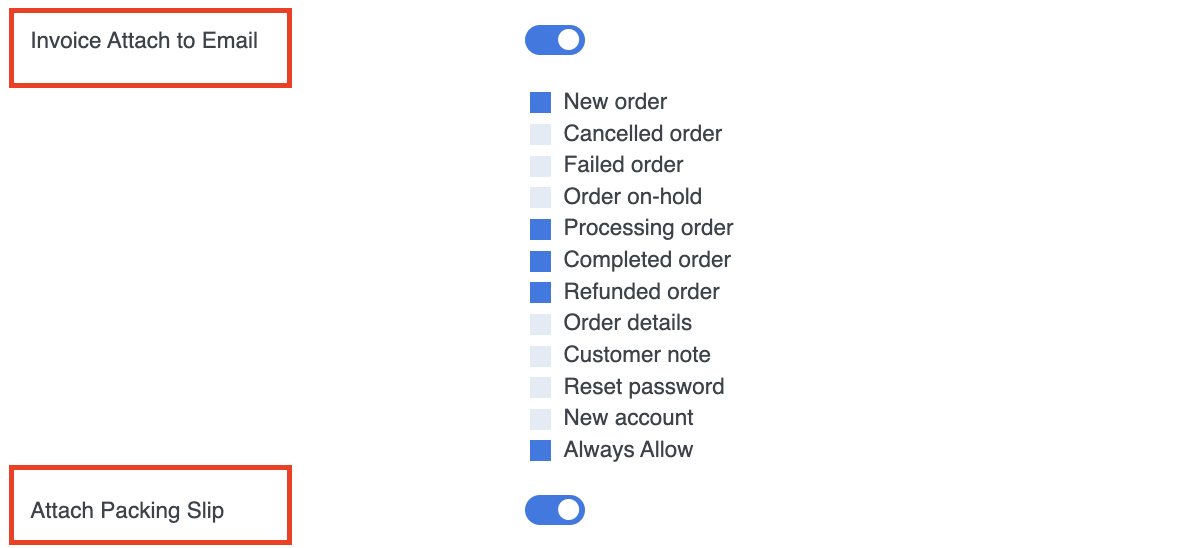
Challan helps you automate the whole process of invoice creation. As soon as a customer completes an order, the plugin automatically creates an invoice for that purchased order and attaches it to the order confirmation email.
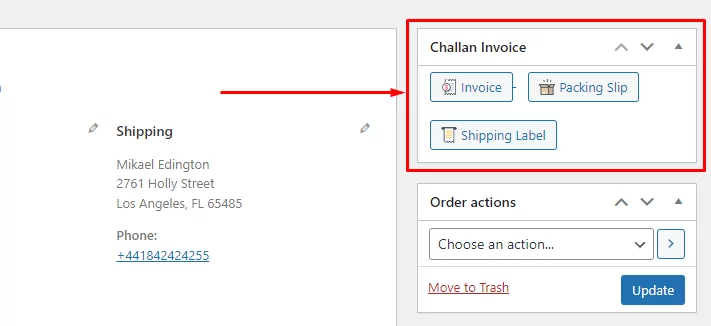
In addition to that, you can download invoices, packing slips, and shipping labels from individual order pages.
Challan also has a paid version called Challan pro with added features.
The most excellent feature of Challan pro is it lets you customize your packing slip and an invoice extensively.
You can also create custom billing templates by adding custom meta fields such as a paid stamp, thank you emails, a custom footer, an authorized sign, etc.
Again, Challan Pro offers an array of custom templates for you to personalize the appearance of your invoices. You can also add a background image for your packing slip and invoice template.
Overall, if you are running a WooCommerce store, then Challan is the best solution to create and send packing slips and invoices.
Key features of Challan:
- Easy-to-use user interface.
- It enables you to create invoices, packing slips, shipping labels, and credit notes.
- It automatically attaches invoices and even packing slips to the order confirmation emails or to your chosen emails.
- You can customize WooCommerce email templates to directly forward the packing slip to your shipping department.
- Allows you to extensively customize packing slips and invoices with CSS and background images.
- Supports adding custom fields such as product and order meta data.
- Offers a range of premade template layouts for invoices.
- Supports adding product attributes such as SKU, category, description, etc., to the packing slip and invoice.
- Allows you to attach static files such as terms & conditions documents.
But, how do I create a packing slip?
Well, creating a packaging slip using Challan is way simpler than you think. It includes only 3 steps:
Step 1: Install Challan from your WordPress dashboard.
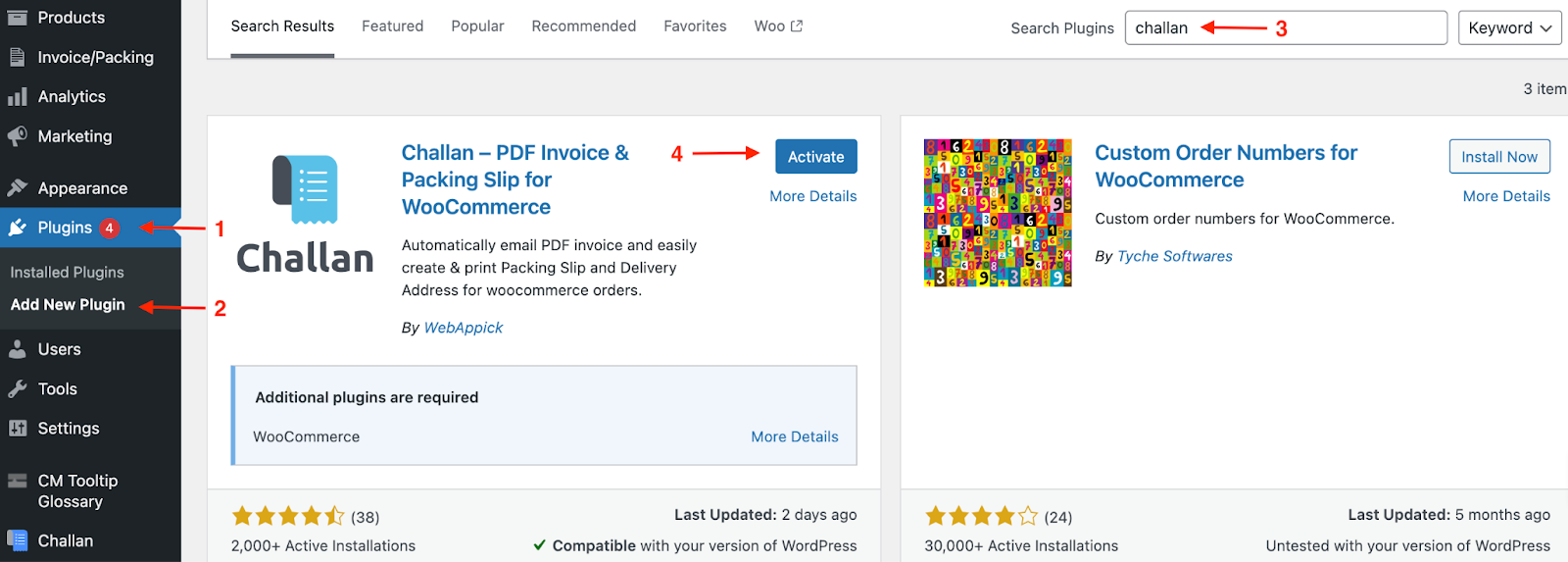
Step 2: Once you activate the plugin, simply go to Challan >> Settings >> Packing Slip. Then you’ll find all the configuration options to create a customized packing slip.
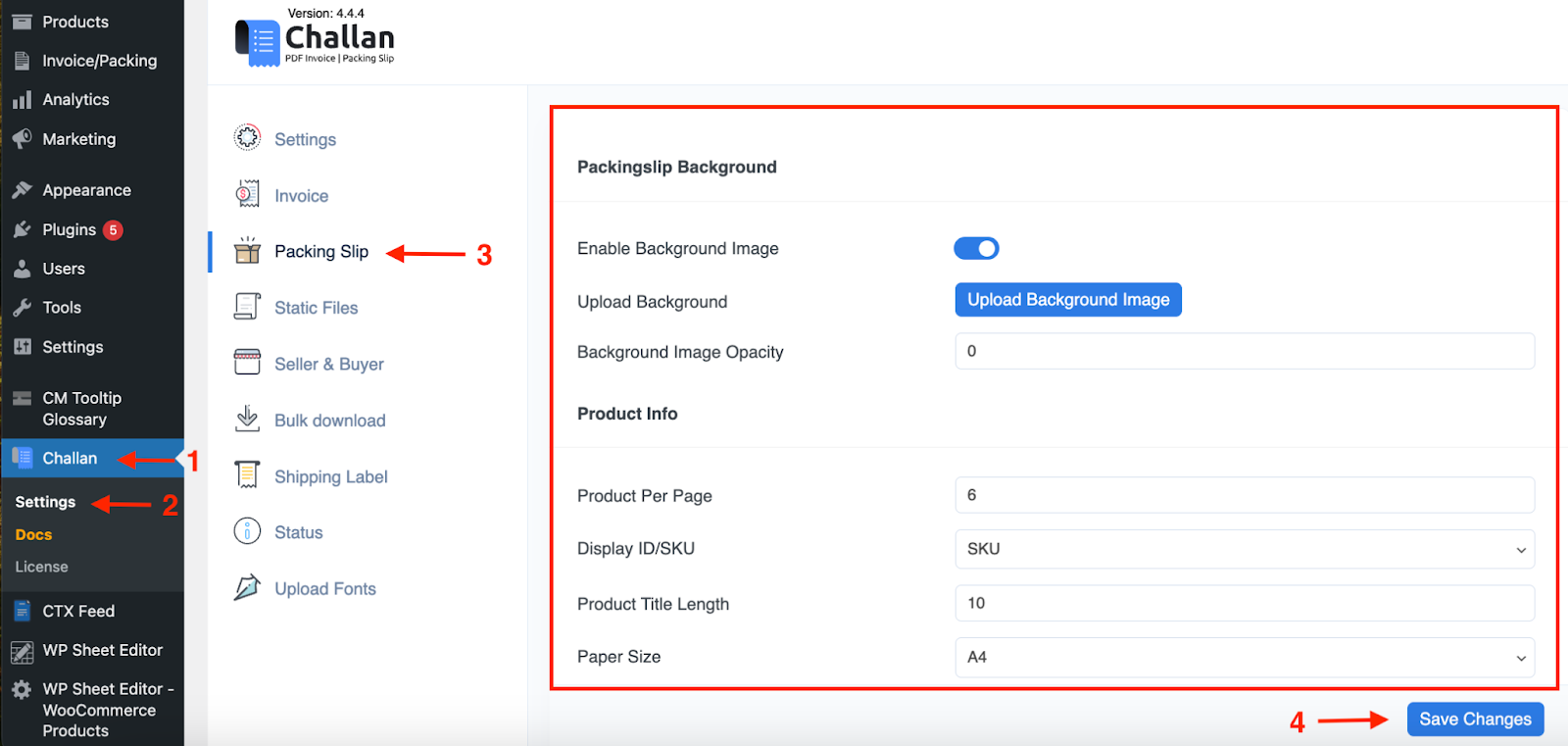
Bonus Tip:
Still struggling to set up the packing slips with the suitable parameters?
Then there is a great news for you. Challan provides you pre-made packing slip templates to create one.
Step 3: Now, just hit on save changes and your packing slip is ready to download and print.
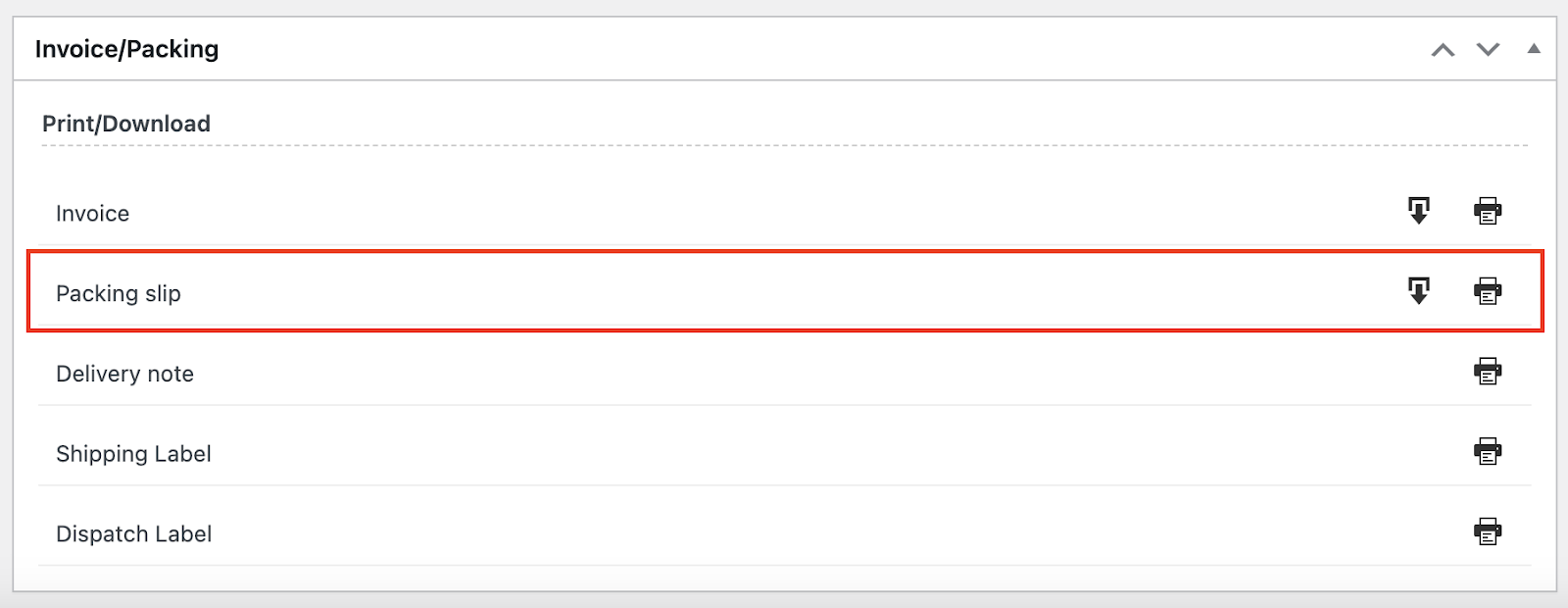
So simple, right?
Now, how do you create an invoice?
Challan gives you a 3-in-1 package for creating packing slips, invoices, and even delivery slips. So you can easily create an invoice for your customers.
Step 1: If you’ve already installed Challan, simply go to Challan >> Settings >> Invoices.
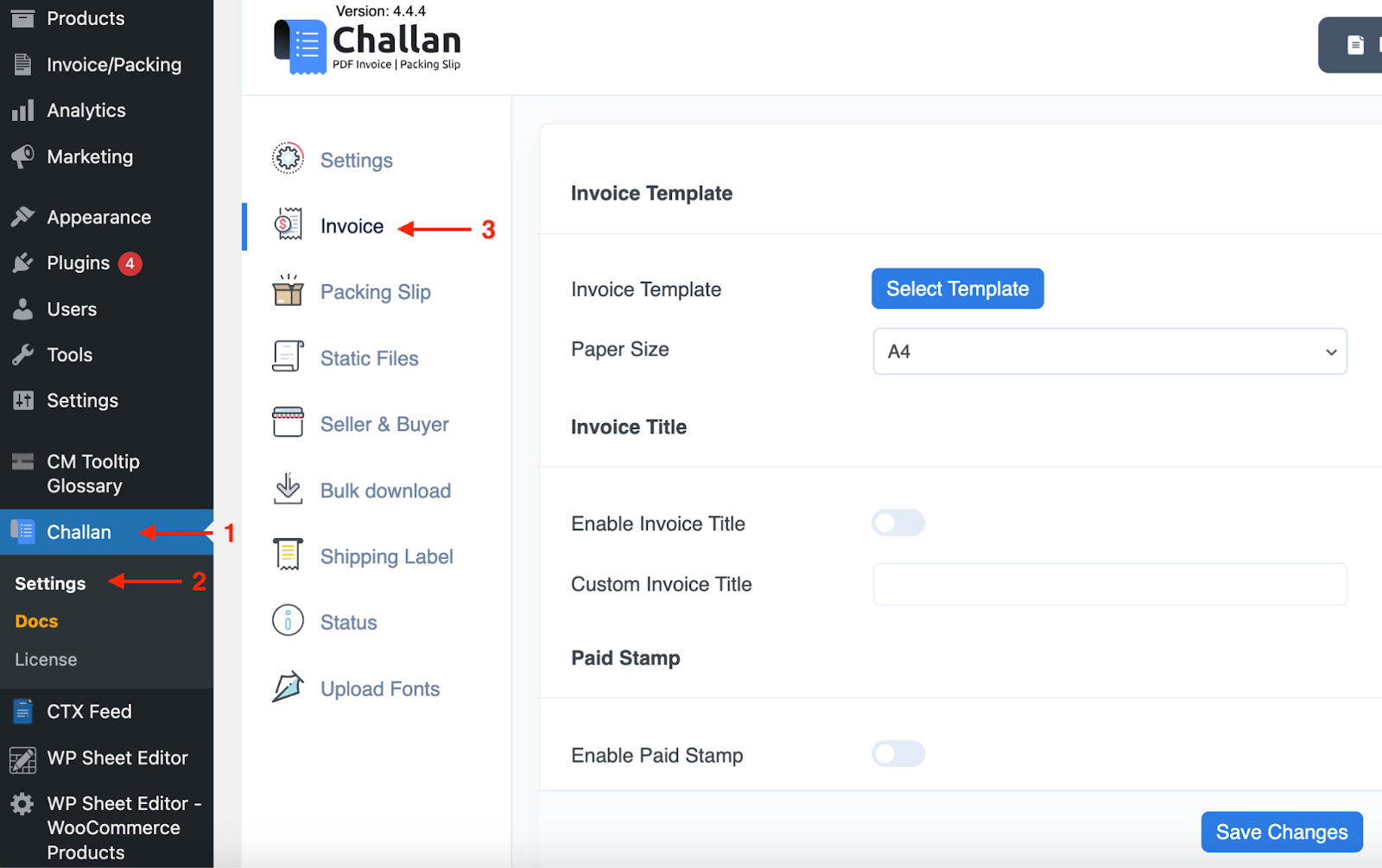
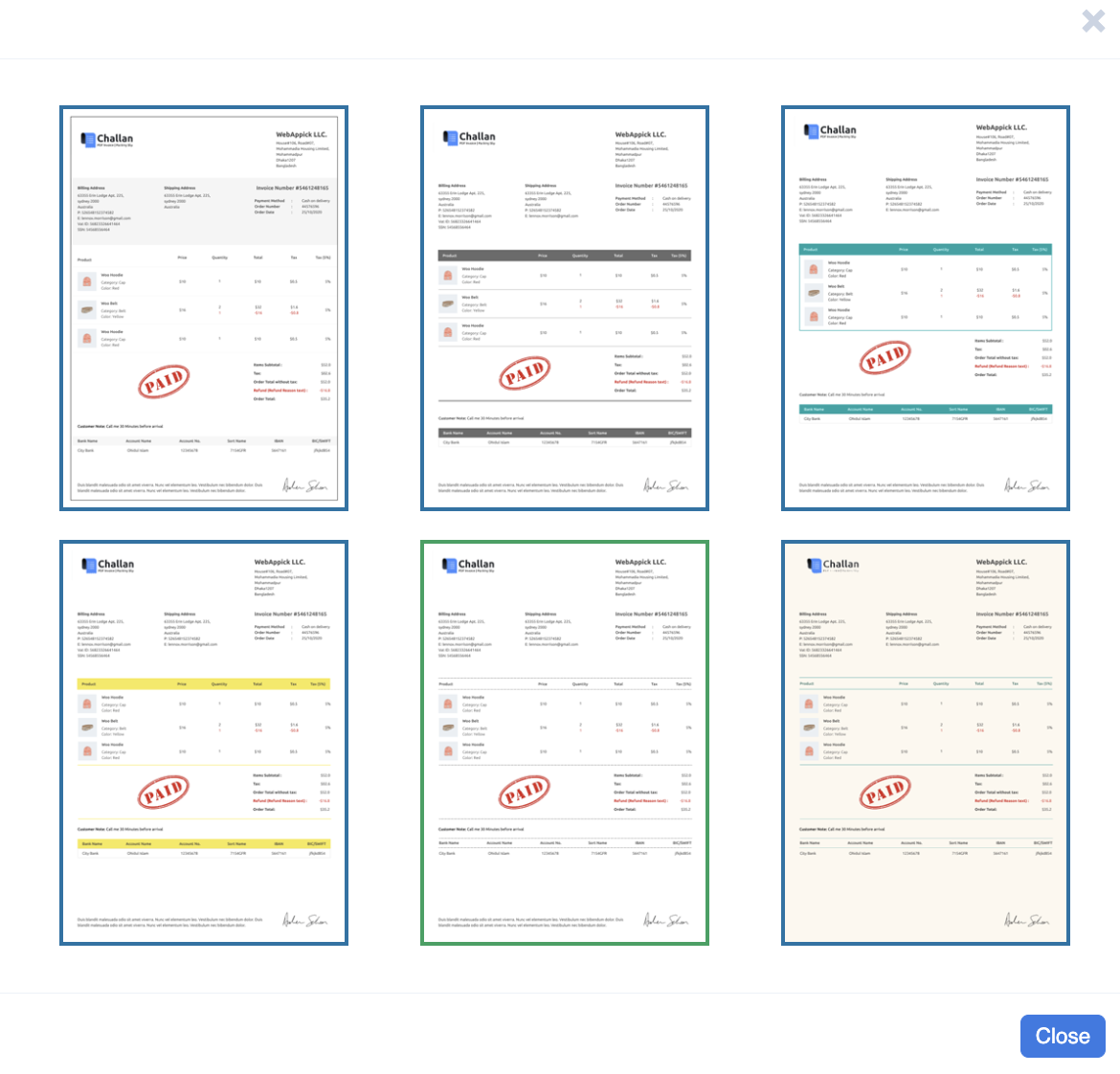
Step 2: Still, you can configure the invoice settings from there. However, Challan gives you six built-in professional invoice pdf templates to make the creation a breeze. Just select one and include the necessary details.
Step 3: Finally, save the changes and send the e-invoice to your customer via email. Again, you can automate the mailing process by pre-selecting the order status.
Step 4: You can also download the invoice easily to keep track of your accounts management.
Frequently Asked Questions
Is a packing slip the same as an invoice?
No. A packing slip is a shipping document that lists the items in a package. An invoice is a billing document that records the financial details of a sale, including prices, taxes, and payment terms. They often accompany the same order, but they serve different purposes and carry different information.
What is the difference between an invoice and a packing list?
An invoice records the financial details of a sale prices, taxes, payment terms, and billing information. A packing list records the physical contents of a shipment product names, SKUs, quantities, and dimensions. For international shipments, both documents are typically required: the invoice for customs valuation and the packing list for contents verification.
Does a packing slip include pricing?
No. A packing slip does not include prices, taxes, or subtotals. It lists only the products, quantities, weights, and dimensions. Pricing information belongs on the invoice.
Where does the packing slip go?
The packing slip goes inside the shipping box, placed on top of the packaged items. Some sellers also attach a copy in a clear pouch on the outside of the package, but inside is the standard practice for eCommerce.
Is a packing slip required by law?
No. Packing slips are not legally required for domestic shipments in most countries. However, they are a best practice for eCommerce businesses. For international shipments, a detailed packing list is often required alongside a commercial invoice for customs clearance.
What is the difference between a packing slip and a delivery note?
A packing slip lists the items in a package for the customer to verify. A delivery note is typically signed by the recipient to confirm the shipment was received. In many businesses, the terms are used interchangeably, but a delivery note often includes a signature field while a packing slip does not.
What is the difference between a packing slip and a bill of lading?
A packing slip lists the contents of a package for the buyer. A Bill of Lading (BoL) is a legal contract between the shipper and the carrier, serving as a receipt, a contract of carriage, and a document of title. The BoL carries legal authority over transportation. The packing slip does not.
What is the difference between a payslip and an invoice?
A payslip is issued by an employer to an employee showing earnings, deductions, and net pay for a specific period. An invoice is issued by a seller to a buyer requesting payment for goods or services. A payslip is a payroll document. An invoice is a billing document.
Is a packing slip a receipt?
No. A receipt confirms that payment was made. A packing slip confirms what items were included in the shipment. Customers sometimes use packing slips as a reference to check their order, but the packing slip has no financial authority and cannot serve as proof of payment.
What is an invoice slip?
An invoice slip is simply another name for an invoice. It refers to the billing document that details the products sold, the total price, taxes, and payment terms. Some people use “invoice slip” interchangeably with “sales invoice” or “billing slip.”
Can a packing slip be used for returns?
Yes. A packing slip helps identify the specific products in a shipment if items are lost, damaged, or incorrect. Pairing it with a Return Merchandise Authorization (RMA) form makes returns processing much more straightforward.
Can I use an invoice for returns?
Not directly. An invoice records the sale but does not include return authorization. To process a return, you typically need a credit memo or an RMA form. Some businesses use a specific “return invoice” to document returned goods.
Key Takeaways
- A packing slip is a shipping document placed inside the package to list the items shipped. An invoice is a billing document that records the financial details of the sale.
- Invoices include prices, taxes, payment terms, and subtotals. Packing slips include product weights, dimensions, SKUs, and quantities but no pricing.
- From an accounting standpoint, invoices are classified as financial records. Packing slips are classified as operational or logistics documents.
- For international shipments, a commercial invoice and a detailed packing list are typically both required for customs clearance.
- A Bill of Lading is a legal contract between shipper and carrier. A packing slip is a fulfillment document between seller and buyer. The two are not interchangeable.
- For WooCommerce stores, Challan automates invoice and packing slip generation, attaches them to order emails, and supports extensive template customization.

Free version on WordPress.org. Every Pro licence includes a 30-day money-back guarantee.

