
TL;DR
The golden rule of e-commerce discounting is simple: never discount without a specific goal. If your goal is to dump old inventory, deploy a BOGO deal. If you want customers to spend more per order, use tiered cart thresholds.
By matching the right automatic rule or coupon type to your immediate business metric and automating it with tools like Disco plugin, you turn margin-cutting discounts into intentional revenue drivers.
WooCommerce supports a wide range of discount types, including product discounts, cart discounts, coupon discounts, bulk discounts, BOGO deals, dynamic pricing, post-purchase discounts, and loyalty rewards. Store owners can use these discounts to increase conversions, boost average order value, clear inventory, attract new customers, and encourage repeat purchases.
These discount types can be delivered through various promotional strategies, such as scheduled sales, holiday campaigns, flash sales, and customer-specific offers.
In this guide, we’ll break down the most effective WooCommerce discount types, explain when to use each one, and show you how to implement them successfully in your store.
Common WooCommerce Discount Types
WooCommerce offers a variety of discount types to help you boost sales, clear inventory, and reward customers. Let’s dive into the most common types and when to use them.
Product Discounts
WooCommerce product discounts are applied directly to individual products. WooCommerce offers two main types of product discounts:
1. Percentage Discount
A percentage discount reduces the product price by a fixed percentage.
Example: A 20% discount on a $100 product reduces the price to $80.
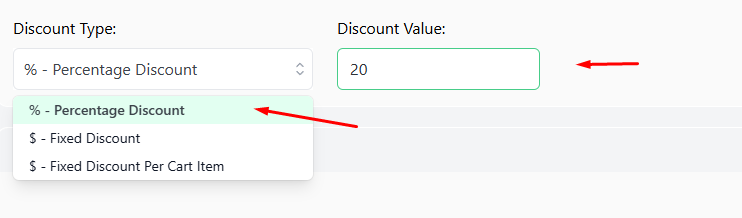
When to use WooCommerce percentage discounts:
- Sitewide Sales: Apply a WooCommerce percentage discount to all products during a specific period, such as a holiday sale or a Black Friday promotion.
- Seasonal Discounts: Offer discounts on relevant products during specific seasons. For example, you could offer a discount on winter coats during the winter season.
- Clearance Sales: Reduce the price of slow-moving or end-of-season products to clear inventory.
- Product Promotions: Highlight specific products with a percentage discount to boost their sales.
2. Fixed Amount Discount:
A fixed-amount discount subtracts a specific amount from the product price.
Example: $10 off a $50 product.
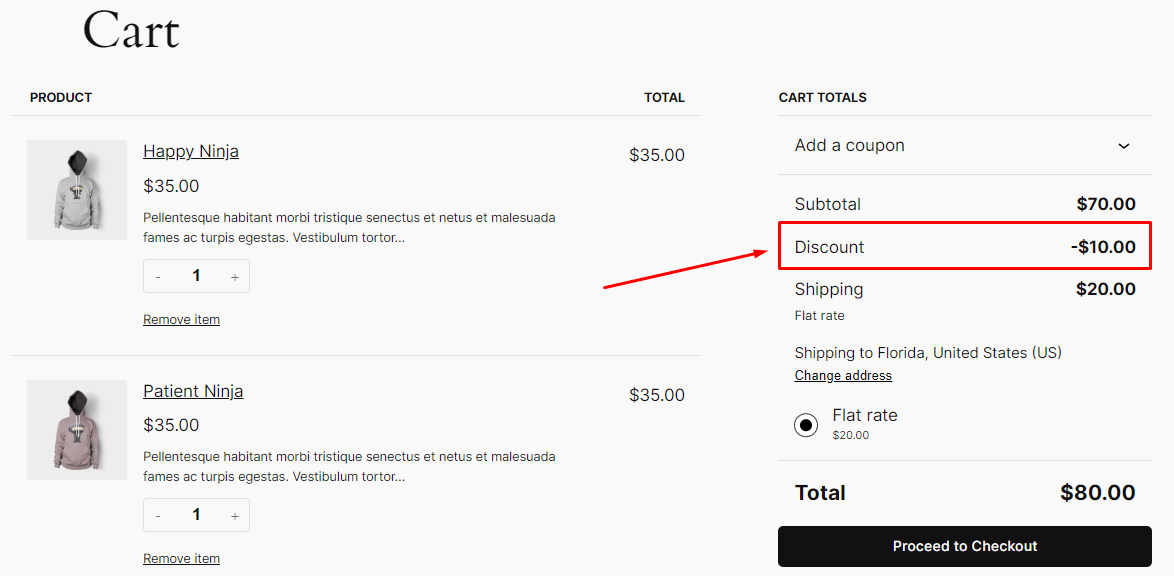
When to use fixed WooCommerce product discounts:
- Price Points: Use WooCommerce fixed discounts to bring product prices to specific price points. For example, you could offer a discount to bring a product’s price down to a round number like $99.
- Limited-Time Offers: Offer a fixed discount for a short period to create urgency and encourage immediate purchases.
- Product Bundles: Create attractive product bundles and offer a fixed discount on the combined price.
- Tiered Pricing: Offer a fixed discount for purchasing a certain quantity of a product.
By understanding these basic WooCommerce discount types and their appropriate use cases, you can effectively implement WooCommerce discounts to achieve your business goals.
Cart Discounts
Cart discounts are another effective discount type WooCommerce. Unlike product discounts, which apply to individual items, WooCommerce cart discounts are applied to the total value of a customer’s cart.
How WooCommerce Cart Discounts Work
Cart discounts trigger when a customer meets a condition such as:
- Minimum cart total
- Minimum quantity
- Specific product/category in cart
Once the condition is met, WooCommerce applies a percentage or fixed discount to the cart total.
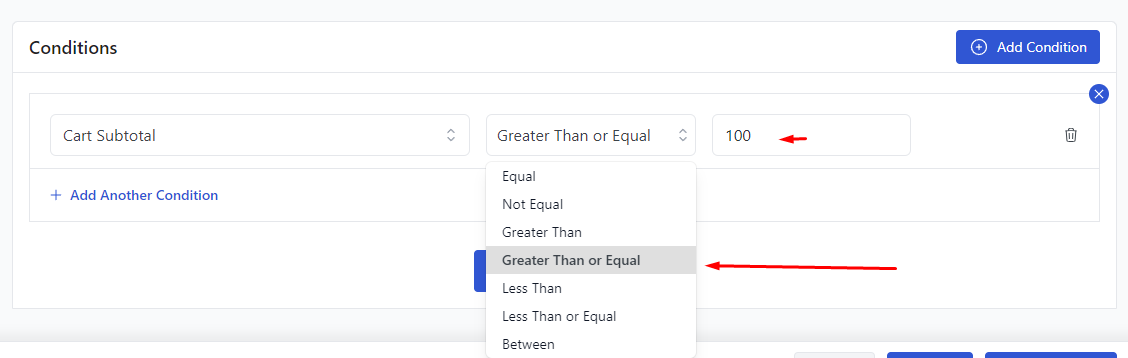
Once this threshold is met, the system applies a predetermined discount to the entire cart total, either a fixed amount or a percentage.
When to Use these WooCommerce discount types:
- Increase average order value
- Promote WooCommerce sitewide discount campaigns
- Encourage category-based purchases (e.g., WooCommerce discount per category)
- Run seasonal WooCommerce promotions
- Reward repeat customers with cart-based offers
Example Cart Discount Strategy
“Spend $100 and get 10% off your entire order”
Coupon Discounts
WooCommerce coupon discount types are a popular way to incentivize purchases and drive sales in WooCommerce. They offer flexibility and allow you to target specific customer segments or promotions.
How it Works: Customers enter a unique code at checkout, and the discount is applied to their order.
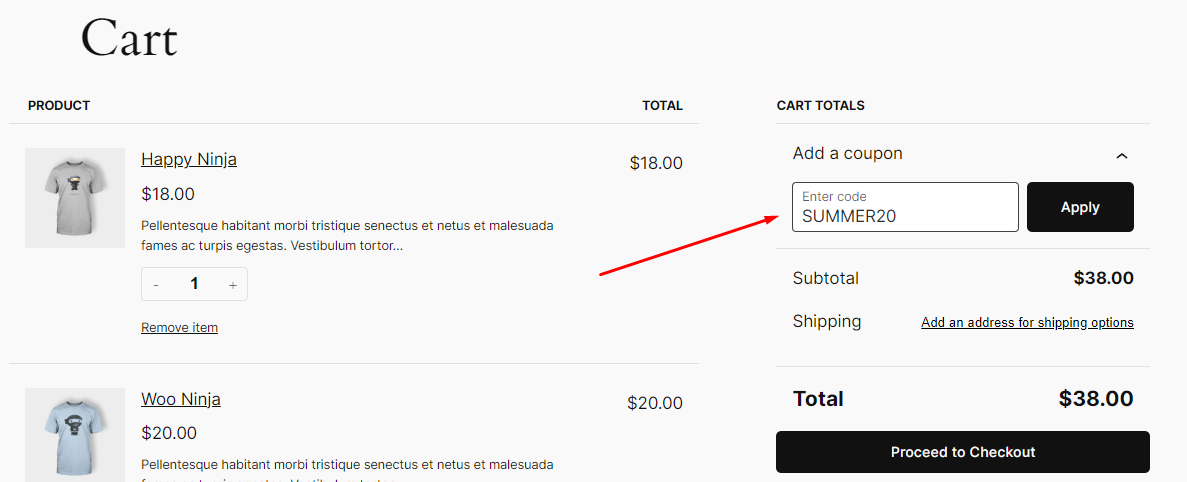
Types of WooCommerce Coupons
- Individual Use Coupons: one-time use per customer
- Multiple Use Coupons: reusable promotional codes
- Product-Specific Coupons: applied to selected products
- Category Coupons: WooCommerce category discounts
- Free Shipping Coupons: remove shipping cost at checkout
Bulk WooCommerce Discount Types
WooCommerce bulk discounts encourage customers to purchase larger quantities of a product by offering a discount on the total order.
How it Works: WooCommerce applies a discount to the total order value when a certain quantity threshold is reached.
When to Use It:
- Wholesale Discounts: Offer discounts to businesses or retailers who purchase large quantities of products.
- Loyalty Programs: Reward loyal customers with bulk discounts based on their purchase history.
- Inventory Clearance: Encourage customers to buy multiple units of a product to clear inventory.
Buy One, Get One (BOGO) Deals
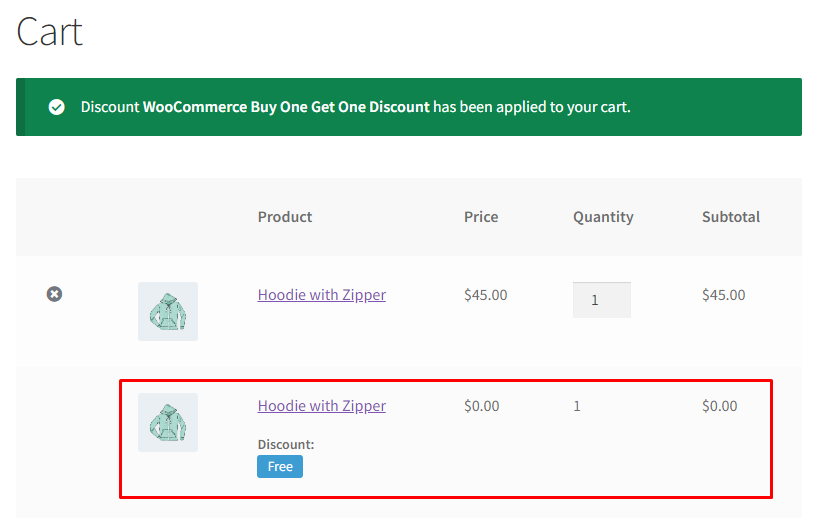
BOGO deals are a popular promotion where customers receive a free product or a discounted product when they purchase a specific item.
How it Works: In this WooCommerce get discount type, customers purchase one product at full price and receive another product at a discounted price or for free.
When to Use It:
- Inventory Clearance: Move excess inventory by offering BOGO deals on slow-moving products.
- Product Promotion: Introduce new products or promote underperforming products with BOGO deals.
- Customer Acquisition: Attract new customers by offering BOGO deals on popular products.
By understanding the different types of coupons and how to create effective WooCommerce coupons, you can leverage this powerful tool to boost your WooCommerce store’s sales and customer engagement.
Advanced WooCommerce Discount Types
To take your WooCommerce store to the next level, you can explore advanced discount strategies that go beyond the basic product, cart, and coupon discounts. These strategies allow you to create unique and personalized offers that can drive sales and customer loyalty.
Dynamic Pricing Discounts
WooCommerce dynamic pricing is a strategy that involves adjusting product prices in real-time based on various factors. This approach allows businesses to optimize their pricing strategy and maximize revenue.
How it Works: Dynamic pricing algorithms analyze data such as customer behavior, inventory levels, competitor pricing, and market trends to determine the optimal price for each product. These algorithms can adjust prices automatically or with manual intervention.
Implementing Dynamic Pricing:
1. Using Plugins:
- Disco – Dynamic Discount Plugin for WooCommerce: This free plugin offers a range of features for dynamic pricing, including time-based pricing, quantity-based discounts, and customer-specific pricing.
- Advanced WooCommerce: This plugin provides advanced pricing options, including dynamic pricing based on various factors like customer segmentation, product popularity, and inventory levels.
2. Custom Code: If you want to skip using plugins, you can use custom codes. This requires a strong understanding of PHP and WooCommerce. You can create custom functions and hooks to adjust prices based on specific conditions.
Key Factors to Consider for Dynamic Pricing:
- Customer Segmentation: Identify different customer segments and tailor pricing strategies accordingly.
- Inventory Levels: Adjust prices based on inventory levels to optimize sales and avoid stockouts.
- Competitor Pricing: Monitor competitor prices and adjust your pricing to stay competitive.
- Demand and Supply: Analyze demand and supply dynamics to optimize pricing.
- Time-Based Pricing: Offer time-limited discounts or premium pricing for specific periods.
- Personalization: Use customer data to personalize pricing offers and increase conversions.
By implementing dynamic pricing, you can optimize your pricing strategy, increase revenue, and improve customer satisfaction. However, it’s essential to use dynamic pricing ethically and transparently to avoid damaging your brand reputation.
Advanced Discount Rules
Custom WooCommerce discount types offer the flexibility to create tailored promotions that meet your specific business needs. WooCommerce custom discount type can be implemented using plugins or custom code.
Common Advanced Rules:
- Tiered pricing discounts
- Quantity-based discounts
- Mix-and-match product bundles
- Customer role-based discounts
By creating custom WooCommerce discount types, you can tailor promotions to your specific business goals and customer preferences. This can lead to increased sales, improved customer satisfaction, and stronger brand loyalty.
Post-Purchase Discounts
WooCommerce post checkout offers discount type is a powerful strategy to increase customer satisfaction, encourage repeat purchases, and boost overall sales. By presenting customers with additional discounts or incentives after they complete their purchase, you can drive upsell and cross-sell opportunities and create a more personalized shopping experience.
How it Works: Post-checkout offers are typically displayed on a thank-you page or in a follow-up email after a customer has placed an order. You can present these offers in various formats, such as pop-ups and banners, or embed them directly into the thank-you page or email.
Types of Post-Purchase Discounts:
- Next order percentage discount
- Free shipping on next purchase
- Store credits
- Upsell offers
By strategically implementing post-checkout offers, you can create a seamless and personalized shopping experience that drives customer satisfaction and loyalty.
Loyalty Discounts & Rewards
Loyalty programs are powerful tools for retaining customers, encouraging repeat purchases, and building long-term relationships. By rewarding customers for their loyalty to your WooCommerce membership site, you can significantly increase customer satisfaction and brand advocacy.
How it Works: Loyalty programs typically involve accumulating points or rewards for every purchase. Customers can redeem these points or rewards for discounts, free products, or exclusive offers.
Types of Loyalty Programs
- Points-based rewards
- Tiered customer levels
- Referral discount systems
By implementing a loyalty program, you can create a sense of community and belonging among your customers. This can increase brand loyalty, higher customer lifetime value, and positive word-of-mouth marketing.
Promotional WooCommerce Discount Strategies
WooCommerce promotional discounts are time-based or event-based campaigns.
Scheduled Sales
Scheduled WooCommerce discount campaigns run during a specific time period.
Use cases:
- Black Friday WooCommerce discounts
- Seasonal sales
- Flash sales
- Inventory clearance
Combining Discount Strategies
To maximize the impact of your discount campaigns, you can combine different WooCommerce discount types and strategies. This allows you to create powerful promotions that attract customers, increase sales, and drive customer loyalty.
Layered Discounts
Layered discounts combine multiple discount types, such as product discounts, cart discounts, and coupon codes, in a single promotion. For example, you might offer a 10% Woo sitewide discount, an additional 20% off selected products, and a free shipping coupon. This approach increases perceived value and encourages higher conversions.
Tiered Discounts
Tiered discounts increase based on how much a customer spends. For example, the more a customer adds to their cart, the higher the discount they receive. This strategy works well for boosting average order value and encouraging larger purchases.
Stacking Discounts
Stacking discounts allows customers to apply multiple offers in a single order, such as a coupon code combined with a cart discount and product-specific discount. While effective for driving sales, it should be carefully controlled to avoid reducing profit margins too much.
Strategic Timing
Strategic timing involves running promotions based on seasonal trends, holidays, or competitor activity. By aligning discounts with customer behavior and market demand, you can significantly improve campaign performance.
Customer Segmentation
Customer segmentation means dividing your audience into groups based on factors like purchase history, behavior, or demographics. You can then tailor discount offers for each group to increase relevance and conversion rates.
A/B Testing
A/B testing helps you compare different discount strategies, such as varying discount amounts, types, or durations. By analyzing performance data, you can optimize your campaigns for better results over time.
By strategically combining different discount types, timing your promotions effectively, and targeting specific customer segments, you can create powerful promotions that drive sales and customer loyalty.
How to Choose the Right Discount Type for Your Store
Choosing the right discount type for your WooCommerce store is crucial for driving sales and achieving your business goals. To make informed decisions, consider the following key factors:
1. Understand Customer Behavior
Analyze whether customers prefer:
- Coupons
- Automatic discounts
- Free shipping offers
2. Define Business Goals
- Increase sales → cart discounts + sitewide offers
- Clear inventory → product discounts + BOGO
- Increase AOV → bulk discounts + tiered pricing
- Improve retention → loyalty discounts
3. Use Timing Strategically
- Seasonal WooCommerce discount offers
- Weekend vs weekday promotions
- Flash sales for urgency
4. Test and Optimize
- A/B test discount types
- Track conversion rates
- Refine pricing strategies
By carefully considering these factors, you can choose the right discount type to achieve your business objectives and drive sales for your WooCommerce store.
Plugins to Enhance WooCommerce Discounts
WooCommerce offers built-in discount features, but to truly unlock the power of promotions, consider exploring additional plugins. These plugins can help you implement a wider range of discount strategies, personalize offers, and optimize your campaigns for maximum impact.
One such plugin is Disco – Dynamic Discount Plugin for WooCommerce.
Disco is a comprehensive discount plugin that empowers you to create and manage flexible, automated discount campaigns. Here’s a glimpse of what Disco can do for your store:
- Simplified Discount Creation: Set up various discounts without needing technical expertise.
- Advanced Discount Rules: Define complex discount conditions based on product categories, user roles, cart totals, and more.
- Dynamic Pricing: Implement dynamic pricing strategies like tiered discounts, quantity-based discounts, and personalized offers.
- Automated Campaigns: Schedule discounts to run automatically during specific periods.
- Discount Targeting: Target specific customer segments with customized promotions.
Benefits of Using Disco:
By leveraging Disco, you can:
- Boost Sales: Encourage larger orders, attract new customers, and clear inventory with targeted discounts.
- Improve Customer Satisfaction: Offer personalized discounts that delight your customers.
- Save Time: Automate discount campaigns for streamlined management.
- Increase Conversion Rates: Craft irresistible offers that convert visitors into paying customers.
Remember: While Disco offers robust features, there are other plugins available to cater to specific discount needs. Choosing the right plugin depends on your unique goals and budget.
Frequently Asked Questions
How do I increase the average order value in WooCommerce?
Use cart thresholds or tiered discounts. Setting a rule like “Spend $100, get 10% off” forces customers to add more items to their cart to unlock the savings, directly lifting your average order value.
What is the best way to clear dead stock in WooCommerce?
Run a Buy One, Get One (BOGO) deal. BOGO promotions are the most effective way to clear old or slow-moving inventory because they incentivize customers to clear multiple units off your shelves at once.
How do I set up dynamic pricing in WooCommerce without code?
Use a dedicated plugin like Disco. While native WooCommerce handles basic coupons, an automation plugin lets you create complex, automated rules like role-based or quantity-based discounts completely code-free.
Can customers use multiple coupons at once in WooCommerce?
Only if you allow discount stacking. By default, WooCommerce lets you restrict coupons to “individual use only.” You must explicitly configure your settings to prevent users from combining offers and wiping out your profit margins.
Key Takeaways
Before you launch your next promotion, keep these core principles in mind to ensure your discounts drive revenue rather than just draining your margins:
- Align the Discount with Your Metric: Never discount without a specific goal. Use cart thresholds to increase average order value, BOGO or product discounts to quickly flush out old inventory, and loyalty rewards to maximize repeat purchases.
- Reduce Friction with Automation: While promo codes are great for tracking specific marketing campaigns, they require manual effort from the user. Use dynamic pricing to apply discounts automatically at checkout, creating a seamless experience that reduces cart abandonment.
- Protect Your Margins When Stacking: Combining discount strategies (like a sitewide percentage off + a free shipping coupon) is highly effective for skyrocketing conversions. However, always set strict cart rules so multiple offers don’t accidentally wipe out your profits.
- Test, Segment, and Optimize: Avoid a one-size-fits-all approach. Segment your audience so you aren’t giving away deep discounts to users who would have bought at full price anyway, and A/B test whether your customers respond better to percentage cuts versus fixed-dollar amounts.
- Work Smarter with the Right Tools: While native WooCommerce handles the basics, utilizing a dedicated plugin like Disco unlocks advanced, code-free promotional rules, tiered volume logic, and targeted role-based pricing without requiring a developer.

Free version on WordPress.org. Every Pro licence includes a 30-day money-back guarantee.

