%22%2F%3E%0A%3Cpath%20d%3D%22M59.8894%2016.6974C60.1689%2016.9331%2060.5416%2017.1216%2060.9142%2017.0745C61.5664%2017.0273%2061.8925%2016.6031%2061.6596%2015.7547C61.5198%2014.4349%2061.4267%2013.1623%2061.2869%2011.8425C61.1006%209.72149%2060.8211%207.55331%2060.5881%205.38512L60.1689%201.70863C60.0757%200.81307%2059.6099%200.294591%2058.7713%200.106053C58.4918%20-0.0353509%2058.2123%20-0.0353509%2057.9328%200.106053C57.7931%200.106053%2057.6999%200.106053%2057.6067%200.153187C56.5353%200.483129%2055.4172%200.81307%2054.3458%201.19015C53.5073%201.47295%2052.6222%201.75576%2051.7371%202.03857C50.2929%202.50991%2048.8488%203.02839%2047.4047%203.49974C46.4264%203.82967%2045.4016%204.1596%2044.3768%204.48952L44.3767%204.48956C43.6313%204.72523%2043.3518%205.24371%2043.6313%205.85646C43.7711%206.13927%2044.004%206.32781%2044.2369%206.46921C44.7028%206.79915%2045.2152%207.08196%2045.6811%207.4119C45.8674%207.55331%2046.0537%207.69471%2045.8208%208.02465C45.7276%208.21319%2045.5879%208.35459%2045.4481%208.54313L45.355%208.73167L44.5164%2010.0986L43.9108%2010.9941L43.3052%2011.8897L43.2121%2011.9839L42.1406%2013.5865L44.5867%2019.8706C45.5713%2022.1447%2048.6357%2026.5713%2052.552%2023.6277L53.9265%2022.2593L54.3458%2021.5523C54.3924%2021.458%2054.4856%2021.3637%2054.5321%2021.2694L54.5787%2021.2223C55.2309%2020.1854%2055.883%2019.1956%2056.5352%2018.2059L56.5353%2018.2057C57.0477%2017.4044%2057.5601%2016.6503%2058.0726%2015.849C58.2123%2015.6604%2058.3055%2015.6133%2058.4918%2015.7076C58.9577%2016.0375%2059.4235%2016.4146%2059.8894%2016.6974Z%22%20fill%3D%22%233D89D0%22%2F%3E%0A%3Cpath%20d%3D%22M28.0259%2022.0232C27.9793%2022.0703%2027.9793%2022.1175%2027.9327%2022.1646C27.9793%2022.1175%2028.0259%2022.0703%2028.0259%2022.0232Z%22%20fill%3D%22url(%23paint1_linear)%22%2F%3E%0A%3Cpath%20d%3D%22M53.9265%2022.3064C53.7402%2022.5892%2053.5538%2022.872%2053.3675%2023.202C53.0414%2023.7204%2052.7153%2024.1918%2052.3892%2024.7103C51.3178%2026.4071%2050.1531%2027.9625%2048.4295%2029.0938C46.9388%2030.0365%2045.4015%2030.6021%2043.6779%2030.8849C42.1872%2031.1206%2040.7896%2030.9791%2039.3921%2030.5549C37.6219%2030.0365%2036.038%2029.1409%2034.687%2027.8211C33.7088%2026.8784%2032.9634%2025.7944%2032.3578%2024.616C32.0317%2023.9561%2031.7988%2023.2491%2031.4727%2022.5421C31.0534%2021.5522%2030.1683%2019.2427%2030.1218%2019.1012C30.0752%2019.0541%2030.0752%2018.9598%2030.0286%2018.9127C29.9354%2018.7242%2029.8422%2018.5828%2029.7957%2018.3942C29.6559%2018.0172%2029.4696%2017.6401%2029.3298%2017.2159C29.2366%2017.0273%2029.1901%2016.8388%2029.0969%2016.6503C28.9571%2016.3674%2028.864%2016.0846%2028.7242%2015.7547C28.5845%2015.3776%2028.4447%2015.0005%2028.2584%2014.6235C28.1652%2014.3407%2028.0254%2014.0579%2027.9323%2013.775C27.9323%2013.7279%2027.9323%2013.7279%2027.8857%2013.6808C27.7925%2013.4922%2027.7459%2013.3037%2027.6528%2013.1152C27.4664%2012.5967%2027.2335%2012.1253%2027.0006%2011.6069C27.0006%2011.5597%2026.954%2011.5126%2026.9074%2011.4655C26.8142%2011.2769%2026.7211%2011.1355%2026.5813%2010.947C26.5347%2010.8998%2026.4882%2010.8527%2026.4882%2010.8056C26.4416%2010.7584%2026.395%2010.7113%2026.395%2010.6642C26.3484%2010.617%2026.3018%2010.5699%2026.2552%2010.5228C26.2086%2010.4756%2026.2086%2010.4285%2026.1621%2010.4285L26.1155%2010.3814C26.0689%2010.3342%2026.0223%2010.2871%2026.0223%2010.2871C25.9291%2010.1928%2025.8826%2010.1457%2025.7894%2010.0514C25.7428%2010.0043%2025.6962%209.95715%2025.6496%209.95715C25.603%209.91002%2025.5565%209.91002%2025.5099%209.86288C25.4167%209.81575%2025.3701%209.76861%2025.277%209.67435C25.2304%209.62721%2025.1838%209.62721%2025.1372%209.58008C25.0906%209.53294%2025.044%209.53294%2024.9974%209.48581C24.9509%209.48581%2024.9043%209.43867%2024.9043%209.43867C24.8577%209.39154%2024.8111%209.39154%2024.7645%209.3444C24.7179%209.3444%2024.7179%209.29727%2024.6714%209.29727C24.5782%209.25014%2024.485%209.203%2024.3918%209.15587C22.9943%208.59025%2021.1775%208.77879%2020.1992%209.10873C19.2675%209.43867%2018.2893%2010.3342%2018.2427%2010.4285C18.6619%209.72148%2019.0812%208.96733%2019.547%208.26031C20.1526%207.36475%2020.7117%206.4692%2021.3638%205.62078C22.3887%204.63095%2023.4602%203.78253%2024.6714%203.07551C27.0006%201.75575%2029.4696%201.52007%2032.0317%201.89715C33.3361%202.08569%2034.5939%202.60417%2035.7585%203.35832C36.9231%204.06534%2037.9014%204.96089%2038.7399%206.04499C39.2989%206.79914%2039.8114%207.60043%2040.1374%208.49598C40.6033%209.67435%2041.1623%2010.8056%2041.5816%2011.9839C41.7679%2012.5496%2042.0008%2013.068%2042.2338%2013.6336C42.2338%2013.6336%2042.2338%2013.6336%2042.2338%2013.6808V13.7279L45.0288%2019.8554C45.4015%2020.8452%2045.9139%2021.6465%2046.7059%2022.3535C47.2183%2022.872%2047.8705%2023.1548%2048.5227%2023.3905C48.5693%2023.3905%2048.6158%2023.4376%2048.6624%2023.4376C49.7805%2023.7676%2051.2246%2023.3905%2052.3426%2023.0134C53.088%2022.6835%2053.6936%2022.4007%2053.9265%2022.3064Z%22%20fill%3D%22url(%23paint2_linear)%22%2F%3E%0A%3Cpath%20d%3D%22M28.0255%2022.0238C27.9789%2022.0709%2027.9789%2022.118%2027.9324%2022.1652C27.9324%2022.1652%2027.9324%2022.1652%2027.9324%2022.2123C27.7926%2022.448%2027.6063%2022.6836%2027.4665%2022.9664C25.8826%2025.8416%2024.4385%2028.1512%2021.6434%2029.6595C19.3142%2030.9793%2016.8452%2031.215%2014.2831%2030.8379C14.1433%2030.8379%2014.0501%2030.7908%2013.9104%2030.7908C12.7458%2030.6022%2011.5812%2030.0838%2010.4165%2029.2825C8.78607%2028.1512%207.52829%2026.5958%206.64318%2024.8047L6.17733%2023.9091L5.01272%2021.5524L0.726927%2012.6911C0.447419%2012.0784%200.214496%2011.4656%200.121327%2010.8529C-0.437689%207.8834%200.95985%204.77252%203.80151%203.35849C5.43198%202.51007%207.24878%202.4158%208.87924%202.93428C10.6029%203.45276%2012.1402%204.67825%2013.0253%206.46937L13.1184%206.6579L14.7489%209.95732C14.7955%2010.0516%2014.7955%2010.1459%2014.8421%2010.2401C15.075%2010.8529%2015.8204%2012.4083%2016.426%2013.5867C16.4725%2013.6809%2016.5191%2013.7752%2016.5657%2013.8223C16.6123%2013.9638%2016.7055%2014.1052%2016.752%2014.1994C16.7986%2014.2937%2016.8452%2014.3408%2016.8452%2014.4351C16.8452%2014.4822%2016.8918%2014.4822%2016.8918%2014.5294C16.9384%2014.5765%2016.9384%2014.6708%2016.985%2014.7179C16.985%2014.765%2017.0316%2014.765%2017.0316%2014.8122C17.0316%2014.8593%2017.0781%2014.8593%2017.0781%2014.9064C17.0781%2014.9536%2017.1247%2015.0007%2017.1247%2015.0478C17.1247%2015.095%2017.1713%2015.095%2017.1713%2015.1421C17.3111%2015.4249%2017.4042%2015.7549%2017.544%2016.0377C17.6372%2016.2262%2017.6837%2016.4147%2017.7769%2016.6504C17.9632%2017.1689%2018.1962%2017.6402%2018.3825%2018.1587C18.5223%2018.4415%2018.6154%2018.7715%2018.7552%2019.0543C18.8018%2019.1485%2018.8484%2019.29%2018.8949%2019.3842C18.9881%2019.5728%2019.0347%2019.7613%2019.1279%2019.9498C19.3608%2020.5154%2019.5937%2021.0811%2019.9664%2021.5995C20.1993%2021.8823%2020.3857%2022.1652%2020.6652%2022.4008C22.3888%2023.9563%2024.9975%2023.862%2028.0255%2022.0238Z%22%20fill%3D%22url(%23paint3_linear)%22%2F%3E%0A%3Cpath%20d%3D%22M68.0888%2024.8694L68%207.88696H71.9963L71.8187%2018.4448L76.8806%207.88696H80.6548L81.3209%2018.3999L85.5392%207.88696H89.713L82.4754%2024.8694H78.1683L77.5466%2013.9072L72.3959%2024.8694H68.0888Z%22%20fill%3D%22%230D5293%22%2F%3E%0A%3Cpath%20d%3D%22M92.7771%2025.1385C89.2693%2025.1385%2086.7383%2022.6675%2086.7383%2019.2081C86.7383%2015.3893%2089.8021%2012.1545%2093.4431%2012.1545C96.6402%2012.1545%2098.8603%2014.4458%2098.8603%2017.7704C98.8603%2018.5342%2098.8159%2019.1182%2098.7271%2019.6124H90.4237C90.6457%2021.0501%2091.7114%2022.0385%2093.2211%2022.0385C94.1536%2022.0385%2094.9528%2021.724%2095.5301%2021.095L97.617%2023.4762C96.0185%2024.6443%2094.5976%2025.1385%2092.7771%2025.1385ZM90.6457%2017.411H95.4857C95.3081%2016.0632%2094.4644%2015.2545%2093.2211%2015.2545C92.0666%2015.2096%2091.0898%2016.0632%2090.6457%2017.411Z%22%20fill%3D%22%230D5293%22%2F%3E%0A%3Cpath%20d%3D%22M105.965%2024.9589C104.411%2024.9589%20103.167%2024.24%20102.368%2022.8473L101.924%2024.869H98.1499L101.791%207.52717L105.698%206.89819L104.322%2013.5923C105.166%2012.7836%20106.32%2012.2894%20107.519%2012.2894C110.139%2012.2894%20112.181%2014.8054%20112.181%2018.0401C112.226%2021.814%20109.428%2024.9589%20105.965%2024.9589ZM103.789%2016.3778L102.945%2020.4212C103.478%2021.185%20104.366%2021.6792%20105.388%2021.6792C107.208%2021.6792%20108.54%2020.2415%20108.54%2018.3097C108.54%2016.6474%20107.43%2015.4793%20105.92%2015.4793C105.077%2015.4793%20104.411%2015.7937%20103.789%2016.3778Z%22%20fill%3D%22%230D5293%22%2F%3E%0A%3Cpath%20d%3D%22M120.44%207.88696H125.058L127.899%2024.8694H123.725L123.193%2020.8259H117.154L114.978%2024.8694H110.582L120.44%207.88696ZM122.704%2017.5912L121.949%2011.9304L118.886%2017.5463H122.704V17.5912Z%22%20fill%3D%22%230D5293%22%2F%3E%0A%3Cpath%20d%3D%22M131.23%2012.3347H135.004L134.782%2013.5927C135.626%2012.7391%20136.736%2012.2449%20137.935%2012.2449C140.555%2012.2449%20142.597%2014.7608%20142.597%2017.9955C142.597%2021.8143%20139.8%2024.9592%20136.336%2024.9592C134.782%2024.9592%20133.539%2024.2853%20132.828%2022.9824L131.274%2030.0809H127.456L131.23%2012.3347ZM134.205%2016.3332L133.317%2020.5114C133.85%2021.2303%20134.738%2021.6796%20135.715%2021.6796C137.535%2021.6796%20138.867%2020.2419%20138.867%2018.31C138.867%2016.6477%20137.757%2015.4796%20136.247%2015.4796C135.493%2015.4796%20134.827%2015.7492%20134.205%2016.3332Z%22%20fill%3D%22%230D5293%22%2F%3E%0A%3Cpath%20d%3D%22M144.595%2012.3347H148.369L148.147%2013.5927C148.99%2012.7391%20150.101%2012.2449%20151.299%2012.2449C153.919%2012.2449%20155.962%2014.7608%20155.962%2017.9955C155.962%2021.8143%20153.164%2024.9592%20149.701%2024.9592C148.147%2024.9592%20146.904%2024.2853%20146.193%2022.9824L144.683%2030.0809H140.865L144.595%2012.3347ZM147.57%2016.3332L146.682%2020.5114C147.214%2021.2303%20148.102%2021.6796%20149.079%2021.6796C150.9%2021.6796%20152.232%2020.2419%20152.232%2018.31C152.232%2016.6477%20151.122%2015.4796%20149.612%2015.4796C148.857%2015.4796%20148.191%2015.7492%20147.57%2016.3332Z%22%20fill%3D%22%230D5293%22%2F%3E%0A%3Cpath%20d%3D%22M159.115%2024.8694H155.296L158.005%2012.3347H161.824L159.115%2024.8694ZM158.449%208.47099C158.449%207.1681%20159.559%206%20160.847%206C161.912%206%20162.8%206.85361%20162.8%207.93186C162.8%209.27967%20161.69%2010.4029%20160.358%2010.4029C159.248%2010.4029%20158.449%209.54924%20158.449%208.47099Z%22%20fill%3D%22%230D5293%22%2F%3E%0A%3Cpath%20d%3D%22M169.727%2020.6909L171.592%2023.1619C170.304%2024.4648%20168.572%2025.1387%20166.752%2025.1387C163.466%2025.1387%20161.068%2022.7126%20161.068%2019.388C161.068%2015.3446%20164.088%2012.1099%20167.862%2012.1099C170.082%2012.1099%20171.947%2013.0983%20173.013%2014.7606L170.304%2017.0069C169.727%2015.9736%20168.927%2015.4794%20167.773%2015.4794C166.13%2015.4794%20164.842%2017.0518%20164.842%2019.0286C164.842%2020.6909%20165.819%2021.6793%20167.329%2021.6793C168.261%2021.7243%20169.016%2021.4098%20169.727%2020.6909Z%22%20fill%3D%22%230D5293%22%2F%3E%0A%3Cpath%20d%3D%22M175.722%207.52717L179.629%206.89819L177.365%2017.6807L182.426%2012.3344H187L180.517%2018.6691L184.691%2024.869H180.162L177.009%2019.5676L175.899%2024.869H172.081L175.722%207.52717Z%22%20fill%3D%22%230D5293%22%2F%3E%0A%3Cdefs%3E%0A%3ClinearGradient%20id%3D%22paint0_linear%22%20x1%3D%2223.1831%22%20y1%3D%2224.7007%22%20x2%3D%2223.3049%22%20y2%3D%228.44851%22%20gradientUnits%3D%22userSpaceOnUse%22%3E%0A%3Cstop%20stop-color%3D%22%23327ACD%22%2F%3E%0A%3Cstop%20offset%3D%221%22%20stop-color%3D%22%234696D2%22%2F%3E%0A%3C%2FlinearGradient%3E%0A%3ClinearGradient%20id%3D%22paint1_linear%22%20x1%3D%2227.9436%22%20y1%3D%2222.0876%22%20x2%3D%2228.0428%22%20y2%3D%2222.0876%22%20gradientUnits%3D%22userSpaceOnUse%22%3E%0A%3Cstop%20offset%3D%220.2029%22%20stop-color%3D%22%234C51BF%22%20stop-opacity%3D%220.9%22%2F%3E%0A%3Cstop%20offset%3D%221%22%20stop-color%3D%22%235A67D8%22%20stop-opacity%3D%220.9%22%2F%3E%0A%3C%2FlinearGradient%3E%0A%3ClinearGradient%20id%3D%22paint2_linear%22%20x1%3D%2232.4583%22%20y1%3D%222.22148%22%20x2%3D%2239.8371%22%20y2%3D%2230.0298%22%20gradientUnits%3D%22userSpaceOnUse%22%3E%0A%3Cstop%20offset%3D%220.3367%22%20stop-color%3D%22%2342B9FF%22%2F%3E%0A%3Cstop%20offset%3D%220.7818%22%20stop-color%3D%22%233B97E1%22%2F%3E%0A%3Cstop%20offset%3D%221%22%20stop-color%3D%22%233784D1%22%2F%3E%0A%3C%2FlinearGradient%3E%0A%3ClinearGradient%20id%3D%22paint3_linear%22%20x1%3D%2211.252%22%20y1%3D%220.972585%22%20x2%3D%2215.8771%22%20y2%3D%2225.7529%22%20gradientUnits%3D%22userSpaceOnUse%22%3E%0A%3Cstop%20offset%3D%220.3367%22%20stop-color%3D%22%2342B9FF%22%2F%3E%0A%3Cstop%20offset%3D%220.7818%22%20stop-color%3D%22%233B97E1%22%2F%3E%0A%3Cstop%20offset%3D%221%22%20stop-color%3D%22%233784D1%22%2F%3E%0A%3C%2FlinearGradient%3E%0A%3C%2Fdefs%3E%0A%3C%2Fsvg%3E%0A)


Does Google Shopping Increase Sales of Your Ecommerce Business?
 Mohammad Miraj
 Quick answer: Yes. Google Shopping ads can significantly increase sales for ecommerce businesses. But results depend on how well you set up and manage your campaigns.
If you run an online store, you have probably asked this question at least once.
You spend money on ads. You want to know if they actually work.
This guide walks you through exactly answer “Does Google Shopping Increase Sales?” and how Google Shopping works, what kind of results you can realistically expect, and how to make it drive more revenue for your ecommerce business.
Google Shopping is one of the most powerful paid search channels for product-based businesses.
It shows your products directly in Google search results with images, prices, and store names. Shoppers see your product before they even click a single link.
What Is Google Shopping and How Does It Work?
Google Shopping is a product listing platform powered by Google Ads. It displays your products at the top of Google search results in a visual format.
Each listing shows a product image, price, store name, and sometimes star ratings.
These listings are called Product Listing Ads, or PLAs. They appear when someone searches for a product you sell.
So if someone types ‘buy running shoes online,‘ your product can appear right at the top. That means high purchase intent traffic comes directly to your product pages.
Google Shopping works through a product feed.
You upload your product data to Google Merchant Center. Then you link it to Google Ads and create a Shopping campaign. Google uses your product data to decide when and where to show your listings.
Google Shopping Free Listings vs. Paid Ads
Google also offers free product listings through the Shopping tab. These appear without any ad spend.
But paid Google Shopping ads get priority placement and far more visibility.
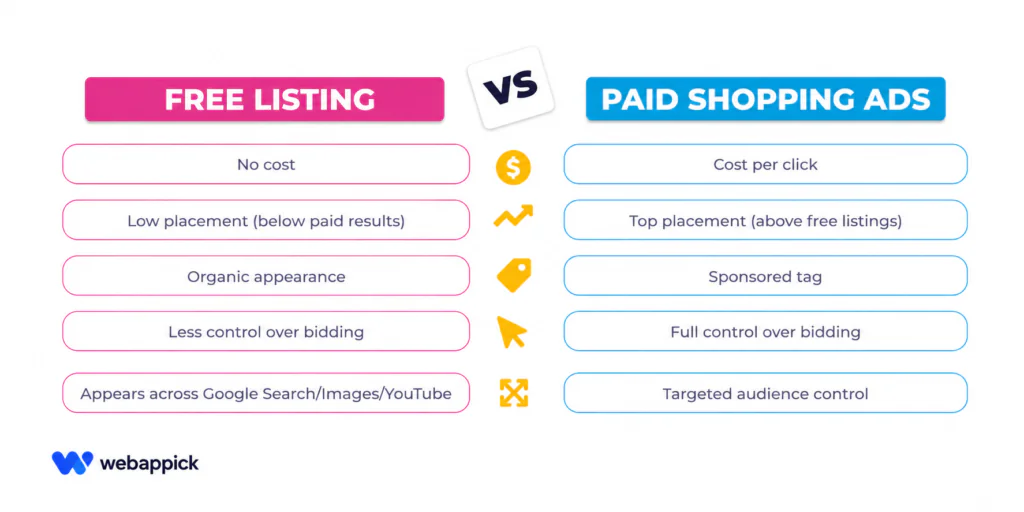
Most ecommerce businesses use both to maximize reach across Google’s search network.
What Is a Product Feed and Why Does It Matter?
A product feed is a file that contains all your product information. It includes titles, descriptions, prices, images, availability, GTINs, and category data.
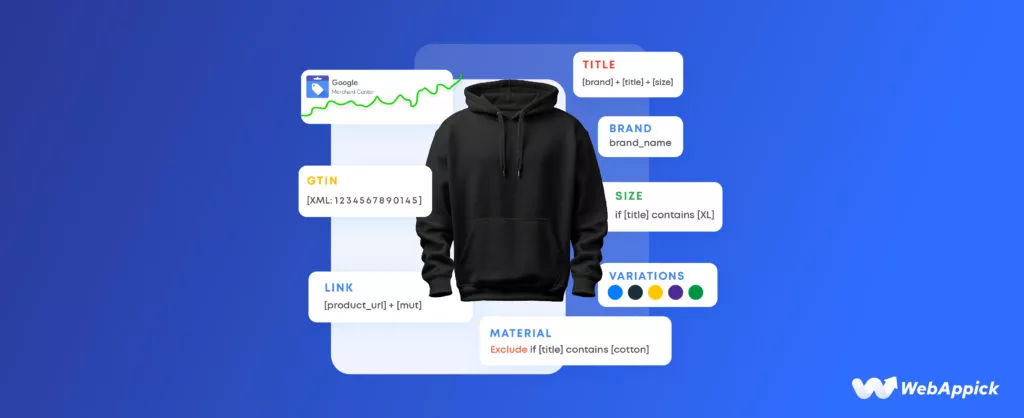
Google reads this file to decide which searches your products match.
The quality of your product feed directly determines how well your Shopping campaigns perform. A feed with strong product titles and complete attributes will reach more buyers and generate more clicks than a poorly optimized one.
Recommended Tool:
CTX Feed – WooCommerce Product Feed Plugin
If your store runs on WooCommerce, CTX Feed is one of the easiest ways to create a Google Shopping product feed. It automates the entire feed generation process so you can focus on selling.
Key features:
✔️ Supports 130+ marketing channels including Google Shopping, Facebook, and Bing
✔️ Auto-updates your product feed in real time as prices and stock change
✔️ Generates feeds in XML, CSV, TSV, and JSON formats accepted by Google Merchant Center
✔️ Custom attribute mapping lets you match your product data to Google’s required fields
✔️ Built-in filter and rules engine to include or exclude specific products
✔️No coding required. Set up your feed in minutes directly from your WordPress dashboard
Used by 100,000+ WooCommerce stores worldwide, CTX Feed removes the most time-consuming part of Google Shopping setup so your products get listed correctly and fast.
Does Google Shopping Increase Sales of Ecommerce?
Yes, it does. And the data backs this up consistently.
| 76% of retail search ad spend goes to Google Shopping | 85% of ecommerce Google Ads clicks come from Shopping ads | 30% +higher conversion rate vs standard text ads (avg) |
Google Shopping ads show products to people who are already looking to buy. This is not brand awareness traffic. These are high-intent shoppers who typed in a specific product keyword.
That is why conversion rates tend to be higher compared to regular display or text ads.
For most ecommerce businesses, Google Shopping is one of the top two revenue-driving channels alongside organic search.
Whether you sell fashion, electronics, home goods, or niche products, Shopping ads can work if your product feed is clean and your bids are well-managed.
Key Benefits of Google Shopping for Ecommerce Businesses
1. Visual Product Discovery Drives More Clicks
Shoppers see your product image before they visit your site. This builds trust instantly. A good image with a competitive price gets clicks.
People self-qualify before clicking, so the traffic you get is more likely to convert.
2. You Reach Buyers at the Bottom of the Funnel
Google Shopping targets commercial intent keywords. Someone searching for ‘blue leather wallet for men‘ is very close to buying.
Shopping puts your product in front of them at that exact moment.
3. Higher Click-Through Rates Than Text Ads
Product listing ads consistently outperform standard text ads in click-through rate for product searches. Visuals, prices, and ratings all help you stand out on the search results page.
4. Better ROAS Than Many Other Paid Channels
Return on ad spend (ROAS) for Google Shopping campaigns is often higher than Facebook or display ads.
You pay only when someone clicks your ad. And those clicks come from people actively searching for your product.
5. Increased Brand Visibility Across Google’s Network
Shopping ads can appear on Google Search, Google Images, YouTube, and partner sites. This gives your products wide exposure without separate campaigns for each channel.
Google Shopping vs Other Ecommerce Advertising Channels
Here is how Google Shopping compares to other common options for ecommerce advertising:
| Channel | Best For vs. Google Shopping |
| Google Search Ads | Shopping wins for product-specific queries. Search suits brand terms. |
| Facebook Ads | Facebook suits brand awareness. Shopping captures active demand. |
| Amazon Ads | Amazon captures marketplace buyers. Shopping captures earlier-stage intent. |
| SEO | SEO is free and long-term. Shopping gives immediate, scalable reach. |
| Display Ads | Display builds awareness. Shopping converts high-intent searchers. |
How Much Does Google Shopping Ads Cost?
Google Shopping uses a cost-per-click model. You only pay when someone clicks your product listing.
The average cost per click (CPC) ranges from $0.50 to $1.50 for most product categories. Competitive niches like electronics or jewelry can go higher.
Your daily budget is fully in your control. You can start with $10 to $20 per day and scale based on what converts.
Many small ecommerce stores see positive ROAS within the first few weeks with a properly structured campaign.
What Affects Your Google Shopping Ad Costs?
- Product category and competition level
- Quality of your product feed and titles
- Bid strategy: manual CPC vs. target ROAS vs. Maximize Clicks
- Seasonality and peak shopping periods such as Black Friday or Q4
- Product price point and profit margins
How to Set Up Google Shopping Ads for Your Ecommerce Store?
Setting up Google Shopping is a step-by-step process. Here is a simplified overview:
- Create a Google Merchant Center account and verify your website.
- Upload your product feed with accurate titles, descriptions, prices, images, and GTINs.
- Link Merchant Center to Google Ads.
- Create a Shopping campaign in Google Ads and set your budget.
- Organize product groups to control bids by category, brand, or margin.
- Add negative keywords to filter out irrelevant search terms.
- Monitor and optimize your search terms report weekly.
Using CTX Feed to Set Up Your Product Feed for Google Shopping
For WooCommerce store owners, generating and maintaining a clean product feed is the hardest part of Google Shopping setup.
CTX Feed automates this completely.
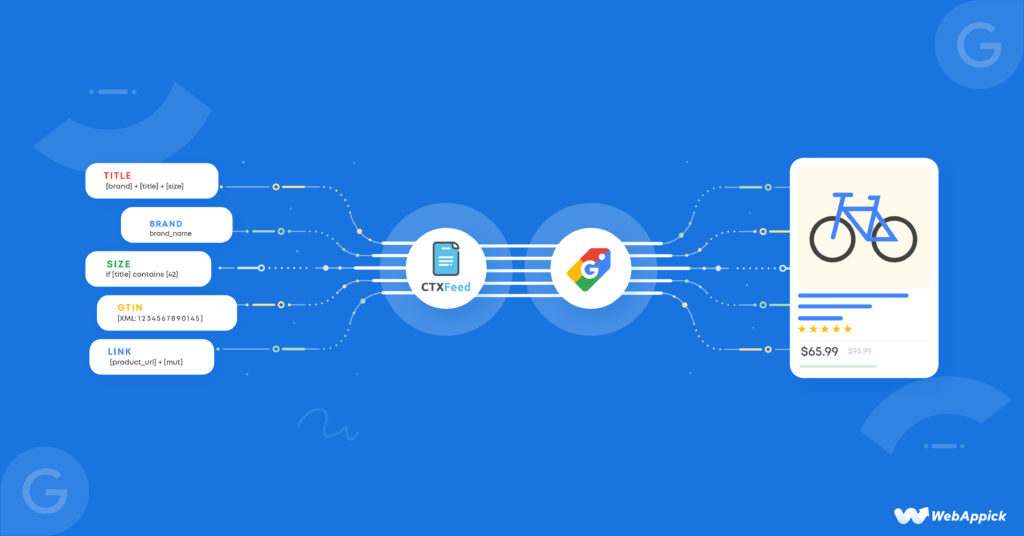
Instead of manually exporting products or coding a feed, you install CTX Feed, select the Google Shopping template, map your attributes, and your feed is ready to upload to Google Merchant Center.
The plugin keeps your feed updated automatically so you never have to worry about stale data.
Pro tip: Your product title is the most important field in your feed. Include the brand, product type, size, color, and key attributes. CTX Feed lets you build dynamic titles using custom attribute templates so every product title is optimized automatically.
Tips to Increase Sales with Google Shopping in 2026
Optimize Your Product Feed First
A well-optimized product feed is the foundation of a successful Google Shopping campaign. Use keyword-rich product titles.
Write clear, detailed descriptions. Use high-quality images with white backgrounds. Keep prices and availability accurate and updated daily.
Use Performance Max Campaigns
Google’s Performance Max campaigns use machine learning to show your ads across all Google channels.
They work well once you have enough conversion data, typically 30 to 50 conversions per month.
Segment Your Products by Margin and Performance
Not all products deserve equal bids. Group your high-margin products separately. Bid more aggressively on best sellers.
Lower bids or pause low-performing SKUs that drain budget without converting.
Add Negative Keywords Regularly
Google Shopping does not use traditional keyword targeting. But your ads still appear for search terms based on your product data.
Check the search terms report weekly. Add irrelevant terms as negative keywords to protect your budget.
Use Customer Reviews and Seller Ratings
Google Shopping listings can show star ratings. Products with reviews and high ratings get more clicks.
Set up Google Customer Reviews or use a third-party review provider to collect product ratings.
Retarget Past Visitors with Remarketing Lists
Combine your Shopping campaigns with remarketing lists (RLSA). Bid higher for people who visited your site but did not buy.
This is one of the most cost-efficient ways to recover lost sales.
Common Mistakes That Reduce Google Shopping Sales
- Using vague or short product titles that miss important search terms
- Poor quality images that fail to attract clicks in search results
- Not updating the product feed regularly, causing price or stock mismatches
- Ignoring the search terms report and wasting budget on irrelevant queries
- Setting the same bid for all products regardless of margin or performance
- Not tracking conversions properly in Google Ads, making optimization impossible
Most of these mistakes come back to the product feed. When your feed has accurate data, strong titles, and correct attributes, your campaign performs better from day one.
CTX Feed helps WooCommerce stores avoid these common feed-related errors with built-in validation and attribute mapping.
Real Ecommerce Results: What to Expect from Google Shopping
Results vary based on your product category, competition, pricing, and campaign setup. But here are realistic benchmarks for ecommerce businesses running Google Shopping:
| Metric | Realistic Range |
| Average ROAS | 300% to 800% for well-optimized campaigns |
| Average click-through rate | 0.86% to 2% depending on niche |
| Average conversion rate | 1.5% to 4% from Shopping traffic |
| Break-even timeline | 30 to 60 days with proper setup |
Newer stores may take longer to see strong results. Established brands with good reviews and competitive prices often see results faster.
The key is consistent optimization, not just launching and leaving campaigns on autopilot.
Is Google Shopping Worth It for Small Ecommerce Businesses?
Yes. Google Shopping works for businesses of all sizes.
You do not need a large budget to start. Even with $300 to $500 per month, a well-structured campaign can generate meaningful revenue if your product margins allow it.
Small ecommerce businesses can compete with large retailers by focusing on niche products, competitive pricing, and strong product feed optimization.
You do not always need to outbid the big players. You just need to show up for the right searches.
For WooCommerce stores especially, tools like CTX Feed make it easier to launch and maintain a high-quality product feed without technical overhead.
That means even a small store with a lean team can compete effectively on Google Shopping from day one.
Frequently Asked Questions About Google Shopping and Ecommerce Sales
Does Google Shopping work for all product types?
Google Shopping works best for physical products with clear images and prices. It is less effective for services, digital-only products without a clear product page, or highly custom items without standard pricing.
How long does it take to see results from Google Shopping?
Most ecommerce businesses see initial data within 7 to 14 days. Meaningful optimization takes 30 to 60 days. Full performance scaling typically happens after 90 days of consistent management.
Can I use Google Shopping without a large budget?
Yes. You can start with as little as $10 to $15 per day. Focus on your top-selling products and most competitive prices first. Scale budget as you see profitable results.
What is the difference between Google Shopping and Google Search ads?
Google Search ads are text-based and triggered by keywords you choose. Google Shopping ads are image-based and triggered by your product feed data. Shopping ads generally perform better for product-specific searches.
Do I need Google Merchant Center for Shopping ads?
Yes. Google Merchant Center is required. It is where you upload and manage your product feed. Without it, you cannot run Google Shopping campaigns.
What is the best WooCommerce plugin for Google Shopping product feeds?
CTX Feed is one of the most popular WooCommerce product feed plugins for Google Shopping. It supports 130+ channels, auto-updates your feed, and provides a pre-built Google Shopping template that meets all of Google Merchant Center requirements.
Final Thoughts: Should You Use Google Shopping to Grow Your Ecommerce Business?
If you sell physical products online, Google Shopping is one of the most effective paid channels available to you.
It captures high-intent buyers right at the moment they are searching for what you sell. That is a powerful position to be in.
The platform rewards those who invest time in feed optimization, smart bidding, and ongoing management.
Businesses that treat Google Shopping as a set-and-forget tool rarely see great results. But the ones who actively manage it consistently see strong ROAS and growing revenue.
Start small, optimize your product feed, track every conversion, and scale what works. Google Shopping can absolutely increase sales for your ecommerce business.
You just need the right strategy to make it happen.
And if your store runs on WooCommerce, CTX Feed gives you the fastest path to a clean, Google-ready product feed so you can launch your Shopping campaigns with confidence.