%22%2F%3E%0A%3Cpath%20d%3D%22M59.8894%2016.6974C60.1689%2016.9331%2060.5416%2017.1216%2060.9142%2017.0745C61.5664%2017.0273%2061.8925%2016.6031%2061.6596%2015.7547C61.5198%2014.4349%2061.4267%2013.1623%2061.2869%2011.8425C61.1006%209.72149%2060.8211%207.55331%2060.5881%205.38512L60.1689%201.70863C60.0757%200.81307%2059.6099%200.294591%2058.7713%200.106053C58.4918%20-0.0353509%2058.2123%20-0.0353509%2057.9328%200.106053C57.7931%200.106053%2057.6999%200.106053%2057.6067%200.153187C56.5353%200.483129%2055.4172%200.81307%2054.3458%201.19015C53.5073%201.47295%2052.6222%201.75576%2051.7371%202.03857C50.2929%202.50991%2048.8488%203.02839%2047.4047%203.49974C46.4264%203.82967%2045.4016%204.1596%2044.3768%204.48952L44.3767%204.48956C43.6313%204.72523%2043.3518%205.24371%2043.6313%205.85646C43.7711%206.13927%2044.004%206.32781%2044.2369%206.46921C44.7028%206.79915%2045.2152%207.08196%2045.6811%207.4119C45.8674%207.55331%2046.0537%207.69471%2045.8208%208.02465C45.7276%208.21319%2045.5879%208.35459%2045.4481%208.54313L45.355%208.73167L44.5164%2010.0986L43.9108%2010.9941L43.3052%2011.8897L43.2121%2011.9839L42.1406%2013.5865L44.5867%2019.8706C45.5713%2022.1447%2048.6357%2026.5713%2052.552%2023.6277L53.9265%2022.2593L54.3458%2021.5523C54.3924%2021.458%2054.4856%2021.3637%2054.5321%2021.2694L54.5787%2021.2223C55.2309%2020.1854%2055.883%2019.1956%2056.5352%2018.2059L56.5353%2018.2057C57.0477%2017.4044%2057.5601%2016.6503%2058.0726%2015.849C58.2123%2015.6604%2058.3055%2015.6133%2058.4918%2015.7076C58.9577%2016.0375%2059.4235%2016.4146%2059.8894%2016.6974Z%22%20fill%3D%22%233D89D0%22%2F%3E%0A%3Cpath%20d%3D%22M28.0259%2022.0232C27.9793%2022.0703%2027.9793%2022.1175%2027.9327%2022.1646C27.9793%2022.1175%2028.0259%2022.0703%2028.0259%2022.0232Z%22%20fill%3D%22url(%23paint1_linear)%22%2F%3E%0A%3Cpath%20d%3D%22M53.9265%2022.3064C53.7402%2022.5892%2053.5538%2022.872%2053.3675%2023.202C53.0414%2023.7204%2052.7153%2024.1918%2052.3892%2024.7103C51.3178%2026.4071%2050.1531%2027.9625%2048.4295%2029.0938C46.9388%2030.0365%2045.4015%2030.6021%2043.6779%2030.8849C42.1872%2031.1206%2040.7896%2030.9791%2039.3921%2030.5549C37.6219%2030.0365%2036.038%2029.1409%2034.687%2027.8211C33.7088%2026.8784%2032.9634%2025.7944%2032.3578%2024.616C32.0317%2023.9561%2031.7988%2023.2491%2031.4727%2022.5421C31.0534%2021.5522%2030.1683%2019.2427%2030.1218%2019.1012C30.0752%2019.0541%2030.0752%2018.9598%2030.0286%2018.9127C29.9354%2018.7242%2029.8422%2018.5828%2029.7957%2018.3942C29.6559%2018.0172%2029.4696%2017.6401%2029.3298%2017.2159C29.2366%2017.0273%2029.1901%2016.8388%2029.0969%2016.6503C28.9571%2016.3674%2028.864%2016.0846%2028.7242%2015.7547C28.5845%2015.3776%2028.4447%2015.0005%2028.2584%2014.6235C28.1652%2014.3407%2028.0254%2014.0579%2027.9323%2013.775C27.9323%2013.7279%2027.9323%2013.7279%2027.8857%2013.6808C27.7925%2013.4922%2027.7459%2013.3037%2027.6528%2013.1152C27.4664%2012.5967%2027.2335%2012.1253%2027.0006%2011.6069C27.0006%2011.5597%2026.954%2011.5126%2026.9074%2011.4655C26.8142%2011.2769%2026.7211%2011.1355%2026.5813%2010.947C26.5347%2010.8998%2026.4882%2010.8527%2026.4882%2010.8056C26.4416%2010.7584%2026.395%2010.7113%2026.395%2010.6642C26.3484%2010.617%2026.3018%2010.5699%2026.2552%2010.5228C26.2086%2010.4756%2026.2086%2010.4285%2026.1621%2010.4285L26.1155%2010.3814C26.0689%2010.3342%2026.0223%2010.2871%2026.0223%2010.2871C25.9291%2010.1928%2025.8826%2010.1457%2025.7894%2010.0514C25.7428%2010.0043%2025.6962%209.95715%2025.6496%209.95715C25.603%209.91002%2025.5565%209.91002%2025.5099%209.86288C25.4167%209.81575%2025.3701%209.76861%2025.277%209.67435C25.2304%209.62721%2025.1838%209.62721%2025.1372%209.58008C25.0906%209.53294%2025.044%209.53294%2024.9974%209.48581C24.9509%209.48581%2024.9043%209.43867%2024.9043%209.43867C24.8577%209.39154%2024.8111%209.39154%2024.7645%209.3444C24.7179%209.3444%2024.7179%209.29727%2024.6714%209.29727C24.5782%209.25014%2024.485%209.203%2024.3918%209.15587C22.9943%208.59025%2021.1775%208.77879%2020.1992%209.10873C19.2675%209.43867%2018.2893%2010.3342%2018.2427%2010.4285C18.6619%209.72148%2019.0812%208.96733%2019.547%208.26031C20.1526%207.36475%2020.7117%206.4692%2021.3638%205.62078C22.3887%204.63095%2023.4602%203.78253%2024.6714%203.07551C27.0006%201.75575%2029.4696%201.52007%2032.0317%201.89715C33.3361%202.08569%2034.5939%202.60417%2035.7585%203.35832C36.9231%204.06534%2037.9014%204.96089%2038.7399%206.04499C39.2989%206.79914%2039.8114%207.60043%2040.1374%208.49598C40.6033%209.67435%2041.1623%2010.8056%2041.5816%2011.9839C41.7679%2012.5496%2042.0008%2013.068%2042.2338%2013.6336C42.2338%2013.6336%2042.2338%2013.6336%2042.2338%2013.6808V13.7279L45.0288%2019.8554C45.4015%2020.8452%2045.9139%2021.6465%2046.7059%2022.3535C47.2183%2022.872%2047.8705%2023.1548%2048.5227%2023.3905C48.5693%2023.3905%2048.6158%2023.4376%2048.6624%2023.4376C49.7805%2023.7676%2051.2246%2023.3905%2052.3426%2023.0134C53.088%2022.6835%2053.6936%2022.4007%2053.9265%2022.3064Z%22%20fill%3D%22url(%23paint2_linear)%22%2F%3E%0A%3Cpath%20d%3D%22M28.0255%2022.0238C27.9789%2022.0709%2027.9789%2022.118%2027.9324%2022.1652C27.9324%2022.1652%2027.9324%2022.1652%2027.9324%2022.2123C27.7926%2022.448%2027.6063%2022.6836%2027.4665%2022.9664C25.8826%2025.8416%2024.4385%2028.1512%2021.6434%2029.6595C19.3142%2030.9793%2016.8452%2031.215%2014.2831%2030.8379C14.1433%2030.8379%2014.0501%2030.7908%2013.9104%2030.7908C12.7458%2030.6022%2011.5812%2030.0838%2010.4165%2029.2825C8.78607%2028.1512%207.52829%2026.5958%206.64318%2024.8047L6.17733%2023.9091L5.01272%2021.5524L0.726927%2012.6911C0.447419%2012.0784%200.214496%2011.4656%200.121327%2010.8529C-0.437689%207.8834%200.95985%204.77252%203.80151%203.35849C5.43198%202.51007%207.24878%202.4158%208.87924%202.93428C10.6029%203.45276%2012.1402%204.67825%2013.0253%206.46937L13.1184%206.6579L14.7489%209.95732C14.7955%2010.0516%2014.7955%2010.1459%2014.8421%2010.2401C15.075%2010.8529%2015.8204%2012.4083%2016.426%2013.5867C16.4725%2013.6809%2016.5191%2013.7752%2016.5657%2013.8223C16.6123%2013.9638%2016.7055%2014.1052%2016.752%2014.1994C16.7986%2014.2937%2016.8452%2014.3408%2016.8452%2014.4351C16.8452%2014.4822%2016.8918%2014.4822%2016.8918%2014.5294C16.9384%2014.5765%2016.9384%2014.6708%2016.985%2014.7179C16.985%2014.765%2017.0316%2014.765%2017.0316%2014.8122C17.0316%2014.8593%2017.0781%2014.8593%2017.0781%2014.9064C17.0781%2014.9536%2017.1247%2015.0007%2017.1247%2015.0478C17.1247%2015.095%2017.1713%2015.095%2017.1713%2015.1421C17.3111%2015.4249%2017.4042%2015.7549%2017.544%2016.0377C17.6372%2016.2262%2017.6837%2016.4147%2017.7769%2016.6504C17.9632%2017.1689%2018.1962%2017.6402%2018.3825%2018.1587C18.5223%2018.4415%2018.6154%2018.7715%2018.7552%2019.0543C18.8018%2019.1485%2018.8484%2019.29%2018.8949%2019.3842C18.9881%2019.5728%2019.0347%2019.7613%2019.1279%2019.9498C19.3608%2020.5154%2019.5937%2021.0811%2019.9664%2021.5995C20.1993%2021.8823%2020.3857%2022.1652%2020.6652%2022.4008C22.3888%2023.9563%2024.9975%2023.862%2028.0255%2022.0238Z%22%20fill%3D%22url(%23paint3_linear)%22%2F%3E%0A%3Cpath%20d%3D%22M68.0888%2024.8694L68%207.88696H71.9963L71.8187%2018.4448L76.8806%207.88696H80.6548L81.3209%2018.3999L85.5392%207.88696H89.713L82.4754%2024.8694H78.1683L77.5466%2013.9072L72.3959%2024.8694H68.0888Z%22%20fill%3D%22%230D5293%22%2F%3E%0A%3Cpath%20d%3D%22M92.7771%2025.1385C89.2693%2025.1385%2086.7383%2022.6675%2086.7383%2019.2081C86.7383%2015.3893%2089.8021%2012.1545%2093.4431%2012.1545C96.6402%2012.1545%2098.8603%2014.4458%2098.8603%2017.7704C98.8603%2018.5342%2098.8159%2019.1182%2098.7271%2019.6124H90.4237C90.6457%2021.0501%2091.7114%2022.0385%2093.2211%2022.0385C94.1536%2022.0385%2094.9528%2021.724%2095.5301%2021.095L97.617%2023.4762C96.0185%2024.6443%2094.5976%2025.1385%2092.7771%2025.1385ZM90.6457%2017.411H95.4857C95.3081%2016.0632%2094.4644%2015.2545%2093.2211%2015.2545C92.0666%2015.2096%2091.0898%2016.0632%2090.6457%2017.411Z%22%20fill%3D%22%230D5293%22%2F%3E%0A%3Cpath%20d%3D%22M105.965%2024.9589C104.411%2024.9589%20103.167%2024.24%20102.368%2022.8473L101.924%2024.869H98.1499L101.791%207.52717L105.698%206.89819L104.322%2013.5923C105.166%2012.7836%20106.32%2012.2894%20107.519%2012.2894C110.139%2012.2894%20112.181%2014.8054%20112.181%2018.0401C112.226%2021.814%20109.428%2024.9589%20105.965%2024.9589ZM103.789%2016.3778L102.945%2020.4212C103.478%2021.185%20104.366%2021.6792%20105.388%2021.6792C107.208%2021.6792%20108.54%2020.2415%20108.54%2018.3097C108.54%2016.6474%20107.43%2015.4793%20105.92%2015.4793C105.077%2015.4793%20104.411%2015.7937%20103.789%2016.3778Z%22%20fill%3D%22%230D5293%22%2F%3E%0A%3Cpath%20d%3D%22M120.44%207.88696H125.058L127.899%2024.8694H123.725L123.193%2020.8259H117.154L114.978%2024.8694H110.582L120.44%207.88696ZM122.704%2017.5912L121.949%2011.9304L118.886%2017.5463H122.704V17.5912Z%22%20fill%3D%22%230D5293%22%2F%3E%0A%3Cpath%20d%3D%22M131.23%2012.3347H135.004L134.782%2013.5927C135.626%2012.7391%20136.736%2012.2449%20137.935%2012.2449C140.555%2012.2449%20142.597%2014.7608%20142.597%2017.9955C142.597%2021.8143%20139.8%2024.9592%20136.336%2024.9592C134.782%2024.9592%20133.539%2024.2853%20132.828%2022.9824L131.274%2030.0809H127.456L131.23%2012.3347ZM134.205%2016.3332L133.317%2020.5114C133.85%2021.2303%20134.738%2021.6796%20135.715%2021.6796C137.535%2021.6796%20138.867%2020.2419%20138.867%2018.31C138.867%2016.6477%20137.757%2015.4796%20136.247%2015.4796C135.493%2015.4796%20134.827%2015.7492%20134.205%2016.3332Z%22%20fill%3D%22%230D5293%22%2F%3E%0A%3Cpath%20d%3D%22M144.595%2012.3347H148.369L148.147%2013.5927C148.99%2012.7391%20150.101%2012.2449%20151.299%2012.2449C153.919%2012.2449%20155.962%2014.7608%20155.962%2017.9955C155.962%2021.8143%20153.164%2024.9592%20149.701%2024.9592C148.147%2024.9592%20146.904%2024.2853%20146.193%2022.9824L144.683%2030.0809H140.865L144.595%2012.3347ZM147.57%2016.3332L146.682%2020.5114C147.214%2021.2303%20148.102%2021.6796%20149.079%2021.6796C150.9%2021.6796%20152.232%2020.2419%20152.232%2018.31C152.232%2016.6477%20151.122%2015.4796%20149.612%2015.4796C148.857%2015.4796%20148.191%2015.7492%20147.57%2016.3332Z%22%20fill%3D%22%230D5293%22%2F%3E%0A%3Cpath%20d%3D%22M159.115%2024.8694H155.296L158.005%2012.3347H161.824L159.115%2024.8694ZM158.449%208.47099C158.449%207.1681%20159.559%206%20160.847%206C161.912%206%20162.8%206.85361%20162.8%207.93186C162.8%209.27967%20161.69%2010.4029%20160.358%2010.4029C159.248%2010.4029%20158.449%209.54924%20158.449%208.47099Z%22%20fill%3D%22%230D5293%22%2F%3E%0A%3Cpath%20d%3D%22M169.727%2020.6909L171.592%2023.1619C170.304%2024.4648%20168.572%2025.1387%20166.752%2025.1387C163.466%2025.1387%20161.068%2022.7126%20161.068%2019.388C161.068%2015.3446%20164.088%2012.1099%20167.862%2012.1099C170.082%2012.1099%20171.947%2013.0983%20173.013%2014.7606L170.304%2017.0069C169.727%2015.9736%20168.927%2015.4794%20167.773%2015.4794C166.13%2015.4794%20164.842%2017.0518%20164.842%2019.0286C164.842%2020.6909%20165.819%2021.6793%20167.329%2021.6793C168.261%2021.7243%20169.016%2021.4098%20169.727%2020.6909Z%22%20fill%3D%22%230D5293%22%2F%3E%0A%3Cpath%20d%3D%22M175.722%207.52717L179.629%206.89819L177.365%2017.6807L182.426%2012.3344H187L180.517%2018.6691L184.691%2024.869H180.162L177.009%2019.5676L175.899%2024.869H172.081L175.722%207.52717Z%22%20fill%3D%22%230D5293%22%2F%3E%0A%3Cdefs%3E%0A%3ClinearGradient%20id%3D%22paint0_linear%22%20x1%3D%2223.1831%22%20y1%3D%2224.7007%22%20x2%3D%2223.3049%22%20y2%3D%228.44851%22%20gradientUnits%3D%22userSpaceOnUse%22%3E%0A%3Cstop%20stop-color%3D%22%23327ACD%22%2F%3E%0A%3Cstop%20offset%3D%221%22%20stop-color%3D%22%234696D2%22%2F%3E%0A%3C%2FlinearGradient%3E%0A%3ClinearGradient%20id%3D%22paint1_linear%22%20x1%3D%2227.9436%22%20y1%3D%2222.0876%22%20x2%3D%2228.0428%22%20y2%3D%2222.0876%22%20gradientUnits%3D%22userSpaceOnUse%22%3E%0A%3Cstop%20offset%3D%220.2029%22%20stop-color%3D%22%234C51BF%22%20stop-opacity%3D%220.9%22%2F%3E%0A%3Cstop%20offset%3D%221%22%20stop-color%3D%22%235A67D8%22%20stop-opacity%3D%220.9%22%2F%3E%0A%3C%2FlinearGradient%3E%0A%3ClinearGradient%20id%3D%22paint2_linear%22%20x1%3D%2232.4583%22%20y1%3D%222.22148%22%20x2%3D%2239.8371%22%20y2%3D%2230.0298%22%20gradientUnits%3D%22userSpaceOnUse%22%3E%0A%3Cstop%20offset%3D%220.3367%22%20stop-color%3D%22%2342B9FF%22%2F%3E%0A%3Cstop%20offset%3D%220.7818%22%20stop-color%3D%22%233B97E1%22%2F%3E%0A%3Cstop%20offset%3D%221%22%20stop-color%3D%22%233784D1%22%2F%3E%0A%3C%2FlinearGradient%3E%0A%3ClinearGradient%20id%3D%22paint3_linear%22%20x1%3D%2211.252%22%20y1%3D%220.972585%22%20x2%3D%2215.8771%22%20y2%3D%2225.7529%22%20gradientUnits%3D%22userSpaceOnUse%22%3E%0A%3Cstop%20offset%3D%220.3367%22%20stop-color%3D%22%2342B9FF%22%2F%3E%0A%3Cstop%20offset%3D%220.7818%22%20stop-color%3D%22%233B97E1%22%2F%3E%0A%3Cstop%20offset%3D%221%22%20stop-color%3D%22%233784D1%22%2F%3E%0A%3C%2FlinearGradient%3E%0A%3C%2Fdefs%3E%0A%3C%2Fsvg%3E%0A)


10 Proven Best Practices for Managing Product Feeds in Fashion [2026]
 Mohammad Miraj
 Fashion ecommerce is one of the most complex product feed environments in all of retail.
A single dress can have 40 or more SKU variants. Every combination of size, colour, and material creates a new entry.
A winter coat collection can go from hero product to clearance inventory in eight weeks. A new season drop can add thousands of products to your catalog overnight.
These realities make managing product feeds in fashion uniquely challenging.
Generic feed optimisation advice written for electronics or home goods often misses the fashion-specific details that determine whether your Google Shopping ads, Meta Catalog campaigns, and TikTok Shop listings actually perform.
This guide covers 10 proven best practices built specifically for fashion and apparel ecommerce. Each practice is grounded in how real fashion stores manage their feeds.
Each one also includes practical guidance on how WooCommerce store owners can implement it using CTX Feed Plugin, the most capable native WooCommerce product feed plugin available.
Quick Answer: The most important best practices for managing product feeds in fashion are: mapping every size and colour variant correctly, writing keyword-rich product titles, keeping feeds seasonally current, using apparel-specific Google Product Taxonomy nodes, and syncing feeds in real time. All of these are achievable in WooCommerce using CTX Feed Plugin.
Why Fashion Product Feeds Are More Complex Than Other Categories?
Before diving into the best practices, it helps to understand what makes fashion feed management harder than other ecommerce verticals.
Each challenge below has a direct impact on ad performance, feed health, and ROAS.
The Fashion Feed Complexity Matrix
| Challenge | Why It Affects Fashion More | Impact If Ignored |
| High variant counts | One style in 6 sizes x 8 colours = 48 SKUs | Missing variants = lost impressions |
| Seasonal catalog turnover | 60-80% of SKUs change every 3-6 months | Stale feeds = disapprovals and irrelevant ads |
| Mandatory apparel attributes | Google requires colour, size, gender, age group for clothing | Feed disapprovals = zero ad visibility |
| Image standards | Lifestyle vs. white background performs differently by channel | Wrong image type = poor CTR |
| Size standardisation | UK, EU, US sizing varies by country and brand | Wrong size data = high return rates |
| Trend-driven search queries | Fashion keywords change with each season and trend cycle | Outdated titles = low query match rate |
| Return rate sensitivity | High return rates damage seller ratings across channels | Poor sizing data in feed = more returns |
Each of these challenges requires a deliberate apparel feed management strategy. The 10 best practices below address every one of them in order of impact.
The 10 Best Practices for Managing Product Feeds in Fashion (2026)
Discover 10 proven best practices for managing product feeds in fashion ecommerce.
Learn how WooCommerce stores use CTX Feed to boost ROAS, fix disapprovals, and optimise apparel feeds.
Best Practice 1: Map Every Size and Colour Variant as a Separate Feed Item
This is the single most important rule in fashion feed management and the most commonly violated. Many WooCommerce stores send their variable product data as a single parent-level entry.
They list all available sizes and colours in one row. This approach is incorrect and costly.
Google Shopping, Meta Catalog, and TikTok Shop all require each size-colour combination to be submitted as a separate item_group_id variant in your feed.
If you sell a dress in Small, Medium, and Large across Black, White, and Red, that is nine separate feed entries.
Each entry needs its own availability, price, image, size, and colour attribute.
Why Variant-Level Feed Data Matters for ROAS?
When a shopper searches for ‘red midi dress size 10‘, Google’s Shopping algorithm matches that query against individual variant-level entries in your feed.
If you only have a parent entry listing ‘Red/White/Black’ and ‘S/M/L/XL’, Google cannot confidently match your ad to that specific query.
Your impression share drops and so does your ROAS.
Proper variant mapping is the foundation of a high-performing fashion product feed.
Every size and colour must live as its own feed row before any other optimisation will deliver its full effect.
Required Attributes for Each Fashion Feed Variant
| Attribute | Example Value | Required for Apparel? |
| item_group_id | DRESS-RED-001 | Yes – links variants to parent product |
| id | DRESS-RED-001-S | Yes – unique identifier per variant |
| size | S | Yes – required for all clothing |
| colour | Red | Yes – required for all clothing |
| gender | Female | Yes – required for apparel |
| age_group | Adult | Yes – required for apparel |
| availability | in stock | Yes – must reflect per-variant stock status |
| price | 49.99 GBP | Yes – must reflect per-variant pricing |
| image_link | red-dress-front.jpg | Yes – variant-specific image strongly preferred |
How CTX Feed Plugin Handles WooCommerce Fashion Variants?
CTX Feed Plugin supports WooCommerce variable products.
When you create a feed, it automatically expands each variable product into individual variant rows. One row per size-colour combination.
Each variant inherits the correct item_group_id from the parent product and carries its own size, colour, price, stock status, and image.
You can use CTX Feed’s attribute mapping to ensure the correct WooCommerce attribute (for example, ‘pa_size‘ or ‘pa_colour‘) maps to the correct Google Shopping field.
You can also set fallback values for any variants that are missing data.
CTX Feed Tip: Enable ‘Include all variations’ in your feed settings to ensure every size-colour combination is submitted. Use filter rules to exclude specific variations that are out of stock, discontinued, or below your minimum price threshold.
Best Practice 2: Use Google’s Apparel-Specific Product Taxonomy
Google Product Taxonomy has over 6,000 category nodes.
For fashion, the difference between a generic top-level category like ‘Apparel and Accessories' and a granular node like ‘Apparel and Accessories > Clothing > Dresses > Midi Dresses‘ is enormous.
Both ad relevance and competitive auction positioning improve with greater specificity.
Fashion stores that use generic categories are telling Google they sell clothes. Stores that use granular taxonomy nodes tell Google exactly what they sell.
Google rewards that specificity with more accurate audience matching and lower CPCs.
Why Granular Taxonomy Improves Your Google Shopping Apparel Feed?
When your product is mapped to a specific Google Product Taxonomy node, Google can match it to a much narrower set of high-intent search queries.
That means lower cost per click, higher conversion rates, and stronger returns on your shopping ad spend.
For competitive fashion categories, taxonomy precision is one of the highest-leverage free optimisations available.
Key Google Product Taxonomy Nodes for Fashion Categories
| Fashion Category | Correct Google Taxonomy Node |
| Women’s dresses | Apparel and Accessories > Clothing > Dresses |
| Men’s jeans | Apparel and Accessories > Clothing > Pants > Jeans |
| Women’s heels | Apparel and Accessories > Shoes > Heels |
| Sports bras | Apparel and Accessories > Clothing > Activewear > Sports Bras |
| Winter coats (women) | Apparel and Accessories > Clothing > Outerwear > Coats and Jackets |
| Men’s suits | Apparel and Accessories > Clothing > Suits |
| Children’s t-shirts | Apparel and Accessories > Clothing > Baby and Toddler Clothing > Tops |
| Handbags | Apparel and Accessories > Handbags, Wallets and Cases > Handbags |
| Sunglasses | Apparel and Accessories > Clothing Accessories > Sunglasses |
| Scarves | Apparel and Accessories > Clothing Accessories > Scarves and Wraps |
How CTX Feed Enables Accurate Fashion Taxonomy Mapping?
CTX Feed includes a dedicated Google Product Category mapping interface.

You can map your WooCommerce product categories to their corresponding Google Taxonomy nodes in bulk.
Product-level overrides are available for exceptions. This means every item in your fashion catalog is submitted to the most precise category possible, without editing products one by one.
Best Practice 3: Write Fashion-Specific, Keyword-Rich Product Titles
Your product title is the primary relevance signal in any shopping channel.
For fashion, this means going far beyond the name you give a product on your website. Shoppers search for specific combinations of attribute, style, occasion, and brand.
Your feed title needs to reflect the way real people shop for clothes online.
The Fashion Feed Title Formula That Drives CTR
Brand + Gender + Product Type + Key Attribute(s) + Occasion or Use Case + Size Range
| Fashion Segment | Weak Title (Typical Website Name) | Strong Feed Title (Optimised for Search) |
| Women’s dress | Floral Wrap Dress | ASOS Women’s Floral Wrap Midi Dress – Summer Wedding Guest – Sizes 6-22 |
| Men’s jeans | Slim Jeans Blue | Levi’s Men’s 511 Slim Fit Jeans – Mid Blue – Sizes 28-40 Waist |
| Kids’ shoes | Canvas Trainers | Nike Boys’ Canvas Low-Top Trainers – White – Sizes 1-6 UK |
| Activewear | Sports Leggings | Gymshark Women’s High-Waist Running Leggings – Black – XS-XL |
| Winter coat | Padded Coat | Women’s Long Puffer Coat with Hood – Black/Camel – Sizes 8-20 |
| Accessories | Leather Belt | Men’s Genuine Leather Dress Belt – Brown – Sizes 28-44 Waist |
Fashion Title Keywords That Improve Search Match Rate
- Season markers: ‘Summer 2026’, ‘AW26’, ‘Winter Collection’ for trend-aligned queries
- Occasion keywords: ‘wedding guest’, ‘office wear’, ‘festival outfit’, ‘casual everyday’
- Style descriptors: ‘midi’, ‘oversized’, ‘slim fit’, ‘wide leg’, ‘cropped’, ‘longline’
- Material mentions: ‘cotton’, ‘linen’, ‘faux leather’, ‘cashmere blend’, ‘recycled polyester’
- Size range indicators: ‘Sizes 6-22’, ‘Plus Size’, ‘Petite’, ‘Tall’ for size-specific searches
How CTX Feed Builds Optimised Fashion Titles Automatically?
CTX Feed’s dynamic title builder lets you construct optimised fashion titles using WooCommerce product variables.
You can set a title rule like the following:’
{brand} + {pa_gender} + {product_name} + {pa_colour} + {pa_style} + Sizes {min_size}-{max_size}
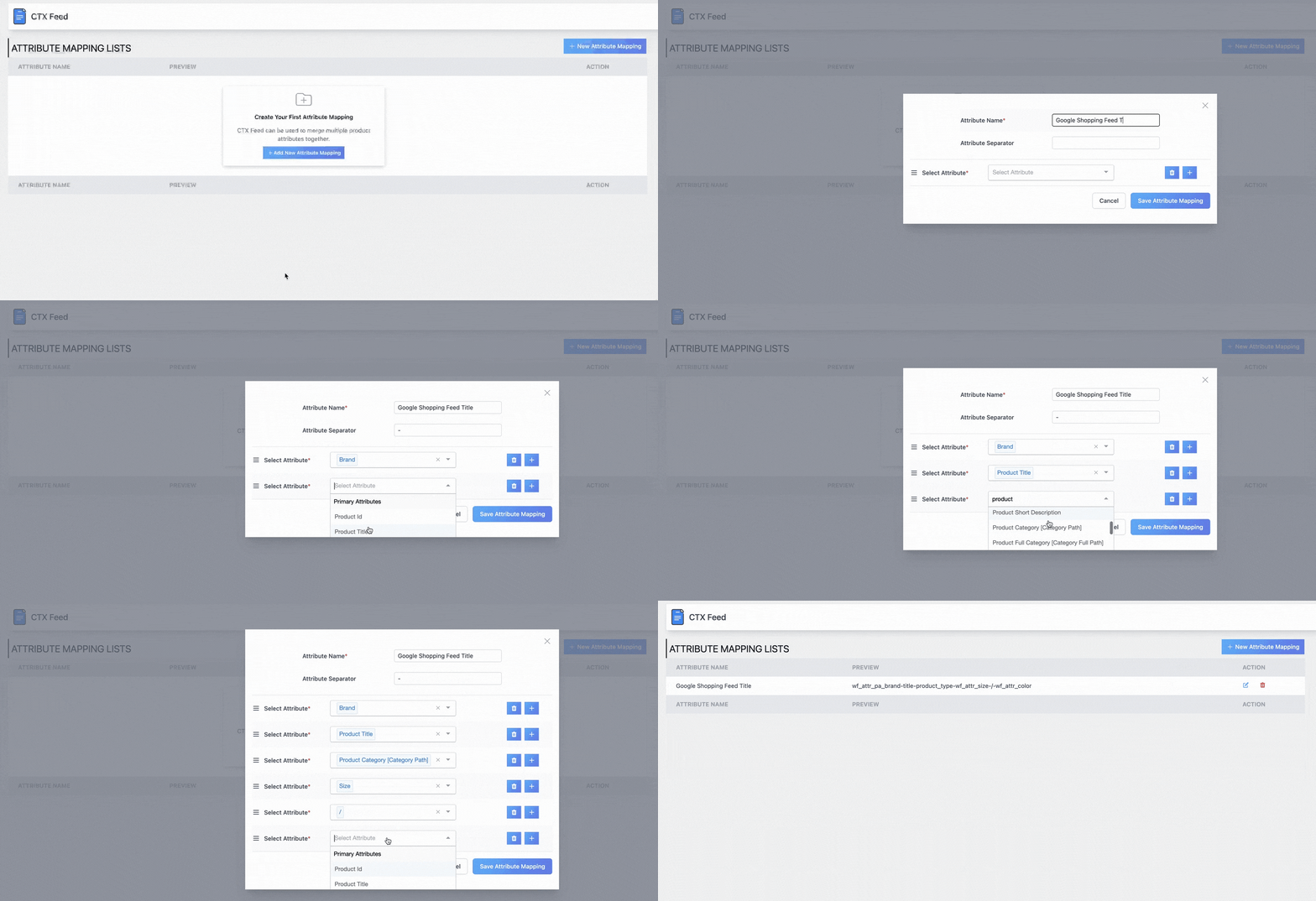
Every product in your WooCommerce catalog then automatically receives a structured, keyword-rich, channel-optimised title.
No manual editing required per product. Conditional rules let you append season terms, occasion keywords, or size range indicators based on the product category.
Best Practice 4: Manage Seasonal Fashion Catalog Turnover Proactively
Fashion is the most seasonally volatile product category in ecommerce.
New collections launch every 8 to 12 weeks. End-of-season sales shift pricing across hundreds of SKUs overnight.
Products move from hero status to clearance within a single quarter.
If your feed management does not keep pace with this turnover, you end up in one of two situations.
You advertise products that are out of stock or discontinued, or you fail to get new arrivals into your feeds quickly enough to capitalise on peak demand.
The Fashion Feed Seasonal Calendar
| Season or Event | Months (UK/EU) | Feed Action Required |
| Spring/Summer launch | Jan-Feb | Add SS26 collection; exclude AW25 clearance |
| Valentine’s Day push | Late Jan | Create promo feed with gifting labels |
| Summer sale | Jun-Jul | Update sale prices; segment clearance feed |
| Back to School | Jul-Aug | Create back-to-school category feed |
| Autumn/Winter launch | Aug-Sep | Add AW26 collection; update taxonomy |
| Black Friday and Cyber Monday | Nov | Update prices hourly; segment promotional feed |
| Christmas gifting | Oct-Dec | Create gifts feed with price ranges |
| January sales | Jan | Mass price updates; clearance feed activation |
How to Handle Seasonal Feed Transitions in CTX Feed?
- Use CTX Feed’s custom_label fields to tag products by season (for example, custom_label_0 = ‘SS26’, custom_label_1 = ‘clearance’)
- Create filter rules to automatically exclude products tagged as ‘end-of-season’ once stock falls below a threshold
- Build separate promotional feeds for sale events with sale_price populated from WooCommerce sale price fields
- Use the availability filter to auto-exclude products marked as ‘discontinued’ in WooCommerce
- Set CTX Feed to auto-sync every 1 to 2 hours during peak sale events like Black Friday to keep pricing accurate
Critical Warning: Never let a summer collection feed run into autumn without updating it. Advertising sold-out or irrelevant seasonal products is one of the top causes of Google Merchant Center account-level quality warnings for fashion stores.
Best Practice 5: Standardise Size Data Across All Markets
Size is one of the most searched attributes in fashion and one of the most inconsistently handled in product feeds.
A ‘Medium’ in one brand is a size 12 in another. UK sizes differ from EU and US sizes. Plus size, petite, and tall ranges follow completely different numbering conventions.
If your feed sends inconsistent or ambiguous size data, two things happen.
First, shoppers searching for specific sizes cannot find your products. Second, those who find your products and order the wrong size return them.
This damages your seller ratings and increases operational costs.
Why Consistent Size Data Reduces Fashion Return Rates?
Poor sizing information in your product feed is one of the leading causes of returns in fashion ecommerce.
When shoppers cannot see accurate size information in the ad or on the product page, they guess. They return.
Standardised size data in your WooCommerce fashion feed directly reduces return rates and improves your seller reputation across Google, Meta, and marketplace channels.
Size Standardisation Rules for Fashion Product Feeds
| Size Format | Best Practice for Feed | Example |
| Clothing (UK) | Use UK numeric sizing where possible | 8, 10, 12, 14, 16 |
| Clothing (EU market) | Include EU size in title or use EU values | 34, 36, 38, 40, 42 |
| Clothing (letter sizing) | Spell out in full for clarity | Small, Medium, Large, X-Large |
| Shoes (UK) | Use UK numeric with half-sizes | 5, 5.5, 6, 6.5, 7 |
| Shoes (EU market) | Submit EU sizing in size field | 38, 39, 40, 41 |
| Jeans and Trousers | W x L format | 30W x 32L, 32W x 30L |
| Plus size | Use ‘Plus’ prefix or numeric range | Plus 18, Plus 20, 18W |
| Petite and Tall | Include in size field and product title | Petite 10, Tall 14 |
How CTX Feed Manages Fashion Size Standardisation?
CTX Feed lets you map your WooCommerce size attributes to a standardised output format in your feed. If your store uses custom size labels that differ from Google’s expected format, you can apply string replacement rules or static mapping tables within CTX Feed’s rule engine.
The output normalises automatically without changing your actual WooCommerce product data.
CTX Feed Tip: Create a dedicated ‘size_type’ attribute mapping in CTX Feed to flag plus-size, petite, and tall ranges. This unlocks Google Shopping’s size type filters, helping size-conscious shoppers find your products faster and reducing return rates.
Best Practice 6: Optimise Fashion Product Images for Every Channel
In fashion ecommerce, the product image is not just a supporting asset. It is the primary purchase trigger.
A shopper browsing Google Shopping decides whether to click in under two seconds. That decision is driven almost entirely by the image quality, background, and styling.
Different channels have different image norms and technical requirements.
Getting this right across Google, Meta, TikTok, and Pinterest is one of the highest-leverage improvements you can make to CTR without changing your bids or budget.
Fashion Product Image Best Practices by Channel
| Channel | Recommended Image Type | Technical Spec | Fashion-Specific Tip |
| Google Shopping | Model shot on white or light background | Min 800x800px; 1000×1000 ideal | Avoid text overlays; show full garment clearly |
| Meta and Instagram | Lifestyle or editorial image | 1:1 square or 4:5 portrait | Show product in context; include model and setting |
| TikTok Shop | Front-facing model shot with movement | 9:16 vertical video preferred | Dynamic content outperforms static; show fit in motion |
| Aspirational lifestyle imagery | 2:3 vertical at 1000x1500px | Show full outfit styled; rich visual storytelling | |
| Bing Shopping | Same as Google Shopping | Min 800x800px | White background; garment centred in frame |
Common Fashion Image Mistakes That Cause Feed Disapprovals
- Using mannequin images for children’s clothing. Google requires real child models or flat lays.
- Adding promotional text overlays such as ‘SALE’ or ‘20% OFF’ to the primary image_link. This causes disapprovals across all channels.
- Submitting images below 100x100px or under 16KB total file size. Google Merchant Center auto-rejects these.
- Showing the wrong colour variant in the main image. If your feed says ‘Red’ but the image shows ‘Blue’, Google will flag the item.
- Using the same image across all colour variants. Each colour should ideally have its own variant-specific image.
How CTX Feed Manages Variant-Specific Fashion Image Mapping
CTX Feed supports both the primary image_link field and up to ten additional_image_link fields per product.
![10 Proven Best Practices for Managing Product Feeds in Fashion [2026] - image requerments](https://webappick.com/wp-content/uploads/2026/04/image-requerments--1024x371.png "10 Proven Best Practices for Managing Product Feeds in Fashion [2026]")
For fashion variable products, you can map variant-specific images so that the Red variant shows the red product image and the Blue variant shows the blue product image.
This happens automatically from your WooCommerce gallery.
Variant-specific image mapping is critical for reducing disapprovals caused by image-attribute mismatches.
It also significantly improves CTR by showing shoppers exactly the colour variant they searched for.
Best Practice 7: Keep Pricing and Availability Data Perfectly Accurate
Fashion ecommerce has some of the highest pricing volatility of any product category.
Flash sales run for 24 hours. End-of-season discounts change weekly. Stock sells out on popular sizes within hours of a new drop. Promotional codes change the effective price daily.
Google Merchant Center compares the price and availability in your feed against the actual data on your product pages. Any discrepancy, even a single penny difference in price, can trigger a disapproval.
In fashion, where prices move constantly, feed accuracy requires active management.
The Real Cost of Inaccurate Fashion Feed Data
| Data Error Type | Consequence | How Quickly It Happens in Fashion |
| Price mismatch (feed vs. site) | Item disapproval; wasted click spend | Can happen within hours of a sale going live |
| Out-of-stock item still in feed | Shoppers click and find unavailable product | Happens on popular sizes within minutes |
| Sale price not reflected in feed | Shoppers see higher price in ad than on site | Every sale event without hourly sync |
| Wrong currency in feed | Channel-level disapproval across all products | During market expansion if feed not updated |
| Discontinued product still active | Budget wasted on unbuyable items | End of each season if feed not cleaned |
How CTX Feed Keeps Your Fashion Feed Accurate in Real Time?
CTX Feed supports automatic feed refresh at intervals as frequent as every hour.
When a sale goes live in WooCommerce and updates prices across hundreds of SKUs, the next scheduled CTX Feed sync propagates every change to Google, Meta, TikTok, and any other connected channel automatically.
For fashion stores running daily or weekly promotional events, this real-time synchronisation is not optional. It is the difference between a profitable campaign and an account full of disapprovals.
Do not rely on the default 24-hour feed refresh for fashion stores with active promotions. During sale events, set CTX Feed to sync every 1 hour. On Black Friday and other peak sale days, push feeds manually after each major price update to ensure zero lag between your site and your live ads.
Best Practice 8: Build Separate Feeds for Different Fashion Segments
Not all fashion products should be advertised the same way.
Your bestselling hero pieces deserve different treatment than end-of-season clearance. New arrivals need their own visibility strategy.
High-margin accessories and low-margin basics require different bidding approaches.
Sending a single flat feed covering your entire fashion catalog forces Google’s algorithm to figure out your product hierarchy on its own. That takes time and budget.
Feed segmentation gives the algorithm the signals it needs to bid correctly from the start.
Why Feed Segmentation Improves Fashion Ecommerce ROAS?
When you submit one unsegmented feed, Google’s Smart Bidding algorithm treats all products equally at first. It burns budget learning which SKUs convert.
Segmented feeds with custom labels give Google the performance signals it needs on day one. This means less wasted spend and faster ROAS improvement across your fashion catalog.
Fashion Feed Segmentation Strategy with Custom Labels
| Feed Segment | Include | Custom Label Value | Bidding Strategy |
| New Arrivals | Products added in last 14 days | new_arrival | Aggressive – maximise early visibility |
| Hero Products | Top 20% by revenue or conversion rate | hero | Target ROAS – protect margin |
| Seasonal Sale | Products with active sale price | sale | Max conversions during event |
| High Margin | Products with margin above 40% | high_margin | Target ROAS – prioritise profitability |
| Clearance | End-of-season, stock below 5 units | clearance | Minimal spend – volume exit |
| Premium and Designer | Products above GBP 100 price point | premium | Brand awareness plus conversion |
| Basics and Essentials | Core staples with stable demand | basics | Efficient ROAS – low bid |
How CTX Feed Enables Fashion Feed Segmentation?
CTX Feed’s filter and rule engine lets you create all of these segment feeds from a single WooCommerce catalog.
Use custom_label_0 through custom_label_4 to tag products with their segment values. Then build a separate CTX Feed configuration for each segment with the appropriate filter rules applied.
In Google Ads, create separate asset groups or campaign structures for each custom label. This gives your bidding algorithm the clean segmentation signals it needs to allocate budget intelligently across your fashion catalog.
Power Move: Combine CTX Feed’s custom_label rules with Google Ads Smart Bidding. Tag your top 100 SKUs as ‘hero’, set a higher Target ROAS for that segment, and let the algorithm prioritise budget toward your most profitable products automatically.
Best Practice 9: Optimise Your Fashion Feed for Google’s Shopping Graph and AI-Powered Search
Google’s Shopping ecosystem is rapidly moving toward AI-powered discovery. Google’s Shopping Graph is a real-time dataset of over 35 billion product listings.
It uses machine learning to understand product style relationships, trend signals, and shopper intent at a semantic level.
For fashion specifically, Google’s AI is now capable of understanding that a shopper searching for ‘boho wedding guest dress summer 2026‘ is looking for a specific aesthetic, a specific occasion, and a specific season.
It surfaces products whose feed data best matches all three signals simultaneously.
What Optimising for AI Search Means for Fashion Brands?
Products that appear in Google AI Overviews and Shopping Graph panels share three qualities: complete feed data, semantically rich product descriptions, and accurate structured identifiers like GTIN and brand.
For fashion brands, this means feed data quality is no longer just a compliance requirement. It is a competitive advantage in AI-powered search.
What Fashion Feeds Need for AI Search Visibility?
- Semantically rich descriptions: Describe the product’s fit, feel, occasion, and styling context in natural language. Not just a spec list.
- Trend-aligned title language: Include current fashion terminology such as ‘barrel leg’, ‘quiet luxury’, ‘dopamine dressing’, and ‘coastal grandmother’ where genuinely applicable.
- Complete attribute coverage: Every item needs colour, size, material, gender, age_group, and pattern. These are all Shopping Graph signals.
- Accurate GTIN data: GTINs allow Google to cross-reference your product against its knowledge graph, improving match accuracy for branded fashion items.
- product_type hierarchy: Use a multi-level value like ‘Women > Dresses > Midi Dresses > Floral’ to give Google a rich category signal beyond the Google_product_category field.
- Rich additional images: Submit front, back, detail, and lifestyle images via additional_image_link. Google’s AI selects the most contextually relevant image for each placement.
How CTX Feed Prepares Fashion Feeds for AI-Powered Search
CTX Feed lets you build complex description fields that draw from multiple WooCommerce data sources. It combines short descriptions, custom fields, attribute values, and product tags into a rich, semantically dense text block.
You can also build multi-level product_type hierarchies using WooCommerce category data combined with static text rules.
This level of data richness is precisely what Google’s Shopping Graph rewards.
It increasingly separates fashion brands that dominate AI-powered shopping surfaces from those that disappear into irrelevance.
Best Practice 10: Monitor Fashion Feed Health and Fix Disapprovals Fast
Even perfectly configured fashion feeds develop problems over time. Variants go out of stock. Seasonal price updates introduce mismatches.
New product uploads miss required attributes. A supplier changes a GTIN. Each issue can trigger disapprovals in Google Merchant Center.
Every disapproval is an ad that is not running, a product that is not being seen, and revenue you are not earning. Proactive feed health monitoring is the practice that keeps all your other optimisation work functioning.
Why Disapproval Monitoring Is Critical for Fashion Feeds?
Fashion feeds are more susceptible to disapprovals than most other categories. Required apparel attributes, variant-level data, image standards, and high pricing volatility all create more opportunities for errors.
A single missed attribute update after a collection launch can cause hundreds of disapprovals overnight. Weekly feed health monitoring is the minimum standard for any fashion store running shopping ads.
Fashion Feed Health Metrics to Monitor Weekly
| Metric | Healthy Threshold | Action If Breached |
| Disapproval rate | Below 2% of total products | Audit disapproval reasons; fix within 48 hours |
| Missing required attributes | 0% | Identify source; fix in WooCommerce or CTX Feed rules |
| Price mismatch errors | 0 items | Increase CTX Feed sync frequency immediately |
| Out-of-stock rate in active feed | Below 5% of submitted products | Activate exclusion filter for out-of-stock variants |
| Image quality warnings | 0 items | Replace images; check size and format compliance |
| Feed submission errors | 0 errors | Check CTX Feed logs; verify channel connection |
| New arrivals indexed within | Under 24 hours of upload | Trigger manual feed refresh on new product upload |
Common Fashion Feed Disapproval Reasons and How to Fix Them
- Missing colour attribute: Map the ‘pa_colour’ WooCommerce attribute to the ‘colour’ feed field in CTX Feed. Set a fallback value for products with no colour data.
- Missing size attribute for apparel: Map ‘pa_size’ to the ‘size’ feed field. For one-size products, use ‘One Size’ as a fallback value.
- Price mismatch: Increase CTX Feed sync frequency. Check WooCommerce sale price schedules and make sure sale end dates are accurate.
- Image too small: Set a minimum image dimension filter in CTX Feed to exclude products whose featured image is below 800x800px.
- Prohibited promotional text in image: Remove text overlays from product images. Never include ‘SALE’, ‘FREE’, or percentage discount text in the image_link image.
- Incorrect or missing GTIN: For branded products, source GTINs from the brand or a GTIN database. Map to the ‘gtin’ field in CTX Feed. For unbranded products, set ‘identifier_exists’ to ‘no’.
How CTX Feed Supports Ongoing Fashion Feed Health?
CTX Feed includes built-in feed diagnostics that highlight missing or invalid attribute values before your feed is submitted to a channel.
This pre-submission validation layer catches the most common fashion feed errors including missing colour, missing size, empty title, and no image, before they turn into Merchant Center disapprovals.
Combined with CTX Feed’s auto-sync scheduling, you get a feed that is both proactively monitored and continuously refreshed. These are the two pillars of healthy, high-performing fashion product feed management.
How CTX Feed Solves the Unique Challenges of Fashion Feed Management
CTX Feed is the WooCommerce Product Feed Manager Plugin by WebAppick.
For WooCommerce fashion stores, it is the most complete native solution available. It handles every complexity covered in this guide from a single dashboard inside WordPress.
CTX Feed Features Built for Fashion Ecommerce
| Fashion Challenge | CTX Feed Solution |
| Variant explosion (size x colour) | Native variable product expansion – auto-creates one feed row per variant |
| Mandatory apparel attributes | Pre-mapped templates for colour, size, gender, age_group, and item_group_id |
| Seasonal catalog turnover | Custom label rules and filter logic for season tagging and auto-exclusion |
| Multi-channel distribution | 220+ channel templates for Google, Meta, TikTok, Pinterest, Bing, ASOS, Zalando, and more |
| Real-time price and stock sync | Automated feed refresh up to every hour |
| Feed segmentation strategy | Multiple feed configurations from one catalog using the custom_label rule engine |
| Variant-specific image mapping | Maps WooCommerce variant gallery images to the correct variant feed row |
| Google Product Taxonomy | Built-in category mapping interface with bulk mapping and fallback rules |
| Feed health monitoring | Pre-submission attribute validation and feed diagnostic tools |
Common Mistakes in Fashion Product Feed Management to Avoid
Even experienced WooCommerce store owners make these errors. Identifying and fixing them can unlock significant performance improvements almost immediately.
Mistake 1: Submitting Parent Products Instead of Variants
Sending one feed row per product instead of one per variant is the single most damaging fashion feed mistake. Google cannot match size-specific or colour-specific queries against parent-level entries.
Always expand WooCommerce variable products into individual variant using CTX Feed.
Mistake 2: Using Generic Top-Level Product Categories
Mapping all your dresses to ‘Apparel and Accessories’ instead of the correct deep taxonomy node severely limits auction eligibility.
Take the time to map every WooCommerce category to its most granular Google Product Taxonomy equivalent using CTX Feed’s category mapping interface.
Mistake 3: Ignoring Feed Sync Frequency During Sale Events
Running a 24-hour sync cycle during a Black Friday sale is a guaranteed way to generate price mismatch disapprovals.
Fashion stores with active promotions need hourly sync as a minimum.
CTX Feed supports this out of the box.
Mistake 4: Using the Same Feed for All Channels
Google Shopping, Meta, and TikTok have different audience intent and different content standards. A single feed optimised for Google will underperform on Meta and TikTok.
Use CTX Feed’s channel-specific templates to create independently optimised feeds for each platform.
Mistake 5: Skipping Variant-Specific Images
Showing the wrong colour variant image is one of the most common causes of fashion feed disapprovals and one of the easiest to fix.
CTX Feed automatically maps WooCommerce variant gallery images to each variant feed row. Enable this feature for every fashion feed you run.
Best Fashion Product Feed Management Tools in 2026
Here is how the leading product feed tools compare for fashion-specific ecommerce use cases:
| Tool | Fashion-Specific Strengths | WooCommerce Native? | Pricing Model |
| CTX Feed | Best variant handling; native WooCommerce; 220+ channels; no SaaS fees | Yes – WordPress plugin | One-time or Annual |
| DataFeedWatch | Strong rule engine; good multi-channel support; fashion title templates | Via API integration | Monthly SaaS per channel |
| Channable | Large catalog management; automation; feed rules for seasonal events | Via API integration | Monthly by SKU volume |
| Feedonomics | Enterprise managed service; best for high-SKU fashion brands | Via integration | Enterprise pricing |
| GoDataFeed | Good for US fashion brands; supports Shopify and WooCommerce | Via API integration | Monthly SaaS |
For WooCommerce fashion stores, CTX Feed’s native integration, zero per-channel fees, and deep variant handling make it the strongest choice at every price point.
You manage everything from inside WordPress with no data leaving your server and no SaaS subscriptions stacking up.
Frequently Asked Questions About Product Feeds in Fashion Ecommerce
What attributes are required for fashion product feeds in Google Shopping?
Google Shopping requires the following attributes for apparel and fashion products: title, description, link, image_link, price, availability, id, item_group_id (for variants), colour, size, gender, and age_group. For branded fashion items, GTIN is also required. Missing any of these fields on clothing or footwear will result in item disapprovals in Google Merchant Center.
How do I manage size and colour variants in a WooCommerce fashion product feed?
In WooCommerce, size and colour variants are created as variable products with product attributes. CTX Feed automatically expands these into individual feed rows. Each row carries its own item_group_id, size, colour, price, availability, and image. Enable ‘Include all variations’ in CTX Feed’s feed settings to ensure full variant coverage across your fashion catalog.
How often should a fashion ecommerce product feed be updated?
Fashion feeds should be updated at minimum every 6 to 12 hours for standard catalog management. During active sale events, promotional launches, or Black Friday, update every 1 hour. CTX Feed supports automated refresh at hourly intervals, ensuring pricing and availability data stays accurate even during high-velocity sale periods.
What is item_group_id and why is it important for fashion feeds?
item_group_id is a Google Shopping attribute that links all size and colour variants of the same base product together. Without it, Google treats each variant as a completely unrelated product. This makes it impossible to display size and colour selectors in Shopping ads, reduces eligibility for variant-matching, and lowers overall ad quality. CTX Feed automatically generates item_group_id values from WooCommerce parent product IDs.
How do I handle seasonal products in my fashion product feed?
Use CTX Feed’s custom_label fields to tag products by season such as SS26, AW26, clearance, or sale. Build separate feed configurations for each segment with appropriate filter rules. For example, exclude products tagged ‘AW25’ once the spring collection launches. Schedule automatic sync and use filter rules to auto-exclude out-of-stock seasonal items.
Can CTX Feed manage product feeds for luxury and premium fashion brands?
Yes. CTX Feed supports all WooCommerce product types and price points. For luxury fashion, you can create dedicated premium segments using custom_label rules, map to the correct Google Product Taxonomy nodes, include brand and GTIN data for Shopping Graph integration, and generate editorial-quality descriptions using WooCommerce custom fields.
How do I reduce return rates through product feed optimisation in fashion?
High return rates in fashion are often caused by poor size data, misleading images, or inaccurate colour descriptions in product feeds. To reduce returns: map size attributes to standardised values, ensure each colour variant has its own accurate product image, include size guide information in the description field, and use the size_type attribute (regular, plus, petite, tall) so shoppers can filter by the right fit.
What is the Google Shopping Graph and how does it affect fashion feeds?
Google’s Shopping Graph is a dynamic dataset of over 35 billion product listings used by Google’s AI to match products with search queries. For fashion, it interprets style, occasion, trend, and shopper intent signals simultaneously. Products with complete, accurate, and semantically rich feed data are more likely to appear in Shopping Graph results, AI Overviews, and Google’s Search Generative Experience (SGE) shopping panels.
Conclusion: Build Fashion Product Feeds That Win in 2026
Managing product feeds in fashion is not a set-and-forget task. It is an ongoing discipline that touches every part of your ecommerce operation.
From how you structure product data in WooCommerce, to how quickly your feeds sync during a flash sale, to how well your image strategy aligns with each channel’s best practices.
The 10 best practices in this guide give you a complete framework. Map every variant correctly. Use the right taxonomy. Write titles the way shoppers search.
Manage seasonality proactively. Standardise size data. Optimise images by channel. Keep pricing accurate. Segment your catalog. Prepare for AI-powered search. And monitor feed health continuously.
For WooCommerce fashion store owners, CTX Feed provides the most direct and cost-efficient path to implementing all 10 of these practices.
Its native variant handling, 130+ channel templates, dynamic rule engine, and hourly auto-sync give you everything you need to build a fashion feed that competes at the highest level without the complexity or cost of enterprise feed management platforms.
Fashion is a visual, emotional, and fast-moving category. Your product feeds should reflect that. Build them with the same care you give your collections.