%22%2F%3E%0A%3Cpath%20d%3D%22M59.8894%2016.6974C60.1689%2016.9331%2060.5416%2017.1216%2060.9142%2017.0745C61.5664%2017.0273%2061.8925%2016.6031%2061.6596%2015.7547C61.5198%2014.4349%2061.4267%2013.1623%2061.2869%2011.8425C61.1006%209.72149%2060.8211%207.55331%2060.5881%205.38512L60.1689%201.70863C60.0757%200.81307%2059.6099%200.294591%2058.7713%200.106053C58.4918%20-0.0353509%2058.2123%20-0.0353509%2057.9328%200.106053C57.7931%200.106053%2057.6999%200.106053%2057.6067%200.153187C56.5353%200.483129%2055.4172%200.81307%2054.3458%201.19015C53.5073%201.47295%2052.6222%201.75576%2051.7371%202.03857C50.2929%202.50991%2048.8488%203.02839%2047.4047%203.49974C46.4264%203.82967%2045.4016%204.1596%2044.3768%204.48952L44.3767%204.48956C43.6313%204.72523%2043.3518%205.24371%2043.6313%205.85646C43.7711%206.13927%2044.004%206.32781%2044.2369%206.46921C44.7028%206.79915%2045.2152%207.08196%2045.6811%207.4119C45.8674%207.55331%2046.0537%207.69471%2045.8208%208.02465C45.7276%208.21319%2045.5879%208.35459%2045.4481%208.54313L45.355%208.73167L44.5164%2010.0986L43.9108%2010.9941L43.3052%2011.8897L43.2121%2011.9839L42.1406%2013.5865L44.5867%2019.8706C45.5713%2022.1447%2048.6357%2026.5713%2052.552%2023.6277L53.9265%2022.2593L54.3458%2021.5523C54.3924%2021.458%2054.4856%2021.3637%2054.5321%2021.2694L54.5787%2021.2223C55.2309%2020.1854%2055.883%2019.1956%2056.5352%2018.2059L56.5353%2018.2057C57.0477%2017.4044%2057.5601%2016.6503%2058.0726%2015.849C58.2123%2015.6604%2058.3055%2015.6133%2058.4918%2015.7076C58.9577%2016.0375%2059.4235%2016.4146%2059.8894%2016.6974Z%22%20fill%3D%22%233D89D0%22%2F%3E%0A%3Cpath%20d%3D%22M28.0259%2022.0232C27.9793%2022.0703%2027.9793%2022.1175%2027.9327%2022.1646C27.9793%2022.1175%2028.0259%2022.0703%2028.0259%2022.0232Z%22%20fill%3D%22url(%23paint1_linear)%22%2F%3E%0A%3Cpath%20d%3D%22M53.9265%2022.3064C53.7402%2022.5892%2053.5538%2022.872%2053.3675%2023.202C53.0414%2023.7204%2052.7153%2024.1918%2052.3892%2024.7103C51.3178%2026.4071%2050.1531%2027.9625%2048.4295%2029.0938C46.9388%2030.0365%2045.4015%2030.6021%2043.6779%2030.8849C42.1872%2031.1206%2040.7896%2030.9791%2039.3921%2030.5549C37.6219%2030.0365%2036.038%2029.1409%2034.687%2027.8211C33.7088%2026.8784%2032.9634%2025.7944%2032.3578%2024.616C32.0317%2023.9561%2031.7988%2023.2491%2031.4727%2022.5421C31.0534%2021.5522%2030.1683%2019.2427%2030.1218%2019.1012C30.0752%2019.0541%2030.0752%2018.9598%2030.0286%2018.9127C29.9354%2018.7242%2029.8422%2018.5828%2029.7957%2018.3942C29.6559%2018.0172%2029.4696%2017.6401%2029.3298%2017.2159C29.2366%2017.0273%2029.1901%2016.8388%2029.0969%2016.6503C28.9571%2016.3674%2028.864%2016.0846%2028.7242%2015.7547C28.5845%2015.3776%2028.4447%2015.0005%2028.2584%2014.6235C28.1652%2014.3407%2028.0254%2014.0579%2027.9323%2013.775C27.9323%2013.7279%2027.9323%2013.7279%2027.8857%2013.6808C27.7925%2013.4922%2027.7459%2013.3037%2027.6528%2013.1152C27.4664%2012.5967%2027.2335%2012.1253%2027.0006%2011.6069C27.0006%2011.5597%2026.954%2011.5126%2026.9074%2011.4655C26.8142%2011.2769%2026.7211%2011.1355%2026.5813%2010.947C26.5347%2010.8998%2026.4882%2010.8527%2026.4882%2010.8056C26.4416%2010.7584%2026.395%2010.7113%2026.395%2010.6642C26.3484%2010.617%2026.3018%2010.5699%2026.2552%2010.5228C26.2086%2010.4756%2026.2086%2010.4285%2026.1621%2010.4285L26.1155%2010.3814C26.0689%2010.3342%2026.0223%2010.2871%2026.0223%2010.2871C25.9291%2010.1928%2025.8826%2010.1457%2025.7894%2010.0514C25.7428%2010.0043%2025.6962%209.95715%2025.6496%209.95715C25.603%209.91002%2025.5565%209.91002%2025.5099%209.86288C25.4167%209.81575%2025.3701%209.76861%2025.277%209.67435C25.2304%209.62721%2025.1838%209.62721%2025.1372%209.58008C25.0906%209.53294%2025.044%209.53294%2024.9974%209.48581C24.9509%209.48581%2024.9043%209.43867%2024.9043%209.43867C24.8577%209.39154%2024.8111%209.39154%2024.7645%209.3444C24.7179%209.3444%2024.7179%209.29727%2024.6714%209.29727C24.5782%209.25014%2024.485%209.203%2024.3918%209.15587C22.9943%208.59025%2021.1775%208.77879%2020.1992%209.10873C19.2675%209.43867%2018.2893%2010.3342%2018.2427%2010.4285C18.6619%209.72148%2019.0812%208.96733%2019.547%208.26031C20.1526%207.36475%2020.7117%206.4692%2021.3638%205.62078C22.3887%204.63095%2023.4602%203.78253%2024.6714%203.07551C27.0006%201.75575%2029.4696%201.52007%2032.0317%201.89715C33.3361%202.08569%2034.5939%202.60417%2035.7585%203.35832C36.9231%204.06534%2037.9014%204.96089%2038.7399%206.04499C39.2989%206.79914%2039.8114%207.60043%2040.1374%208.49598C40.6033%209.67435%2041.1623%2010.8056%2041.5816%2011.9839C41.7679%2012.5496%2042.0008%2013.068%2042.2338%2013.6336C42.2338%2013.6336%2042.2338%2013.6336%2042.2338%2013.6808V13.7279L45.0288%2019.8554C45.4015%2020.8452%2045.9139%2021.6465%2046.7059%2022.3535C47.2183%2022.872%2047.8705%2023.1548%2048.5227%2023.3905C48.5693%2023.3905%2048.6158%2023.4376%2048.6624%2023.4376C49.7805%2023.7676%2051.2246%2023.3905%2052.3426%2023.0134C53.088%2022.6835%2053.6936%2022.4007%2053.9265%2022.3064Z%22%20fill%3D%22url(%23paint2_linear)%22%2F%3E%0A%3Cpath%20d%3D%22M28.0255%2022.0238C27.9789%2022.0709%2027.9789%2022.118%2027.9324%2022.1652C27.9324%2022.1652%2027.9324%2022.1652%2027.9324%2022.2123C27.7926%2022.448%2027.6063%2022.6836%2027.4665%2022.9664C25.8826%2025.8416%2024.4385%2028.1512%2021.6434%2029.6595C19.3142%2030.9793%2016.8452%2031.215%2014.2831%2030.8379C14.1433%2030.8379%2014.0501%2030.7908%2013.9104%2030.7908C12.7458%2030.6022%2011.5812%2030.0838%2010.4165%2029.2825C8.78607%2028.1512%207.52829%2026.5958%206.64318%2024.8047L6.17733%2023.9091L5.01272%2021.5524L0.726927%2012.6911C0.447419%2012.0784%200.214496%2011.4656%200.121327%2010.8529C-0.437689%207.8834%200.95985%204.77252%203.80151%203.35849C5.43198%202.51007%207.24878%202.4158%208.87924%202.93428C10.6029%203.45276%2012.1402%204.67825%2013.0253%206.46937L13.1184%206.6579L14.7489%209.95732C14.7955%2010.0516%2014.7955%2010.1459%2014.8421%2010.2401C15.075%2010.8529%2015.8204%2012.4083%2016.426%2013.5867C16.4725%2013.6809%2016.5191%2013.7752%2016.5657%2013.8223C16.6123%2013.9638%2016.7055%2014.1052%2016.752%2014.1994C16.7986%2014.2937%2016.8452%2014.3408%2016.8452%2014.4351C16.8452%2014.4822%2016.8918%2014.4822%2016.8918%2014.5294C16.9384%2014.5765%2016.9384%2014.6708%2016.985%2014.7179C16.985%2014.765%2017.0316%2014.765%2017.0316%2014.8122C17.0316%2014.8593%2017.0781%2014.8593%2017.0781%2014.9064C17.0781%2014.9536%2017.1247%2015.0007%2017.1247%2015.0478C17.1247%2015.095%2017.1713%2015.095%2017.1713%2015.1421C17.3111%2015.4249%2017.4042%2015.7549%2017.544%2016.0377C17.6372%2016.2262%2017.6837%2016.4147%2017.7769%2016.6504C17.9632%2017.1689%2018.1962%2017.6402%2018.3825%2018.1587C18.5223%2018.4415%2018.6154%2018.7715%2018.7552%2019.0543C18.8018%2019.1485%2018.8484%2019.29%2018.8949%2019.3842C18.9881%2019.5728%2019.0347%2019.7613%2019.1279%2019.9498C19.3608%2020.5154%2019.5937%2021.0811%2019.9664%2021.5995C20.1993%2021.8823%2020.3857%2022.1652%2020.6652%2022.4008C22.3888%2023.9563%2024.9975%2023.862%2028.0255%2022.0238Z%22%20fill%3D%22url(%23paint3_linear)%22%2F%3E%0A%3Cpath%20d%3D%22M68.0888%2024.8694L68%207.88696H71.9963L71.8187%2018.4448L76.8806%207.88696H80.6548L81.3209%2018.3999L85.5392%207.88696H89.713L82.4754%2024.8694H78.1683L77.5466%2013.9072L72.3959%2024.8694H68.0888Z%22%20fill%3D%22%230D5293%22%2F%3E%0A%3Cpath%20d%3D%22M92.7771%2025.1385C89.2693%2025.1385%2086.7383%2022.6675%2086.7383%2019.2081C86.7383%2015.3893%2089.8021%2012.1545%2093.4431%2012.1545C96.6402%2012.1545%2098.8603%2014.4458%2098.8603%2017.7704C98.8603%2018.5342%2098.8159%2019.1182%2098.7271%2019.6124H90.4237C90.6457%2021.0501%2091.7114%2022.0385%2093.2211%2022.0385C94.1536%2022.0385%2094.9528%2021.724%2095.5301%2021.095L97.617%2023.4762C96.0185%2024.6443%2094.5976%2025.1385%2092.7771%2025.1385ZM90.6457%2017.411H95.4857C95.3081%2016.0632%2094.4644%2015.2545%2093.2211%2015.2545C92.0666%2015.2096%2091.0898%2016.0632%2090.6457%2017.411Z%22%20fill%3D%22%230D5293%22%2F%3E%0A%3Cpath%20d%3D%22M105.965%2024.9589C104.411%2024.9589%20103.167%2024.24%20102.368%2022.8473L101.924%2024.869H98.1499L101.791%207.52717L105.698%206.89819L104.322%2013.5923C105.166%2012.7836%20106.32%2012.2894%20107.519%2012.2894C110.139%2012.2894%20112.181%2014.8054%20112.181%2018.0401C112.226%2021.814%20109.428%2024.9589%20105.965%2024.9589ZM103.789%2016.3778L102.945%2020.4212C103.478%2021.185%20104.366%2021.6792%20105.388%2021.6792C107.208%2021.6792%20108.54%2020.2415%20108.54%2018.3097C108.54%2016.6474%20107.43%2015.4793%20105.92%2015.4793C105.077%2015.4793%20104.411%2015.7937%20103.789%2016.3778Z%22%20fill%3D%22%230D5293%22%2F%3E%0A%3Cpath%20d%3D%22M120.44%207.88696H125.058L127.899%2024.8694H123.725L123.193%2020.8259H117.154L114.978%2024.8694H110.582L120.44%207.88696ZM122.704%2017.5912L121.949%2011.9304L118.886%2017.5463H122.704V17.5912Z%22%20fill%3D%22%230D5293%22%2F%3E%0A%3Cpath%20d%3D%22M131.23%2012.3347H135.004L134.782%2013.5927C135.626%2012.7391%20136.736%2012.2449%20137.935%2012.2449C140.555%2012.2449%20142.597%2014.7608%20142.597%2017.9955C142.597%2021.8143%20139.8%2024.9592%20136.336%2024.9592C134.782%2024.9592%20133.539%2024.2853%20132.828%2022.9824L131.274%2030.0809H127.456L131.23%2012.3347ZM134.205%2016.3332L133.317%2020.5114C133.85%2021.2303%20134.738%2021.6796%20135.715%2021.6796C137.535%2021.6796%20138.867%2020.2419%20138.867%2018.31C138.867%2016.6477%20137.757%2015.4796%20136.247%2015.4796C135.493%2015.4796%20134.827%2015.7492%20134.205%2016.3332Z%22%20fill%3D%22%230D5293%22%2F%3E%0A%3Cpath%20d%3D%22M144.595%2012.3347H148.369L148.147%2013.5927C148.99%2012.7391%20150.101%2012.2449%20151.299%2012.2449C153.919%2012.2449%20155.962%2014.7608%20155.962%2017.9955C155.962%2021.8143%20153.164%2024.9592%20149.701%2024.9592C148.147%2024.9592%20146.904%2024.2853%20146.193%2022.9824L144.683%2030.0809H140.865L144.595%2012.3347ZM147.57%2016.3332L146.682%2020.5114C147.214%2021.2303%20148.102%2021.6796%20149.079%2021.6796C150.9%2021.6796%20152.232%2020.2419%20152.232%2018.31C152.232%2016.6477%20151.122%2015.4796%20149.612%2015.4796C148.857%2015.4796%20148.191%2015.7492%20147.57%2016.3332Z%22%20fill%3D%22%230D5293%22%2F%3E%0A%3Cpath%20d%3D%22M159.115%2024.8694H155.296L158.005%2012.3347H161.824L159.115%2024.8694ZM158.449%208.47099C158.449%207.1681%20159.559%206%20160.847%206C161.912%206%20162.8%206.85361%20162.8%207.93186C162.8%209.27967%20161.69%2010.4029%20160.358%2010.4029C159.248%2010.4029%20158.449%209.54924%20158.449%208.47099Z%22%20fill%3D%22%230D5293%22%2F%3E%0A%3Cpath%20d%3D%22M169.727%2020.6909L171.592%2023.1619C170.304%2024.4648%20168.572%2025.1387%20166.752%2025.1387C163.466%2025.1387%20161.068%2022.7126%20161.068%2019.388C161.068%2015.3446%20164.088%2012.1099%20167.862%2012.1099C170.082%2012.1099%20171.947%2013.0983%20173.013%2014.7606L170.304%2017.0069C169.727%2015.9736%20168.927%2015.4794%20167.773%2015.4794C166.13%2015.4794%20164.842%2017.0518%20164.842%2019.0286C164.842%2020.6909%20165.819%2021.6793%20167.329%2021.6793C168.261%2021.7243%20169.016%2021.4098%20169.727%2020.6909Z%22%20fill%3D%22%230D5293%22%2F%3E%0A%3Cpath%20d%3D%22M175.722%207.52717L179.629%206.89819L177.365%2017.6807L182.426%2012.3344H187L180.517%2018.6691L184.691%2024.869H180.162L177.009%2019.5676L175.899%2024.869H172.081L175.722%207.52717Z%22%20fill%3D%22%230D5293%22%2F%3E%0A%3Cdefs%3E%0A%3ClinearGradient%20id%3D%22paint0_linear%22%20x1%3D%2223.1831%22%20y1%3D%2224.7007%22%20x2%3D%2223.3049%22%20y2%3D%228.44851%22%20gradientUnits%3D%22userSpaceOnUse%22%3E%0A%3Cstop%20stop-color%3D%22%23327ACD%22%2F%3E%0A%3Cstop%20offset%3D%221%22%20stop-color%3D%22%234696D2%22%2F%3E%0A%3C%2FlinearGradient%3E%0A%3ClinearGradient%20id%3D%22paint1_linear%22%20x1%3D%2227.9436%22%20y1%3D%2222.0876%22%20x2%3D%2228.0428%22%20y2%3D%2222.0876%22%20gradientUnits%3D%22userSpaceOnUse%22%3E%0A%3Cstop%20offset%3D%220.2029%22%20stop-color%3D%22%234C51BF%22%20stop-opacity%3D%220.9%22%2F%3E%0A%3Cstop%20offset%3D%221%22%20stop-color%3D%22%235A67D8%22%20stop-opacity%3D%220.9%22%2F%3E%0A%3C%2FlinearGradient%3E%0A%3ClinearGradient%20id%3D%22paint2_linear%22%20x1%3D%2232.4583%22%20y1%3D%222.22148%22%20x2%3D%2239.8371%22%20y2%3D%2230.0298%22%20gradientUnits%3D%22userSpaceOnUse%22%3E%0A%3Cstop%20offset%3D%220.3367%22%20stop-color%3D%22%2342B9FF%22%2F%3E%0A%3Cstop%20offset%3D%220.7818%22%20stop-color%3D%22%233B97E1%22%2F%3E%0A%3Cstop%20offset%3D%221%22%20stop-color%3D%22%233784D1%22%2F%3E%0A%3C%2FlinearGradient%3E%0A%3ClinearGradient%20id%3D%22paint3_linear%22%20x1%3D%2211.252%22%20y1%3D%220.972585%22%20x2%3D%2215.8771%22%20y2%3D%2225.7529%22%20gradientUnits%3D%22userSpaceOnUse%22%3E%0A%3Cstop%20offset%3D%220.3367%22%20stop-color%3D%22%2342B9FF%22%2F%3E%0A%3Cstop%20offset%3D%220.7818%22%20stop-color%3D%22%233B97E1%22%2F%3E%0A%3Cstop%20offset%3D%221%22%20stop-color%3D%22%233784D1%22%2F%3E%0A%3C%2FlinearGradient%3E%0A%3C%2Fdefs%3E%0A%3C%2Fsvg%3E%0A)


Facebook Ads for Ecommerce Success: Strategies, Tips, and Best Practices
 Muntaha Karim
 The average Facebook conversion rate for ecommerce ads is 3.3%. Most online stores never beat it because they rely on generic campaign setups instead of tested, intent-driven strategies.
This guide covers the Facebook ad strategies that actually move ecommerce sales from Dynamic Product Ads and retargeting funnels to bid tactics, creative approaches, and seasonal campaigns. Whether you are just starting or trying to fix a campaign that is not converting, these strategies apply directly.
13 Facebook Ad Strategies for Ecommerce Success
1. Use Dynamic Product Ads (DPA)
Dynamic Product Ads (DPAs) are the highest-ROI ad format for most ecommerce stores. Instead of building individual ads for each product, DPAs pull product details automatically from your catalog and show each shopper the items most relevant to their browsing behavior.
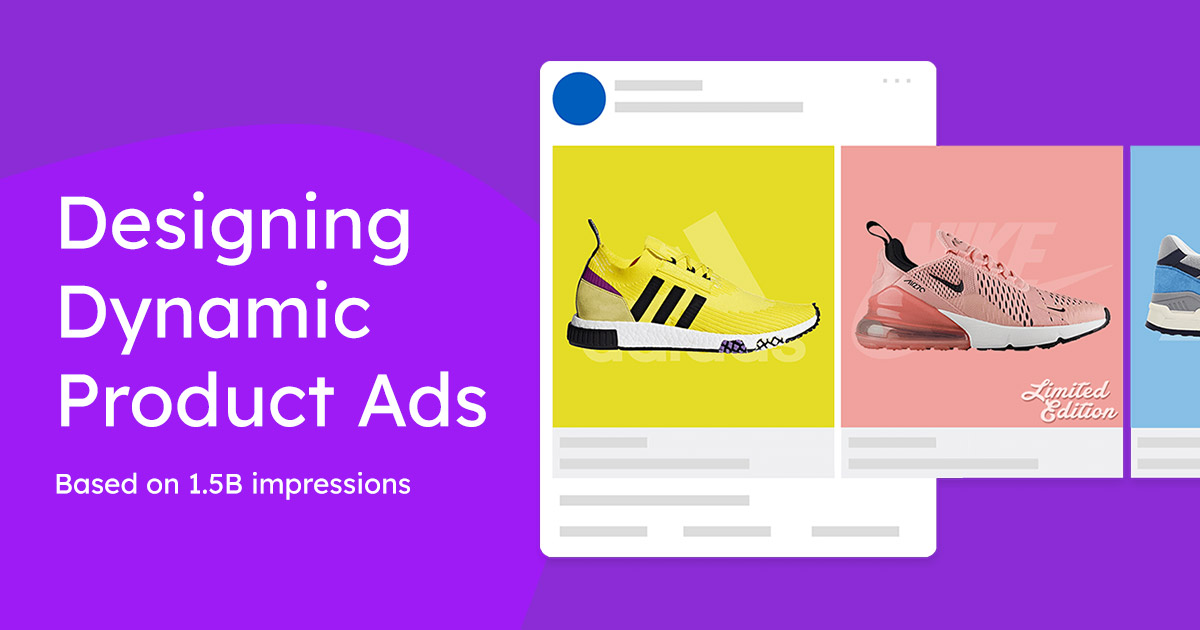
This makes DPAs especially effective for retargeting. A shopper who viewed a product or added it to their cart and left will see that exact product in their next Facebook session. The ads update automatically, so you do not need to rebuild campaigns when your inventory changes.
Setting up DPAs with CTX Feed (WooCommerce):
If you run a WooCommerce store, CTX Feed is one of the most widely used plugins for generating Facebook-ready product feeds. It automates feed creation from your existing product data, which removes the manual work of formatting product attributes for Facebook Catalog.
Setup takes three steps:
- Install CTX Feed and create a Facebook Dynamic Product Ads feed.
- Generate the feed file and upload it to Facebook Ads Manager to create a product catalog.
- Define your target audience and launch your DPA campaign.
Tip: Target users who added items to their cart but did not check out. DPAs showing those specific products are one of the most effective abandoned cart recovery tactics available on Facebook.
2. Build a Facebook Ads Funnel for Ecommerce
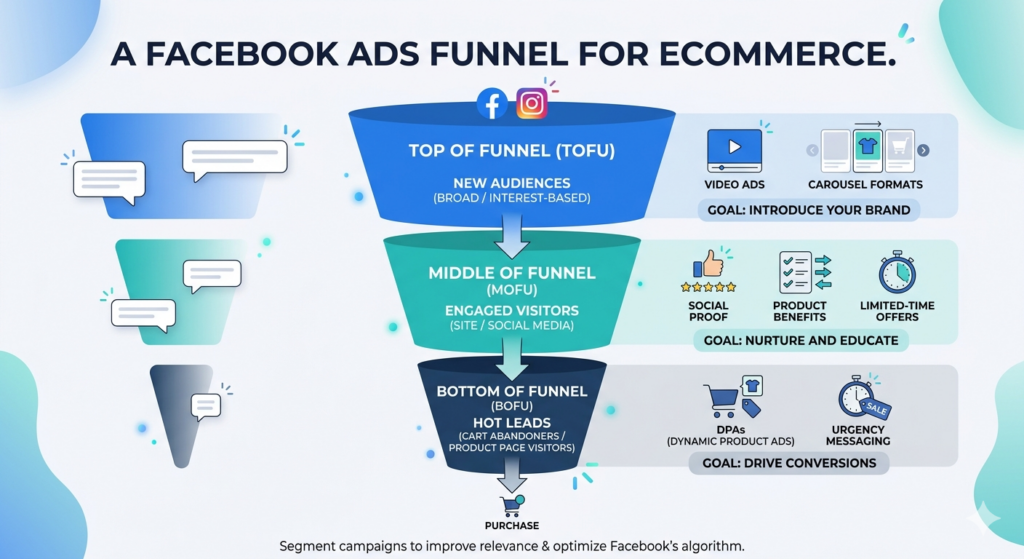
A Facebook ads funnel for ecommerce moves shoppers from awareness to purchase across multiple ad touch points. Running all ads to the same audience with the same message is one of the most common reasons campaigns underperform.
A simple ecommerce funnel on Facebook has three stages:
- Top of funnel (TOFU): Broad or interest-based campaigns to introduce your brand to new audiences. Video ads and carousel formats work well here.
- Middle of funnel (MOFU): Retargeting campaigns for people who have visited your site or engaged with your content. Show social proof, product benefits, or limited-time offers.
- Bottom of funnel (BOFU): Highly targeted conversion campaigns for cart abandoners or product-page visitors. Use DPAs with urgency messaging.
Segmenting your campaigns this way improves relevance at every stage and gives Facebook’s algorithm better data to optimize each objective independently.
3. Run Retargeting Campaigns
Most shoppers do not convert on their first visit. Retargeting lets you re-engage visitors who browsed your store, viewed specific products, or abandoned a cart, showing them relevant ads on Facebook after they leave.
Retargeted ads consistently outperform cold audience ads in click-through rates. The key is matching the ad message to where the shopper dropped off.
How to run ecommerce retargeting on Facebook:
- Set up a Facebook Pixel on your site to track product views, add-to-cart events, and purchase completions.
- Create custom audiences for each stage: product viewers, cart abandoners, and checkout abandoners.
- Pair your retargeting campaigns with DPAs to show each user the specific products they viewed.
- For cart abandoners, use urgency copy (“Still thinking it over?”) or offer a time-limited incentive.
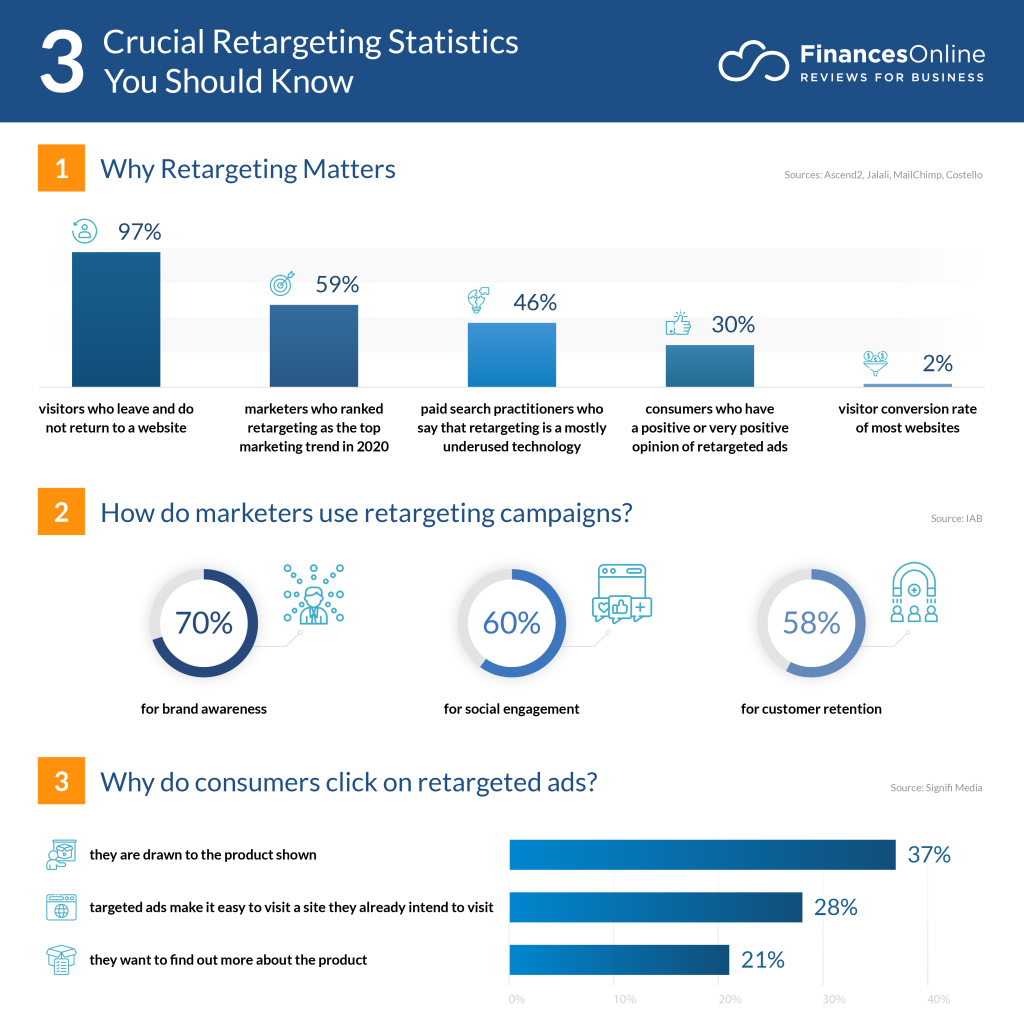
Facebook ads for ecommerce abandoned cart campaigns are among the highest-converting retargeting setups available. Most abandoned cart shoppers are still in a buying mindset and just need a direct reminder.
4. Exclude Existing Customers from Cold Campaigns
Showing the same acquisition ad to someone who already purchased wastes budget and can create a frustrating experience for loyal customers. Excluding existing customers from cold audience campaigns keeps your spend focused on new potential buyers.
How to exclude existing customers in Facebook Ads Manager:
- Export your customer email list from your ecommerce platform.
- Upload it to Facebook Ads Manager using the Custom Audience feature.
- Apply this audience as an exclusion when setting up any acquisition campaign.
For returning customer campaigns, create a separate ad set with messaging tailored to repeat buyers’ loyalty rewards, new arrivals, or cross-sell offers based on past purchases.
5. Use Carousel Ads to Showcase Products and Stories
Facebook Carousel Ads let you feature up to 10 images or videos in a single ad, each with its own link, headline, and call to action. Unlike DPAs, carousel ads are manually built, giving you full creative control over sequencing and messaging.
Carousels work well for:
- Showcasing multiple product variations (colors, sizes, styles) in one ad
- Telling a product story across cards (problem, product, proof, CTA)
- Highlighting different products in a category collection
- Running promotions where each card features a different deal

Each card in a carousel should include a clear, specific CTA. Vague calls to action (“Learn More”) underperform against direct ones (“Shop Red Sneakers” or “See All Colors”).
6. Add Faces to Ad Images and Videos
Ads featuring people consistently outperform product-only visuals in engagement and click-through rates. Human faces trigger an instinctive attention response, which makes them effective in a high-volume, fast-scrolling feed.
The most effective approach is to show real people using your products in natural settings. Authentic-looking lifestyle images outperform overly staged or studio-produced visuals. Match the person’s look, context, and emotional tone to what your target audience identifies with.

This approach is most useful for fashion, beauty, fitness, and lifestyle categories. For digital products, software, or B2B ecommerce, a strong graphic or data-driven visual may perform better than a face-forward image.
7. Run Ads at the Best Times for Your Audience
The best times globally for Facebook ad delivery are generally 7–9 a.m., 1–3 p.m., and 7–9 p.m. in your target audience’s time zone. Midweek days (Wednesday and Thursday) tend to see stronger engagement for ecommerce ads.
The most reliable way to find your specific best times is through your own data. In Facebook Ads Manager, review campaign performance by day of week and time of day. Look for patterns in CTR, cost per click, and conversion rate.
Best days to run Facebook ads for ecommerce in 2026: Wednesday and Thursday remain the strongest days on average, but peak hours vary significantly by niche and audience. Run your ads for at least a full week before drawing timing conclusions.
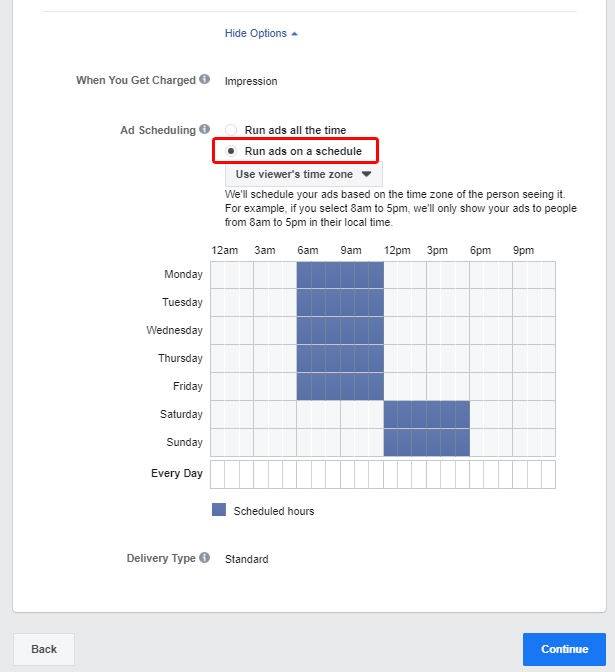
For international audiences, schedule ads to align with each region’s peak browsing window rather than using a single global schedule.
8. Use Broad Targeting Strategically
Narrow targeting made sense before Facebook’s algorithm reached its current maturity. Today, broad targeting often outperforms highly specific interest stacks, because Facebook has enough behavioral data to find buyers within a wide audience more effectively than manual interest targeting can.
How to use broad targeting for ecommerce:
- Start with basic age, location, and broad interest parameters.
- Use Lookalike Audiences based on your existing customer list or purchaser data to find similar buyers at scale.
- Let campaigns run for at least 7–10 days before evaluating, since the learning phase requires sufficient data.
- Monitor cost per purchase, not just CTR, to determine if broad audiences are actually converting.
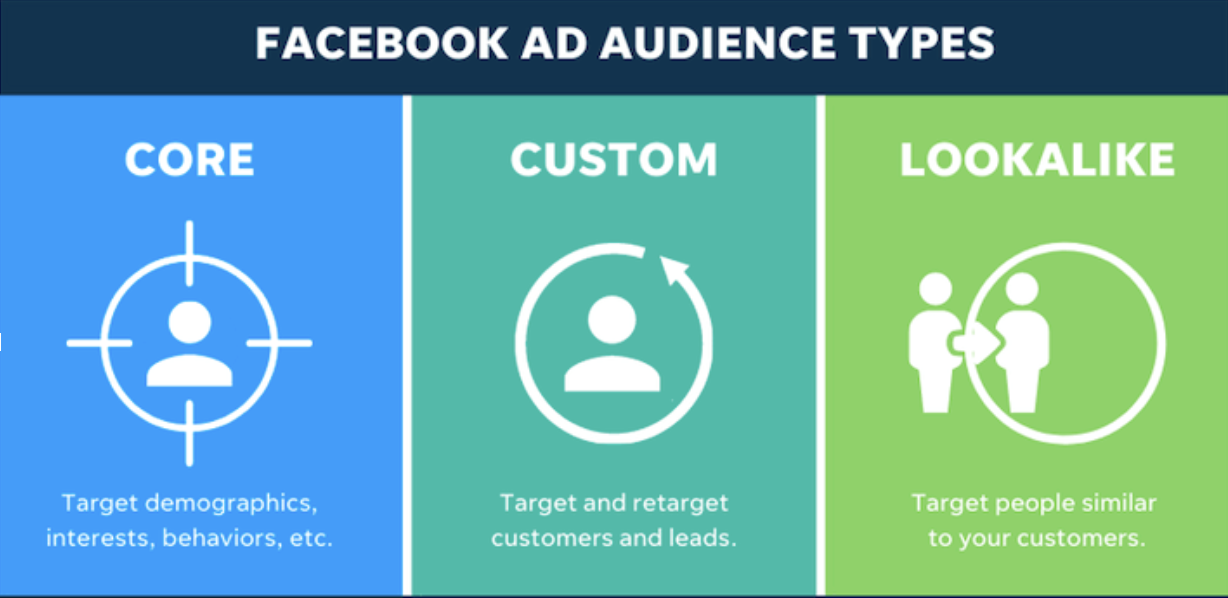
Facebook’s Advantage+ audience tools (formerly called automated targeting) work on a similar principle and are worth testing alongside manually defined audiences.
9. Use Facebook Ads for Product Launches and Promotions
Facebook ads for ecommerce product launches and seasonal promotions require a different setup from evergreen campaigns. The goal is to generate concentrated awareness and conversions within a defined time window.
For product launches:
- Run a short awareness campaign 3–5 days before launch to warm up your audience.
- Use video or carousel ads that build anticipation.
- Switch to a conversion-optimized campaign at launch with a clear CTA and the product page as the destination.
For seasonal campaigns and ecommerce promotions:
- Create separate ad sets for each promotion to avoid conflating performance data.
- Set campaign schedules to match the promotion window.
- Use countdown copy in ad text to create time urgency.
- Exclude audiences that have already converted during the promotion period.
Tip: Start holiday campaigns (Black Friday, Eid, Diwali, Christmas) at least two weeks before the event. CPMs rise sharply in peak windows, so earlier entry lowers your cost per result.
10. Incorporate Social Proof
Social proof reduces purchase hesitation, particularly for first-time buyers who have not heard of your brand. Reviews, star ratings, and user-generated content (UGC) in your ad creatives signal that other people already trust your products.
Effective ways to add social proof to Facebook ads:
- Include a customer review snippet in your ad copy (keep it short and specific).
- Use UGC photos or videos showing real customers with your product.
- Reference aggregate review data where it is strong (“4.8 stars across 2,000+ reviews”).
- Highlight media mentions or influencer endorsements in your ad creative.

Respond to comments on your ad posts as well. A brand that engages publicly signals responsiveness, which builds trust with potential buyers who are reading the comments before clicking.
11. Embed a Strong CTA Button
Facebook lets advertisers customize the CTA button on every ad. This is a simple but widely underused optimization. The right button label directly tells the viewer what will happen when they click, reducing friction and increasing CTR.
Match your CTA button to the campaign objective:
- “Shop Now” for product-focused conversion campaigns
- “Learn More” for awareness or content-driven campaigns
- “Get Offer” for discount or promotional campaigns
- “See Menu” or “Book Now” for service-based ecommerce
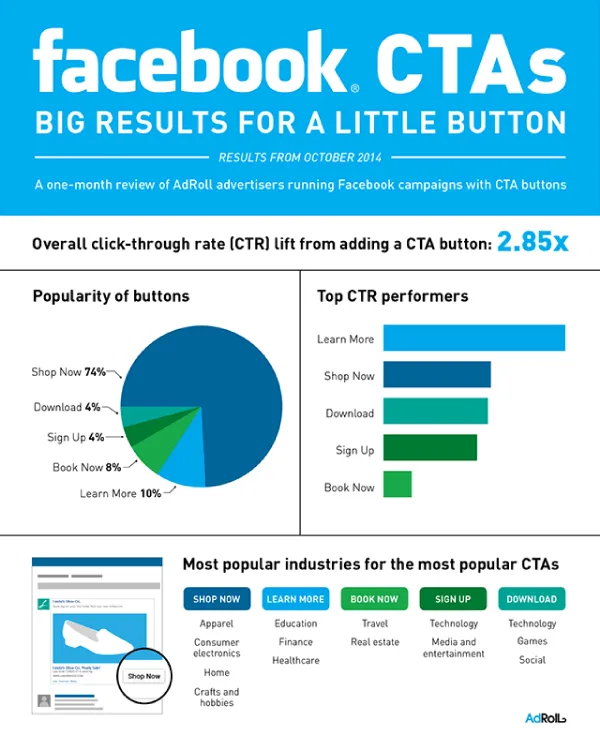
Avoid leaving the default button unchanged. A specific, action-oriented label consistently outperforms a generic one.
12. Set and Adjust Bids Strategically
Facebook ad bids function as an auction. A fixed bid left unchanged will not adapt to changing competition, audience saturation, or seasonal CPM shifts. Regular bid adjustments based on performance data keep your campaigns competitive without overspending.
Bid strategy for ecommerce:
When entering a competitive bidding auction, bidding slightly above round-number bids ($101 instead of $100, for example) can place your ad ahead of competitors setting flat bids, without a large cost increase. This is a marginal edge, not a guaranteed outcome, but it applies particularly in high-competition retail categories.
Practical bid management:
- Increase bids on ad sets with strong conversion rates and low cost per purchase.
- Reduce or pause bids on ad sets with high spend and low conversion.
- Review bids at least weekly, and more frequently during promotions or seasonal peaks.
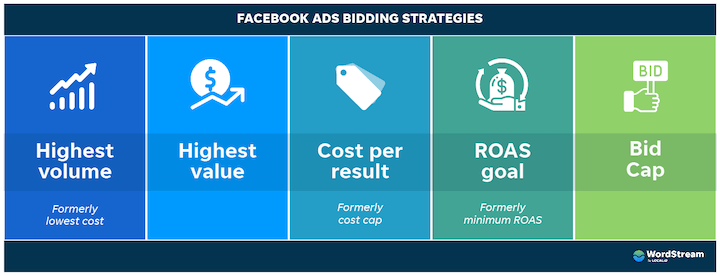
- A/B test different bid strategies (Lowest Cost vs. Cost Cap vs. Bid Cap) to find what suits your margin structure.
13. Diagnose Your Facebook Ads Funnel When Conversions Drop
If your Facebook ecommerce ads are getting clicks but not converting, the problem is usually in the post-click experience, not the ad itself. Common funnel breakdown points include slow landing pages, unclear product pages, a complicated checkout, or a mismatch between the ad promise and the landing page content.
How to find where your funnel is leaking:
- In Facebook Ads Manager, check CTR versus purchase conversion rate. High CTR and low purchases means the landing page or checkout is the problem.
- Use session recording tools (such as Hotjar or Microsoft Clarity) to watch where users scroll, click, and drop off.
- Check your site’s mobile load speed. Most Facebook traffic is mobile, and a slow page kills conversions before they start.
- A/B test landing page variants to isolate what changes improve purchase rate.
Common fixes:
- Landing page: Make the product headline, price, and CTA visible above the fold.
- Checkout: Reduce the number of steps and enable guest checkout.
- Product page: Add reviews, clear sizing/variant info, and a visible return policy.
Generating Your Facebook Product Feed with CTX Feed
For WooCommerce store owners running Dynamic Product Ads, CTX Feed automates Facebook catalog creation directly from your product database. It maps your WooCommerce product data to the attributes Facebook requires: ID, title, price, availability, image URL, product URL, category, brand, GTIN, and MPN.
Key Features
- Automated feed generation with over 220+ supported channels including Facebook, Instagram, and Google Shopping
- Real-time feed refresh to keep inventory and pricing data accurate
- Custom attribute mapping for variable products, bundles, and custom fields
- Filter rules to exclude out-of-stock or low-margin products from your feed
- Free version available; paid plans are listed on the official CTX Feed pricing page
Frequently Asked Questions
What is the best Facebook ad type for ecommerce?
Dynamic Product Ads (DPAs) deliver the strongest ROI for most ecommerce stores. They automatically pull product data from your catalog and show each user the items most relevant to their browsing history, which makes them effective for both retargeting and prospecting campaigns.
What is the average Facebook ads conversion rate for ecommerce?
The average Facebook conversion rate for ecommerce is around 3.3%, though this varies significantly by industry, product price, and audience quality. High-converting ecommerce Facebook ads typically exceed this benchmark through precise audience segmentation, strong creative, and optimized landing pages.
What are the best days to run Facebook ads for ecommerce?
Wednesday and Thursday tend to produce the highest engagement for ecommerce campaigns on average. However, your own data from Facebook Ads Manager is more reliable than general benchmarks. Review performance by day and time for at least two to three weeks before adjusting your schedule.
My ecommerce Facebook ads aren’t converting. What should I check?
Start by separating the click data from the conversion data. If CTR is healthy but purchases are low, the problem is post-click: landing page speed, product page clarity, checkout friction, or a mismatch between the ad and the destination. If CTR is also low, revisit your audience targeting, ad creative, and offer.
How much should I spend on Facebook ads for ecommerce?
There is no universal minimum, but most advertisers need at least $5–$10 per day per ad set to generate enough data for Facebook’s algorithm to optimize delivery. Start conservatively, measure cost per purchase against your margin, and scale budgets on ad sets that are profitable.
What is a good Facebook ads conversion rate for ecommerce?
Anything above 3.3% is above average. Strong ecommerce campaigns in competitive categories typically see conversion rates between 5% and 10%, with some high-intent retargeting campaigns performing higher. Conversion rate benchmarks vary widely by vertical, product price, and audience temperature.
Key Takeaways
- The average Facebook ecommerce conversion rate is 3.3%. High-converting campaigns beat this through audience segmentation, strong creative, and post-click optimization.
- Dynamic Product Ads are the highest-ROI Facebook ad format for ecommerce because they automatically personalize product display based on each user’s behavior.
- A three-stage Facebook ads funnel (awareness, retargeting, conversion) outperforms single-objective campaigns by matching the message to where the shopper is in their decision process.
- Facebook ads for abandoned cart recovery, product launches, and seasonal promotions each require a distinct campaign setup and audience strategy.
- Broad targeting and Lookalike Audiences often outperform narrow interest stacks for scaling ecommerce campaigns.
- When Facebook ecommerce ads stop converting, the problem is usually the landing page, checkout, or audience mismatch not the ads themselves.
- Bids, creative, and audiences should be reviewed and adjusted regularly. Static campaign setups lose efficiency over time.