The is_bundle attribute tells Google Shopping whether a product is a merchant-defined bundle — a main item sold together with extras for one combined price. Setting it correctly keeps Merchant Center from confusing your bundle with the standalone product and helps your listings pass review. This guide explains what counts as a bundle, when Google needs the attribute, and how to add it to your WooCommerce feed with CTX Feed.
What is_bundle means to Google
In Google’s vocabulary, a bundle is a main product paired with one or more accessories that revolve around that main product, sold for a single price. Classic examples:
- A camera sold with a bag and a memory card.
- A phone sold with a case and a screen protector.
- A grill sold with a cover and utensils.
The value is one of two words:
yes— this listing is a bundle built around a clear primary product.no— this is a single product (the default assumption).
Google uses is_bundle so a bundle priced at, say, $499 is not matched against the bare camera at $399 in price comparisons. Without it, a bundle can look overpriced and get filtered or mistrusted.
Do not use is_bundle for a multipack (several identical units of the same item, like a 6-pack of socks) — that is the separate multipack attribute. And a bundle must have one main product; a group of unrelated products of similar value is not a bundle.
When you need it
is_bundle is optional for most products, but Google expects is_bundle = yes whenever your price covers a main product plus accessories. If you sell that kind of package and leave the attribute off, Google treats the listing as a single product, which can lead to price mismatches and warnings. If you sell only standalone products, you can either send no explicitly or leave the attribute out entirely.
How CTX Feed detects bundles automatically
CTX Feed ships an Is Bundle product attribute that resolves to yes or no on its own. When you map it, the plugin checks whether each product is a bundle created by a supported bundle plugin — WooCommerce Product Bundles, YITH WooCommerce Product Bundles, WPC Product Bundles (WooSB), or Easy Product Bundles — and returns yes for those, no otherwise. If you use one of these plugins to build your bundles, this automatic mapping is usually all you need.
Bundle-plugin products require CTX Feed Pro. The free plugin feeds simple, variable, grouped and external products only, so products built with a bundle plugin are not in a free feed at all. The Is Bundle attribute and the Text method below are free.
If you assemble bundles some other way (for example a grouped product that you consider a true bundle), the auto-detection returns no, and you set the value manually as shown below.
Add the is_bundle attribute in CTX Feed
- In your WordPress dashboard, open CTX Feed → Manage Feeds, then click Make Feed for a new feed, or click a Google feed’s name to edit it.
- In Feed settings, set Template to Google Shopping so the
is_bundlechannel attribute is available. - Open the Config tab — the mapping table with Channel attribute, Source, Value, and Output columns.
- Click Add attribute to add a row.
- Under Channel attribute, choose Is Bundle [is_bundle].
- Under Source, pick your approach:
- Attribute — choose Is Bundle (in the Primary Attributes group) in the Value column to let CTX Feed auto-detect bundles from your bundle plugin and output
yesornoper product. - Text — type a fixed value (
yesorno) in the Value field. Use this when every product in the feed is (or is not) a bundle — for example, a feed built only from your bundle category.
- Attribute — choose Is Bundle (in the Primary Attributes group) in the Value column to let CTX Feed auto-detect bundles from your bundle plugin and output
- Save with Save & generate, then regenerate the feed.
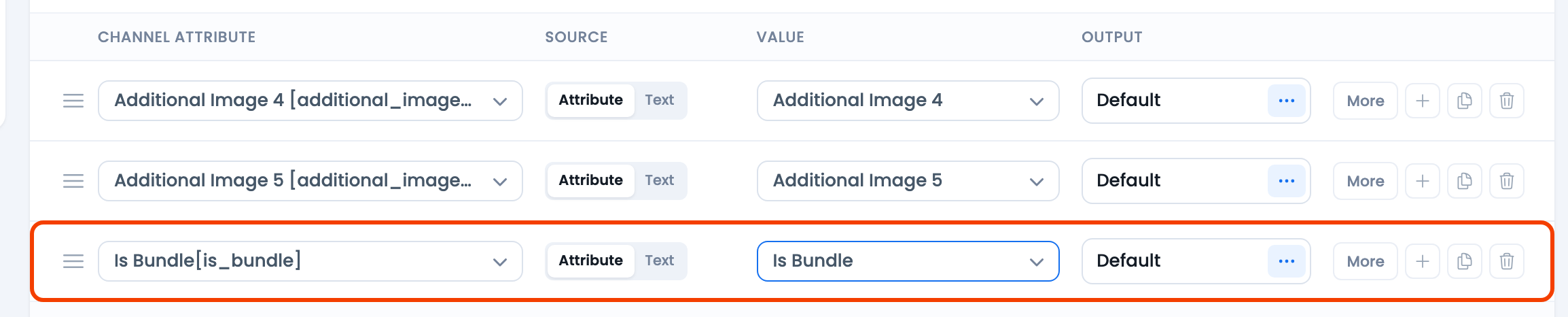
yes or no per product.After regeneration, open the feed file from the Manage Feeds table and confirm each item shows is_bundle with the value you expect.
Setting is_bundle by rule
If some products in the feed are bundles and others are not — and you cannot rely on the automatic detection — build the logic with Dynamic attributes. For example: “if category is Bundles, set is_bundle to yes; otherwise no.” Then pick that dynamic attribute as the is_bundle row’s Value. Dynamic attributes require CTX Feed Pro.
Troubleshooting
- My bundle products are not in the feed. Bundle-plugin product types are added by CTX Feed Pro; on the free plugin they are skipped.
- is_bundle is
nofor a real bundle. The automatic detection recognizes the supported bundle plugins listed above. A WooCommerce grouped product always returnsno. If your bundle was built another way, set the value with Text or a Dynamic attribute instead of the auto-detected Is Bundle attribute. - The attribute is missing from the feed. Confirm the row exists on the Config tab with a Value, then regenerate. An empty Value produces an empty tag.
- Google flags a price mismatch. This is the exact problem
is_bundle = yessolves — add it to any listing whose price includes accessories around a main product. - You used is_bundle for a multipack. Switch to the
multipackattribute for identical-unit packs; keepis_bundlefor main-product-plus-accessory packages.
Related guides
- How to upload a WooCommerce product feed to Google Merchant Center
- How to configure the Google Merchant shipping attribute
- How to map store category with merchant category
- How to solve the microdata error for Google Merchant
